데이터 조회 과정
- 사용자가 데이터를 조회해 달라고 웹 페이지에서 URL 요청을 보낸다.
- 서버의 컨트롤러가 요청을 받아 해당 URL에서 찾으려는 데이터 정보를 리파지터리에 전달한다.
- 리파지터리는 정보를 가지고 DB에 데이터 조회를 요청한다.
- DB는 해당 데이터를 찾아 이를 엔티티로 반환한다.
- 반환된 엔티티는 모델을 통해 뷰 템플릿으로 전달된다.
- 최종적으로 결과 뷰 페이지가 완성돼 사용자의 화면에 출력된다.
단일 데이터 조회
ArticleController 클래스에 아래 코드를 추가한다.
    @GetMapping("articles/{id}")        // 데이터 조회 요청 접수
    public String show(@PathVariable Long id, Model model) {
        log.info("id = " + id);         // id를 잘 받았는지 로그 찍기
        // 1. id를 조회해 데이터 가져오기
        Article articleEntity = articleRepository.findById(id).orElse(null);
        // 2. 모델에 데이터 등록하기
        model.addAttribute("article", articleEntity);
        // 3. 뷰 페이지 반환하기
        return "articles/show";
    }
localhost:8080/articles/ 뒤에 id를 변수로 사용하기 때문에, id의 숫자를 입력하면 해당 id 페이지로 갈 수 있게 되며, 해당 id 값을 변수로 전달하게 된다.
JPA의 CrudRepository가 제공하는 .findById() 메서드는 원래 반환형이 Optional 타입인데, 코드 맨 뒤에 .orElse(null)을 추가하면 에러가 사라진다. 이는 id 값으로 데이터를 찾으며, 해당 id 값이 없다면 null을 반환하라는 뜻이다.
컨트롤러를 만들었으니, 해당 페이지의 뷰를 만들 차례다.
articles/show.mustache를 생성하고 코드를 넣는다.
{{>layouts/header}}
<table class="table">
    <thead>
    <tr>
        <th scope="col">Id</th>
        <th scope="col">Title</th>
        <th scope="col">Content</th>
    </tr>
    </thead>
    <tbody>
    {{#article}}
    <tr>
        <th>{{id}}</th>
        <td>{{title}}</td>
        <td>{{content}}</td>
    </tr>
    {{/article}}
    </tbody>
</table>
{{>layouts/footer}}
{{#article}}{{/article}}을 사용했는데, 이렇게 사용하면 모델 데이터를 사용할 수 있는 영역을 지정할 수 있다.
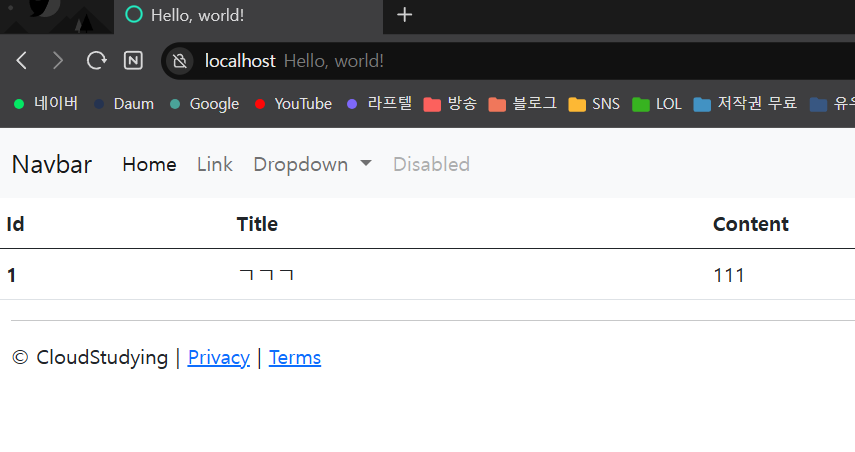
DB에 저장하여, localhost:8080/articles/1로 접속해보면 이렇게 나오는 것을 확인할 수 있었다.
데이터 목록 조회
방금은 하나의 데이터만 불러왔다면, 이번에는 여러 데이터들을 조회하는 방법을 배울 차례다.
단일 데이터를 조회할 때는 리파지터리가 엔티티를 반환했지만, 데이터 목록을 조회할 때는 엔티티의 묶음인 리스트를 반환한다.
ArticleController 클래스에 아래 코드를 추가한다.
    @GetMapping("/articles")
    public String index(Model model) {
        // 1. 모든 데이터 가져오기
        ArrayList<Article> articleEntityList = articleRepository.findAll();
        // 2. 모델에 데이터 등록하기
        model.addAttribute("articleList", articleEntityList);
        // 3. 뷰 페이지 설정하기
        return "articles/index";
    }
여기에서 사용된 CrudRepository의 .findAll() 메서드는 해당 리파지터리에 있는 모든 데이터를 가져오는 메서드이다. 이렇게 가져와진 데이터는 Iterable 타입으로 반환되어 ArrayList와 반환형이 달라서 오류가 나게 된다. 이럴 때 다운캐스팅으로 맞춰주거나, Iterable 타입으로 맞춰줘도 된다. 그런데 이번에는 ArticleRepository에서 ArrayList형으로 바로 반환하도록 수정했다.
package com.example.firstproject.repository;

import com.example.firstproject.entity.Article;
import org.springframework.data.repository.CrudRepository;

import java.util.ArrayList;

public interface ArticleRepository extends CrudRepository<Article, Long> {
    @Override
    ArrayList<Article> findAll();	// Iterable → ArrayList 수정
}
그리고 index.mustache 파일도 생성
{{>layouts/header}}

<table class="table">
    <thead>
    <tr>
        <th scope="col">Id</th>
        <th scope="col">Title</th>
        <th scope="col">Content</th>
    </tr>
    </thead>
    <tbody>
    {{#articleList}}
        <tr>
            <th>{{id}}</th>
            <td>{{title}}</td>
            <td>{{content}}</td>
        </tr>
    {{/articleList}}
    </tbody>
</table>

{{>layouts/footer}}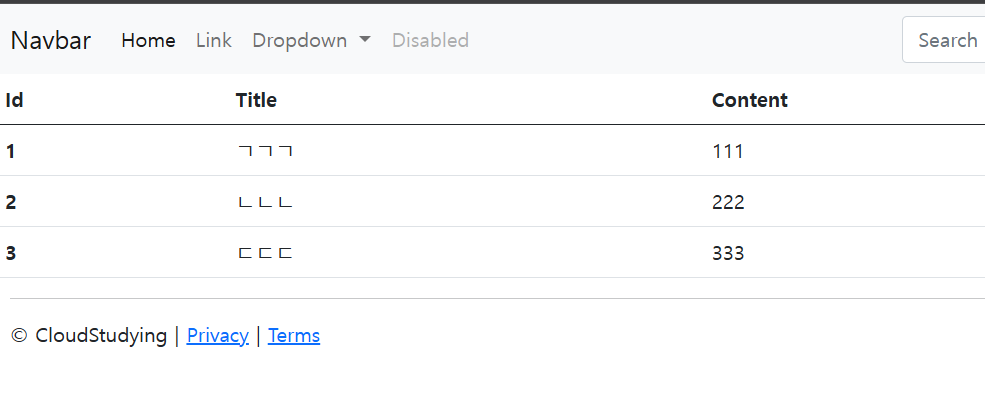
이렇게 하면 DB에 있는 모든 article 데이터를 불러올 수 있게 된다.