Today I Learn and I did
1. Implement ReFresh Token
I had time to create additional features for the blog I was making as a team project. The deadline for this is next week.
The parts I need to implement are the current Refresh Token and Category parts.
Among them, today we implemented the Refresh Token part.
What is the refresh token?
In the case of tokens, problems arise when the token itself is stolen. If an attacker steals a user's token, they will have full access with that token until that token expires. However, if the expiration time of the token is shortened, the user must be re-logged in each time it expires. A way to secure this is the Refresh Token.
-
Set the expiration time of the access token to between 30 minutes and 1 hour.
-
The Refresh Token makes the expiry time a generous 2 weeks.
-
When the access token expires and a user request is received, the user's Refresh Token is checked.
-
If the Refresh Token has not expired, the access token and Refresh Token are reissued without logging out, and the login status is maintained.
-
Log out only when the refresh token expires.
How is it work?
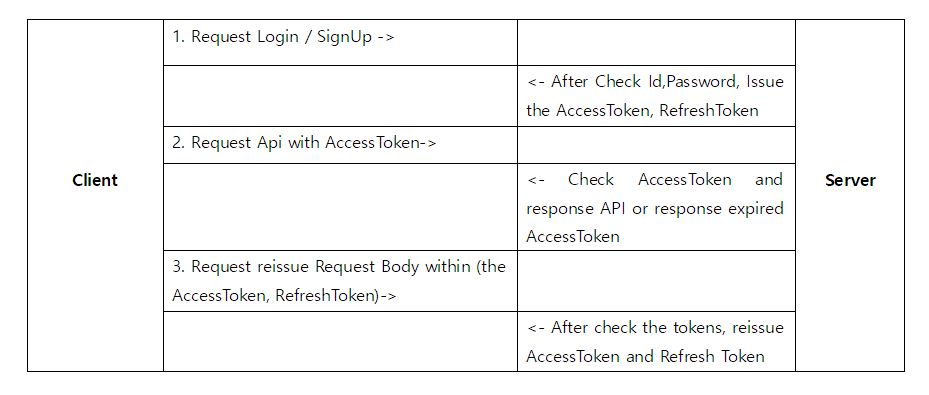
RefreshToken.java
@Entity
@Table(name = "refreshtoken")
@Getter
@NoArgsConstructor
public class RefreshToken extends TImeStamped {

    @Id
    @GeneratedValue(strategy = GenerationType.IDENTITY)
    private Long id;

    private Long keys;

    private String token;

    public RefreshToken updateToken(RefreshToken token) {
        this.token = token.getToken();
        return this;
    }
//use this builder in UserService RefreshToken.buildeR()
    @Builder
    public RefreshToken(Long keys, String token) {
        this.keys = keys;
        this.token = token;
    }
}
Create an entity so that the token is stored in the db, and create a key value to bring the object using the user. Since createdDate and modifiedDate exist in TImeStamped, it is inherited and compared with the expiration time later to expire.
RefreshTokenJpaRepo.java
public interface RefreshTokenJpaRepo extends JpaRepository<RefreshToken, Long> {

    Optional<RefreshToken> findByKeys(Long key);
}
Use the key value to find the corresponding refresh token.
TokenRequestDTO.java
@Getter
@NoArgsConstructor
public class TokenRequestDto {
    String accessToken;
    String refreshToken;
}
TokenResponseDTO.java
@Getter
@NoArgsConstructor
public class TokenResponseDto {
    private String accessToken;
    private String refreshToken;

    public TokenResponseDto(String accessToken,  RefreshToken refreshToken) {
        this.accessToken = accessToken;
        this.refreshToken = refreshToken.getToken();
    }
}
JwtUtil.java
@Slf4j
@Component
@RequiredArgsConstructor
public class JwtUtil {

    public static final String AUTHORIZATION_HEADER = "Authorization";
    public static final String AUTHORIZATION_KEY = "auth";
    private static final String BEARER_PREFIX = "Bearer ";
//    private static final long ACCESS_TOKEN_TIME = 60 * 60 * 1000L; //1 hour // 60min X 60sec X 1000ms
    private static final long ACCESS_TOKEN_TIME = 12 * 1000L; //12sec
    private static final Long REFRESH_TOKEN_TIME = 14 * 24 * 60 * 60 * 1000L; // 14 day

    private final UserDetailsServiceImpl userDetailsService;

    @Value("${jwt.secret.key}")
    private String secretKey;
    private Key key;
    private final SignatureAlgorithm signatureAlgorithm = SignatureAlgorithm.HS256;

    @PostConstruct
    public void init() {
        byte[] bytes = Base64.getDecoder().decode(secretKey);
        key = Keys.hmacShaKeyFor(bytes);
    }

    // Get header token
    public String resolveToken(HttpServletRequest request) {
        String bearerToken = request.getHeader(AUTHORIZATION_HEADER);
        if (StringUtils.hasText(bearerToken) && bearerToken.startsWith(BEARER_PREFIX)) {
            return bearerToken.substring(7);
        }
        return null;
    }

   public String resolveAccessTokenAndRefreshToken(String token) {
        if (StringUtils.hasText(token) && token.startsWith(BEARER_PREFIX)) {
            return token.substring(7);
        }
        return null;
    }

    public String createToken(String username, UserRoleEnum role) {
        Date date = new Date();

        return BEARER_PREFIX + Jwts.builder().setSubject(username).claim(AUTHORIZATION_KEY, role).setExpiration(new Date(date.getTime() + ACCESS_TOKEN_TIME)).setIssuedAt(date).signWith(key, signatureAlgorithm).compact();
    }

    public String refreshToken(String username) {
        Date date = new Date();

        return BEARER_PREFIX + Jwts.builder().setSubject(username).setExpiration(new Date(date.getTime() + REFRESH_TOKEN_TIME)).setIssuedAt(date).signWith(key, signatureAlgorithm).compact();
    }

    // token validation
    public boolean validateToken(String token) {
        try {
            Jwts.parserBuilder().setSigningKey(key).build().parseClaimsJws(token);
            return true;
        } catch (SecurityException | MalformedJwtException e) {
            log.info("Invalid JWT signature, 유효하지 않는 JWT 서명 입니다.");
        } catch (ExpiredJwtException e) {
            log.info("Expired JWT token, 만료된 JWT token 입니다.");
        } catch (UnsupportedJwtException e) {
            log.info("Unsupported JWT token, 지원되지 않는 JWT 토큰 입니다.");
        } catch (IllegalArgumentException e) {
            log.info("JWT claims is empty, 잘못된 JWT 토큰 입니다.");
        }
        return false;
    }

    // Get user info from token
    public Claims getUserInfoFromToken(String token) {
        try {
            return Jwts.parserBuilder().setSigningKey(key).build().parseClaimsJws(token).getBody();
        }catch(ExpiredJwtException e) {
            return e.getClaims();
        }
    }

    public Authentication createAuthentication(String username) {
        UserDetails userDetails = userDetailsService.loadUserByUsername(username);
        return new UsernamePasswordAuthenticationToken(userDetails, null, userDetails.getAuthorities());
    }

    public Authentication getAuthentication(String token) {
         // Extract claims from Jwt
        Claims claims = getUserInfoFromToken(token);
        // No permission information
        if (claims.get(AUTHORIZATION_KEY) == null) {
            throw new IllegalStateException("no Authentication ");
        }
        UserDetails userDetails = userDetailsService.loadUserByUsername(claims.getSubject());
        return new UsernamePasswordAuthenticationToken(userDetails, null, userDetails.getAuthorities());
    }
@Value("spring.jwt.secret")
- The encryption key is important, so take it out and manage it separately.
- Set in application.properties part.
init()
- Base64 coding of the secretKey to be used as a signature when creating Jwt.
resolveToken
- Get the token in the header, cut the Bearer part of the preceding PreFix with a substring, and return the value.
resolveAccessTokenAndRefreshToken
Get Access Token as String, cut PreFix part with substring and return the value.
createToken,createRefreshToken
-
Receives the user and role to be stored in the token as parameters.
-
User is saved as setSubject, and role is entered in key-value format.
validateToken
- Use the exception handling provided by jwt.
getUserInfoFromToken
- Get user information as key value and token value.
createAuthentication, getAuthentication
- To check authorization information in Jwt, verify the secret key and bring the authorization list.
- After taking claims from the token, check if there is permission, and if so, receive the user entity through loadUserByUsername() with the pk value.
- The user entity inherits userDetails and overrides getAuthorize(), so you can use it.
RefreshController.java
@RequiredArgsConstructor
@RestController
@RequestMapping("/api/users")
public class RefreshController {
    private final UserServiceInterface userServiceInterface;
    @PostMapping("/reissue")
    public TokenResponseDto reissue(@RequestBody TokenRequestDto tokenRequestDto, HttpServletResponse response) {
        return userServiceInterface.reissue(tokenRequestDto,response);
    }
}
UserService.java
  @Transactional(readOnly = true)
    public TokenResponseDto login(LoginRequest loginRequest, HttpServletResponse response) {
        String username = loginRequest.getUsername();
        String password = loginRequest.getPassword();
        // Check user
        User user = userRepository.findByUsername(username).orElseThrow(
                () -> new InvalidErrorException("Invalid User", ErrorCode.NO_USER)
        );
        // Check password
        if (!passwordEncoder.matches(password, user.getPassword())) {
            throw new InvalidErrorException("Invalid Password", ErrorCode.WRONG_PASSWORD);
        }

        //Issuing AccessToken
        String accessToken = jwtUtil.createToken(user.getUsername(), user.getRole());
        //Add accessToken in Header
        response.addHeader(JwtUtil.AUTHORIZATION_HEADER, accessToken);
        //Issuing refreshToken
        String refreshToken1 = jwtUtil.refreshToken(username);
        //Making the refresh token object
        RefreshToken refreshToken = RefreshToken.builder().keys(user.getId()).token(refreshToken1).build();
        //save RefreshToken
        refreshTokenJpaRepo.save(refreshToken);
        return new TokenResponseDto(accessToken, refreshToken);
    }


//Reissue the AccessToken and RefreshToken in this method
    @Transactional
    public TokenResponseDto reissue(TokenRequestDto tokenRequestDto, HttpServletResponse response) {

        String refreshTokenResolved = jwtUtil.resolveAccessTokenAndRefreshToken(tokenRequestDto.getRefreshToken());
         // Expired RefreshToken -> Error
        if (!jwtUtil.validateToken(refreshTokenResolved)) {
            throw new IllegalStateException("expired token");
        }
        String accessToken = jwtUtil.resolveAccessTokenAndRefreshToken(tokenRequestDto.getAccessToken());
        //Get authentication information and check.
        Authentication authentication = jwtUtil.getAuthentication(accessToken);
        //check user
        Optional<User> user = userRepository.findByUsername(authentication.getName());
        if (user.isEmpty()) {
            throw new IllegalArgumentException("no user in authentication");
        }
        // Token lookup through key value and user id.
        RefreshToken refreshToken = refreshTokenJpaRepo.findByKeys(user.get().getId())
                .orElseThrow(IllegalArgumentException::new);

        // Refresh token mismatch error
        if (!refreshToken.getToken().equals(tokenRequestDto.getRefreshToken()))
            throw new IllegalArgumentException("Refresh token is not matched");

        // AccessToken, RefreshToken token reissuance, refresh token storage
        String newCreatedToken = jwtUtil.createToken(user.get().getUsername(), user.get().getRole());
        response.addHeader(JwtUtil.AUTHORIZATION_HEADER, newCreatedToken);
        String refreshToken1 = jwtUtil.refreshToken(user.get().getUsername());
        //Making the refresh token object
        RefreshToken refreshToken2 = RefreshToken.builder().keys(user.get().getId()).token(refreshToken1).build();
        RefreshToken updateRefreshToken = refreshToken.updateToken(refreshToken2);
        refreshTokenJpaRepo.save(updateRefreshToken);

        return new TokenResponseDto(newCreatedToken, updateRefreshToken);
    }
Login
- When logging in, a refresh token that did not exist is created and issued.
- Enter the user's authority and user pk value information into the access token.
- Refresh tokens are stored in the token storage. The user's pk value is used as the key value.
- It is used for verification when the access token expires in the future.
Reissue
- Request access token reissuance through TokenRequestDto.
- Validate expiration of refresh token -> Re-login when expired
- Find the user by access token. (At this time, it is good to put an id value that cannot be specified externally.)
- Find a refresh token with the user pk value in the refresh token storage.
- Compare the received refresh token with the refresh token stored in the db. -> If different, log in again
- If the above logic passes, a new access token and refresh token are issued.
- New issue returns TokenResponseDto.