What is index?
Think of a book. An index is often likened to a “table of contents” in the first chapter of a book. If you have a 10-page book, you probably don't need a table of contents. Of course, it's okay to have, but if most people don't use the table of contents, it can be a waste of paper. Now let's imagine we have a book with 10000 pages. It's a database book, and I want to find the part related to transactions. You may not realize how much 10000 pages is, but let's look at the following picture.
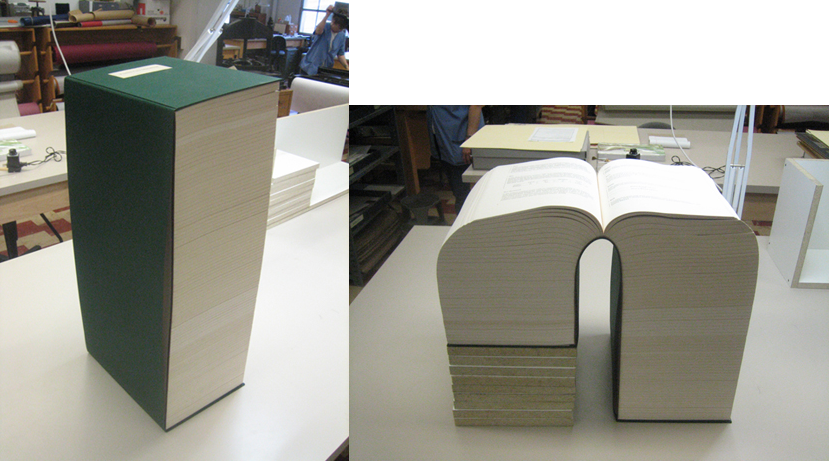
If there is no table of contents, the desire to know what a transaction is will disappear like snow. But if you think about it. It is certainly convenient to have a table of contents, but if you think of a general book, the table of contents is not in the order of strings as follows.
1. Intro
2. SQL
3. DML
...
10. Transaction
11. Concurrency Control
...
50. Outro
Create a table of contents based on major titles, in the order of contents of the book, not in the order of strings.
Still, it's much more convenient than no table of contents, but having an alphabetical list of the main points of the book will make it easier to find the specific thing you're looking for.
Somewhat thick books provide this convenience by providing something called an index.
At this time, index is Index in English, and it plays the same role as that of DB.
Example 1 - Finding the first page of a specific chapter
The aforementioned 10000 page database book is stored in a table like this:
page	title
1	Intro
2	Intro
3	Intro
…	…
512	SQL
513	SQL
…	…
5544	Optimizer
5545	Transaction
5546	Transaction
5547	Transaction
…	…
5700	Transaction
5701	Transaction
5702	ConcurrenctControl
5703	ConcurrenctControl
…	…
9999	Outro
10000	Outro
You can see that the Transaction part is from page 5545 to page 5701.
The search method is expressed as a query as follows. (let's say the table name is db_book)
SELECT	page
FROM	db_book
WHERE	title = 'Transaction';
In other words, it searches for a page whose title is ‘Transaction’ in a table called db_book.
To find the relevant page, check all pages from page 1 to page 5545, and then you will be able to find the transaction part.
And from the DB's point of view, I think there may be a keyword called 'Transaction' not only on page 5545, but also on the back. (And it actually exists)
In the end, the DB performs a full scan of all 10000 data.
A full scan literally traverses all data in a table.
Of course, a human would find page 5545 and stop searching, but computers aren't as smart as you might think.
And the information we want from the DB is only page 5545 where the transaction part starts, and the rest of the pages are not needed.
Let's create an index for the struggling DB.
An index is also a table after all. Let's create a table named index_title.
First of all, it would be nice to sort them in abc order so that you can easily find the keyword ‘Transaction’.
title	page
ConcurrenctControl	5702
ConcurrenctControl	5703
…	…
Intro	1
Intro	2
Intro	3
…	…
SQL	512
SQL	513
…	…
Optimizer	5544
Outro	9999
Outro	10000
…	…
Transaction	5545
Transaction	5546
Transaction	5547
Transaction	5700
Transaction	5701
For convenience, the order of the title column and the page column is reversed.
Also, it would be nice to delete all duplicate content except for the first page of the content.
title	page
ConcurrenctControl	5702
Intro	1
SQL	512
Optimizer	5544
Outro	9999
Transaction	5545
For convenience, let's assume that there are no titles other than the 6 titles.
Now, the DB only needs to find 6 data in the index_title table, and since it is even sorted by string, it can find the string ‘Transaction’ more quickly.
Example 2 - Finding a book in a bookstore
The first example was written for the purpose of understanding the necessity of indexes and basic operating concepts.
I removed duplicates from the index table for convenience to illustrate how dramatic indexes perform.
In practice, no work is involved in removing duplicates from the indexing table. (Of course, you can use it like that, but I'm talking about the general case)
Let's look at the following table.
This is a table that stores the names, categories, and locations of books displayed in a bookstore.
There are 10,000 books, and they are displayed in random locations from A to Z.
rowid	name	category	location
1	let’s start java	java	A
2	python basic	python	K
3	js for seinor	javascript	B
4	let’s start java	java	C
…	…	…	…
4222	java? java!	java	Z
4223	pythonic thinking	python	A
…	…	…	…
9999	javavara	java	K
10000	i love C++	C++	N
A person who likes java visits a bookstore and wants to purchase all the books in the category java.
To find all the names and locations of books with a category of java, the query is as follows.
Let's say the table name is book_store.
SELECT	name, location
FROM	book_store
WHERE	category = 'java'
The result would be:
name location
let’s start java A
let’s start java C
java? java! Z
javavara K
Since there is no current index, it would have searched through all 10000 data to find the result (full scan).
Let's create an index for the poor DB again.
Since we're looking for data by category, let's sort by category.
And let's put rowid together so that DB can find it easily.
(If you put all other columns into the index, the contents of the original table will eventually become the same as the original table, which is a waste of space, so only rowid is inserted.
Just as in the table of contents of a book, only the title and page number are listed, but not the entire contents.)
category	id
…	…
C++	10000
…	…
java	1
java	4
java	4222
java	9999
javascript	3
…	…
python	2
python	4223
…	…
Since the index is sorted in string order,
As soon as you continuously search for the string ‘java’ and encounter the string ‘javascript’, you can conclude that the string ‘java’ no longer exists and end the search.
In addition, since data is internally stored in a structure called B-Tree, finding the string ‘java’ is much faster than searching sequentially from the beginning.
(B-Tree-related information will be organized separately)
And it is enough to query the database based on the found rowid value.
The rowid values found in the index are 1, 4, 4222, 9999, so you can search as follows.
SELECT	name, location
FROM	book_store
WHERE	rowid IN (1, 4, 4222, 9999)
This query retrieves the names and locations of books with rowids of 1, 4, 4222, and 9999 in the book_store table.
At this point, you may be wondering what the difference is between searching with catrgory = ‘java’.
Rowid is actually a value automatically generated inside the DB when inserting data, and indicates the unique address value of the row.
Therefore, if a rowid is given, the DB can directly access it through the rowid without having to find out where the data is located.
It gets complicated if you go into too much detail, so you just need to know that searching through this rowid is the fastest way to find data in the DB.
In other words, the reason for creating an index is to improve query performance by inducing data search based on this rowid.
In actual use, the user does not need to directly input these series of processes, but if the index is created as follows, it works internally.
CREATE INDEX index_category ON book_store(category)After creating an index called index_category on the category column of the book_store table as above, use it in the same way as before.
SELECT	name, location
FROM	book_store
WHERE	category = 'java'
Reference
[[https://blog.lib.uiowa.edu/preservation/2011/01/07/10000-page-book-bound-at-conservation-lab/]]