
Let's learn about the Steam API added in Java 8.
When using an array or collection in Java, to access the data stored in it, you had to use a loop or iterator to access the data.
This results in code that is too long, less readable, and less reusable.
Stream API came out to overcome these problems.
This makes it more concise and is often used because it provides a common approach to data sources.
Now, let's learn about the features and usage of Stream API one by one.
Before we get into it, the stream API uses a lot of lambda expressions, so let's get to know what they are.
1.Stream API
1-1 Main features and operation flow
- Streams do not change the original data.
- Unlike collections, which work through external iterations, streams work through internal iterations.
- Unlike a reusable collection, a stream can only be used once.
- Stream operation optimizes performance through lazy operation using a filter-map based API.
- Streams support easy parallel processing through the parallelStream() method.
- A stream operates in three steps: [creation of stream -> intermediate operation of stream -> final operation of stream], and in the case of intermediate operation, the result is returned in the form of a stream, so it can be connected and used continuously.
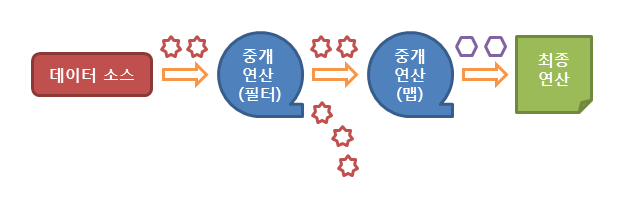
1-2. Creation of stream
The stream API can create from a variety of data sources (collections, arrays, variadic parameters, contiguous integers in a specified range, random numbers of a specific type, lambda expressions, files, empty streams).
▷ 1) Collection
The Stream() method is defined in the Collections interface, which is the highest ancestor of all collections provided by Java.
Therefore, streams can be created with the stream() method in all List and Set collection classes that implement the Collection interface. Also, by using the parallelStream() method, a stream capable of parallel processing can be created.
public class Main {
    public static void main(String[] args) {
        List<Integer> list = Arrays.asList(1, 2, 3, 4);
        Stream<Integer> stream = list.stream();
        stream.forEach(System.out::println); //1,2,3,4


        // print map utilizing stream api
        Map<String, Integer> map = new HashMap<>();
        map.put("mine", 50);
        map.put("mine-it", 100);
        map.put("mine-it-record", 200);

        map.entrySet().stream()
            .filter(e -> e.getKey().contains("it"))
            .filter(e -> e.getValue() > 150)
            .forEach(e -> System.out.println(e.getKey() + " : " + e.getValue())); //mine-it-record : 200
    }
}
▷ 2) Array
To create a stream about an array, various types of stream() methods are defined as class methods in the Arrays class. In addition, streams related to arrays that can store basic types such as int, long, and double are separately defined.
These streams are provided as intStream, LongStream, and DoubleStream interfaces of the java.util.stream package, respectively.
public class Main {
    public static void main(String[] args) {

        String[] arr = new String[]{"one", "two", "three", "four"};


        Stream<String> stream1 = Arrays.stream(arr);
        stream1.forEach(e -> System.out.print(e + " "));
        // stream1.forEach(System.out::println);
        System.out.println(); // one,two,three,four


        Stream<String> stream2 = Arrays.stream(arr, 3, 4);
        stream2.forEach(e -> System.out.print(e + " ")); // four
    }
}
▷ 3) Variable parameters
Using the of() method of the Stream class, you can create a stream by passing a variable parameter.
public class Main {
  public static void main(String[] args) {

      Stream<Double> stream = Stream.of(4.2, 2.5, 3.1, 1.9);
      stream.forEach(System.out::println);
  }
}
▷ 4) Consecutive integers in the specified range
IntStream or LongStream interfaces define range() and rangeClose() methods to create a stream of consecutive integers within a specified range.
range(int startInclusive, int endExclusive) : Creates a stream that includes the specified starting integer but not the specified ending integer.
rangeCloase (int startInclusive, int endExclusive) : Creates a stream that includes not only the specified starting integer but also the specified ending integer.
public class Main {
  public static void main(String[] args) {

      IntStream stream1 = IntStream.range(1, 4);
      stream1.forEach(e -> System.out.print(e + " ")); // 1 2 3
      System.out.println();

      IntStream stream2 = IntStream.rangeClosed(1, 4);
      stream2.forEach(e -> System.out.print(e + " ")); // 1 2 3 4

  }
}
▷ 5) Random numbers of a specific type
Methods such as ints(), longs(), and doubles() are defined in the Random class to generate a stream of random numbers of a specific type.
These methods can receive the size of the stream as a long type parameter.
These methods return an infinite stream of unspecified size if no parameters are passed. (In this case, the size of the stream must be limited using the limit() method.)
public class Main {
    public static void main(String[] args) {

        DoubleStream stream = new Random().doubles(3);
        stream.forEach(System.out::println);
  		//0.3462821253366677
		//0.016631496227258125
		//0.9856439528572047

    }
}
▷ 6) Lambda expression
The iterate() and generate() methods are defined in the Stream class to receive a lambda expression as a parameter and generate an infinite stream whose elements are the values returned by the lambda expression.
iterate(T seed, UnaryOperator f) : Creates an infinite stream by using the value specified as the seed in the lambda expression and using the returned value as the seed again.
generate(Supplier s) : Generates an infinite stream with the returned values using a lambda expression with no parameters.
public class Main {
  public static void main(String[] args) {
      Stream stream = Stream.iterate(2, n -> n + 2); // 2, 4, 6, 8, 10, ...
      stream.forEach(System.out::println);
  }
}
▷ 7) File
The lines() method is defined in the java.nio.file.Files class to create a stream with a single line of a file as an element.
Also, using the lines() method of the java.io.BufferedReader class, you can read data line by line from other inputs as well as files.
public class Main {
    public static void main(String[] args) throws IOException {
        Path path = Paths.get("D:\\mytestbook.txt");
        Stream<String> stream1 = Files.lines(path);
        Stream<String> stream2 = Files.lines(path, Charset.forName("UTF-8"));
    }
}
▷ 8) Empty stream
An empty stream with no elements can be created using the empty() method of the Stream class.
public class Main {
  public static void main(String[] args) throws IOException {
		//Making the Empty stream
      Stream<Object> stream = Stream.empty();
      System.out.println(stream.count()); // print stream's count.
      // 0
  }
}
1-3. Intermediate operations of streams (transformation of streams)
-
An initial stream created by the stream API is converted into another stream through an intermediary operation.
-
Since mediation operations receive streams and return them as streams, mediation operations can be used in series.
-
Stream mediation operation uses filter-map based API, so performance can be optimized through lazy operation.
-
Representative mediation operations that can be used in the stream API and the corresponding methods are as follows.
(Stream filtering) filter(Predicate<? super T> predicate): Returns a new stream consisting only of elements that meet the given condition (predicate) in the stream.
(Stream filtering) distinct(): Returns a new stream with duplicate elements removed from the stream. (internally uses the equals() method of the Object class)
(Stream conversion) map(Functoin<? super T, ? extends R> mapper): Passes the elements of the stream as arguments to the given function, and returns a new stream made up of the return value.
(Stream conversion) flatMap(Functoin<? super T, ? extends Stream<? extends R>> mapper) : If the element of the stream is an array, each element of the array is passed as an argument to the given function, and the return value is Returns a new stream made up of
(Stream limit) limit(long maxSize): Returns a new stream consisting of as many elements as the number passed from the stream.
(Stream limit) skip(long n): Returns a new stream consisting of only the remaining elements excluding the number of elements passed from the first element of the stream.
(Stream sorting) sorted(Comparator<? super T> comparator): Sorts the stream using the given comparator. (If a comparator is not passed, it is sorted in natural alphabetical order.)
(Check the result of stream operation) peek (Consumer<? super T> action): Consumes each element from the resulting stream and performs additional specified actions to create and return a new stream. (It is mainly used when you want to check the result between operations. Therefore, it can be seen that developers use it a lot for debugging purposes.)
public class Main {
    public static void main(String[] args) {

        //remove duplicates (distinct) and only pick out odd numbers (filter)
        IntStream streamFilter = IntStream.of(7, 5, 5, 2, 1, 2, 3, 5, 4, 6);
        streamFilter.distinct().filter(n -> n % 2 != 0).forEach(System.out::println);
        // 7 5 1 3

        // Converts each element of the array and puts them back together to return a new stream (map)
        Stream<String> streamMap = Stream.of("Int", "Double", "Long");
        streamMap.map(s -> s.concat("Stream")).forEach(System.out::println);
        // IntStream DoubleStream LongStream

        // Returns an array of strings after converting it into a stream of words contained in each string (flatMap)
        // If you look at the parameter type of flatMap, keep in mind that it is a Stream type.
        String[] arr = {"I study hard", "You study JAVA", "I am hungry"};
        Stream<String> streamFlatmap = Arrays.stream(arr);
        streamFlatmap.flatMap(s -> Stream.of(s.split(" "))).forEach(System.out::println);
        // I study hard You study JAVA I am hungry

        // Returns a stream that excludes 3 elements from the first element (skip) and consists of only 5 elements from the first element (limit)
        IntStream streamLimit = IntStream.range(0, 10); // 0 1 2 3 4 5 6 7 8 9
        streamLimit.skip(3).limit(5).forEach(n -> System.out.print(n + " "));
        // 3 4 5 6 7

        // Sort in ascending and descending order (sort)
        Stream<String> streamSort1 = Stream.of("JAVA", "HTML", "JAVASCRIPT", "CSS");
        Stream<String> streamSort2 = Stream.of("JAVA", "HTML", "JAVASCRIPT", "CSS");

        streamSort1.sorted().forEach(s -> System.out.print(s + " ")); // CSS HTML JAVA JAVASCRIPT
        streamSort2.sorted(Comparator.reverseOrder()).forEach(s -> System.out.print(s + " "));
        // JAVASCRIPT JAVA HTML CSS

        // Checking results between operations (peek)
        IntStream streamPeek = IntStream.of(7, 5, 5, 2, 1, 2, 3, 5, 4, 6);
        streamPeek.peek(s -> System.out.println("Stream : " + s))
            .skip(2)
            .peek(s -> System.out.println("skip(2) after execution : " + s))
            .sorted()
            .peek(s -> System.out.println("sorted() after execution : " + s))
            .forEach(System.out::println);
    }
}
1-4. Final operations on streams (uses of streams)
-
The stream converted through the intermediate operation in the stream API finally consumes each element through the final operation and displays the result. That is, all intermediate operations that have been delayed are all performed in the final operation.
-
A stream that consumes all elements in the final operation cannot be used any more.
-
Representative final operations that can be used in the stream API and the corresponding methods are as follows.
(Output of elements) forEach(Consumer<? super T> action): For each element in the stream, the element is consumed and the specified action is performed.
(Consumption of elements) reduce(T identity, BinaryOperator accumulator): After performing an operation with the first two elements, the operation is performed again with the result and the next element. In this way, the operation is performed by consuming all the elements of the stream, and the result is returned. (If the initial value (identity) is passed as an argument, the initial value and the first element of the stream are operated first. And the return type changes depending on whether the initial value is used or not, so be careful when using it. (Refer to the example) )
(Search for elements) findFirst() : Returns an Optional object referring to the first element in the stream.
(Search for elements) findAny() : Returns an Optional object referring to the first element in the stream. (mainly used for parallel streams)
(Inspection of elements) anyMatch(Predicate<? super T> predicate) : Returns true when some elements of the stream satisfy a specific condition.
(Inspection of elements) allMatch(Predicate<? super T> predicate) : Returns true when all elements of the stream satisfy a specific condition.
(Inspection of elements) noneMatch(Predicate<? super T> predicate) : Returns true when all elements of the stream do not satisfy a specific condition.
(Statistics of elements) count(): Returns the number of elements in the stream.
(Statistics of elements) max(Comparator<? super T> comparator): Returns an Optional object that refers to the element with the largest value among elements in the stream.
(Statistics of elements) min(Comparator<? super T> comparator): Returns an Optional object that refers to the element with the smallest value among elements in the stream.
(Operation of elements) sum(): Returns the sum of all elements in the stream.
(Element operation) average(): Returns the average value of all elements in the stream.
(Collection of elements) collect(Collector<? super T,A,R> collector): Collects stream elements according to the method implemented in the Collectors object passed as an argument. (In the Collector class, various predefined methods are defined as class methods. In addition, users can define their own collection methods by implementing the Collector interface.)
public class Main {
    public static void main(String[] args) {

      	// Consume each element and perform the specified action. (forEach)
        IntStream streamEach = IntStream.of(1, 2, 4, 3);
        streamEach.forEach(System.out::println);
        // 1 2 4 3

        // After calculating with the first and second elements, perform the third and fourth consecutively (reduce)
        Stream<String> streamReduce1 = Stream.of("four", "two", "three", "one");
        Optional<String> reduce1 = streamReduce1.reduce((s1, s2) -> s1 + "! " + s2);
        reduce1.ifPresent(System.out::println);
        // four! two! three! one


		// Give an initial value to the operation of reduce
        Stream<String> streamReduce2 = Stream.of("four", "two", "three", "one");
        String reduce2 = streamReduce2.reduce("Start", (s1, s2) -> s1 + "! " + s2);
        System.out.println(reduce2);
        // Start! four! two! three! one

  		// After sorting all elements, print the first element (findFirst)
        // If you use findAny() here, the same result is obtained
        // The findAny() method returns an accurate operation result only when used in the case of a parallel stream.
        IntStream streamFind = IntStream.of(4, 2, 7, 3, 5, 1, 6);
        OptionalInt findResult = streamFind.sorted().findFirst();
        // OptionalInt findResult = streamFind.sorted().findAny();
        System.out.println(findResult.getAsInt());
        // 1

        // Satisfied or unsatisfied with a specific element (anyMatch, allMatch, noneMatch)
        IntStream streamMatch = IntStream.of(30, 90, 70, 10);
        System.out.println(streamMatch.anyMatch(n -> n > 80)); // true
        // System.out.println(streamMatch.allMatch(n -> n > 80)); // false
        // System.out.println(streamMatch.noneMatch(n -> n > 90)); // true

        // Extract statistics of elements. (Number: count / maximum value: max / minimum value: min)
        IntStream streamStat = IntStream.of(30, 90, 70, 10);
        System.out.println(streamStat.count()); // 4
        // System.out.println(streamStat.max().getAsInt()); // 90
        // System.out.println(streamStat.min().getAsInt()); // 10

        // find the sum of the elements (sum)
        IntStream streamSum = IntStream.of(30, 90, 70, 10);
        System.out.println(streamSum.sum()); // 200

        // Calculate the average of the elements. (average)
        DoubleStream streamAvg = DoubleStream.of(30.3, 90.9, 70.7, 10.1);
        System.out.println(streamAvg.average().getAsDouble()); // 50.5

        // Collect streams into a list. (collect)
        Stream<String> stream = Stream.of("four", "two", "one", "three");
        List<String> list = stream.collect(Collectors.toList());
        Iterator<String> iter = list.iterator();
        while(iter.hasNext()) {
            System.out.print(iter.next() + " ");
        }
    }
}
Reference
1.https://www.geeksforgeeks.org/stream-in-java/
2.https://docs.oracle.com/javase/8/docs/api/?java/util/stream/Stream.html
3.https://developer.android.com/reference/java/util/stream/package-summary