
https://doc.rust-lang.org/rust-by-example/hello/print.html
인쇄는 std::fmt에 정의된 일련의 매크로에 의해 처리
- format! : 형식이 지정된 텍스트를 문자열에 쓰기
- print! : 콘솔(io::stdout)에 형식이 지정된 텍스트를 쓰기
- println! : 콘솔(io::stdout)에 형식이 지정된 텍스트를 쓰기, 마지막에 개행문자(\n)추가
- eprint! : 콘솔(io::stderr)에 형식이 지정된 텍스트를 쓰기
- eprintln! : 콘솔(io::stderr)에 형식이 지정된 텍스트를 쓰기, 마지막에 개행문자(\n)추가
fn main() {
    // In general, the `{}` will be automatically replaced with any
    // arguments. These will be stringified.
    println!("{} days", 31);

    // Without a suffix, 31 becomes an i32. You can change what type 31 is
    // by providing a suffix. The number 31i64 for example has the type i64.

    // There are various optional patterns this works with. Positional
    // arguments can be used.
    println!("{0}, this is {1}. {1}, this is {0}", "Alice", "Bob");

    // As can named arguments.
    println!("{subject} {verb} {object}",
             object="the lazy dog",
             subject="the quick brown fox",
             verb="jumps over");

    // Special formatting can be specified after a `:`.
    println!("{} of {:b} people know binary, the other half doesn't", 1, 2);

    // You can right-align text with a specified width. This will output
    // "     1". 5 white spaces and a "1".
    println!("{number:>width$}", number=1, width=6);

    // You can pad numbers with extra zeroes. This will output "000001".
    println!("{number:0>width$}", number=1, width=6);

    // Rust even checks to make sure the correct number of arguments are
    // used.
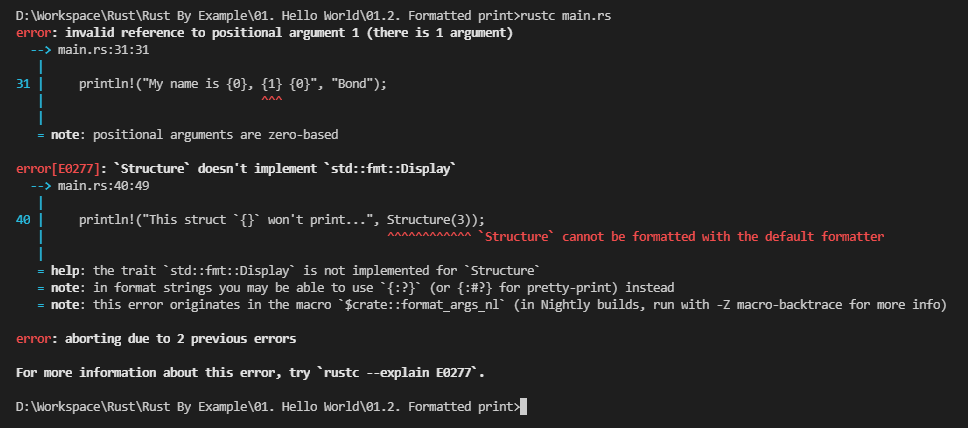
    println!("My name is {0}, {1} {0}", "Bond");
    // FIXME ^ Add the missing argument: "James"

    // Create a structure named `Structure` which contains an `i32`.
    #[allow(dead_code)]
    struct Structure(i32);

    // However, custom types such as this structure require more complicated
    // handling. This will not work.
    println!("This struct `{}` won't print...", Structure(3));
    // FIXME ^ Comment out this line.
}
std::fmt에는 텍스트 표시를 제어하는 많은 trait이 포함되어 있음
- fmt::Debug : {:?}를 사용하여 디버깅을 위해 서식 지정
- fmg::Display : {}를 사용하여 화며에 표시
Activity
- FIXME부분을 참고하여 에러 수정
- std::fmt 문서를 참고하여 pi = 3.141592를 화면에 3.142로 반올림하여 표시하는 println 구문 추가
fn main() {
    // In general, the `{}` will be automatically replaced with any
    // arguments. These will be stringified.
    println!("{} days", 31);

    // Without a suffix, 31 becomes an i32. You can change what type 31 is
    // by providing a suffix. The number 31i64 for example has the type i64.

    // There are various optional patterns this works with. Positional
    // arguments can be used.
    println!("{0}, this is {1}. {1}, this is {0}", "Alice", "Bob");

    // As can named arguments.
    println!("{subject} {verb} {object}",
             object="the lazy dog",
             subject="the quick brown fox",
             verb="jumps over");

    // Special formatting can be specified after a `:`.
    println!("{} of {:b} people know binary, the other half doesn't", 1, 2);

    // You can right-align text with a specified width. This will output
    // "     1". 5 white spaces and a "1".
    println!("{number:>width$}", number=1, width=6);

    // You can pad numbers with extra zeroes. This will output "000001".
    println!("{number:0>width$}", number=1, width=6);

    // Rust even checks to make sure the correct number of arguments are
    // used.
    // println!("My name is {0}, {1} {0}", "Bond");
    // FIXME ^ Add the missing argument: "James"
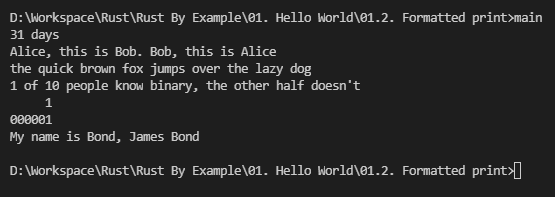
    println!("My name is {0}, {1} {0}", "Bond", "James");

    // Create a structure named `Structure` which contains an `i32`.
    #[allow(dead_code)]
    struct Structure(i32);

    // However, custom types such as this structure require more complicated
    // handling. This will not work.
    //println!("This struct `{}` won't print...", Structure(3));
    // FIXME ^ Comment out this line.
}

Mickey