
하나의 파일에 많은 Component들을 선언할 수 있지만, 큰 용량의 파일은 탐색이 어려울 수 있습니다. 이러한 문제를 해결하려면 Component를 자체 파일로 export하고 다른 파일에서 import할 수 있습니다.
// Gallery.js
import Profile from './Profile.js';

export default function Gallery() {
  return (
    <section>
      <h1>Amazing scientists</h1>
      <Profile />
      <Profile />
      <Profile />
    </section>
  );
}

// Profile.js
export default function Profile() {
  return (
    <img
      src="https://i.imgur.com/QIrZWGIs.jpg"
      alt="Alan L. Hart"
    />
  );
}
The root component file
위 예시는 App.js 라는 루트 컴포넌트 파일에 존재합니다. 하지만 설정에 따라 루트 컴포넌트가 다른 파일에 있을 수도 있습니다. Next.js와 같은 파일 기반 라우팅이 포함된 프레임워크를 사용하는 경우 루트 컴포넌트는 페이지마다 다릅니다.
Exporting and importing a component
아래와 같은 루트 컴포넌트에서 Gallery 와 Profile 를 분리하고 모듈화하면 다른 파일에서 가능해집니다.
- 컴포넌트를 넣을 새 JS 파일을 만듭니다.
- 해당 파일에서 함수 컴포넌트를 export합니다. (default or named exports)
- 컴포넌트를 사용할 파일로 import합니다. (default or named exports에 해당되는 기술 사용)
// App.js
import Gallery from './Gallery.js';

export default function App() {
  return (
    <Gallery />
  );
}

// Gallery.js
function Profile() {
  return (
    <img
      src="https://i.imgur.com/QIrZWGIs.jpg"
      alt="Alan L. Hart"
    />
  );
}

export default function Gallery() {
  return (
    <section>
      <h1>Amazing scientists</h1>
      <Profile />
      <Profile />
      <Profile />
    </section>
  );
}
1. Gallery.js
Profile: 동일한 파일 내에서만 사용되며 export되지 않는 컴포넌트
Gallery: 컴포넌트를 default export 합니다.
2. App.js
Gallery.js에서Gallery컴포넌트를 default import합니다.
루트 App 컴포넌트를 export합니다.
📝 다음과 같이 파일 확장자가 없는 .js 파일로 나타날 수 있습니다.
import Gallery from './Gallery';'./Gallery.js'또는 둘 중 하나 './Gallery'는 React와 함께 작동하지만 전자는 기본 ES 모듈이 작동하는 방식에 더 가깝습니다.
Default vs Named Exports
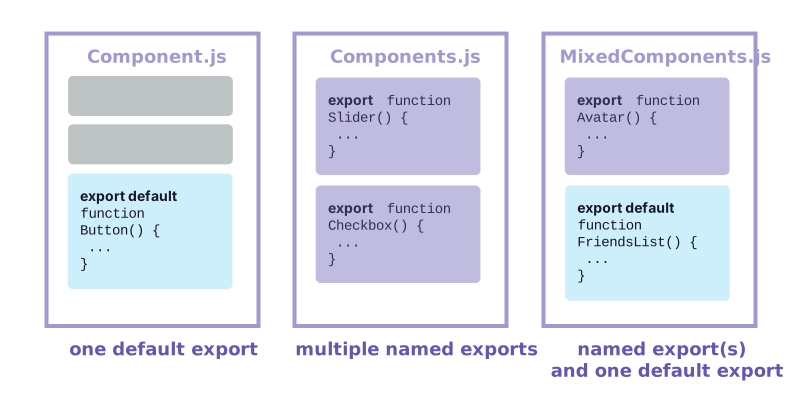
JavaScript를 사용하여 값을 내보내는 두 가지 주요 방법은 default export와 named export입니다. 파일에는 default export가 하나만 있을 수 있지만, named exports는 여러개 있을 수 있습니다.
| Syntax | Export statement | Import statement |
|---|---|---|
| Default | export default function Button() {} | import Button from './Button.js'; |
| Named | export function Button() {} | import { Button } from './Button.js'; |
위 표와 같이 export 방법에 따라 import 방법이 결정됩니다.
default import를 작성할 때에 import 뒤에 원하는 이름을 넣을 수 있습니다. 예를 들어, import Banana from ‘./Button.js’ 를 대신 쓸 수 있으며 동일한 export가 제공됩니다. named import의 경우 이름이 양쪽에서 일치해야 합니다.
파일이 하나의 컴포넌트만 내보내는 경우 사람들은 종종 default export를 사용하고, 여러 컴포넌트와 값을 내보내는 경우 named export를 사용합니다. export default () ⇒ {} 와 같이 이름이 없는 컴포넌트는 디버깅을 어렵게 만들기 때문에 권장되지 않습니다.
Exporting and importing multiple components from the same file
gallery 대신 하나의 Profile 만 띄우고 싶다면, Profile 컴포넌트를 export할 수 있습니다. 하지만 Gallery.js 는 이미 default export를 갖고 있기 때문에 두개의 default export를 가질 수 없습니다. default export를 가진 새로운 파일을 생성하거나, Profile에 대한 named export를 추가할 수 있습니다.
📝 default export와 named export의 잠재적인 혼동을 줄이기 위해서 일부 팀에서는 하나의 스타일만 고수하거나 단일 파일에허 혼합하지 않도록 서택합니다.
//먼저 Gallery.js 에서 Profile을 export 합니다. (no default keyword)
export function Profile() {
  // ...
}

// 그 다음, Gallery.js에서 App.js로 Profile을 named import를 사용하여 import 합니다. (with the curly braces)
import { Profile } from './Gallery.js';

// 최종적으로, App Component 에서 <Profile > 렌더링합니다.
export default function App() {
  return <Profile />;
}Gallery.js는 두가지의 export를 갖습니다. (default Gallery export, named Profile export) App.js 는 두가지 모두 import합니다.
1. Gallery.js
Profile컴포넌트를 named export 합니다.
Gallery컴포넌트를 default export 합니다.
2. App.js
Gallery.js에서Profile컴포넌트를 named import 합니다.
Gallery.js에서Gallery컴포넌트를 default import 합니다.
루트App컴포넌트를 export 합니다.