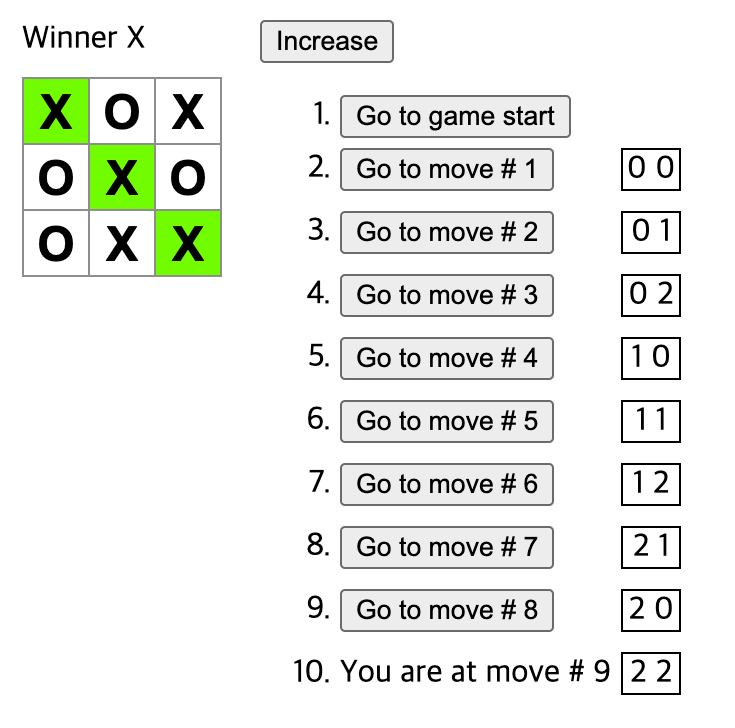
Tic-Tac-Toe 만들기
구현 순서
- 3 x 3 보드 만들기
- props를 통한 데이터 입력
- 상호작용 component 구현
- 승자 결정 방법 구현
- 히스토리 저장
심화 구현
- 현재 이동에 대해서만 버튼 대신 'You are at move #N' 표시
- 2차원 loop을 사용하여 보드 만들기
- 이동 내역 오름차순 또는 내림차순으로 정렬할 수 있는 토글 구현
- 게임 종료 시 승리를 가져온 3개의 사각형 강조 및 무승부 메시지 표시
- 이동 내역 목록에 각 이동의 위치를 행, 열 형식으로 표시
1. 3 x 3 보드 만들기
export default function Board() {
  return (
    <>
      <div className="board-row">
        <button className="square">1</button>
        <button className="square">2</button>
        <button className="square">3</button>
      </div>
      <div className="board-row">
        <button className="square">4</button>
        <button className="square">5</button>
        <button className="square">6</button>
      </div>
      <div className="board-row">
        <button className="square">7</button>
        <button className="square">8</button>
        <button className="square">9</button>
      </div>
    </>
  );
}
하드코딩을 통한 구현 예시
2. props를 통한 데이터 입력
function Square({ value }) {
  return <button className="square">{value}</button>;
}

export default function Board() {
  return (
    <>
      <div className="board-row">
        <Square value="1" />
        <Square value="2" />
        <Square value="3" />
      </div>
      <div className="board-row">
        <Square value="4" />
        <Square value="5" />
        <Square value="6" />
      </div>
      <div className="board-row">
        <Square value="7" />
        <Square value="8" />
        <Square value="9" />
      </div>
    </>
  );
}
JSX 구문을 통한 Board 렌더링
props 는 객체 형태
중괄호 없이 props를 parameter로 넘기는 경우 객체로 넘어오고
중괄호를 사용하면 객체의 key에 접근한 value가 넘어옴
3. 상호작용 component 구현
import { useState } from 'react';

function Square({value, onSquareClick}) {
  return (
    <button className="square" onClick={onSquareClick}>
      {value}
    </button>
  );
}

export default function Board() {
  const [xIsNext, setXIsNext] = useState(true);
  const [squares, setSquares] = useState(Array(9).fill(null));

  function handleClick(i) {
    if (squares[i]) {
      return;
    }
    const nextSquares = squares.slice();
    if (xIsNext) {
      nextSquares[i] = 'X';
    } else {
      nextSquares[i] = 'O';
    }
    setSquares(nextSquares);
    setXIsNext(!xIsNext);
  }

  return (
    <>
      <div className="board-row">
        <Square value={squares[0]} onSquareClick={() => handleClick(0)} />
        <Square value={squares[1]} onSquareClick={() => handleClick(1)} />
        <Square value={squares[2]} onSquareClick={() => handleClick(2)} />
      </div>
      <div className="board-row">
        <Square value={squares[3]} onSquareClick={() => handleClick(3)} />
        <Square value={squares[4]} onSquareClick={() => handleClick(4)} />
        <Square value={squares[5]} onSquareClick={() => handleClick(5)} />
      </div>
      <div className="board-row">
        <Square value={squares[6]} onSquareClick={() => handleClick(6)} />
        <Square value={squares[7]} onSquareClick={() => handleClick(7)} />
        <Square value={squares[8]} onSquareClick={() => handleClick(8)} />
      </div>
    </>
  );
}
useState를 사용한 상태 관리
handleClick() 함수를 사용하여 value가 'X'로 업데이트되면 다시 리렌더링
Lifting State Up
여러 자식 component의 데이터 수집이나 두 자식 component의 통신을 위하여 부모 component에서 shared state를 선언한다.
부모 component는 props를 통해 state를 자식 component로 전달이 가능하고 이를 통해 동기화한다.
JavaScript는 Closure를 지원한다.
즉, inner-function이 outer-function에서 정의된 변수 및 함수에 접근할 수 가능함.
immutability(불변성)이 중요한 이유
slice()를 호출하여 기존 배열을 수정하는 대신 squares 배열의 복사본을 만드는 방식의 이점
1. 복잡한 기능 구현이 쉬어진다. 이전 데이터를 유지할 수 있기 때문
2. 리렌더링 시 성능상 updated되지 않은 트리 부분을 건너뛸 수 있음
4. 승자 결정 방법 구현
import { useState } from 'react';

function Square({value, onSquareClick}) {
  return (
    <button className="square" onClick={onSquareClick}>
      {value}
    </button>
  );
}

export default function Board() {
  const [xIsNext, setXIsNext] = useState(true);
  const [squares, setSquares] = useState(Array(9).fill(null));

  function handleClick(i) {
    if (calculateWinner(squares) || squares[i]) {
      return;
    }
    const nextSquares = squares.slice();
    if (xIsNext) {
      nextSquares[i] = 'X';
    } else {
      nextSquares[i] = 'O';
    }
    setSquares(nextSquares);
    setXIsNext(!xIsNext);
  }

  const winner = calculateWinner(squares);
  let status;
  if (winner) {
    status = 'Winner: ' + winner;
  } else {
    status = 'Next player: ' + (xIsNext ? 'X' : 'O');
  }

  return (
    <>
      <div className="status">{status}</div>
      <div className="board-row">
        <Square value={squares[0]} onSquareClick={() => handleClick(0)} />
        <Square value={squares[1]} onSquareClick={() => handleClick(1)} />
        <Square value={squares[2]} onSquareClick={() => handleClick(2)} />
      </div>
      <div className="board-row">
        <Square value={squares[3]} onSquareClick={() => handleClick(3)} />
        <Square value={squares[4]} onSquareClick={() => handleClick(4)} />
        <Square value={squares[5]} onSquareClick={() => handleClick(5)} />
      </div>
      <div className="board-row">
        <Square value={squares[6]} onSquareClick={() => handleClick(6)} />
        <Square value={squares[7]} onSquareClick={() => handleClick(7)} />
        <Square value={squares[8]} onSquareClick={() => handleClick(8)} />
      </div>
    </>
  );
}

function calculateWinner(squares) {
    const lines = [
      [0, 1, 2],
      [3, 4, 5],
      [6, 7, 8],
      [0, 3, 6],
      [1, 4, 7],
      [2, 5, 8],
      [0, 4, 8],
      [2, 4, 6],
     ];

  	for (let line of lines) {
		const [a, b, c] = line;
		if (squares[a] && squares[a] === squares[b] && squares[a] === squares[c]) {
			return line;
		}
	}
 	return null;
}
calculateWinner 함수를 통한 승자를 결정한다.
5. 히스토리 저장
import { useState } from 'react';

function Square({ value, onSquareClick }) {
  return (
    <button className="square" onClick={onSquareClick}>
      {value}
    </button>
  );
}

function Board({ xIsNext, squares, onPlay }) {
  function handleClick(i) {
    if (calculateWinner(squares) || squares[i]) {
      return;
    }
    const nextSquares = squares.slice();
    if (xIsNext) {
      nextSquares[i] = 'X';
    } else {
      nextSquares[i] = 'O';
    }
    onPlay(nextSquares);
  }

  const winner = calculateWinner(squares);
  let status;
  if (winner) {
    status = 'Winner: ' + winner;
  } else {
    status = 'Next player: ' + (xIsNext ? 'X' : 'O');
  }

  return (
    <>
      <div className="status">{status}</div>
      <div className="board-row">
        <Square value={squares[0]} onSquareClick={() => handleClick(0)} />
        <Square value={squares[1]} onSquareClick={() => handleClick(1)} />
        <Square value={squares[2]} onSquareClick={() => handleClick(2)} />
      </div>
      <div className="board-row">
        <Square value={squares[3]} onSquareClick={() => handleClick(3)} />
        <Square value={squares[4]} onSquareClick={() => handleClick(4)} />
        <Square value={squares[5]} onSquareClick={() => handleClick(5)} />
      </div>
      <div className="board-row">
        <Square value={squares[6]} onSquareClick={() => handleClick(6)} />
        <Square value={squares[7]} onSquareClick={() => handleClick(7)} />
        <Square value={squares[8]} onSquareClick={() => handleClick(8)} />
      </div>
    </>
  );
}

export default function Game() {
  const [xIsNext, setXIsNext] = useState(true);
  const [history, setHistory] = useState([Array(9).fill(null)]);
  const currentSquares = history[history.length - 1];

  function handlePlay(nextSquares) {
    setHistory([...history, nextSquares]);
    setXIsNext(!xIsNext);
  }

  return (
    <div className="game">
      <div className="game-board">
        <Board xIsNext={xIsNext} squares={currentSquares} onPlay={handlePlay} />
      </div>
      <div className="game-info">
        <ol>{/*TODO*/}</ol>
      </div>
    </div>
  );
}

function calculateWinner(squares) {
  const lines = [
    [0, 1, 2],
    [3, 4, 5],
    [6, 7, 8],
    [0, 3, 6],
    [1, 4, 7],
    [2, 5, 8],
    [0, 4, 8],
    [2, 4, 6],
  ];
  for (let line of lines) {
		const [a, b, c] = line;
		if (squares[a] && squares[a] === squares[b] && squares[a] === squares[c]) {
			return line;
		}
	}
  return null;
}
Game이라는 새로운 최상위 component를 통해 history를 표시한다.
history state를 Game component에 배치한다.
최종 정리
import { useState } from 'react';

function Square({ value, onSquareClick }) {
  return (
    <button className="square" onClick={onSquareClick}>
      {value}
    </button>
  );
}

function Board({ xIsNext, squares, onPlay }) {
  function handleClick(i) {
    if (calculateWinner(squares) || squares[i]) {
      return;
    }
    const nextSquares = squares.slice();
    if (xIsNext) {
      nextSquares[i] = 'X';
    } else {
      nextSquares[i] = 'O';
    }
    onPlay(nextSquares);
  }

  const winner = calculateWinner(squares);
  let status;
  if (winner) {
    status = 'Winner: ' + winner;
  } else {
    status = 'Next player: ' + (xIsNext ? 'X' : 'O');
  }

  return (
    <>
      <div className="status">{status}</div>
      <div className="board-row">
        <Square value={squares[0]} onSquareClick={() => handleClick(0)} />
        <Square value={squares[1]} onSquareClick={() => handleClick(1)} />
        <Square value={squares[2]} onSquareClick={() => handleClick(2)} />
      </div>
      <div className="board-row">
        <Square value={squares[3]} onSquareClick={() => handleClick(3)} />
        <Square value={squares[4]} onSquareClick={() => handleClick(4)} />
        <Square value={squares[5]} onSquareClick={() => handleClick(5)} />
      </div>
      <div className="board-row">
        <Square value={squares[6]} onSquareClick={() => handleClick(6)} />
        <Square value={squares[7]} onSquareClick={() => handleClick(7)} />
        <Square value={squares[8]} onSquareClick={() => handleClick(8)} />
      </div>
    </>
  );
}

export default function Game() {
  const [history, setHistory] = useState([Array(9).fill(null)]);
  const [currentMove, setCurrentMove] = useState(0);
  const xIsNext = currentMove % 2 === 0;
  const currentSquares = history[currentMove];

  function handlePlay(nextSquares) {
    const nextHistory = [...history.slice(0, currentMove + 1), nextSquares];
    setHistory(nextHistory);
    setCurrentMove(nextHistory.length - 1);
  }

  function jumpTo(nextMove) {
    setCurrentMove(nextMove);
  }

  const moves = history.map((squares, move) => {
    let description;
    if (move > 0) {
      description = 'Go to move #' + move;
    } else {
      description = 'Go to game start';
    }
    return (
      <li key={move}>
        <button onClick={() => jumpTo(move)}>{description}</button>
      </li>
    );
  });

  return (
    <div className="game">
      <div className="game-board">
        <Board xIsNext={xIsNext} squares={currentSquares} onPlay={handlePlay} />
      </div>
      <div className="game-info">
        <ol>{moves}</ol>
      </div>
    </div>
  );
}

function calculateWinner(squares) {
  const lines = [
    [0, 1, 2],
    [3, 4, 5],
    [6, 7, 8],
    [0, 3, 6],
    [1, 4, 7],
    [2, 5, 8],
    [0, 4, 8],
    [2, 4, 6],
  ];
  for (let line of lines) {
		const [a, b, c] = line;
		if (squares[a] && squares[a] === squares[b] && squares[a] === squares[c]) {
			return line;
		}

  return null;
}
저장한 history를 바탕으로 특정 시점으로 돌아갈 수 있다.
해당 시점에서 새로운 동작을 하면 그 뒤의 기록 삭제 후 새로운 기록 유지
심화 구현
1. 현재 이동에 대해서만 버튼 대신 'You are at move #N' 표시
const moves = history.map((squares, move) => {
		let description;
		let res = -1;

		if (move > 0) {
			res = squares.findIndex((value, idx) => value !== history[move - 1][idx]);
		}
		if (move === currentMove) {
			description =
				move === 0 ? 'You are at game start' : `You are at move # ${move}`;
		} else {
			description = move > 0 ? `Go to move # ${move}` : 'Go to game start';
		}

		return (
			<li key={move}>
				<div className='moveLocation'>
					{move === currentMove ? (
						<>
							{description}
							{res !== -1 ? (
								<div className='rowAndCol'>
									{` ${Math.floor(res / 3)} ${res % 3}`}
								</div>
							) : (
								''
							)}
						</>
					) : (
						<>
							<button onClick={() => jumpTo(move)}>{description}</button>
							{res !== -1 ? (
								<div className='rowAndCol'>
									{` ${Math.floor(res / 3)} ${res % 3}`}
								</div>
							) : (
								''
							)}
						</>
					)}
				</div>
			</li>
		);
	});
2. 2차원 loop을 사용하여 보드 만들기
const N = Math.sqrt(squares.length);
...중략...
{Array(N)
	.fill(null)
    .map((_, row) => (
      <div className='board-row' key={row}>
      	{Array(N)
        .fill(null)
        .map((_, col) => (
        	<Square
            	key={row * N + col}
                value={squares[row * N + col]}
                onSquareClick={() => handleClick(row * N + col)}
                highlight={
                winningLine !== null
                	? winningLine.includes(row * N + col)
                	: null
               	}
               />
        	))}
        </div>
3. 이동 내역 오름차순 또는 내림차순으로 정렬할 수 있는 토글 구현
// Game 함수
const [isIncrease, setIsIncrease] = useState(true);

function toggle() {
		setIsIncrease(!isIncrease);
}

<div className='game-info'>
	<button onClick={toggle}>{isIncrease ? 'Increase' : 'Decrease'}</button>
	{isIncrease ? <ol>{moves} </ol> : <ol reversed>{moves.reverse()}</ol>}
</div>
4. 게임 종료 시 승리를 가져온 3개의 사각형 강조 및 무승부 메시지 표시
// calucateWinner 함수 수정
function calculateWinner(squares) {
	const lines = [
		[0, 1, 2],
		[3, 4, 5],
		[6, 7, 8],
		[0, 3, 6],
		[1, 4, 7],
		[2, 5, 8],
		[0, 4, 8],
		[2, 4, 6],
	];

	for (let line of lines) {
		const [a, b, c] = line;
		if (squares[a] && squares[a] === squares[b] && squares[a] === squares[c]) {
			return line;
		}
	}
	return null;
}

// Board 함수 수정
const winningLine = calculateWinner(squares);
const winner = squares[winningLine?.[0]];

let status;
let isDraw = false;
if (winner) {
	status = 'Winner ' + winner;
} else {
	isDraw = !squares.includes(null);
    status = 'Next Player : ' + (xIsNext ? 'X' : 'O');
}

return (
		<>
			<div className='status' key={status}>
				{status}
			</div>
			<div>{isDraw ? 'Draw' : ''}</div>
			{Array(N)
				.fill(null)
				.map((_, row) => (
					<div className='board-row' key={row}>
						{Array(N)
							.fill(null)
							.map((_, col) => (
								<Square
									key={row * N + col}
									value={squares[row * N + col]}
									onSquareClick={() => handleClick(row * N + col)}
									highlight={
										winningLine !== null
											? winningLine.includes(row * N + col)
											: null
									}
								/>
							))}
					</div>
				))}
		</>
	);

// Square 함수 수정
function Square({ value, onSquareClick, highlight }) {
	return (
		<button
			className={highlight ? 'square-win' : 'square'}
			onClick={onSquareClick}>
			{value} {highlight}
		</button>
	);
}
5. 이동 내역 목록에 각 이동의 위치를 행, 열 형식으로 표시
const moves = history.map((squares, move) => {
		let description;
		let res = -1;

		if (move > 0) {
			res = squares.findIndex((value, idx) => value !== history[move - 1][idx]);
		}
		if (move === currentMove) {
			description =
				move === 0 ? 'You are at game start' : `You are at move # ${move}`;
		} else {
			description = move > 0 ? `Go to move # ${move}` : 'Go to game start';
		}

		return (
			<li key={move}>
				<div className='moveLocation'>
					{move === currentMove ? (
						<>
							{description}
							{res !== -1 ? (
								<div className='rowAndCol'>
									{` ${Math.floor(res / 3)} ${res % 3}`}
								</div>
							) : (
								''
							)}
						</>
					) : (
						<>
							<button onClick={() => jumpTo(move)}>{description}</button>
							{res !== -1 ? (
								<div className='rowAndCol'>
									{` ${Math.floor(res / 3)} ${res % 3}`}
								</div>
							) : (
								''
							)}
						</>
					)}
				</div>
			</li>
		);
	});