DHCP (Dynamic Host Configuration[Control] Protocol)
- UDP / 67 (server) , 68 (client)
- 전원 켜기 → 자신의 IP 구성방식 확인(만약 정적 구성이라면 해당 주소를 자신의 NIC에 할당하고 gratuitous ARP[동일IP확인]를 발생시킴)
- IP 주소 요청
- DISCOVER : 목적지 255.255.255.255
- OFFER 메시지
- DHCP는 자신의 dhcp bind table (어떤 MAC이 어떤 IP 주소를 언제까지[expire time] 사용할 수 있는지가 기록된 테이블)에 할당되지 않은 주소를 dhcp pool 에서 꺼내어 PC에게 전달
- OFFER를 받은 PC는 해당 오퍼에 대하여 서버에게 REQUEST를 전달한다.
- 서버는 최종적으로 해당 주소에 대한 binding 테이블을 작성한다.
default-lease [1일] : 해당 시간이 되면 PC가 동작중인지 여부를 확인한다.
max-lease [1일 1시간] :
DNS/웹/DHCP 활용 실습
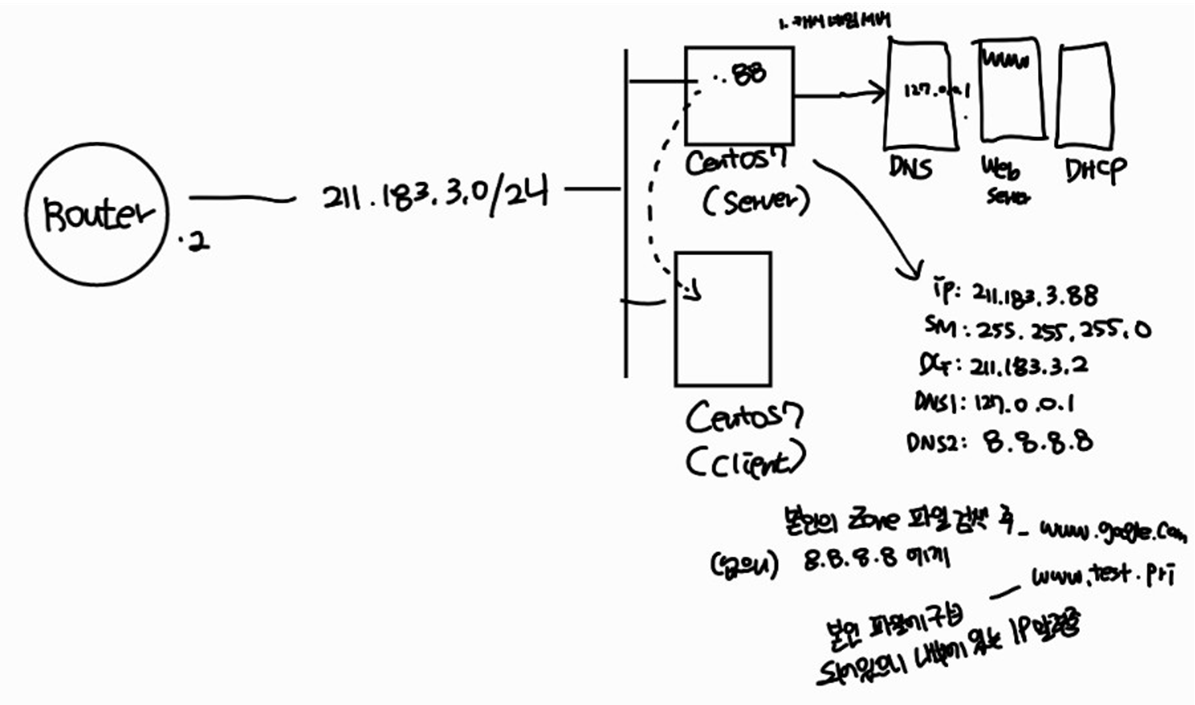
CentOS8 : DNS서버 & 웹서버 → VMnet10 (211.183.3.X)
CentOS7 : 일반PC → VMnet10 (DHCP를 이용하여 211.183.3.201 ~ 239사이 할당 받도록)
                                                  DNS : 211.183.3.88

                                                  http://www.test.pri
CentOS8 : DNS 서버(캐시네임서버, 마스터네임서버)
관리하는 도메인 주소 : test.pri
웹서버 : www.test.pri
DHCP 서버로 동작
- 211.183.3.201~211.183.3.239
- DNS : 211.183.3.88
작업 순서
- CLI를 이용하여 Server의 IP 주소를 211.183.3.88로 입력한다. 기본 게이트웨이는 211.183.3.2가 되어야 한다. DNS 정보는 향후 이 서버가 test.pri에 대한 master 네임 서버로 동작할 계획임을 감안하여 등록한다.
- 웹서버,DNS, DHCP 서비스를 위하여 방화벽과 SELinux는 편의상 비활성화 시켜둔다.
- 웹서비스를 활성화 시킨다.
- 캐시네임서버와 마스터네임서버(test.pri)를 구성하되, 내부에 www정보를 zone 파일에 등록한다. 단, 웹서버는 자기 자신이다.
- PC들을 위한 DHCP 서비스를 구성하고 활성화시킨다.
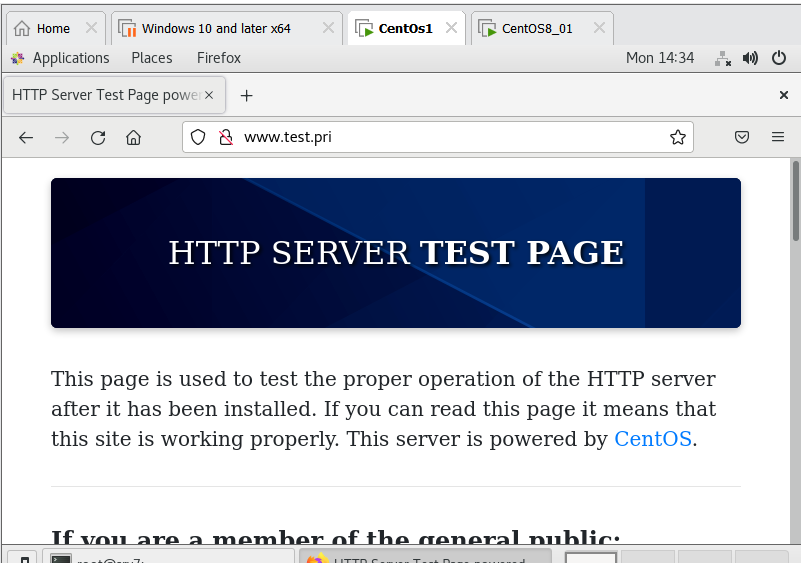
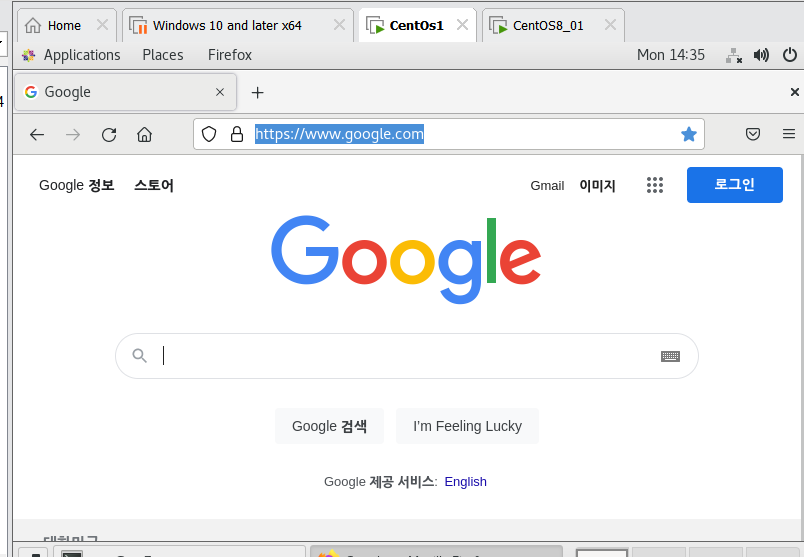
- PC는 IP 주소입력에 대하여 DHCP로 전환하고, 211.183.3.201~239사이의 주소를 할당받아야한다. 또한 Firefox를 실행한뒤 주소창에 www.test.pri를 입력했을 경우 서버의 웹페이지 내용이 보여야한다. 또한 www.google.com을 입력했을 경우에도 정상적인 페이지가 보여야 한다.
[CentOS8]
vi /etc/ssh/sshd_config
password어쩌구 변경
systemctl restart sshd
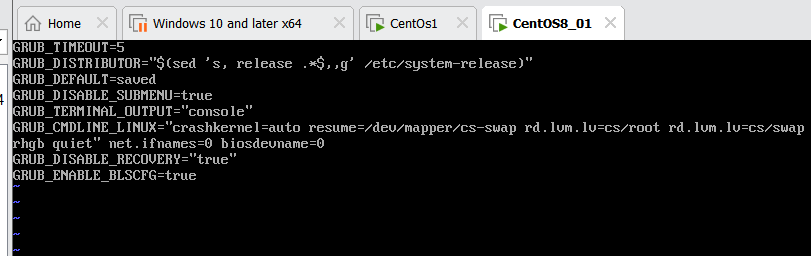
vi /etc/default/grub bioses?하지않겠다
network-scripts ifcfg-eth0으로 변경
vi ifcfg~들어가서 Proxymethod지우고 등등 booteth0으로바꾸고 device도 eth0 ipaddr 88로 dns1을127001 dns2를 8888
grub2-mkconfig -o /boot/grub2/grub.cfg reboot
ifconfig | more
ping www.google.com 정상적연결해야함
캐시서버
dnf -y install bind bind-chroot
any any dnssecvalidation no
systemctl restart named
centos7
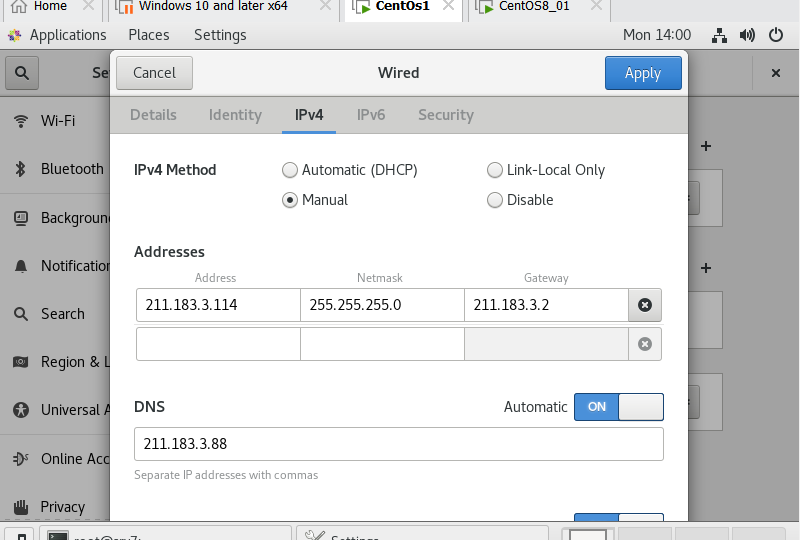
211.183.3.?? / 3.2
211.183.3.88을 DNS로 해서 인터넷 나갈수있는지만 쳌
nslookup server
nslookup www.google.com로 확인
step1
vi /etc/default/grub6행 가장 뒤에 net.ifnames=0 biosdevname=0 추가
cd /etc/sysconfig/network-scripts
mv ifcfg-ens160 ifcfg-eth0
vi /etc/sysconfig/network-scripts/ifcfg-eth0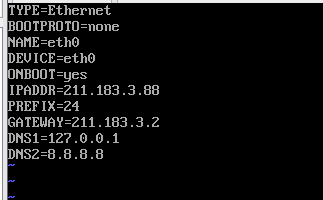
- centos7이 이런 상태일 때 DNS로 google 접속이 가능한지 여부만 확인
- ping -c 3 www.google.com 이 연결 가능해야함
step2
systemctl stop firewalld
systemctl disable firewalld
setenforce 0
sed -i 's/SELINUX=enforcing/SELINUX=disabled/' /etc/selinux/config
step3
dnf -y install httpd
echo "hello" > /var/www/html/index.html
systemctl enable httpd --now
systemctl status httpd <-- 동작상태 확인
step4
- 캐시 네임서버 구성
dnf -y install bind bind-chroot
vi /etc/named.conf
listen-on port 53 { any; }; # 127.0.0.1 -> any 로 수정
listen-on-v6 port 53 { none; }; # none 으로 수정
allow-query { any; }; # any 로 수정
dnssec-validation no; # yes 를 no 로 수정
systemctl restart named
systemctl enable named
systemctl status named- 마스터 네임서버 구성
vi /etc/named.conf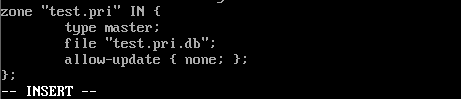
- 구성상태확인
named-checkconfcd /var/named/
ls
touch test.pri.db
vi test.pri.db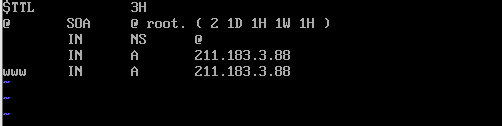
systemctl restart named
[root@server named]# named-checkzone test.pri test.pri.db    <--- 구성파일 점검
zone test.pri/IN: loaded serial 2
OK    <--- 문제없음 확인!!!
[확인]
echo "HELLO" > /var/www/html/index.html
systemctl restart httpd
curl www.test.pri
step5
[centos7]
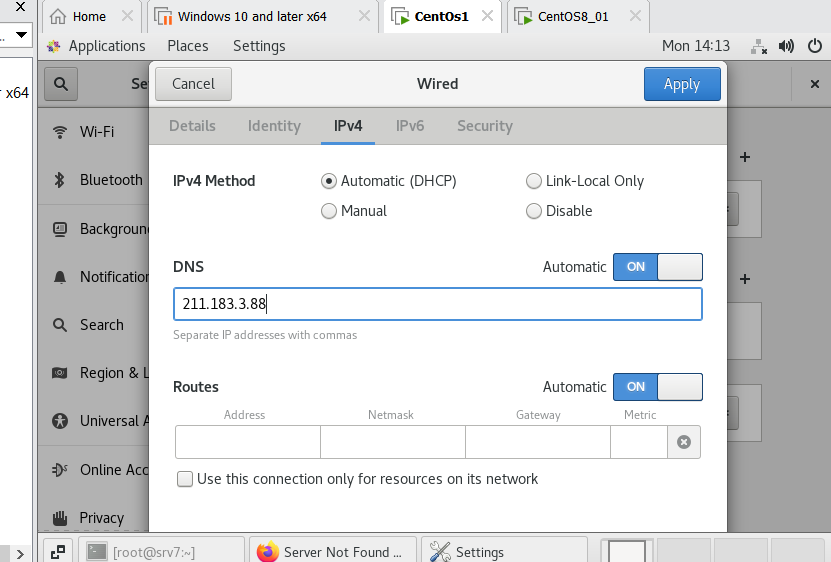
[centos7]
rpm -qa dhcp-client # DHCP 클라이언트 패키지 확인vi /etc/sysconfig/network-scripts/ifcfg-eth0BOOTPROTO=dhcp로 변경
nmcli connection down eth0
nmcli connection up eth0
reboot
[centos8]
- dhcp server 설치
dnf -y install dhcp-server- 설정파일 편집
vi /etc/dhcp/dhcpd.conf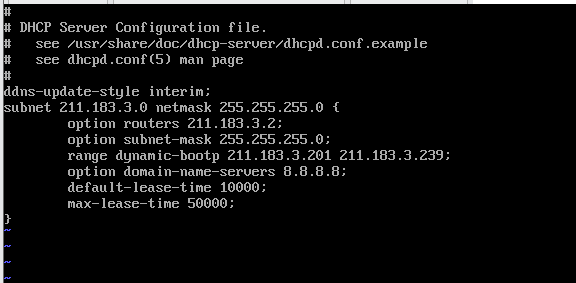
- 파일 확인
ls -l /var/lib/dhcpd/dhcpd.leases- dhcp 시작,확인,상시가동
systemctl restart dhcpd
systemctl enable dhcpd
systemctl status dhcpd- 새로운 IP 정보 할당받기 (Client)
[centos7]
DHCP auto로 변경
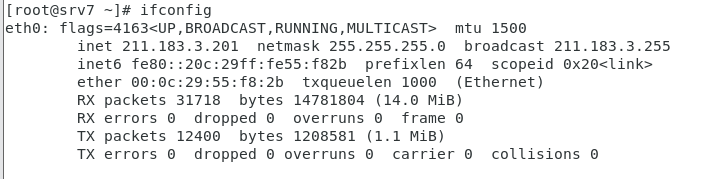
su -c 'systemctl restart NetworkManager'설정한 201~239 사이 할당 받은 것 확인
step6
[centos7]
cat /etc/resolv.conf
# Generated by NetworkManager
nameserver 211.183.3.88
[centos7]
방화벽
- OS에서 포워딩 기능 활성화
echo "1" > /proc/sys/net/ipv4/ip_forward- 확인
[root@srv7 ~]# cat /proc/sys/net/ipv4/ip_forward
1- 재부팅시 포워딩 기능 활성화
vi /etc/sysctl.confnet.ipv4.ip_forward = 1 추가
- 방화벽 설정 확인
systemctl status firewalld- 방화벽 활성화
systemctl start firewalld[root@srv7 ~]# firewall-cmd --list-all
public (active)
target: default
icmp-block-inversion: no
interfaces: eth0
sources:
services: dhcpv6-client ssh
ports:
protocols:
masquerade: no
forward-ports:
source-ports:
icmp-blocks:
rich rules:방화벽이 활성화 된 상태
과거의 방화벽은 인터페이스별로 정책을 설정하였다.
zone을 이용할 수 있다.
[root@srv7 ~]# firewall-cmd --get-default-zone
public

[root@srv7 ~]# firewall-cmd --zone=work --add-interface=eth1
success

[root@srv7 ~]# firewall-cmd --zone=work --add-service=ssh
Warning: ALREADY_ENABLED: 'ssh' already in 'work'
success

# 특정 port도 설정 가능
[root@srv7 ~]# firewall-cmd --zone=work --add-port=8888/tcp
success[root@srv7 ~]# firewall-cmd --zone=work --list-all
work (active)
target: default
icmp-block-inversion: no
interfaces: eth1
sources:
services: dhcpv6-client ssh
ports: 8888/tcp
protocols:
masquerade: no
forward-ports:
source-ports:
icmp-blocks:
rich rules:- default에 대해서는 zone을 지정하지 않아도 default인 public에 지정됨
[root@srv7 ~]# firewall-cmd --permanent --add-port=80/tcp
success- 변경된 내용 구성내용 반영
[root@srv7 ~]# firewall-cmd --reload
success[root@srv7 ~]# cat /etc/firewalld/zones/public.xml
<?xml version="1.0" encoding="utf-8"?>
<zone>
<short>Public</short>
<description>For use in public areas. You do not trust the other computers on networks to not harm your computer. Only selected incoming connections are accepted.</description>
<service name="ssh"/>
<service name="dhcpv6-client"/>
<port protocol="tcp"[root@srv7 firewalld]# cd /etc/firewalld/
[root@srv7 firewalld]# cd zones
[root@srv7 zones]# ls
public.xml public.xml.old
[root@srv7 zones]# cat public.xml > dbzone.xml
[root@srv7 zones]# vi dbzone.xml 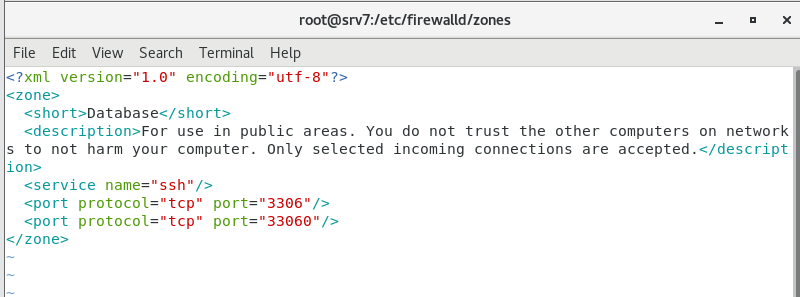
You have new mail in /var/spool/mail/root
[root@srv7 zones]# firewall-cmd --reload
success[root@srv7 zones]# firewall-cmd --get-zones
block dbzone dmz drop external home internal public trusted work주로 사용하는 방화벽 설정
firewall-cmd --permanent --add-service=ssh
firewall-cmd --permanent --add-port=3306/tcp
firewall-cmd --reload
add-service=ssh 이런식으로 service=mariadbd 이런식으로 만들어 쓰고싶다면 xml 파일을 만들어 정의 할 수 있음
- ssh.xml내용가져와 일부 바꾸기
[root@srv7 zones]# cd /etc/firewalld/services/
[root@srv7 services]# ls
[root@srv7 services]# cat /usr/lib/firewalld/
helpers/   icmptypes/ ipsets/    services/  zones/
[root@srv7 services]# cp /usr/lib/firewalld/services/ssh.xml ./mariadb.xml
You have new mail in /var/spool/mail/root
[root@srv7 services]# ls
mariadb.xml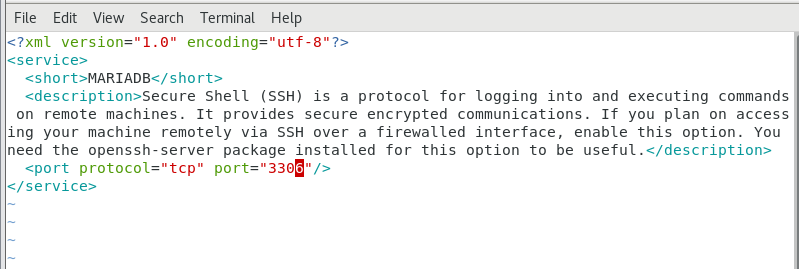
[root@srv7 services]# firewall-cmd --reload
success

[root@srv7 services]# firewall-cmd --permanent --add-service=mariadb
success