Chapter 11. Client Identification and Cookies
(해석 또는 이해가 잘못된 부분이 있다면 댓글로 편하게 알려주세요.)
✏️ 원문 번역
Cookies
Cookies are the best current way to identify users and allow persistent sessions. They don’t suffer many of the problems of the previous techniques, but they often are used inconjunction with those techniques for extra value. Cookies were first developed by Netscape but now are supported by all major browsers.
-
쿠키는 사용자를 식별하고 영속적인 세션을 허용하기 위한 최선의 방법입니다.
-
이전의 기술로 인한 여러 문제들로 어려움을 겪지는 않지만 부가 가치를 위해 이전의 기술과 함께 사용되는 경우가 많습니다.
-
쿠키는 Netscape에 의해 최초로 개발되었지만 현재는 대부분의 브라우저에서 지원되고 있습니다.
Because cookies are important, and they define new HTTP headers, we’re going to explore them in more detail than we did the previous techniques. The presence of cookies also impacts caching, and most caches and browsers disallow caching of any cookied content. The following sections present more details.
-
쿠키는 중요하며 새로운 HTTP 헤더를 정의하고 있어 이전의 기술들보다 더 상세하게 학습할 예정입니다.
-
쿠키의 존재는 캐싱에도 영향을 끼칩니다.
-
대부분의 캐시와 브라우저는 모든 쿠키 콘텐츠를 캐시하는 것을 허용하지 않습니다.
-
이어지는 섹션에서 자세한 내용을 설명합니다.
Types of Cookies
You can classify cookies broadly into two types: session cookies and persistent cookies. A session cookie is a temporary cookie that keeps track of settings and preferences as a user navigates a site. A session cookie is deleted when the user exits the browser. Persistent cookies can live longer; they are stored on disk and survive browser exits and computer restarts. Persistent cookies often are used to retain a configuration profile or login name for a site that a user visits periodically.
-
쿠키는 크게 세션 쿠키(Session Cookie)와 영속 쿠키(Persistent Cookie) 두 가지 유형으로 분류할 수 있습니다.
-
세션 쿠키는 사용자가 사이트를 이동함에 따라 설정과 속성을 추적하기 위한 일시적인 쿠키입니다.
-
사용자가 브라우저를 떠나면 삭제됩니다.
-
영속 쿠키는 더 오랜 시간 지속됩니다.
-
영속 쿠키는 디스크에 저장되어 브라우저를 떠나거나 컴퓨터를 재부팅하더라도 유지됩니다.
-
주기적으로 방문하는 사용자에 대한 구성 프로필이나 사이트의 로그인 네임을 유지하기 위해 종종 사용됩니다.
The only difference between session cookies and persistent cookies is when they expire. As we will see later, a cookie is a session cookie if its Discard parameter is set, or if there is no Expires or Max-Age parameter indicating an extended expiration time.
-
세션 쿠키와 영속 쿠키의 차이는 오직 만료 시점에 있습니다.
-
추후 살펴보겠지만 Discard 파라미터가 설정되어 있거나 만료 시간 연장을 나타내는 Expires나 Max-Age 파라미터가 존재하지 않는 경우 세션 쿠키에 해당합니다.
How Cookies Work
Cookies are like “Hello, My Name Is” stickers stuck onto users by servers. When a user visits a web site, the web site can read all the stickers attached to the user by that server.
-
쿠키는 서버가 사용자에게 붙이는 이름 스티커와 같습니다.
-
사용자가 웹 사이트에 방문할 때 웹 사이트는 서버가 사용자에게 부착한 모든 스티커를 읽을 수 있습니다.
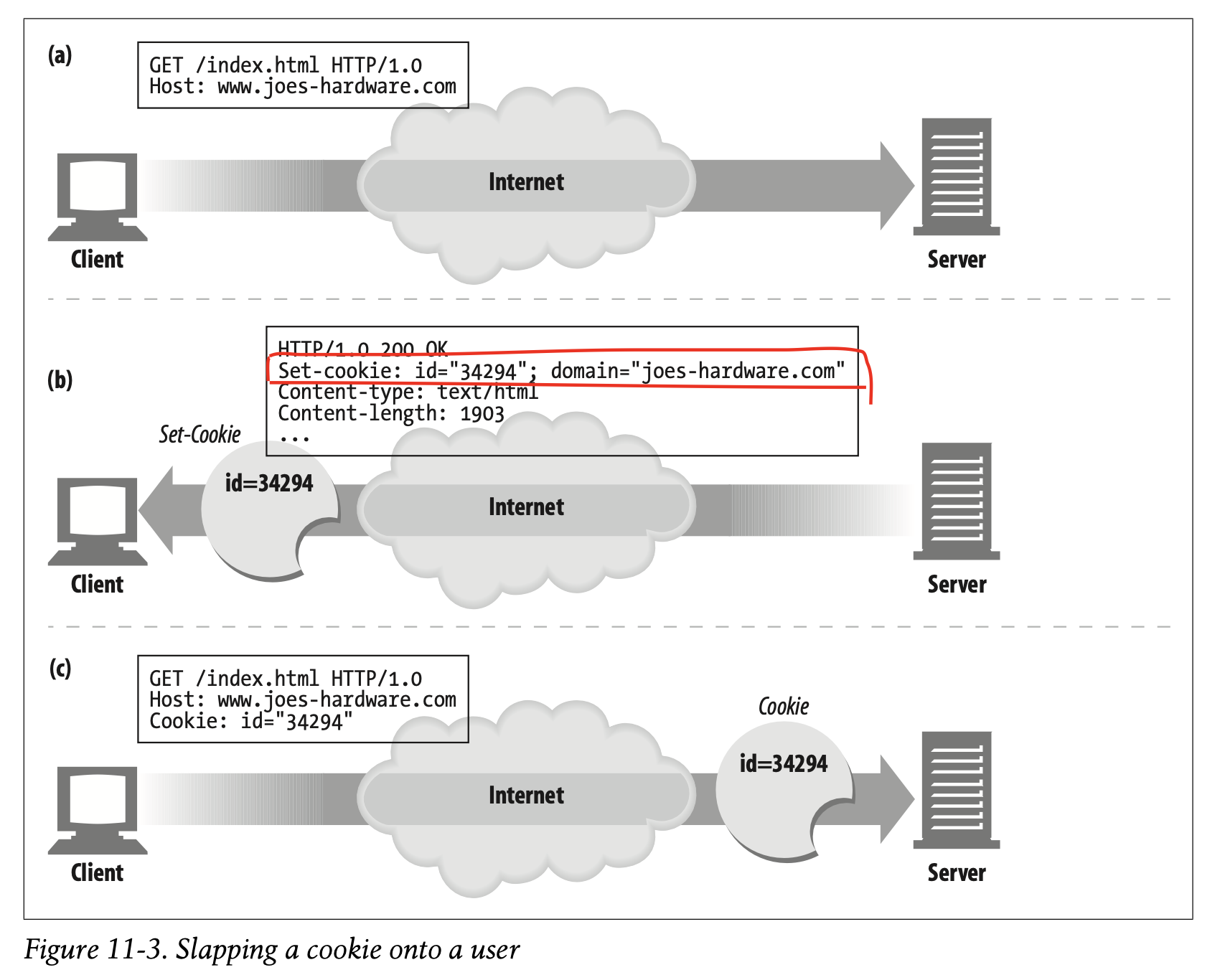
The first time the user visits a web site, the web server doesn’t know anything about the user (Figure 11-3a). The web server expects that this same user will return again, so it wants to “slap” a unique cookie onto the user so it can identify this user in the future. The cookie contains an arbitrary list of name=value information, and it is attached to the user using the Set-Cookie or Set-Cookie2 HTTP response (extension) headers.
-
사용자가 웹 사이트에 처음 방문하면 웹 서버는 사용자에 대해 아무것도 알지 못합니다. (Figure 11-3a)
-
웹 서버는 동일한 사용자가 다시 방문할 것으로 예상하여 향후 사용자를 식별할 수 있도록 고유한 쿠키를 발급합니다.
-
쿠키는 임의의 name=value 정보 목록을 포함하고 있습니다.
-
이때 Set-Cookie나 Set-Cookie2 HTTP 응답 헤더를 사용하여 사용자에게 첨부합니다.
Cookies can contain any information, but they often contain just a unique identification number, generated by the server for tracking purposes. For example, in Figure 11-3b, the server slaps onto the user a cookie that says id=“34294”. The server can use this number to look up database information that the server accumulates for its visitors (purchase history, address information, etc.).
-
쿠키는 모든 정보를 포함할 수 있지만 보통 서버가 추적 목적으로 생성한 고유한 식별 번호만을 포함하고 있습니다.
-
예를 들어 Figure 11-3b에서 서버는 사용자에게 id="34294"를 나타내는 쿠키를 전송합니다.
-
서버는 서버가 방문자로부터 축적한 데이터베이스 정보(구매 내역, 주소 정보 등)를 찾는 데 식별 번호를 사용할 수 있습니다.
However, cookies are not restricted to just ID numbers. Many web servers choose to keep information directly in the cookies. For example:
Cookie: name="Brian Totty"; phone="555-1212"
-
하지만 쿠키는 ID 번호에만 국한되지 않습니다.
-
많은 웹 서버가 직접적으로 쿠키에 정보를 유지하는 것을 선택하고 있습니다.
The browser remembers the cookie contents sent back from the server in Set-Cookie or Set-Cookie2 headers, storing the set of cookies in a browser cookie database (think of it like a suitcase with stickers from various countries on it). When the user returns to the same site in the future (Figure11-3c), the browser will select those cookies slapped onto the user by that server and pass them back in a Cookie request header.
-
브라우저는 Set-Cookie나 Set-Cookie2 헤더를 통해 서버로부터 전달받은 쿠키의 내용을 기억하고 있습니다.
-
브라우저 쿠키 데이터베이스에 쿠키의 집합을 보관하고 있기 때문입니다(여러 나라의 스티커가 붙은 여행 가방처럼 생각하시면 됩니다).
-
향후에 사용자가 동일한 사이트를 방문할 때 브라우저는 서버를 통해 사용자에게 전달한 쿠키를 Cookie 요청 헤더에 실어 전달합니다. (Figure 11-3)
Cookie Jar: Client-Side State
The basic idea of cookies is to let the browser accumulate a set of server-specific information, and provide this information back to the server each time you visit.
- 쿠키의 기본 아이디어는 브라우저가 특정 서버에 대한 정보 집합을 축적하여 사용자가 방문할 때마다 이 정보를 서버에 전달할 수 있게 하는 것이었습니다.
Because the browser is responsible for storing the cookie information, this system is called client-side state. The official name for the cookie specification is the HTTP State Management Mechanism.
-
쿠키 정보를 저장하는 주체가 브라우저기 때문에 해당 시스템을 client-side state로 정의합니다.
-
쿠키 명세의 공식적인 이름은 HTTP State Management Mechanism입니다.
Netscape Navigator Cookies
Different browsers store cookies in different ways. Netscape Navigator stores cookies in a single text file called cookies.txt. For example:
-
브라우저는 서로 다른 방식으로 쿠키를 저장합니다.
-
Netscape Navigator는 쿠키를 cookies.txt라는 하나의 텍스트 파일 형태로 저장합니다.
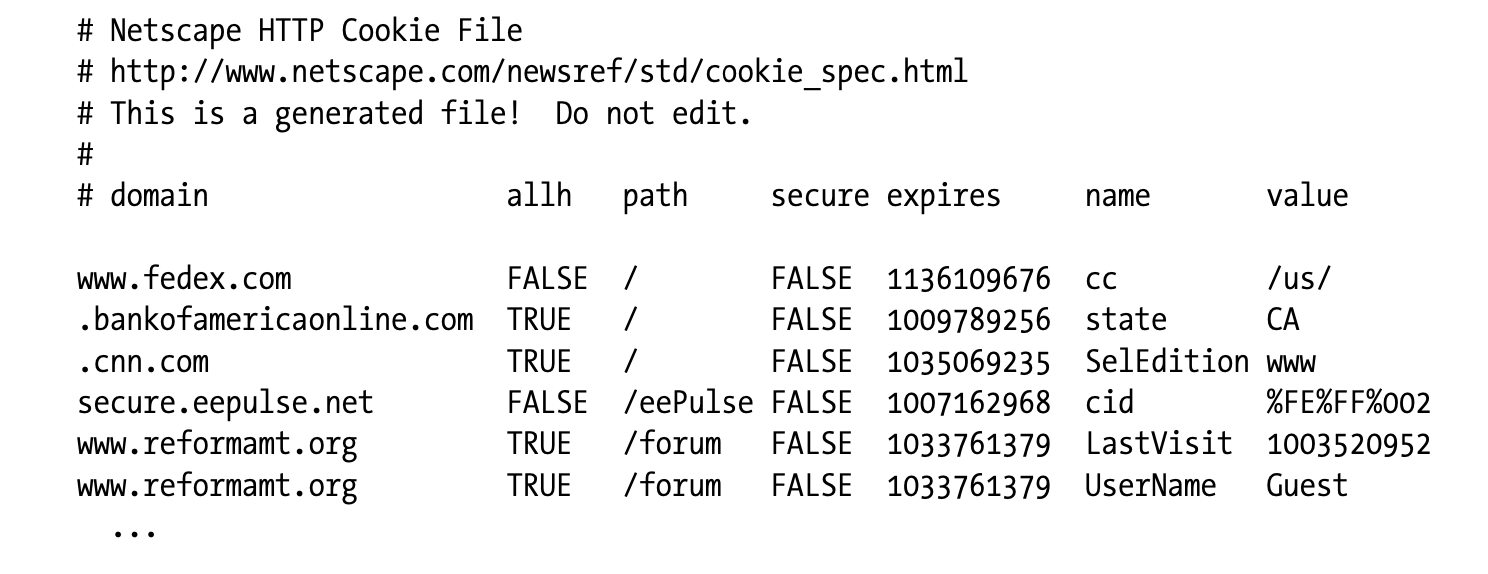
Each line of the text file represents a cookie. There are seven tab-separated fields:
domain
The domain of the cookieallh
Whether all hosts in a domain get the cookie, or only the specific host namedpath
The path prefix in the domain associated with the cookiesecure
Whether we should send this cookie only if we have an SSL connectionexpiration
The cookie expiration date in seconds since Jan 1, 1970 00:00:00 GMTname
The name of the cookie variablevalue
The value of the cookie variable
-
텍스트 파일의 각 라인은 쿠키를 나타냅니다.
-
이때 탭으로 구분되는 7가지의 항목이 있습니다.
- domain : 쿠키가 적용되는 도메인
- allh : 도메인의 모든 호스트가 쿠키를 가지고 있는지 나열된 특정 호스트만 가지고 있는지에 관한 정보
- path : 쿠키와 연관된 도메인 경로의 접두사
- secure : SSL 연결일 때만 쿠키를 전송해야 하는지에 대한 여부
- expiration : 쿠킼의 만료 일시를 Jan 1, 1970 00:00:00 GMT 초 단위로 표현한 것
- name : 쿠키 변수의 이름
- value : 쿠키의 값
Microsoft Internet Explorer Cookies
Microsoft Internet Explorer stores cookies in individual text files in the cache directory. You can browse this directory to view the cookies, as shown in Figure 11-4. The format of the Internet Explorer cookie files is proprietary, but many of the fields are easily understood. Each cookie is stored one after the other in the file, and each cookie consists of multiple lines.
-
Microsoft Internet Explorer는 쿠키를 캐시 디렉토리 내에 개별 텍스트 파일로 저장합니다.
-
Figure 11-4와 같이 디렉토리를 검색하여 쿠키를 확인할 수 있습니다.
-
Internet Explorer의 쿠키 파일 형식은 독점적이지만 대부분의 필드를 쉽게 이해할 수 있습니다.
-
각각의 쿠키는 파일에 차례로 저장되며, 여러 개의 라인으로 구성됩니다.
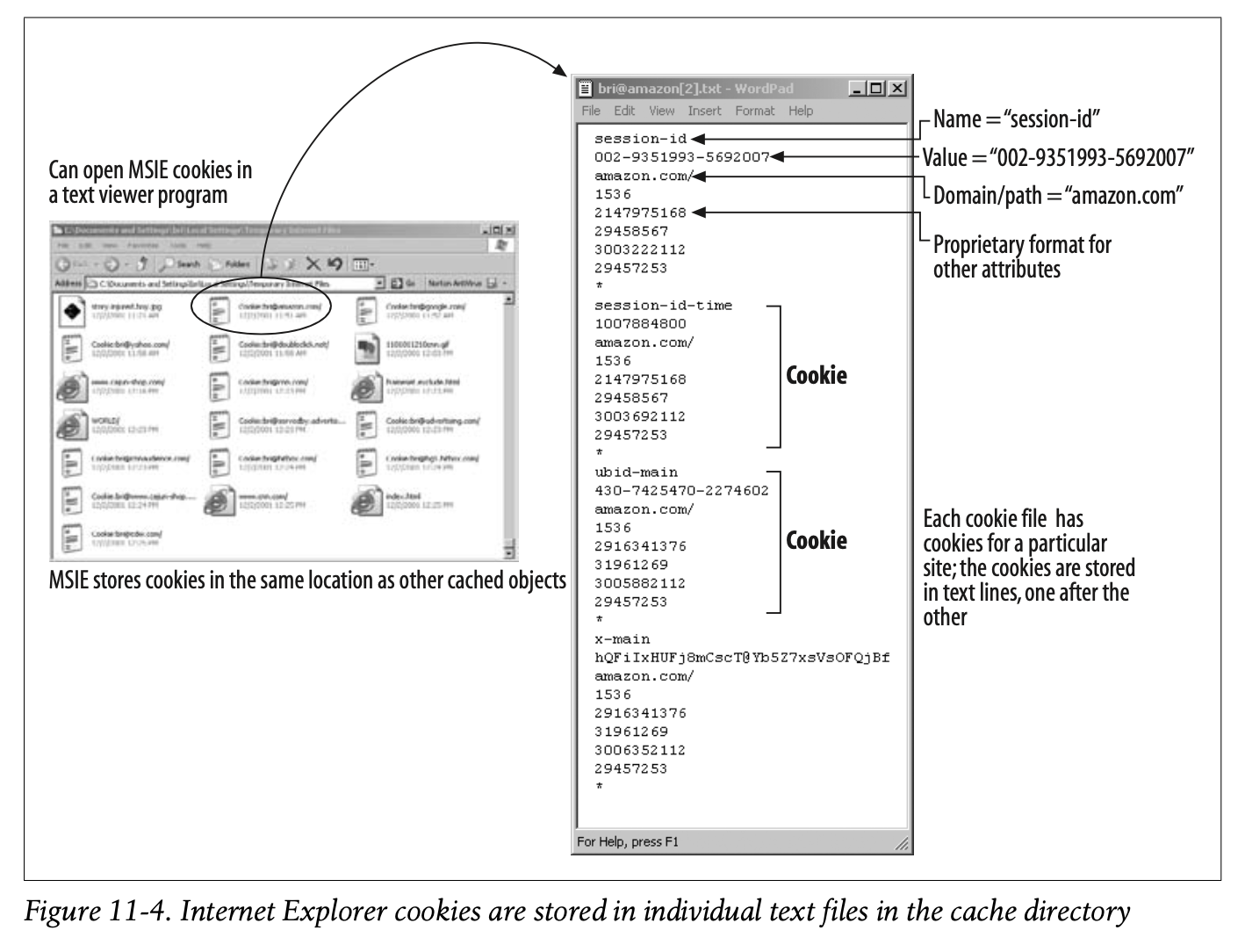
The first line of each cookie in the file contains the cookie variable name. The next line is the variable value. The third line contains the domain and path. The remaining lines are proprietary data, presumably including dates and other flags.
-
파일 내 각 쿠키의 첫 번째 줄은 쿠키 변수의 이름을 포함합니다.
-
다음 줄은 변수의 값입니다.
-
세 번째 줄은 domain과 path를 나타냅니다.
-
나머지 라인은 날짜와 기타 플래그를 비롯한 독점적인 데이터로 추정됩니다.
✏️ 요약
Cookies
- Session Cookies : 사용자가 사이트를 이동할 때 설정 정보를 추적하기 위한 임시 쿠키 -> Discard 파라미터
- Persistent Cookies : 디스크에 저장되어 브라우저를 끄거나 재부팅 시에도 유지되는 쿠키 -> Max-Age, Expires 파라미터
[1] How Cookies Work
- 웹 사이트 최초 방문
- 웹 서버가 사용자를 식별하기 위한 쿠키 발급
Set-cookie: id="34294" - 이후 요청 시 사용자가 쿠키를 함께 전송
Cookie: id="34294"
[2] HTTP State Management Mechanism
: 쿠키는 Client-side State에 해당(쿠키를 저장하는 주체가 브라우저)
- Netscape Navigator : cookies.txt를 활용하여 쿠키 저장
- Internet Explorer : 캐시 디렉토리 내에 별도의 파일로 저장
- 파일에는 쿠키 변수의 이름과 값, 적용 도메인 및 경로 등이 포함됨
✏️ 요약
Set-cookie와 Set-cookie2는 뭐가 다를까
Set-cookie2는 Set-cookie의 문제를 개선하기 위해 등장했다. Netscape에서 만든 초기 쿠키 사양을 개선하는 새로운 쿠키 버전이 구현되면서 새로 만들어진 헤더다. Set-cookie와 달리 Max-Age 속성을 추가로 지원한다거나 특정 포트에서만 쿠키를 사용할 수 있도록 지정할 수 있다는 특징이 있다.
결론부터 이야기하자면 Set-cookie2는 현재 사용되지 않는다. 쿠키를 개선해보려는 시도는 좋았지만 이미 Set-cookie가 널리 쓰이고 있었기 때문에 브라우저에 채택되지 않았다. 시간이 흐름에 따라 Set-cookie도 진화하면서 Max-Age, Secure, HttpOnly와 같은 속성을 사용할 수 있게 되었다. 그러므로 Set-cookie2를 유지할 필요도 없었다.
RFC 6265에서 Set-cookie2는 공식적으로 deprecated 처리되었다.