
Reference
📎 https://velog.io/@cocorig/NestJS-NestJS-란-무엇인가-프로젝트-생성-방법-폴더-구조-이해
📎 https://nomadcoders.co/nestjs-fundamentals
📎 https://docs.nestjs.com/
📎 https://www.elancer.co.kr/blog/view?seq=197

💡 NestJS 설치 및 실행 방법
1. NestCLI 설치
→ NestCLI : Nest 애플리케이션의 초기화, 개발 및 유지 관리를 도와주는 인터페이스 도구
npm i -g @nestjs/cli2. 프로젝트 생성
nest new [project-name]3. 프로젝트 실행
- 개발 환경에서 실행하는 경우 (ex, VS Code)
npm run start- 파일 변경을 감지, 자동 컴파일 후 로드 (
nodemon)
npm run start:dev- 저장소가
모노레포인 경우 (swc-loader 패키지 사용)npm i --save-dev @swc/cli @swc/core nest start -b swc
💡NestJS의 주요 프로젝트 구조
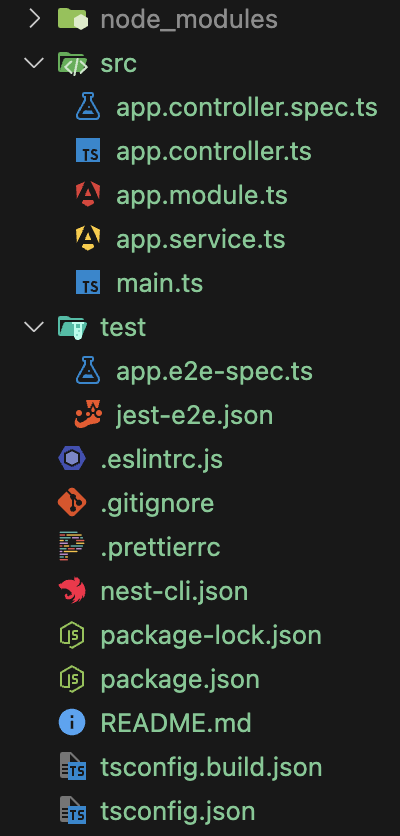
🚩 app.controller.spec.ts
import { Test, TestingModule } from '@nestjs/testing';
import { AppController } from './app.controller';
import { AppService } from './app.service';

describe('AppController', () => {
  let appController: AppController;

  beforeEach(async () => {
    const app: TestingModule = await Test.createTestingModule({
      controllers: [AppController],
      providers: [AppService],
    }).compile();

    appController = app.get<AppController>(AppController);
  });

  describe('root', () => {
    it('should return "Hello World!"', () => {
      expect(appController.getHello()).toBe('Hello World!');
    });
  });
});
특정 컨트롤러의 테스트를 위한 파일.
Jest또는 테스트 프레임워크를 사용하여 컨트롤러의 동작을 확인할 수 있다.
🚩 main.ts
import { NestFactory } from '@nestjs/core';
import { AppModule } from './app.module';

async function bootstrap() {
  const app = await NestFactory.create(AppModule);
  await app.listen(3000);
}
bootstrap();
NestJS 애플리케이션의 최초 진입점이다.
app.module에서 불러온AppModule생성포트 3000에서 서버를 실행하는bootstrap()함수 호출
🚩 app.modules.ts
import { Module } from '@nestjs/common';
import { AppController } from './app.controller';
import { AppService } from './app.service';

@Module({
  imports: [],
  controllers: [AppController],
  providers: [AppService],
})
export class AppModule {}
Controller와service모듈 등 NestJS 애플리케이션의 통합 루트 모듈
AppModule클래스 정의@Module데코레이터로 모듈 정의
- 해당 모듈 내부에
controllers와providers배열에 각각 컨트롤러 클래스, 서비스 클래스들을 포함시킨다.
🚩 app.controller.ts
import { Controller, Get } from '@nestjs/common';
import { AppService } from './app.service';

@Controller()
export class AppController {
  constructor(private readonly appService: AppService) {}

  @Get()
  getHello(): string {
    return this.appService.getHello();
  }

  @Get('/home')
  getGoHome(): string{
	  return this.appService.getGoHome();
  }
}
실제 HTTP 요청을 처리하는 컨트롤러 클래스 정의, URL 엔드포인터 호출
Express의라우터(Router)와 같은 역할- HTTP 요청을 처리하는 메인 컨트롤러
- 라우팅을 처리하여 특정 요청에 따라 적절한 응답을 반환하는 역할
- URL 엔드포인터를 가져와,
URL에 매핑된 함수 실행
→ `엔드포인터 처리`
이떄, 사용자로부터 /home 이라는 요청을 Get 으로 받을 시 위 코드를 보면 @Get('/home') 데코레이터가 정의한 getGoHome() 함수를 호출함으로써 엔드포인터 처리를 한다.
getGoHome() 함수 내부에는 appService 에 존재하는 getGoHome() 을 실행하는 로직이 있다.
이는, Spring 과 같이 “실제 실행되는 로직”과 “비즈니스” 로직을 분리하는 것을 말한다.
→ Controller는 URL 라우팅 및 요청을 받아 해당 로직을 수행하도록 Service 에 요청
→ Service 는 해당 요청에 맞는 실제 비즈니스 로직을 실행하여 그 결과를 Controller 에 반환
💀 데코레이터 사용 시 주의사항
// 올바르지 않은 코드
@Get('/home')
// 주석
getGoHome(): string{
	return this.appService.getGoHome();
}

// 올바른 코드
@Get('/home')
getGoHome(): string{
	return this.appService.getGoHome();
}- 함수를 정의할 때
데코레이터와함수호출 혹은 선언부 사이에 주석 혹은 빈 칸이 존재할 시 동작되지 않는다. 이를 유의하고 코드를 작성하자.
🚩 app.service.ts
import { Injectable } from '@nestjs/common';

@Injectable()
export class AppService {
  getHello(): string {
    return 'Hello World!';
  }

  getGoHome(): string{
	  return 'welcome to home!';
  }
}
Controller에서 전달받은 요청에 따른 실제 비즈니스 로직을 실행하고 반환한다.
@Injectable(): 해당 데코레이터는 해당 클래스가NestJS에서 의존성 주입이 가능한 서비스임을 나타낸다.
→ 즉, `NestJS` 에서 `Service(Provider)` 역할을 수행한다는 것을 의미getHello(),getGoHome()은 실제 실행되는 비즈니스 로직이며, 반환 값인 문자열은Controller를 통해 클라이언트에게 응답되어 브라우저에 출력된다.
🧨 정리
위와 같이
비즈니스 로직과 데이터 처리를 담당하는서비스 클래스를 정의하고Controller와Service를 분리함으로써 코드 재사용성과 효율성을 극대화시킬 수 있다!
→ 마치Spring의Model-View-Controller와 같은 맥락
💡NestJS의 CLI 사용법
NestJS는 터미널에서nest명령어 수행 시 주요 명령어와 옵션을 제공한다.
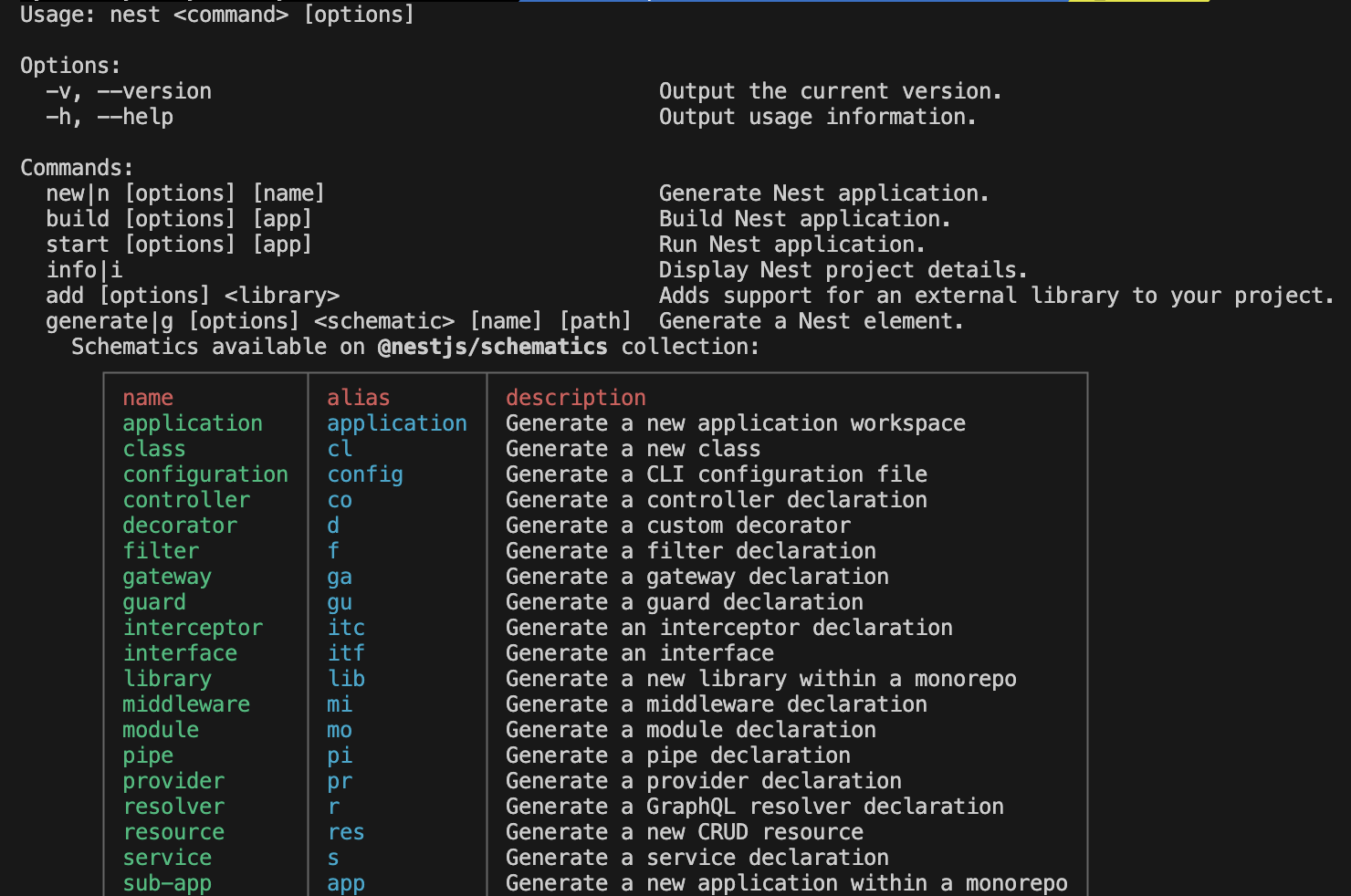
nest generate|g [options] <schematic> [name] [path]generate: 생성할 요소의 유형 (module,controller,service등)name: 생성할 요소의 이름path: 생성된 요소의 경로 (기본값 : 현재 디렉터리에 생성)
🚩 예시) Controller 생성 방법c
nest generate controller home

// 아래와 같이 축약 가능 (위 nest 명렁 사용 시 출력되는 alias 사용)
nest g co homehome이라는Controller생성
🤔 만약, CLI로 파일을 생성할 때 이름을 입력하지 않으면?
// 이름 없이 아래 명령어 실행 시
nest generate controller

// 아래와 같은 문구 출력
> What name would you like to use for the controller?- 해당 문구가 출력되는 이유는 컨트롤러를 생성할 때 이름을 지정하지 않아서 출력된다.
- 이름을 입력하지 않고 엔터를 누를 시
폴더 없이컨트롤러가 생성된다.
- 이름을 입력하지 않고 엔터를 누를 시