예외처리
예외처리는 프로그램에서 에러가 발생했을 때, 프로그램이 중단되는 것을 막기위한 처리 기법이다.
아무리 오류 없이 잘 돌아가게 만들었다해도 오류가 발생하지 않을것이라 장담하긴 어려워 우리는 예외처리를 해줘서 프로그램 셧다운을 막아야한다.
try-catch
public class Exception extends Throwable {
    public static void main(String[] args) {
        try {
            // 예외가 발생할 수 있는 코드
            System.out.println("Exception 01 ========");
            throw new java.lang.Exception();

        } catch (java.lang.Exception e) {
            // 예외 처리 코드
            System.out.println("Exception 02 ========");
        } finally {
            // 예외와 상관없이 무조건 실행되는 코드
            System.out.println("Exception 03 ========");
        }
    }
}- 예외가 발생하지 않은 경우 : 1번( try ) 실행 후 3번( finally ) 순으로 코드가 진행됨.
- 예외가 발생한 경우 : 1번( try )의 에러난 부분까지 실행후 2번( catch )이 실행되고 마지막으로 3번( finally )까지 코드가 진행됨.
throw 와 throws 예외처리
- throw : 에러를 고의로 발생시킬 때 사용한다.
- throws : 자신을 호출한 상위 메소드로 에러를 던져버린다.
throw 예제
public class Exception {
    public static void main(String[] args) {
        int num1 = 10;
        int num2 = 4;

        try {
            throwTest(num1, num2);
        } catch (ArithmeticException e) {
            System.out.println("AritheticException : " + e.getMessage());
        }
    }

    public static void throwTest(int a, int b) throws ArithmeticException {
        throw new ArithmeticException();
    }
}
위의 예제의 생성자를 보면 값이 null일 때 throw를 통해서 강제로 에러를 발생시킨다.
만약, 강제로 에러를 발생시켰다면 try ~ catch로 예외처리를 하게 된다.
try ~ catch로 해결하기 싫다면 throws를 사용하여 호출한 곳으로 에러를 던지면 된다.
throws 예제
public class Exception {
    public static void main(String[] args) {
        int num1 = 10;
        int num2 = 4;

        try {
            throwTest(num1, num2);
        } catch (ArithmeticException e) {
            System.out.println("AritheticException : " + e.getMessage());
        }
    }

    public static void throwTest(int a, int b) throws ArithmeticException {
        System.out.println("throw a/b : " + a/b);
    }
}
위 방법은 ArithmeticException 예외가 발생한다면 <메세지를 호출한 곳>에 예외처리를 던져버리는 것이다.
그렇다면 <메세지를 호출한 곳>에서 반드시 try ~ catch로 메서드 호출부분을 감싸줘야한다.
그렇지 않으면 예외처리를 양쪽에서 아무도 하지 않는 것이다.
그러므로 이 헷갈림과 결국엔 try ~ catch를 사용하는 이유로 잘 사용하지 않는다.
Exception 과 Error
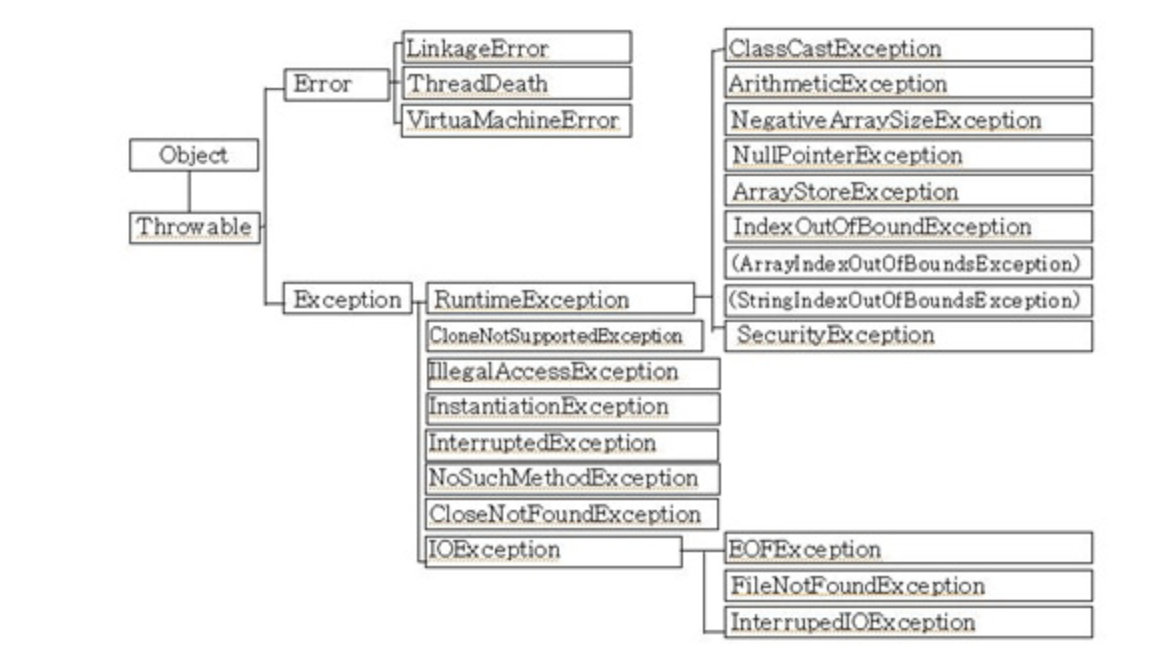
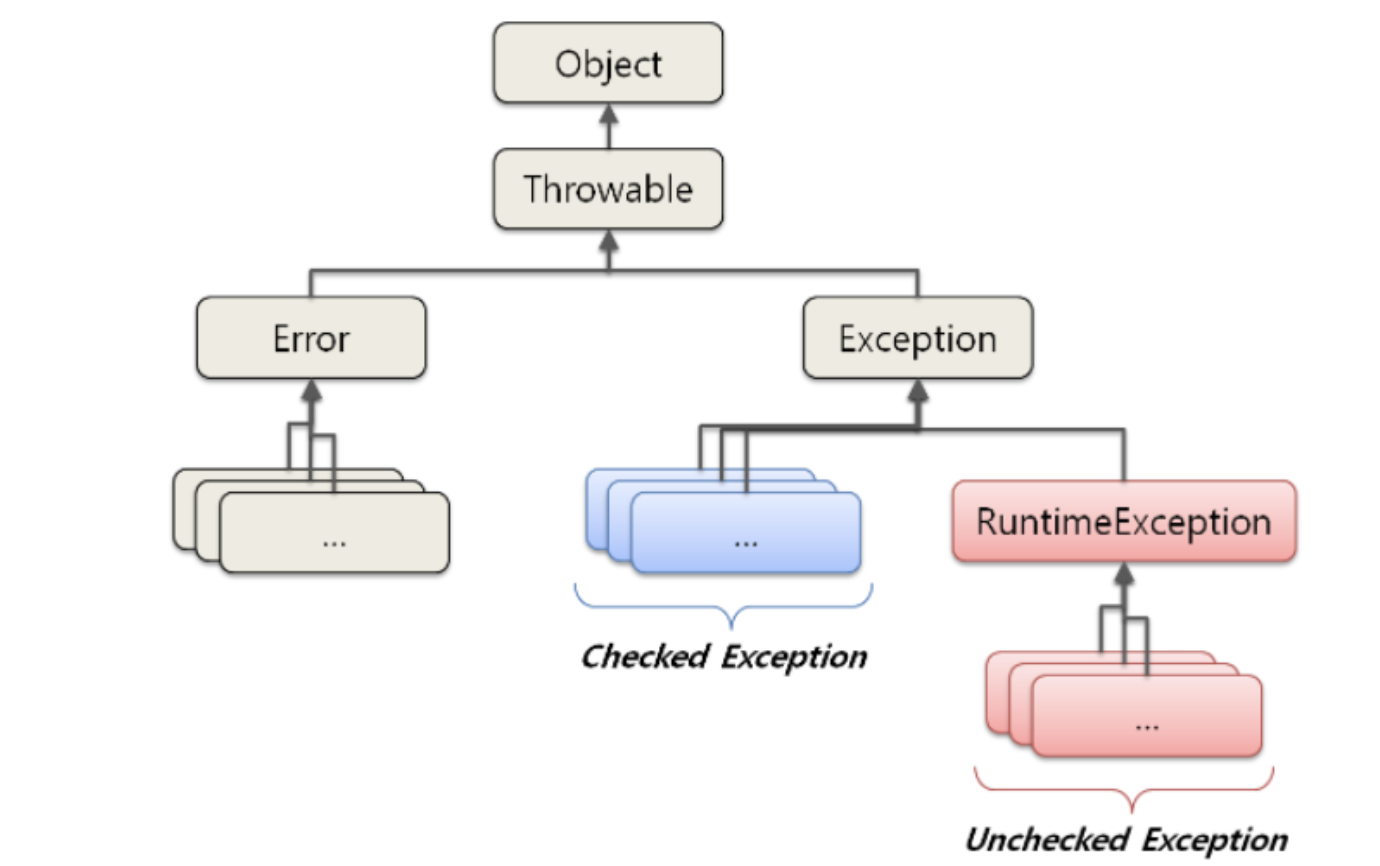
자바에서 발생할 수 있는 프로그램 오류를 "에러"와 "예외"로 구분했다
- 에러( error ) : 프로그램 코드에 의해서 수습될 수 없는 심각한 오류
- 예외( exception ) : 프로그램 코드에 의해서 수습될 수 있는 다소 미약한 오류
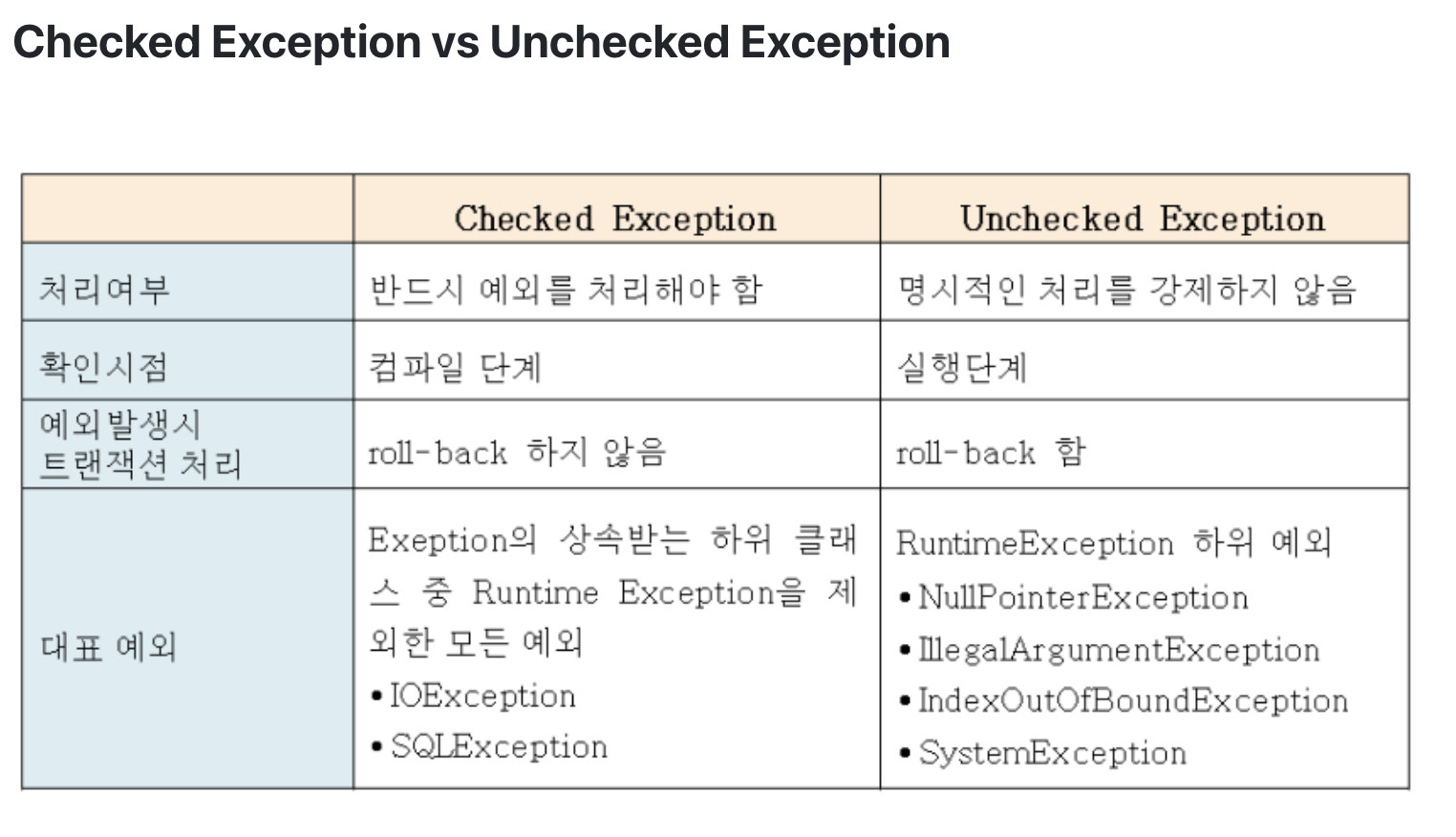
예외중 RuntimeException 클래스들은 주로 프로그래머의 실수에 의해서 발생될 수 있는 예외들로서 예를 들면 배열의 범위( IndexOutOfBoundsException ), 값이 null인 경우( NullPointerException ) 등의 경우에 발생하는 예외들이다.
예외중 Exception 클래스들은 주로 외부의 영향으로 발생할 수 있는 것들로 예를 들면 FileNotFoundException, ClassNotFoundException, DataFormatException 등이 있다. 이런 종류의 외부에서 영향을 받을 수 있는 것들은 반드시 예외 처리를 해줘야한다.
커스텀 예외 처리
- 반드시 처리해야하는 예외로 선언할 경우 Exception을 상속받아 구현.
- 실행 예외로 처리해야하는 예외인 경우 RuntimeException을 상속받아 구현.
- 커스텀 예외처리 클래스 작성 시 생성자는 두 개를 선언하는 것이 일반적이다.
public class CustomException extends RuntimeException{
    CustomException() {

    }
    // 예외 발생 원인을 전달하기 위해 String 타입의 매개변수를 가진 생성자
    CustomException(String message) {
        super(message); // RuntimeException 클래스의 생성자를 호출.
    }
}
예외 발생시키기
public class CustomException extends RuntimeException{
    CustomException() {

    }
    // 예외 발생 원인을 전달하기 위해 String 타입의 매개변수를 가진 생성자
    CustomException(String message) {
        super(message); // RuntimeException 클래스의 생성자를 호출.
    }

    public static void main(String[] args) {
        try {
            test();
        } catch (CustomException e) {
            System.out.println("커스텀 예외 테스트");
        }
    }

    public static void test() throws CustomException {
        throw new CustomException("예외 테스트");
    }
}
한 페이지에 작성하려다보니 조금 난잡해졌다..
위 예제처럼 custom으로 사용할 수 있다는 것을 알아두자
예외 정보 얻기
getMessage() :
- String 타입의 매개변수 메세지를 갖는 생성자를 이용하였다면, 메세지는 자동적으로 예외 객체 내부에 저장되게 되는데 이 메세지를 리턴하는 함수이다.
printStackTrace() :
- 예외 발생 코드를 추적해서 모두 콘솔에 출력한다.
- 어떤 예외가 어디에서 발생했는지 상세하게 출력해주기 때문에 프로그램 테스트하면서 오류 찾을 때 활용한다.