리스트뷰 프로젝트에 이어서 작성하였다.
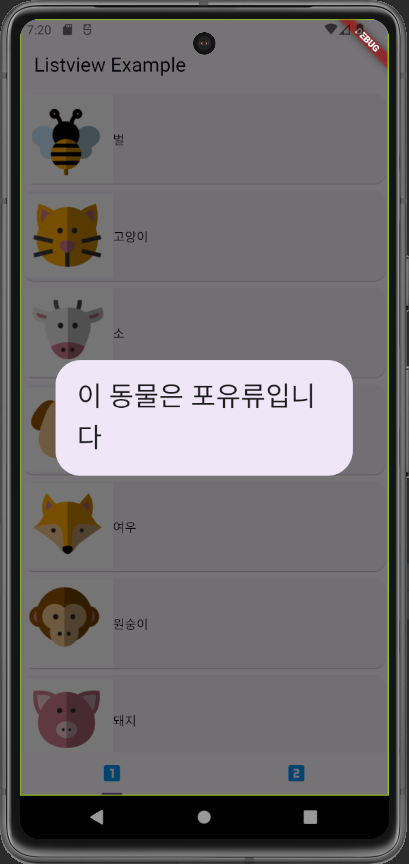
각 동물 아이템을 터치했을 때 해당 동물의 정보를 보여주는 알람 창을 띄우도록 만들어보았다.
터치 이벤트를 처리하기 위해 GestureDetector 위젯을 사용한다.
GestureDetector를 작성하고 Card를 child에 넣는다.
Widget build(BuildContext context) {
return Scaffold(
body: Container(
child: Center(
child: ListView.builder(
itemBuilder: (context, position) {
return GestureDetector(
child: Card(
child: Row(
children: <Widget>[
Image.asset(
list![position].imagePath!,
height: 100,
width: 100,
fit: BoxFit.contain,
),
Text(list![position].animalName!)
],
),
),
);
},
itemCount: list!.length)),
),
);
}GestureDetector 위젯은 한 번 터치, 두 번 터치, 길게 누르기, 끌기 등 손가락 제스처와 관련된 많은 이벤트를 처리한다.
여기선 한 번 터치했을 때 알람 창을 띄우도록 onTap 이벤트에 showDialog() 함수를 호출한다.
                  return GestureDetector(
                    child: Card(
                      child: Row(
                        children: <Widget>[
                          Image.asset(
                            list![position].imagePath!,
                            height: 100,
                            width: 100,
                            fit: BoxFit.contain,
                          ),
                          Text(list![position].animalName!)
                        ],
                      ),
                    ),
                    onTap: () {
                      AlertDialog dialog = AlertDialog(
                        content: Text(
                          '이 동물은 ${list![position].kind}입니다',
                          style: TextStyle(fontSize: 30.0),
                        ),
                      );
                      showDialog(
                          context: context,
                          builder: (BuildContext context) => dialog);
                    },
);AlertDialog를 이용해 dialog라는 이름의 알람 창을 만들고 내용과 스타일을 content와 style로 설정한다.
showDialog() 함수를 호출해 알람 창을 띄운다.