main
<%@ page language="java" contentType="text/html; charset=UTF-8"
    pageEncoding="UTF-8"%>
<!DOCTYPE html>
<html>
	<head>
		<meta charset="UTF-8">
		<title>main</title>
	</head>
	<body>
	  <h2>메인페이지</h2>
	  <ul>
	    <li><a href="jsp0110_04_select.jsp">게시판리스트</a></li>
	    <li><a href="jsp0110_04_insert.jsp">글쓰기</a></li>
	    <li><a href="jsp0110_04_login.jsp">로그인</a></li>
	    <li><a href="jsp0110_04_logout.jsp">로그아웃</a></li>
	  </ul>
	</body>
</html>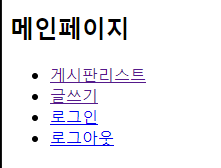
글쓰기
INSERT
form으로 제목과 내용을 jsp0110_04_doinsert.jsp로 보낸다.<%@ page language="java" contentType="text/html; charset=UTF-8"
pageEncoding="UTF-8"%>
<!DOCTYPE html>
<html>
<head>
<meta charset="UTF-8">
<title>insert</title>
</head>
<body>
<h2>게시글 작성</h2>
<form action="jsp0110_04_doinsert.jsp" name="frm" method="post">
<label>제목</label>
<input type="text" name="title" id="title"><br>
<label>내용</label>
<input type="text" name="content" id="content"><br>
<input type="submit" value="전송">
</form>
</body>
</html>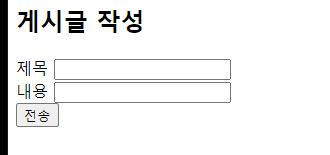
DoInsert
   🎈 insert에서 입력받은 값을
 	   doinsert에서 oracle로 보내서
   		 값을 저장해주는 역할


	1.request.setCharacterEncoding("utf-8")
    :jsp에서 값을 받을 때 한글로 된 값을 받으려면 한글로
    CharacterEncoding을 하여 받아야 한다.
    (insert에서 한글로 된 내용과 제목을 받아오기 위해서)

    2.query = "insert into board2 values(생략)";
      int result = stmt.executeUpdate(query);

      vs

      ResultSet rs;
      String query="select * from board2";
	  rs=stmt.executeQuery(query);

      insert/delete/update/drop/create 경우
      sql 실행문이긴 하지만, table을 읽어들어와서
      정보를 반환하는 명령문은 아니다.
      따라서 명령문이 실행되었는지 안되었는지만 알면되기때문에,
      int rs를 만들어서
      실행되었으면 :1 true
      실패했으면 :0 false로 값을 받아 온다.


      반면 select 경우, 원하는 테이블을 반환하는
      명령문임으로, 테이블을 받아 올  Result set type의
      변수가 필요하다.

    3.try{}catch(exception){}finally{try{
    		if(stmt!=null) stmt.close();
    		if(conn!=null) conn.close();
    }catch(exception){}}

   ❗ open한 순서의 반대로 close해주면 된다.

4.<%@page import="java.sql.DriverManager"%>
<%@page import="java.sql.Timestamp"%>
<%@page import="java.sql.ResultSet"%>
<%@page import="java.sql.Statement"%>
<%@page import="java.sql.Connection"%>
<%@ page language="java" contentType="text/html; charset=UTF-8"
pageEncoding="UTF-8"%>
<%!
Connection conn;
Statement stmt;
int no,result;
String title,content,query;
Timestamp bdate;
%>
<%
request.setCharacterEncoding("utf-8");
//insert.jsp에서 form을 통해 날라온 정보
title = request.getParameter("title");
content = request.getParameter("content");
%>
<!DOCTYPE html>
<html>
<head>
<meta charset="UTF-8">
<title>파일 저장</title>
</head>
<body>
<%
try{
Class.forName("oracle.jdbc.driver.OracleDriver");
//oracle open
conn = DriverManager.getConnection("jdbc:oracle:thin:@localhost:1521:xe","orauser","1111");
//orauser로 접속
stmt = conn.createStatement();
//worksheet 실행
query = "insert into board2 values(board2_seq.nextval,'"+title+"','"+content+"',sysdate)";
result = stmt.executeUpdate(query);
//sql에 넣고 싶은 쿼리문 넣기
}catch(Exception e){
e.printStackTrace();
}finally{
try{
if(stmt!=null) stmt.close();
if(conn!=null) conn.close();
}catch(Exception e2){
e2.printStackTrace();
}
}
%>
<script>
alert("저장이 완료되었습니다.");
location.href="jsp0110_04_select.jsp";
</script>
</body>
</html>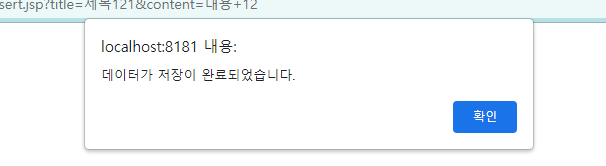
select
	1.Timestamp bdate : Timestamp type도 있다.

    2. function updateBtn(no){
        	alert(no);
        	location.href="jsp0110_04_update.jsp?no="+no;
        }


        밑에 구문에서 rs에 모든 table 정보를 받아오고
        while문에서 rs안의 정보를 하나씩 받아온다.
        그 중 변수 no에 table-no값을 넣어주고
        updateBtn()에서 no를
        jsp0110_04_update.jsp파일로 이동할 때
        태워서 보낸다.


      String query = "select * from board2 order by no desc";
	    rs = stmt.executeQuery(query);

      while(rs.next()){
	      no = rs.getInt("no");

     <td class="update" onclick="updateBtn(<%=no %>)">수정</td>


	3. 게시판 글 전체를 보여주고/ 삭제 / 수정
기능을 넣어준다.<%@page import="java.sql.DriverManager"%>
<%@page import="java.sql.Timestamp"%>
<%@page import="java.sql.ResultSet"%>
<%@page import="java.sql.Statement"%>
<%@page import="java.sql.Connection"%>
<%@ page language="java" contentType="text/html; charset=UTF-8"
pageEncoding="UTF-8"%>
<%! //전역변수 선언
Connection conn;
Statement stmt;
ResultSet rs;
int no,result;
String title,content;
Timestamp bdate;
%>
<!DOCTYPE html>
<html>
<head>
<meta charset="UTF-8">
<title>select</title>
<script src="http://code.jquery.com/jquery-latest.min.js"></script>
<style>
table,th,td{border:1px solid black; border-collapse: collapse;}
th,td{width:150px; height:40px;}
th:nth-child(3){width:250px;}
th:nth-child(4){width:250px;}
.del,.update{cursor: pointer;}
</style>
<script>
function delBtn(no){
alert(no);
if(confirm("정말 삭제하시겠습니까?")){
location.href="jsp0110_04_del.jsp?no="+no;
}else{
return false;
}
}
function updateBtn(no){
alert(no);
location.href="jsp0110_04_update.jsp?no="+no;
}
</script>
</head>
<body>
<h2>게시판</h2>
<table>
<tr>
<th>번호</th>
<th>제목</th>
<th>내용</th>
<th>날짜</th>
<th>수정</th>
<th>삭제</th>
</tr>
<%
try{
Class.forName("oracle.jdbc.driver.OracleDriver");
conn = DriverManager.getConnection("jdbc:oracle:thin:@localhost:1521:xe", "orauser", "1111");
stmt = conn.createStatement();
String query = "select * from board2 order by no desc";
rs = stmt.executeQuery(query);
while(rs.next()){
no = rs.getInt("no");
title = rs.getString("title");
content = rs.getString("content");
bdate = rs.getTimestamp("bdate");
%>
<tr>
<td><%=no %></td>
<td><%=title %></td>
<td><%=content %></td>
<td><%=bdate %></td>
<td class="update" onclick="updateBtn(<%=no %>)">수정</td>
<td class="del" onclick="delBtn(<%=no %>)">삭제</td>
</tr>
<%
}
}catch(Exception e){
e.printStackTrace();
}finally{
try{
if(rs!=null) rs.close();
if(stmt!=null) rs.close();
if(conn!=null) rs.close();
}catch(Exception e2){
e2.printStackTrace();
}
}
%>
</table>
<br>
<button><a href="jsp0110_04_insert.jsp">글쓰기</a></button>
</body>
</html>
update
	1.no=Integer.parseInt(request.getParameter("no"));

    select 파일에서 받아온 no를 no라는 변수에
    받아준다.


    2.String query="select * from board2 where no="+no;
    해당 no를 sql의 no값으로 받아서 해당 query문을
    작성한다.
<%@page import="java.sql.DriverManager"%>
<%@page import="java.sql.ResultSet"%>
<%@page import="java.sql.Statement"%>
<%@page import="java.sql.Connection"%>
<%@ page language="java" contentType="text/html; charset=UTF-8"
    pageEncoding="UTF-8"%>
<%!
	Connection conn;
	Statement stmt;
	ResultSet rs;
	int no,result;
	String title,content;
%>

<%
	try{
		Class.forName("oracle.jdbc.driver.OracleDriver");
		conn=DriverManager.getConnection("jdbc:oracle:thin:@localhost:1521:xe","orauser","1111");
		stmt=conn.createStatement();
		no=Integer.parseInt(request.getParameter("no"));
		String query="select * from board2 where no="+no;
		rs=stmt.executeQuery(query);

		while(rs.next()){
			title=rs.getString("title");
			content=rs.getString("content");
		}
		}catch(Exception e){
				e.printStackTrace();
		}finally{
			try{
				if(rs!=null) rs.close();
				if(stmt!=null) stmt.close();
				if(conn!=null) conn.close();
			}catch(Exception e2){
				e2.printStackTrace();
			}
		}

%>
<!DOCTYPE html>
<html>
	<head>
		<meta charset="UTF-8">
		<title>update</title>
	</head>
	<body>
		<h2>게시글 수정</h2>
		<form action="jsp0110_04_doupdate.jsp" name="frm">
			<label>제목</label>
			<input type="hidden" name="no" value="no">
			<input type="text" name="title" id="title" value="<%=title%>"><br>
			<label>내용</label>
			<input type="text" name="content" id="content" value="<%=content%>"><br>
			<input type="submit" value="전송">
		</form>
	</body>
</html>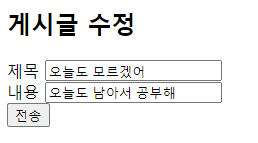

추가 공부

가끔져요