table생성 기본 문법
	1.CREATE 문으로 테이블을 생성할 때
    해당 필드의 타입 뒤에 PRIMARY KEY를 명시하면,
    해당 필드가 기본 키로 설정된다.

    2. table 생성 기본 문법

       create table 테이블이름
        (
		    필드이름 필드타입(최대 byte) primary key,
			 ... );

    3. 하기 쉬운 실수:
    마지막에 선언한 필드같은 경우, ','를 붙이면 오류가 난다.

    4. 필드 타입은 링크를 걸어 놓겠다.
create table member (
id varchar2(20) primary key,
pw varchar2(20),
name varchar2(20),
phone varchar2(20));


create table stuscore(
stuNo number(4) primary key,
name varchar2(20),
kor number(3),
eng number(3),
math number(3),
total number(3),
avg number(5,2)
--number(최대자리수,소수점자리수)--
);
insert : table에 값 넣기 / table에 행 추가하기
1. insert into 테이블이름(필드이름,필드이름,..) values('필드값','필드값' ...);

2. 만약에 모든 필드값을 넣는 경우라면,
	필드이름을 넣는 부분은 생략이 가능하다.
    insert into 테이블이름 values('필드값','필드값' ...);
insert into member(id,pw,name,phone) values(
'aaa','1111','홍길동','010-1111-1111');

insert into member values(
			'bbb','8888','홍길순','010-8888-8888');
select : table에 값 검색
1. select*from 테이블 이름;

	✔*은 all을 의미함

2. select * from 테이블 이름 where 필드이름='필드값';select*from member;
select * from member where name='홍길동';
update: table 값 수정
1.update 테이블 이름 set 필드이름='필드값' where 필드이름='필드값';

  where 뒤에 있는 필드이름의 필드값을 찾아서 set 뒤에 있는 필드이름의 필드값을 수정해준다.
update member set pw='2222' where name='홍길동';alter: 변경 명령어
1.SQL의 ALTER문은 관계형 데이터베이스 관리 시스템(RDBMS)의
관리 하에 이미 존재하는 개체의 특성을 변경하는 데이터 정의 언어(DDL) 명령이다.
alter table stuscore add rank number(4);

ALTER TABLE Employee ADD Birthday DATE;

ALTER TABLE Employee DROP COLUMN Birthday;

alter table stuscore2 rename to stuscore;
desc : descending || description
	1.desc는 descending (내림차순)으로 쓸 수도 있지만, description(설명) 표에 대한 설명을
    실행할 때 쓰이기도 한다.

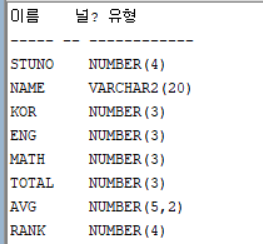
    2.description: desc table_name; 아래와 같이 field에 관한 설명을 불러온다.
	3.descending: select*from table_name order by field_name desc;
    결과 값을 보면, stuno이라는 field_name을 기준으로 내림차순(높은 순에서 낮은 순)으로
    table을 정렬해주고 있다.

    🔅참고로 오름차순(낮은 순에서 높은 순)는 asc(ascending)이다.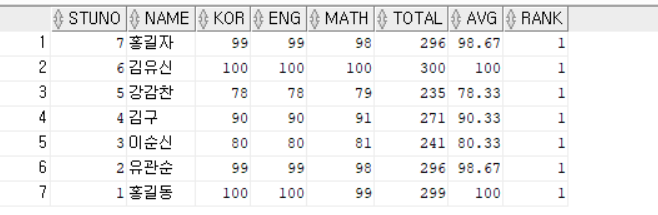
desc stuscore;

select*from stuscore order by stuno desc;
rank() vs dense_rank()

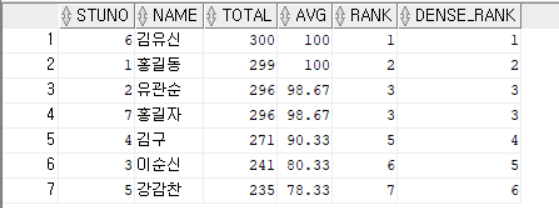
	1. 이해하기 쉽게 예제를 가져와서 보자.

    2.rank() over 함수를 total 값을 기준으로 내림차순으로 해서 순위값을 가져온다면,
    total 값이 같은 유관순과 홍길자는 각 각 3위이고 중복 순위 개수 (2)만큼 다음 순위 값을
    증가 시켜서 3+2=5등으로 김구 순위가 매겨진다.

    3.dense_rank()경우 total 값을 기준으로 내림차순으로 해서 순위값을 가져온다면,
     total 값이 같은 유관순과 홍길자는 각 각 3위이지만, 중복 순위가 존재해도 순차적으로
     다음 순위인 4위를 김구에게 매긴다.

    4. select field_name,field_name,..,
       함수() over(order by field_name 차순방식) column_name
	   from table_name;
select stuNo,name,total,avg,
rank() over (order by total desc) rank,
dense_rank() over(order by total desc) dense_rank
from stuscore; ✔궁금증: rank랑 dense_rank로 column_name을 줘서 table에서 순위를 매겨서,
읽어오지만, rank랑 dense_rank는 fieldtype으로 선언되어 있지 않은 것일까?
왜냐하면, 위의 코드를 실행하면 위의 결과값 table은 띄우지만,
commit 이후에, stuscore에 가면, rank나 dense_rank 값은 없기 때문이다.
🔑해결
select는 읽어들어 온거지, insert한것은 아님으로 그렇다고 한다.
distinct: 중복된 값에서 하나의 값만 가져오기 / 중복 제거용
	1. select distinct field from table
    가 기본 문법이다.

    2.아래의 경우 stuscore라는 table에서 모두를 가져오는데 중복된건 제거하고 가져오는 것이다.
    💣가져오는 것이지, table이 중복을 제거한 것으로 update된건 아니다.

    3.stuscore2라는 table을 중복이 제거된 stuscore의 table의 형태를 그대로 가지고 와서
    새로운 table을 만들 수 있다.

    4.
select distinct*from stuscore;

create table stuscore2 as
select distinct *from stuscore order by stuno;
drop: 삭제
        1. DROP 문을 사용하여 데이터베이스와 테이블을 삭제할 수 있음
        	-영구 삭제임

        2. drop table table_name;
      	  drop database 데이터베이스이름;

        3. delete라는 것도 있는데, delete경우 where같은 문구와 함께 특정 데이터를 삭제할 때
        보통 쓰인다.

        DELETE 테이블 명 WHERE 조건

        아래 코드에서 보면, board라는 table에서 bid가=1인 테이블 행을 삭제하는 것이다.
drop table stuscore;
DROP DATABASE Hotel;
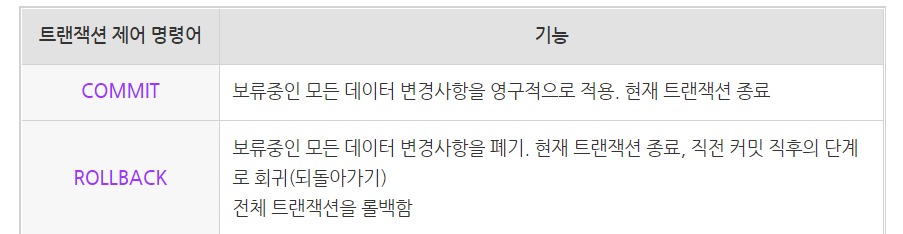
delete board where bid=1;commit : 완전 저장 or 작업 확정/ rollback: 작업 취소
ORACLE 예약어(ORA-00904 부적합한 식별자)

가끔져요
좋은 정보 감사합니다..