Sequence
생성 문법:
CREATE SEQUENCE 이름
INCREMENT BY 증감숫자
START WITH 시작숫자
MINVALUE 최솟값
MAXVALUE 최대값
CYCLE OR NOCYCLE
CACHE
ORDER OR NOORDER
수정 문법:
ALTER SEQUENCE 시퀀스 이름
INCREMENT BY 증가단위
MAXVALUE 최대값
MINVALUE 최소값
CYCLE | NOCYCLE
CACHE | NOCACHE
*단 START WITH 값은 수정이 불가능
삭제 문법:
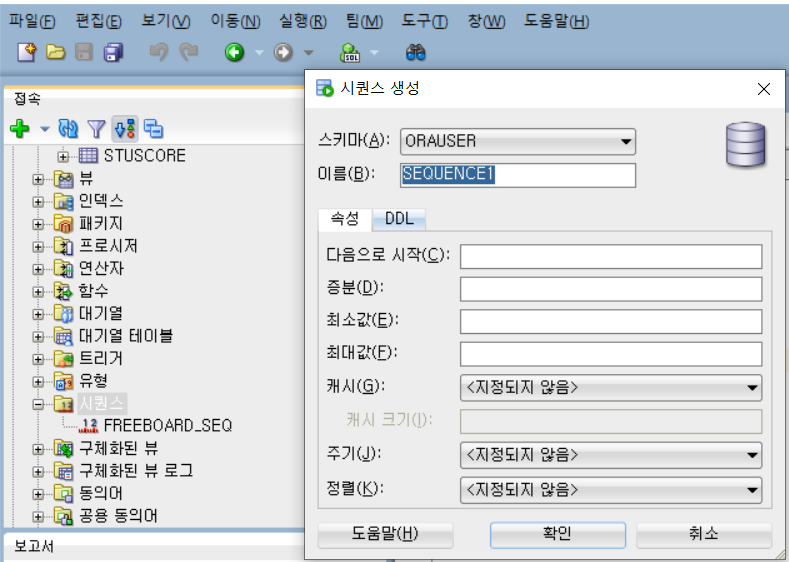
DROP SEQUENCE 시퀀스 이름create sequence freeboard_seq --시퀀스
start with 1 --시작번호
increment by 1 --증분
minvalue 1 --최소값
maxvalue 9999 --최댓값
nocycle --maxvalue까지 갔을때, 그 다음번에 최소값으로 갈 것인지 아닌지
--즉, cycle이 있을지 없을지
nocache --메모리에 시퀀스 값을 미리 할당
order--반드시 순차적으로 모두 채워서 시퀀스를 사용
-- NOORDER : 시퀀스 값을 건너뛸 수 있음
-- 해당 시퀀스의 값을 증가시키고 싶다면
sequence_name.NEXTVAL

-- 현재 시퀀스를 알고 싶다면
sequence_name.CURRVALcreate table freeboard1(
no number(3),
btitle varchar(100)
);
insert into freeboard1 values(
freeboard_seq.nextval,'코딩은 어려워');
insert into freeboard1 values(
freeboard_seq.nextval,'그러게 말이야');
select freeboard_seq.currval from dual;
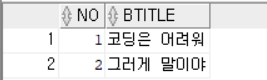
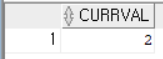
Table 복제
🎈테이블 복사하기(filed type과 데이터 모두 복사)
	문법:

    CREATE TABLE new_table_name AS

	SELECT * FROM origin_table_name
create table board2 as select * from board;🎈테이블 field type만 복사하기
	  문법:

      CREATE TABLE new_table_name AS

      SELECT * FROM origin_table_name  WHERE 1=2
      [where절에 '참'이 아닌 조건을 넣어줌]
create table board3 as select * from board where 1=2;
🎈 테이블은 이미 생성되어 있고 데이터만 복사 (field type 동일)
		문법:

        INSERT INTO 데이터가 비어있는 테이블 SELECT * FROM 데이터가 있는 테이블
insert into board3 select * from board;🎈테이블은 이미 생성되어 있고 데이터만 복사 (field type 다를 때)
   		 문법:

         INSERT INTO 데이터가 비어있는 테이블 (복사하고싶은 field1,field2..)
         SELECT 복사해 올 field1,filed2,... FROM 복사해 올 테이블명
create table board5 (
no number(3),
btitle varchar(100)
);
insert into board5(no,btitle) select no,title from board;
--발견: 받아오는 데이터의 크기가 field type의 크기보다 크면 못 받아 온다.
-- test해 본 결과 같은 field type+ 받아오는 데이터를 충분히 담을 수 있는
-- 크기의 field라면 굳이 field 크기는 같을 필요가 없다.
create table board6 (
no number(3),
btitle varchar(2)
);
insert into board6(no,btitle) select no,title from board;
✔ 발견❗
✔ board description: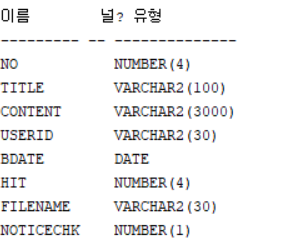
column 추가
문법: alter table table_name add(field_name field_type(field_capacity)alter table freeboard1 add(content varchar2(3000));column 숨기기/보이기
문법: alter table table_name modify field_type invisible;
기존 데이터 정보: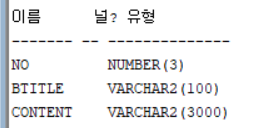
No를 invisible 한 후: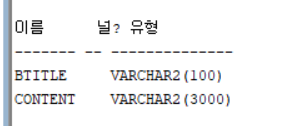
No를 다시 visible 한 후: No가 맨 마지막에 추가되는걸 볼 수 있다.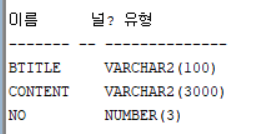
column date값 update
문법: update table_name set 바꾸고 싶은 내용
update freeboard1 set no=1;
update 전: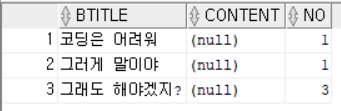
update 후: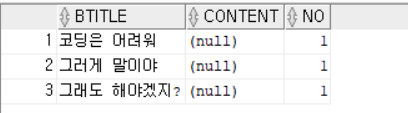
❗ 주의 ❗
insert into freeboard1 values(
'그래야겟지',null,max(no)+1
);

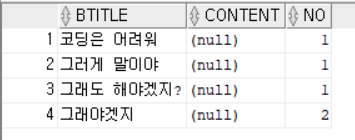
insert into freeboard1 values(
'그래야겟지',null,(select max(no) from freeboard1)+1
);
group function 에러 - where 절에서는 subquery로 해결해야한다.
sysdate
	현재 날짜와 시간 정보

    기본적으로 sysdate는 date type이다.
select sysdate-1 yesterday,sysdate today,sysdate+1 tomorrow
from dual;
❗date type끼리는 뺄셈은 가능하지만, 덧셈은 불가능하다.
months_between/add_months/next_day/last_day
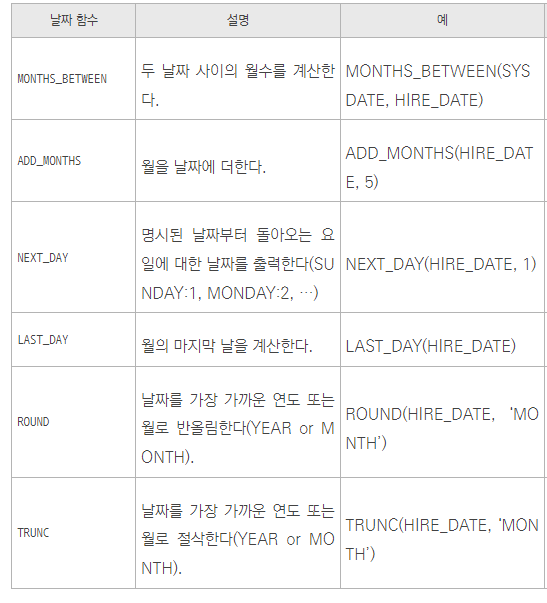
--sysdate: 2023-01-09--

select months_between(sysdate,'2022-12-15') month_between from dual;
--0.837...

select add_months(sysdate,100) from dual; -- 31/05/09

select next_day(sysdate,'월') from dual; -- 23/01/16

select last_day(sysdate) from dual; -- 23/01/31

select trunc(sysdate - hire_date),hire_date from employees;


가끔져요