이 글은 이런 분에게 도움이 될거에요
- 여러 곳에서 재사용 가능한 하나의 하단시트, 확인 모달창 컴포넌트를 만들고 싶어요!
key point!
- 비즈니스 로직과 모달UI 컴포넌트 분리하기
무엇을 만드나요❓
모달창 종류
- 기본설정 메뉴 버튼 : 테마변경, 로그아웃
- 게시글 더보기 버튼 : 수정, 삭제 / 신고
- 댓글 더보기 버튼 : 삭제 / 신고
-
하단시트 모달창 : 상단에 적은 버튼들을 누르면 뜨는 필수 모달
-
확인 모달창 : 신고, 삭제 등 한번 더 확인이 필요한 경우 뜨는 선택 모달
모달창 작동 예시
| 기본설정 메뉴 버튼 | 게시글 더보기 버튼 | 댓글 더보기 버튼 |
|---|---|---|
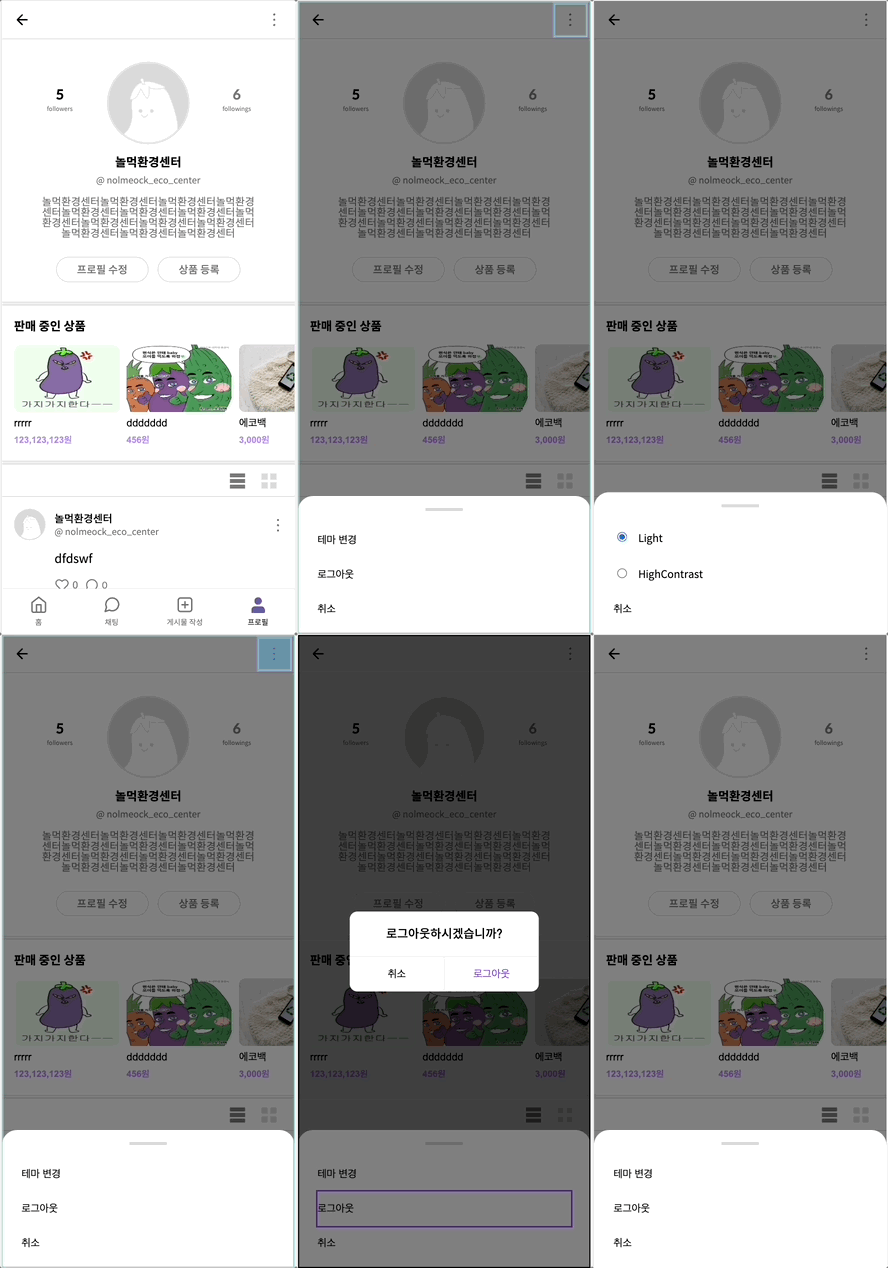 |  |  |
버튼-모달창 로직
-
하단시트 모달창을 열고 닫는 상태변수는 버튼 컴포넌트에서 관리하고,
확인 모달창을 열고 닫는 상태변수는 전역으로 관리하기 -
모달창 UI를 재사용하기 위해 비지니스 로직은 사용하는 버튼에서 구현하고 전달받기
전체 흐름을 설명하자면,
버튼별로 원하는 기능을 해당 컴포넌트 내에 구현하고, 이 기능함수와
'확인 모달창'을 띄울지 여부를 담은 객체 형태의 option 변수를 하단시트 모달 컴포넌트에 넘겨줍니다.
'확인 모달창'이 띄워져야하는 메뉴인 경우, 메뉴 클릭시 해당 기능함수를 전역 상태(doAlert)에 저장하고, 활성화 전역 상태(isAlert)를 true로 변환하여 '확인 모달창' 컴포넌트를 렌더링합니다.
이렇게 만들었어요 💡
기본설정 메뉴 버튼 : ButtonOption function ButtonOption() {
const navigate = useNavigate();
const [isModal, setIsModal] = useState(false);
const [isThemeModalOpen, setIsThemeModalOpen] = useState(false);
useEffect(() => {
if (!isModal) setIsThemeModalOpen(() => false);
}, [isModal]);
const handleModal = () => {
setIsModal(prev => !prev);
};
const handleLogout = () => {
storage.clearStorage();
navigate('/login');
};
const options = [
{ text: '테마 변경', func: () => setIsThemeModalOpen(true) },
{ text: '로그아웃', func: handleLogout, openAlert: true },
];
return (
<>
<button type="button" className="btn-option" onClick={() => handleModal()}>
<span className="a11y-hidden">설정</span>
</button>
{isModal &&
(isThemeModalOpen ? (
<Modal closeModal={handleModal}>
<>
<ThemeRadio name="colorSet" id="light" label="Light" checked={localStorage.getItem('theme') === 'light'} defaultChecked />
<ThemeRadio name="colorSet" id="highContrast" label="HighContrast" checked={localStorage.getItem('theme') === 'highContrast'} />
</>
</Modal>
) : (
<Modal options={options} closeModal={handleModal} />
))}
</>
);
}function ButtonOptionPost({ postid, isMyPost }) {
const [isModal, setIsModal] = useState(false);
const navigate = useNavigate();
const location = useLocation();
const handleModal = () => {
setIsModal(prev => !prev);
};
const handleUpdate = () => {
navigate(`/posting?postId=${postid}`);
};
const handleDelete = async () => {
const res = await deletePostAPI(postid);
if (res.status === '200') {
if (location.pathname === '/post') navigate(-1);
else window.location.reload();
}
};
const handleReport = async () => {
const res = await postPostReportAPI(postid);
if (res.status !== 404) toast('게시글 신고 완료', { icon: '⚠️', position: 'bottom-center', ariaProps: { role: 'alert', 'aria-live': 'polite' } });
};
const myOptions = [
{ text: '수정', func: handleUpdate },
{ text: '삭제', func: handleDelete, openAlert: true },
];
const options = [{ text: '신고', func: handleReport, openAlert: true }];
return (
<>
<button type="button" className="btn-option" onClick={() => handleModal()}>
<span className="a11y-hidden">더보기</span>
</button>
{isModal && <Modal options={isMyPost ? myOptions : options} closeModal={handleModal} />}
</>
);
}function ButtonOptionComment({ commentid, isMyCmt }) {
const [isModal, setIsModal] = useState(false);
const location = useLocation();
const postid = new URLSearchParams(location.search).get('postId');
const handleModal = () => {
setIsModal(prev => !prev);
};
const handleDelete = async () => {
const res = await deleteCommentAPI(postid, commentid);
if (res.status === '200') window.location.reload();
};
const handleReport = async () => {
const res = await postCommentReportAPI(postid, commentid);
if (res.report) toast('댓글 신고 완료', { icon: '⚠️', position: 'bottom-center', ariaProps: { role: 'alert', 'aria-live': 'polite' } });
};
const myOptions = [{ text: '삭제', func: handleDelete, openAlert: true }];
const options = [{ text: '신고', func: handleReport, openAlert: true }];
return (
<>
<button type="button" className="btn-option" onClick={() => handleModal()}>
<span className="a11y-hidden">더보기</span>
</button>
{isModal && <Modal options={isMyCmt ? myOptions : options} closeModal={handleModal} />}
</>
);
}확인 모달창 활성화 여부는 전역으로 상태관리
import { atom } from 'recoil';
.
export const isAlertOpen = atom({
  key: 'isAlertOpen',
  default: false,
});
.
export const doAlert = atom({
  key: 'doAlert',
  default: {
    text: '',
    func: () => console.log('실행'),
  },
});
하단시트 모달창
function Modal({ options, children, closeModal }) {
  const [isAlert, setIsAlert] = useRecoilState(isAlertOpen);
  const doFunc = useSetRecoilState(doAlert);
  .
  const renderModal = (
    <>
      <article className="modal-background">
        <h2 className="a11y-hidden">모달창</h2>
        <div className="l_modal">
          {options?.map(i => (
            <button
              key={i.text}
              type="button"
              onClick={() => {
                if (i.openAlert) {
                  setIsAlert(true);
                  doFunc({ text: i.text, func: i.func });
                } else {
                  i.func();
                }
              }}

              {i.text}
            </button>
          ))}
          {children}
          <button type="button" onClick={() => closeModal()}>
            취소
          </button>
        </div>
      </article>
      {isAlert && <Alert closeModal={closeModal} />}
    </>
  );
  return createPortal(renderModal, document.getElementById('root'));
}
확인 모달창
function Alert({ closeModal }) {
  const isAlert = useSetRecoilState(isAlertOpen);
  const doFunc = useRecoilValue(doAlert);
  .
  const renderAlert = (
    <dialog className="modal-background">
      <h2 className="a11y-hidden">확인창</h2>
      <div className="modal-content">
        <p className="modal-description">{doFunc?.text}하시겠습니까?</p>
        <div className="modal-actions">
          <button
            type="button"
            onClick={() => {
              doFunc?.func();
              isAlert(false);
              closeModal();
            }}

            {doFunc?.text}
          </button>
          <button type="button" onClick={() => isAlert(false)}>
            취소
          </button>
        </div>
      </div>
    </dialog>
  );
  return createPortal(renderAlert, document.getElementById('root'));
}