참고한 링크
https://docs.spring.io/spring-cloud-stream/docs/current/reference/html/spring-cloud-stream.html#spring-cloud-stream-overview-introducing
메세징 서비스와 분산캐싱
StreamBridge 사용하기
Spring Cloud Stream
스프링 클라우드 스트림은 RabbitMQ나 아파치 카프카 등 여러 메세지 플랫폼과의 바인딩 부분을 추상화하여 제공하는데 그로 인해 개발자는 메세지 플랫폼에 구애받지 않고 개발을 할 수 있다.
또한 간단한 어노테이션을 활용한 개발을 통해 publisher와 consumer 구현을 간편하게 해준다는 장점이 있다.
Architecture
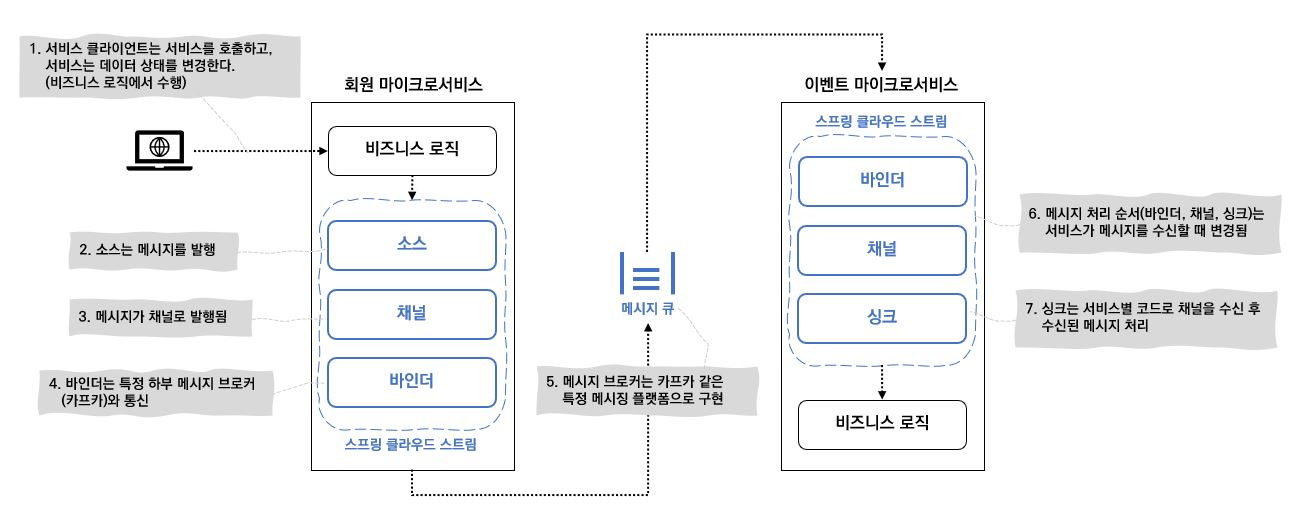
- 소스: 메세지를 표현하는 POJO를 직렬화하여 채널로 발행 (default: JSON)
- 채널: 메세지 생산자/소비자가 메세지를 발행/소비하는 경로, 메세지 큐와 1:1 매핑
- 바인더: 구체적인 메세지 플랫폼의 API 추상화
- 싱크: 메세지(Json)을 POJO로 역직렬화
Stream Bridge 사용하기
1. 의존성 추가
implementation(Spring.cloud.stream.binderKafka)
implementation("org.springframework.cloud:spring-cloud-starter-stream-kafka")
implementation(Spring.cloud.stream.stream)
2. application.yml에 cloud kafka를 설정하기
cloud:
  function:
    definition: kafkaCloudSender #cloud stream을 사용할 클래스
  stream:
    binders: #바인더 생성
        kafka-binder: #이름 설정
            type: kafka
            environment:
                spring.cloud.stream.kafka.binder.brokers: ${KAFKA_BROKERS} #카프카 브로커설정
    bindings:
      kafkaCloudSender-out-0: #바인딩 이름
      	binder: kafka-binder #위에서 정의한 바인더 이름
        destination: event.search # topic
        contentType: application/json
3. Producer 클래스 생성
message 파라미터의 Event 타입은 사내에서 정의된 타입이라 이부분은 각자 구현하면 됩니당~~
class KafkaCloudSender(
	val streamBridge StreamBridge // StreamBridge 주입
){
	//binding은 yml의 bindings에서 정의한 바인딩 이름
	@Async
    fun send(binding: String, message: Event){
    	streamBridge.send(binding, MessageBuilder
        .withPayload(message)
        .setHeader(KafkaHeaders.MESSAGE_KEY, UUID.randomUUID().toString())
        .build())
    }
}
4. 사용
 override suspend fun updateProductDoc(productId: String, version: String) {
        val binding = "KafkaCloudSender-out-0"
        val event = generateSchema(productId = productId).toEvent(version = version)

        kafkaCloudSender.send(binding = binding, message = event)
    }
필요한 로직에서 위에서 만든 KafkaCloudSender의 send를 사용해서 publish 해주면 끝!