RT-DETR 커스텀 데이터셋 fine-tuning
커스텀 데이터 셋을 학습시키기 위한 ai 허브
https://www.aihub.or.kr/aihubdata/data/view.do?currMenu=115&topMenu=100&aihubDataSe=data&dataSetSn=71566
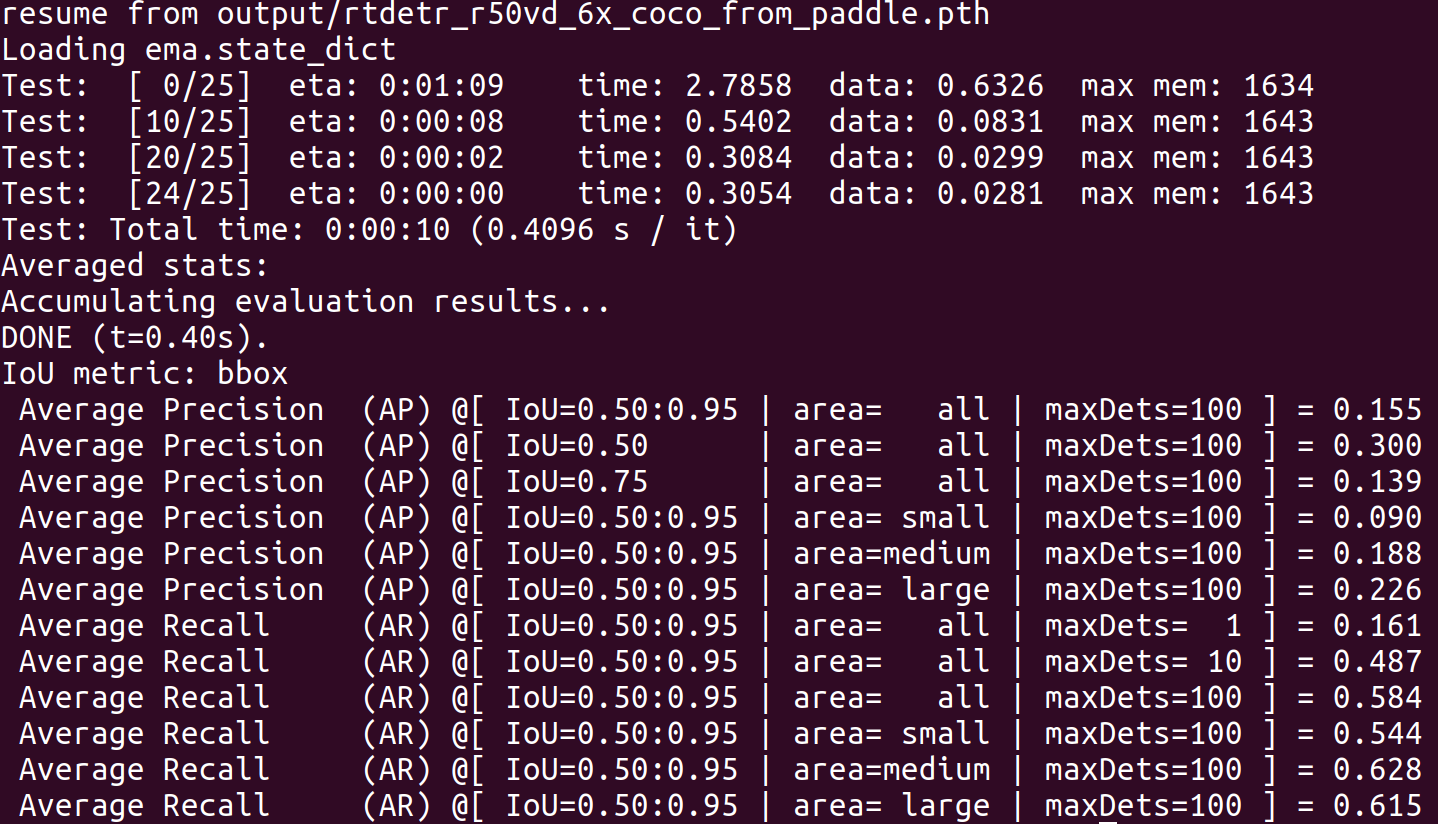
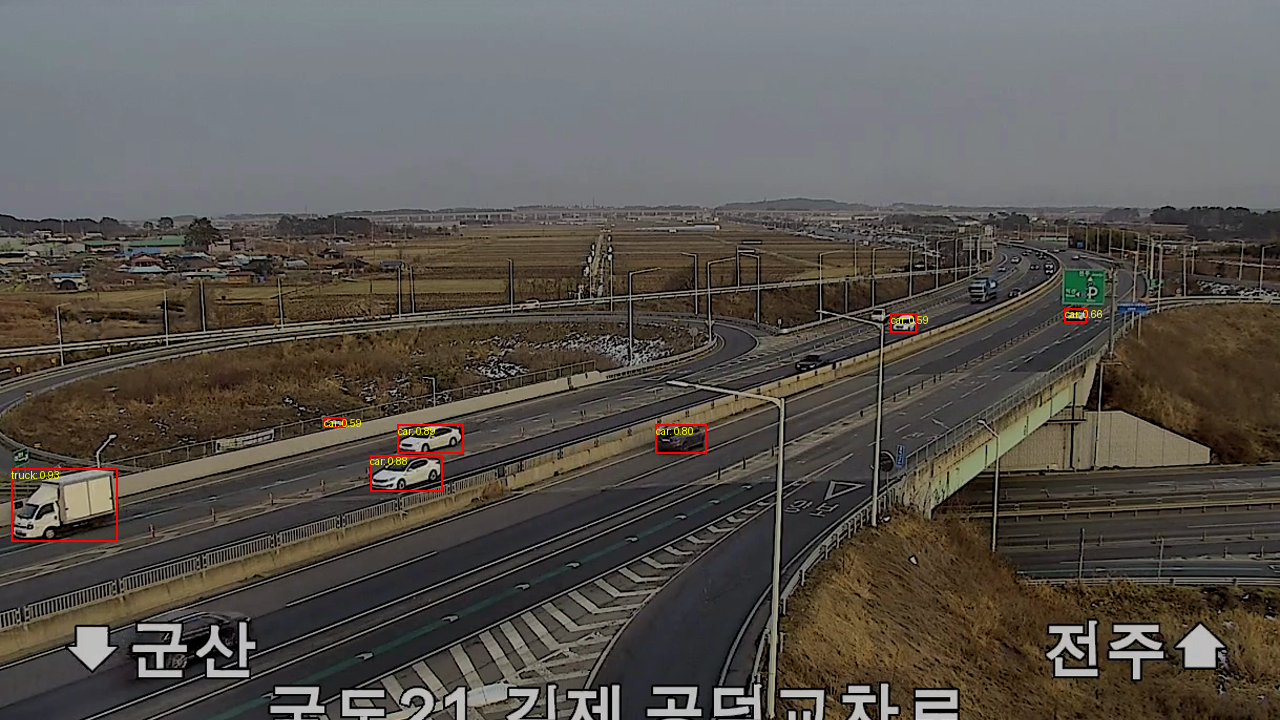
이미 학습된 모델 rtdetr_r50vd_6x_coco.yml로 커스템 데이터셋에 대해서 test해본 결과
root@f96e62834fdb:/workspace/Rt-DETR/RT-DETR/rtdetr_pytorch/configs/dataset/coco/train# find . -name "p01_20221103_an1_036_03_0014.png"
root@f96e62834fdb:/workspace/Rt-DETR/RT-DETR/rtdetr_pytorch/configs/dataset/coco/train# cd ../../../../
root@f96e62834fdb:/workspace/Rt-DETR/RT-DETR/rtdetr_pytorch# torchrun --nproc_per_node=1 tools/train.py -c configs/rtdetr/rtdetr_r50vd_6x_coco.yml -r output/rtdetr_r50vd_6x_coco_from_paddle.pth --test-only
Initialized distributed mode...
Load PResNet50 state_dict
loading annotations into memory...
Done (t=0.03s)
creating index...
index created!
resume from output/rtdetr_r50vd_6x_coco_from_paddle.pth
Loading ema.state_dict
Test: [ 0/125] eta: 0:03:54 time: 1.8782 data: 0.6137 max mem: 1634
Test: [ 10/125] eta: 0:00:47 time: 0.4115 data: 0.0779 max mem: 1643
Test: [ 20/125] eta: 0:00:36 time: 0.2707 data: 0.0248 max mem: 1643
Test: [ 30/125] eta: 0:00:30 time: 0.2748 data: 0.0251 max mem: 1643
Test: [ 40/125] eta: 0:00:26 time: 0.2710 data: 0.0250 max mem: 1643
Test: [ 50/125] eta: 0:00:22 time: 0.2699 data: 0.0249 max mem: 1643
Test: [ 60/125] eta: 0:00:19 time: 0.2711 data: 0.0296 max mem: 1643
Test: [ 70/125] eta: 0:00:16 time: 0.2846 data: 0.0314 max mem: 1643
Test: [ 80/125] eta: 0:00:13 time: 0.2874 data: 0.0274 max mem: 1643
Test: [ 90/125] eta: 0:00:10 time: 0.2886 data: 0.0273 max mem: 1643
Test: [100/125] eta: 0:00:07 time: 0.2888 data: 0.0278 max mem: 1643
Test: [110/125] eta: 0:00:04 time: 0.2815 data: 0.0276 max mem: 1643
Test: [120/125] eta: 0:00:01 time: 0.2967 data: 0.0272 max mem: 1643
Test: [124/125] eta: 0:00:00 time: 0.2921 data: 0.0268 max mem: 1643
Test: Total time: 0:00:36 (0.2941 s / it)
Averaged stats:
Accumulating evaluation results...
DONE (t=2.26s).
IoU metric: bbox
Average Precision (AP) @[ IoU=0.50:0.95 | area= all | maxDets=100 ] = 0.154
Average Precision (AP) @[ IoU=0.50 | area= all | maxDets=100 ] = 0.297
Average Precision (AP) @[ IoU=0.75 | area= all | maxDets=100 ] = 0.133
Average Precision (AP) @[ IoU=0.50:0.95 | area= small | maxDets=100 ] = 0.088
Average Precision (AP) @[ IoU=0.50:0.95 | area=medium | maxDets=100 ] = 0.185
Average Precision (AP) @[ IoU=0.50:0.95 | area= large | maxDets=100 ] = 0.312
Average Recall (AR) @[ IoU=0.50:0.95 | area= all | maxDets= 1 ] = 0.176
Average Recall (AR) @[ IoU=0.50:0.95 | area= all | maxDets= 10 ] = 0.468
Average Recall (AR) @[ IoU=0.50:0.95 | area= all | maxDets=100 ] = 0.563
Average Recall (AR) @[ IoU=0.50:0.95 | area= small | maxDets=100 ] = 0.505
Average Recall (AR) @[ IoU=0.50:0.95 | area=medium | maxDets=100 ] = 0.593
Average Recall (AR) @[ IoU=0.50:0.95 | area= large | maxDets=100 ] = 0.649
root@f96e62834fdb:/workspace/Rt-DETR/RT-DETR/rtdetr_pytorch#
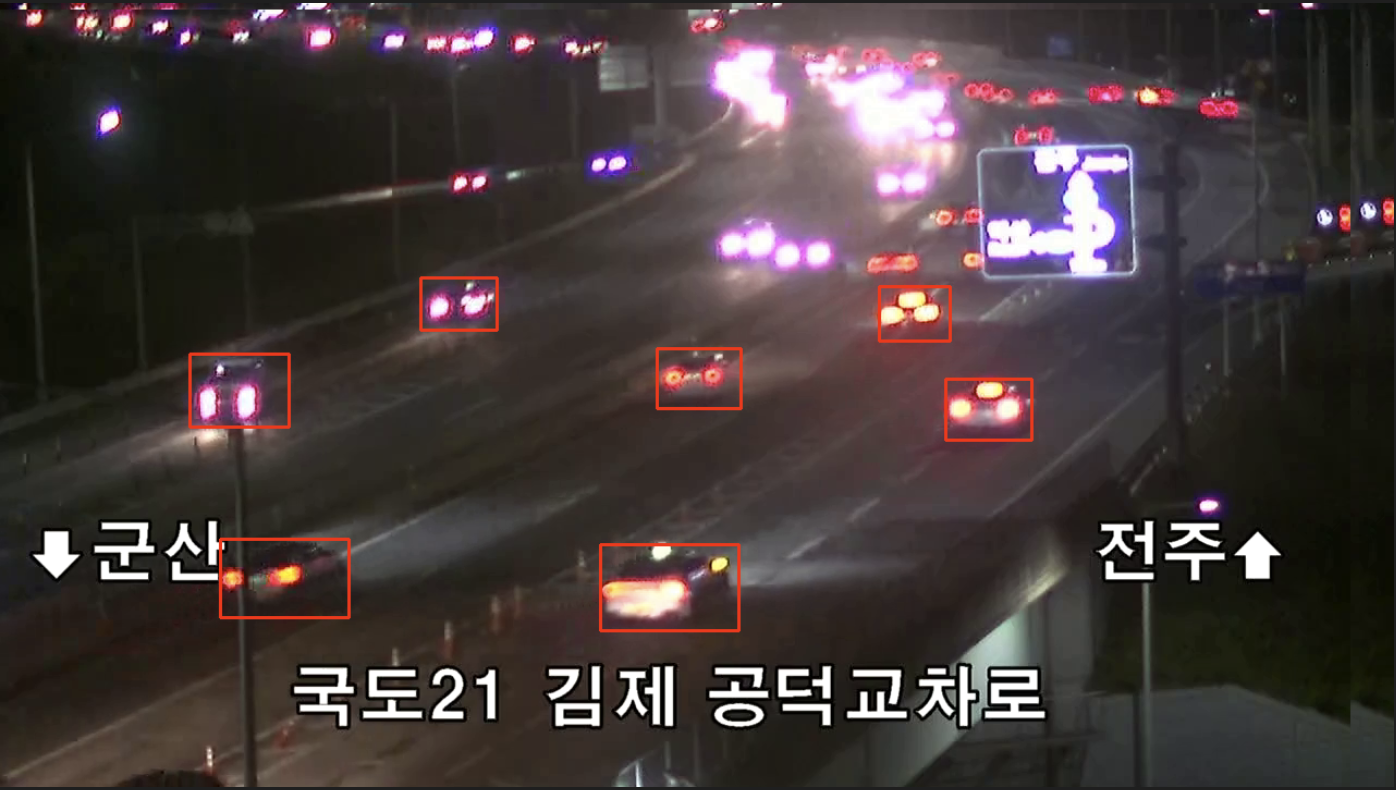
결과가 처참하다... cctv로 차량을 검출하는데 상당이 어려움이 있다는 것을 확인. 따라서 이를 pinetuning하면서 성능을 증가시키는 것을 목표로 한다.
///
Recall이 Precision보다 더 높게 나오는 이유는, 두 지표가 다루는 측정 방식의 차이에서 비롯됩니다. 이 두 지표는 모델이 예측한 결과가 실제 정답과 어떻게 일치하는지를 다르게 평가합니다.
- Recall (재현율)
정의: 모델이 실제로 존재하는 객체들 중에서 얼마나 많은 객체를 정확하게 찾아내었는지를 평가합니다.
True Positives (TP)
True Positives (TP)
- False Negatives (FN)
Recall=
True Positives (TP)+False Negatives (FN)
True Positives (TP)
높은 Recall의 의미: 모델이 대부분의 실제 객체를 검출했다는 뜻입니다. 즉, 놓치지 않고 최대한 많은 객체를 탐지하는 데 초점이 맞춰져 있습니다. 하지만, 잘못 탐지된 객체들까지 포함될 수 있습니다.
2. Precision (정밀도)
정의: 모델이 예측한 객체들 중에서 실제로 맞는 예측이 얼마나 되는지 평가합니다.
True Positives (TP)
True Positives (TP)
- False Positives (FP)
Precision=
True Positives (TP)+False Positives (FP)
True Positives (TP)
낮은 Precision의 의미: 모델이 잘못된 탐지(FP, 즉 실제로는 객체가 아닌 곳을 객체로 탐지)를 많이 했다는 뜻입니다. 다시 말해, 모델이 예측한 결과 중 많은 부분이 틀렸습니다.
왜 Recall이 높고 Precision이 낮은가?
이 상황에서 Recall이 높고 Precision이 낮은 이유는 다음과 같은 몇 가지 원인에서 기인할 수 있습니다:
모델이 많은 객체를 탐지하지만, 그 중 잘못된 탐지가 많을 수 있음:
모델이 많은 객체를 검출하려다 보니 실제로는 없는 곳에도 객체가 있다고 잘못 예측(FP)할 가능성이 커집니다. 이 경우 Recall은 높지만 Precision은 떨어지게 됩니다.
정밀한 경계 상자 위치가 부족할 수 있음:
모델이 물체를 탐지하는 데는 성공하지만, 예측한 경계 상자가 실제 경계 상자와 정확히 맞지 않는 경우, Precision이 낮게 나올 수 있습니다.
데이터의 불균형:
작은 객체 또는 특정 클래스의 객체들이 많이 누락되거나 잘못 탐지되면서 Precision에 부정적인 영향을 미칠 수 있습니다. 반면, 모델이 주요한 객체들을 잘 탐지한다면 Recall은 여전히 높을 수 있습니다.
Threshold 설정:
탐지를 결정하는 임계값(Threshold)이 낮게 설정되어 있으면 더 많은 객체를 탐지하려는 경향이 생기지만, 이로 인해 잘못된 탐지도 늘어나 Precision이 낮아질 수 있습니다.
어떻게 개선할 수 있을까?
임계값 조정: 탐지의 확실성을 높이기 위해 임계값을 조정하여 잘못된 탐지(FP)를 줄일 수 있습니다.
모델 튜닝: 모델이 더 정확한 경계 상자 및 클래스 예측을 할 수 있도록 학습 과정에서 더 많은 정밀 조정이 필요합니다.
데이터 증강: 다양한 객체 크기, 위치, 조명 조건 등을 반영한 데이터를 추가하거나 증강하여 모델의 학습 능력을 향상시킬 수 있습니다.
소형 객체에 대한 개선: 소형 객체를 잘 탐지하도록 네트워크 아키텍처를 조정하거나 더 나은 해상도의 데이터로 학습을 진행할 수 있습니다.
이렇게 Recall과 Precision의 차이를 이해하고, 적절한 조정과 개선을 통해 모델의 성능을 향상시킬 수 있습니다.
///
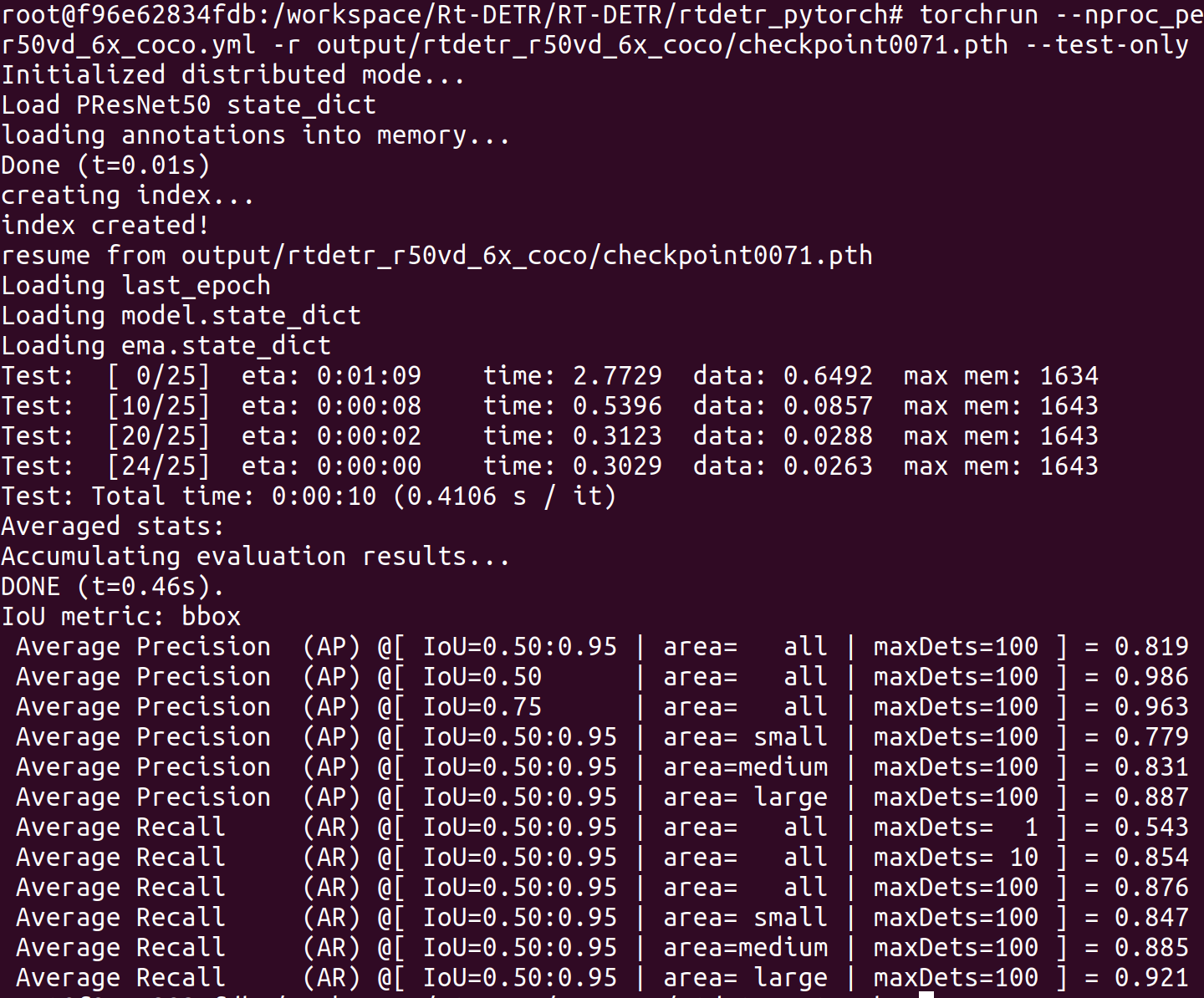
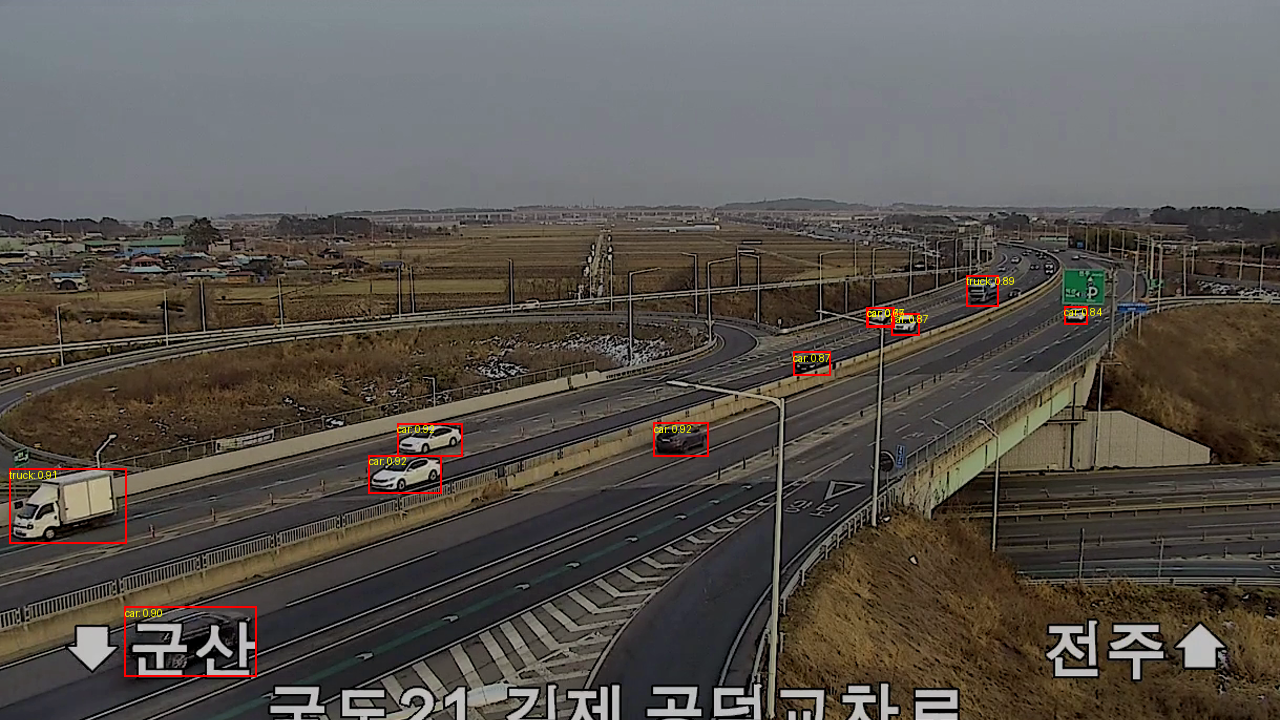
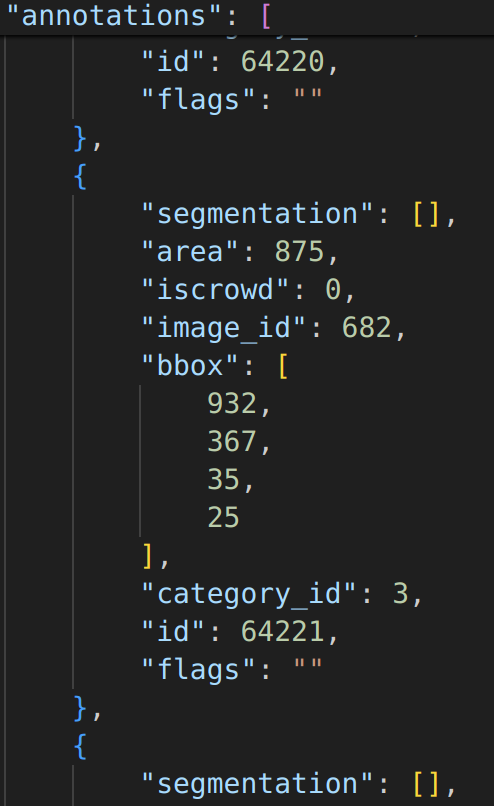
우선 커스텀 데이터셋을 fine tuning 시키기 위해 class를 3가지 (truck, car, bus)로 변경 후 각 coco dataset 구조로 annotation을 변경. 변경한 후에는 train valid test 70 20 10만큼 비중을 둬서 fine tuning 시킴.
root@f96e62834fdb:/workspace/Rt-DETR/RT-DETR/rtdetr_pytorch# torchrun --master_port=8844 --nproc_per_node=1 tools/train.py -c configs/rtdetr/rtdetr_r50vd_6x_coco.yml -r output/rtdetr_r50vd_6x_coco_from_paddle.pth --amp
checkpoint로 모델 만들기
$ python3.9 tools/export_onnx.py -c configs/rtdetr/rtdetr_r50vd_6x_coco.yml -r output/rtdetr_r50vd_6x_coco_from_paddle.pth --file-name output/finetuning_r50.onnx --check
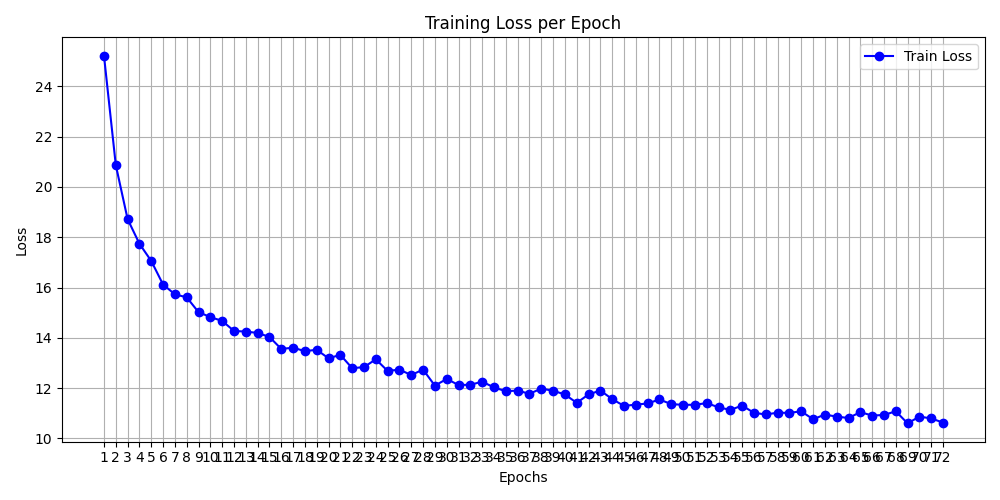
tuning하면서 생긴 log.txt를 보면서 train_loss로 에포트당 그래프 만들기
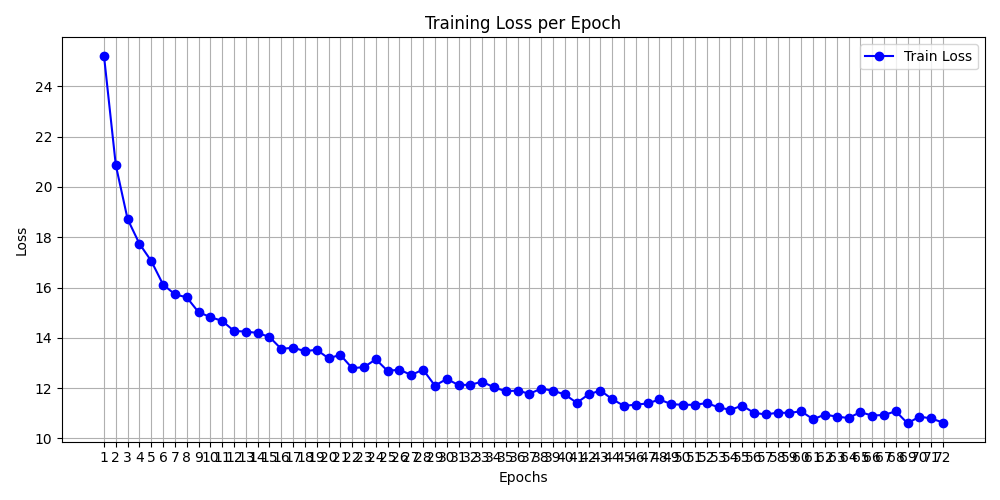
문제는 없어보임.
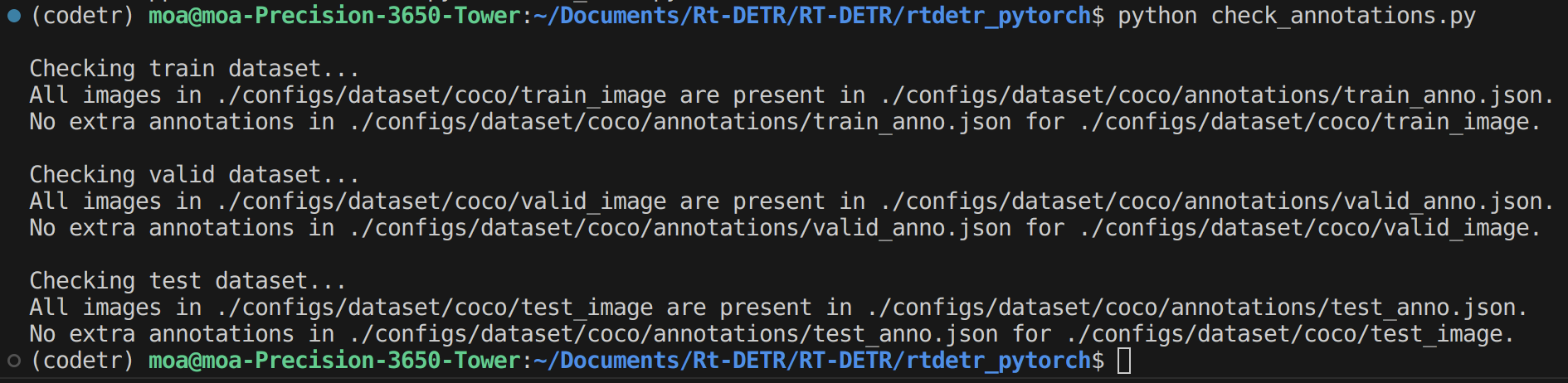
annotations 확인도 해봤는데 문제가 없음.
root@f96e62834fdb:/workspace/Rt-DETR/RT-DETR/rtdetr_pytorch# python3.9 check_annotations.py

Checking train dataset...
All images in ./configs/dataset/coco/train_image are present in ./configs/dataset/coco/annotations/train_anno.json.
No extra annotations in ./configs/dataset/coco/annotations/train_anno.json for ./configs/dataset/coco/train_image.

Checking valid dataset...
All images in ./configs/dataset/coco/valid_image are present in ./configs/dataset/coco/annotations/valid_anno.json.
No extra annotations in ./configs/dataset/coco/annotations/valid_anno.json for ./configs/dataset/coco/valid_image.

Checking test dataset...
All images in ./configs/dataset/coco/test_image are present in ./configs/dataset/coco/annotations/test_anno.json.
No extra annotations in ./configs/dataset/coco/annotations/test_anno.json for ./configs/dataset/coco/test_image.
///