JavaScript Interface 패턴으로 구현하는 Proof of Work 블록체인
Interface 패턴이란?
Interface는 클래스가 구현해야 하는 속성과 메서드의 명세를 정의하는 설계 패턴입니다. JavaScript는 명시적인 Interface 문법을 제공하지 않지만, 클래스 상속을 통해 유사한 패턴을 구현할 수 있습니다.
핵심 개념
- 변수와 타입을 미리 정의하여 구조 일관성 확보
- Java의 추상 클래스와 유사한 개념
- 함수 구현부는 포함하지 않고 명세만 정의
프로젝트 설정
1. Block Interface 파일 생성
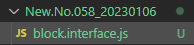
2. Block Interface 구현
class InterfaceBlock {
    version;
    height;
    timestamp;
    previousHash;
    hash;
    merkleRoot;
    nonce;
    difficulty;
    data;

    constructor(_block = null) {
        if (_block == null) {
            this.version = "1.0.0";
            return this;
        }

        this.version = _block.version;
        this.height = _block.height;
        this.timestamp = _block.timestamp;
        this.previousHash = _block.previousHash;
        this.hash = _block.hash;
        this.merkleRoot = _block.merkleRoot;
        this.nonce = _block.nonce;
        this.difficulty = _block.difficulty;
        this.data = _block.data;
    }
}

module.exports = InterfaceBlock;
속성 설명
version: 블록 버전height: 블록 높이 (인덱스)timestamp: 블록 생성 시간previousHash: 이전 블록의 해시hash: 현재 블록의 해시merkleRoot: 데이터의 머클 루트nonce: 작업 증명 카운터difficulty: 채굴 난이도data: 블록에 저장될 데이터
Config 파일 설정
1. Config 파일 생성

2. 패키지 초기화
npm init -y
3. 의존성 설치
npm install merkle crypto-js hex-to-binary
4. Config 구현
const merkle = require("merkle");
const SHA256 = require("crypto-js").SHA256;
const hexToBinary = require("hex-to-binary");

const DIFFICULTY_ADJUSTMENT_INTERVAL = 10;
const BLOCK_GENERATION_INTERVAL = 10;
const TIME_UNIT = 60 * 1000;

module.exports = {
    lib: {
        merkle,
        SHA256,
        hexToBinary,
    },
    constant: {
        DIFFICULTY_ADJUSTMENT_INTERVAL,
        BLOCK_GENERATION_INTERVAL,
        TIME_UNIT,
    }
};
상수 설명
DIFFICULTY_ADJUSTMENT_INTERVAL: 난이도 조정 주기 (10블록마다)BLOCK_GENERATION_INTERVAL: 목표 블록 생성 간격 (10분)TIME_UNIT: 시간 단위 (밀리초)
Block 클래스 구현
1. Block 파일 생성
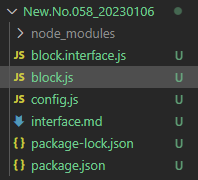
2. 기본 구조
const InterfaceBlock = require("./block.interface.js");
const {
    lib: { merkle, SHA256, hexToBinary },
    constant: {
        BLOCK_GENERATION_INTERVAL,
        DIFFICULTY_ADJUSTMENT_INTERVAL,
        TIME_UNIT,
    }
} = require("./config.js");

class Block extends InterfaceBlock {
    constructor() {
        super();
    }
}

module.exports = Block;
핵심 메서드 구현
1. 머클 루트 생성
getMerkleRoot(_data) {
    return Array.isArray(_data) ? {
        isError: false,
        value: _data.length
            ? merkle("sha256").sync(_data).root()
            : "0".repeat(64),
    } : {
        isError: true,
        error: "Data must be an array"
    };
}
동작 원리
- 데이터 배열 검증
- 배열이 비어있으면 초기값 반환
- 머클 트리로 데이터 무결성 보장
2. 해시 생성
createHash(_block) {
    return SHA256(
        Object.entries(_block)
            .filter((item) => item[0] !== "hash" && item[0] !== "data")
            .join("")
    ).toString().toUpperCase();
}
핵심 로직
hash와data필드 제외 (순환 참조 방지)- 나머지 필드를 문자열로 결합
- SHA256으로 암호화
3. 난이도 조절 (Proof of Work 핵심)
getDifficulty({
    height,
    timestamp,
    previousDifficulty,
    adjustmentDifficulty,
    adjustmentTimestamp,
}) {
    if (height < DIFFICULTY_ADJUSTMENT_INTERVAL) return 0;
    if (height < DIFFICULTY_ADJUSTMENT_INTERVAL * 2) return 1;

    if (height % DIFFICULTY_ADJUSTMENT_INTERVAL !== 0) {
        return previousDifficulty;
    }

    const timeTaken = timestamp - adjustmentTimestamp;
    const timeExpected =
        TIME_UNIT * BLOCK_GENERATION_INTERVAL * DIFFICULTY_ADJUSTMENT_INTERVAL;

    if (timeTaken < timeExpected * 0.5) return adjustmentDifficulty + 1;
    if (timeTaken > timeExpected * 1.5) return adjustmentDifficulty - 1;

    return adjustmentDifficulty;
}
난이도 조정 전략
- 초기 블록(0-9): 난이도 0
- 10-19 블록: 난이도 1
- 10블록마다 난이도 재조정
- 목표 시간의 50% 미만이면 난이도 증가
- 목표 시간의 150% 초과이면 난이도 감소
4. 블록 마이닝
updateBlock(_previousBlock, _adjustmentDifficulty, _adjustmentTimestamp) {
    let hashBinary = hexToBinary(this.hash);

    while (!hashBinary.startsWith("0".repeat(this.difficulty))) {
        this.nonce += 1;
        this.timestamp = Date.now();

        this.difficulty = this.getDifficulty({
            height: this.height,
            timestamp: this.timestamp,
            previousDifficulty: _previousBlock.difficulty,
            adjustmentDifficulty: _adjustmentDifficulty,
            adjustmentTimestamp: _adjustmentTimestamp,
        });

        this.hash = this.createHash(this);
        hashBinary = hexToBinary(this.hash);
    }
}
마이닝 과정
1. 현재 해시를 2진수로 변환
2. 난이도만큼 0으로 시작하는지 확인
3. 조건 미충족 시 nonce 증가 후 재시도
4. 조건 충족까지 반복
5. 블록 검증
isValidNewBlock(_newBlock, _previousBlock) {
    if (_newBlock.height !== _previousBlock.height + 1) {
        return {
            isError: true,
            error: "Block's height is incorrect."
        };
    }

    if (_newBlock.previousHash !== _previousBlock.hash) {
        return {
            isError: true,
            error: "Hash of previous Block is incorrect."
        };
    }

    if (this.createHash(_newBlock) !== _newBlock.hash) {
        return {
            isError: true,
            error: "Hash of block is incorrect."
        };
    }

    return { isError: false, value: _newBlock };
}
검증 항목
- 블록 높이 연속성
- 이전 블록 해시 일치
- 현재 블록 해시 무결성
블록 생성 메서드
create(_previousBlock, _adjustmentDifficulty, _adjustmentTimestamp, _data) {
    try {
        const { height, hash: previousHash } = _previousBlock;

        this.height = height + 1;
        this.previousHash = previousHash;

        const merkleRoot = this.getMerkleRoot(_data);
        if (merkleRoot.isError) throw new Error(merkleRoot.error);
        this.merkleRoot = merkleRoot.value;

        this.nonce = 0;
        this.timestamp = Date.now();

        this.difficulty = this.getDifficulty({
            height: this.height,
            timestamp: this.timestamp,
            previousDifficulty: _previousBlock.difficulty,
            adjustmentDifficulty: _adjustmentDifficulty,
            adjustmentTimestamp: _adjustmentTimestamp,
        });

        this.hash = this.createHash(this);
        this.data = _data;

        this.updateBlock(
            _previousBlock,
            _adjustmentDifficulty,
            _adjustmentTimestamp
        );

        return this;
    } catch (err) {
        throw new Error(err.message);
    }
}
생성 프로세스
1. 이전 블록 정보 가져오기
2. 머클 루트 생성
3. 난이도 계산
4. 초기 해시 생성
5. 마이닝 실행
6. 완성된 블록 반환
테스트 작성
1. Jest 설치
npm install --save-dev jest
2. 테스트 파일 생성
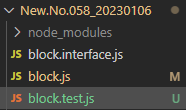
3. 테스트 코드
const Block = require("./block.js");
const InterfaceBlock = require("./block.interface.js");

const genesis = new InterfaceBlock({
    version: "1.0.0",
    height: 0,
    timestamp: Date.now(),
    previousHash: "0".repeat(64),
    hash: "0".repeat(64),
    merkleRoot: "0".repeat(64),
    nonce: 0,
    difficulty: 0,
    data: ["Genesis Block"],
});

describe("Genesis Block 검증", () => {
    it("객체 타입 확인", () => {
        expect(typeof genesis).toBe("object");
    });

    it("Genesis Block 속성 확인", () => {
        expect(genesis.version).toBe("1.0.0");
        expect(genesis.data).toEqual(["Genesis Block"]);
        expect(genesis.height).toBe(0);
    });
});

describe("Block 생성 테스트", () => {
    const block = new Block();
    const adjustmentDifficulty = 0;
    const adjustmentTimestamp = Date.now();

    describe("난이도 검증", () => {
        let tempBlockData;

        beforeEach(() => {
            tempBlockData = {
                height: 10,
                timestamp: Date.now(),
                previousDifficulty: 0,
            };
        });

        it("10번째 블록의 난이도는 재조정된다", () => {
            const difficulty = block.getDifficulty({
                height: tempBlockData.height,
                timestamp: tempBlockData.timestamp,
                previousDifficulty: tempBlockData.previousDifficulty,
                adjustmentDifficulty,
                adjustmentTimestamp,
            });
            expect(typeof difficulty).toBe("number");
        });
    });
});
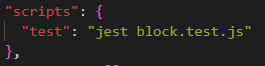
4. package.json 수정
{
  "scripts": {
    "test": "jest"
  }
}
5. 테스트 실행
npm test핵심 개념 정리
Proof of Work (작업 증명)
난이도 조절의 의미
- 블록 생성 속도를 일정하게 유지
- 네트워크 해시 파워에 따라 자동 조정
- 10블록 생성 시간을 기준으로 판단
마이닝 프로세스
- nonce 값을 변경하며 해시 재계산
- 난이도 조건을 만족하는 해시를 찾을 때까지 반복
- 난이도가 높을수록 더 많은 연산 필요
다듬기