구글 모멘텀 시작화면 만들기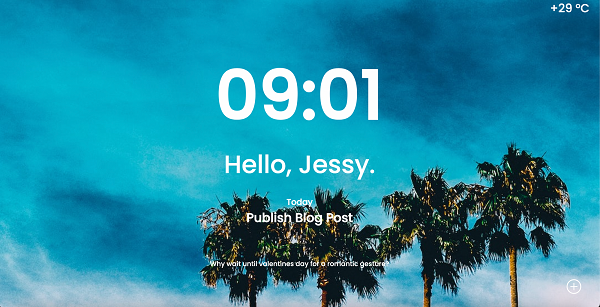
1) api와 fecth를 사용해서 현재시각, 온도, 배경화면을 나타내고
2) 가운데 글자, 오른쪽 하단에 +를 누르면 박스가 나오게 만들어보자
body {
  background-image: url('');
  background-size: cover;
}

.main {
  display: flex;
  flex-direction: column;
  align-items: center;
  justify-content: center;

  height: 100vh; => 화면 비율에 맞춰 글자를 가운데로 모아준다

  color: white;
        }
function renderGalleryItem() {
  let url = 'https://api.thecatapi.com/v1/images/search'
  fetch(url).then(res => res.json()).then((data) => {
    let imgurl = data['url']
    $('#background').css('background-image', `url('${imgurl}')`)
  })
}
1) body의 background url을 공백으로 처리하고
   fetch와 Jquery를 사용해 배경화면을 깔아준다.
2) 페이지가 시작될 때 함수가 실행되도록 설정해준다

function renderCurrentTime() {
  let url = `http://worldtimeapi.org/api/timezone/Asia/Seoul`
  fetch(url).then(res => res.json()).then((data) => {
    let time = data['datetime'].substr(11, 5)
    $('#currentTime').text(time)
  })
}
1) datetime에 표현되는 년, 월, 일, 시, 분, 초 글자들을
   substr 함수를 사용해 시, 분만 표현되도록 잘라준다
   .todoIcon {
  font-size: 40px;

  position: absolute;
  right: 70px;
  bottom: 50px;
  cursor: pointer;
}
$(document).ready(function () {
  renderGalleryItem()
  renderCurrentWeather()
  renderCurrentTime()
  renderAdvice()

  $('#todoIcon').click(function(){
    $('#modal-box').fadeIn().css('display','flex')
    $('#todoIcon').fadeOut()
  })
  $('#main').click(function(){
    $('#modal-box').fadeOut()
    $('#todoIcon').fadeIn()
  })
});

1) + 아이콘의 위치를 position: absolute; 를 활용해서
     위치를 조정한다
2) Jquery를 활용해 + 아이콘을 클릭하면 박스가 나오고 아이콘은 사라지게
    main 구역을 클릭하면 박스가 사리고 아이콘이 나오게 설정해준다
