Component
리액트로 만들어진 어플리케이션의 UI를 이루는 최소 단위
- 코드를 묶어서 태그화 (사용자 정의 태그)
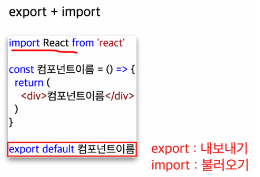
- 앞글자 대문자로 생성 → 기존 HTML 태그와 구분
- export(내보내기) + import(불러오기)
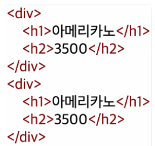
▼
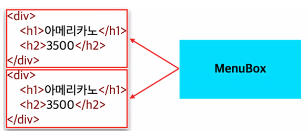
▼
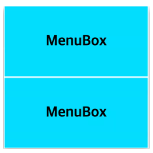
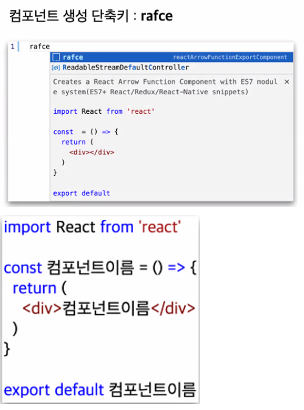
- component 구조 꺼내는 단축키
rafce + Enter
(react arrow function component export)
- components 다운로드(Extenstion 설치)

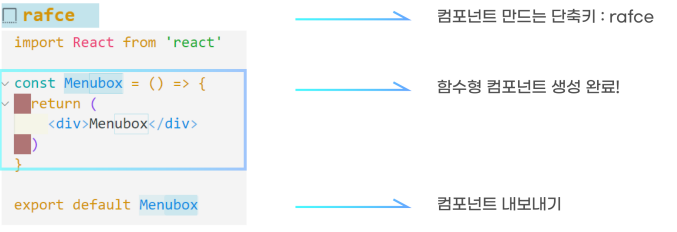
- components 폴더 생성
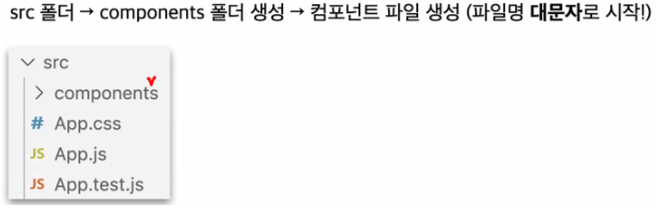
- component 파일 생성

- component 파일 연동
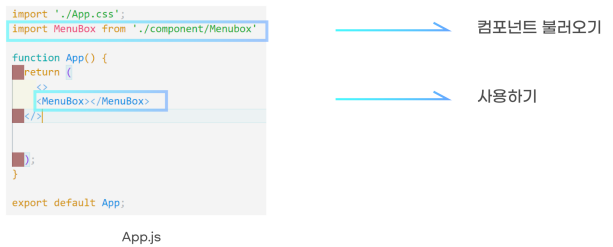
- 내보낸 컴포넌트 불러오기
Props(Properties)
상위 컴포넌트에서 하위 컴포넌트로 값을 전달할 때 사용
-
상위 컴포넌트에서 하위 컴포넌트로 값 보내는 방법
<Component Prop1 = "val1" prop2 = "val2" .../> -
Props(프로퍼티) 사용방법
문자열을 전달할 때는 큰따옴표("")를 문자열 외의 값을 전달할 때는 중괄호({})를 사용한다.
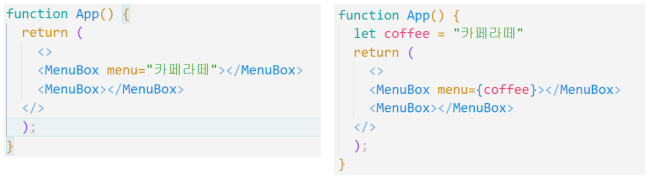
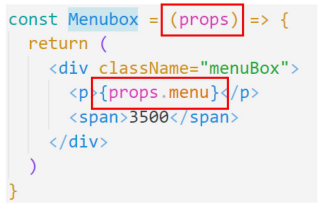
- Props 상위 컴포넌트
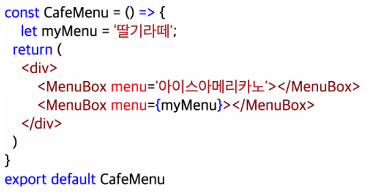
- Props 하위 컴포넌트
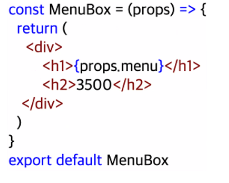
-
실습
-
Ex01.jsx
import React from 'react'
import Ex01MenuBox from './components/Ex01MenuBox';

const Ex01 = () => {

const specialMenu = '토피넛라떼';
const specialPrice = '7000';

  return (
    <div>
        <Ex01MenuBox menu="카라멜라떼" price="5000"/>
        <Ex01MenuBox menu="딸기라떼" price="7000"/>
        <Ex01MenuBox menu="크림라떼" price="6000"/>
        <Ex01MenuBox menu={specialMenu} price={specialPrice}/>
    </div>
  )
}

export default Ex01;
- Ex01MenuBox.jsx
import React from 'react'

const Ex01MenuBox = ({menu, price}) => {

    /*
    상위 컴포넌트에서 보낸 값을 하위 컴포넌트에서 받는 방법
    함수의 형태이기 때문에 값은 매개변수로 받아옴
    (case1) props -> props.menu
    (case2) {menu} -> menu
    */

    /*
    객체 비구조화 할당
    const person = {name : '뽀로로', age : 20}
    -> person.name // 뽀로로
    const {name, age} = {name : '뽀로로', age : 20}
    -> name // 뽀로로
    */

  return (
        <div>
            <h3>{menu}</h3>
            <p>{price}원</p>
        </div>
  )
}

export default Ex01MenuBox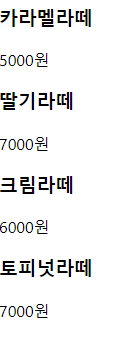
State
컴포넌트 내부에서 바뀔 수 있는 값
값이 변하면 화면에 즉시 렌더링이 된다(일반 변수와 차이점)
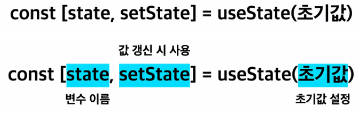
- const[state, setState] = useState(초깃값);
state -> 변수 이름
setState -> 변수 세팅 시 사용할 함수
useState(초깃값) -> 초깃값 설정 - 배열 비구조화 할당
state -> useState()[0]
setState -> useState()[1] - Q. const로 선언하였는데 state 값을 어떻게 업데이트 하는 걸까?
A. const array = ['뽀로로', '크롱', '루피'];
array[0] = '포비';
const object = {name : '양세영', age : 20}
object.name = '무민';
-
State와 변수의 차이점
state는 일반 변수와 다르게 값이 변하면 화면이 렌더링된다.
이 때, setState()라는 함수를 이용한다. -
React Event
JS - onclick = "func()"
React - onClick = {func}
** func()로 작성하면, 렌더링 시 무조건 호출
import React from 'react'
import { useState } from 'react';

function Ex01() {
  // 일반 변수 값
  let letNum = 0;

  // state 값 -> stateNum
  const [stateNum, setStateNum] = useState(0)

  const plusNum = ()=>{
        console.log('click');
        letNum = letNum+1;
        console.log(letNum)

        // state 값 업데이트
        setStateNum(stateNum + 1)
    }

  return (
    <div>
        <p>일반 변수 값 : {letNum}</p>
        <p>state 값 : {stateNum}</p>
        <button onClick={plusNum}>+1</button>
    </div>
  )
}

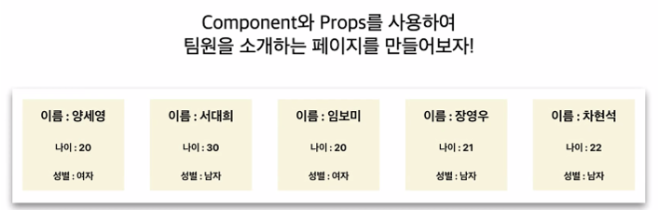
export default Ex01- 실습
import React from 'react'
import Ex02MemberBox from './components/Ex02MemberBox'

function Ex02() {
  return (
    <div style={{
        display : 'flex',
        flexWrap : 'wrap',
        justifyContent : 'space-between'
    }}>
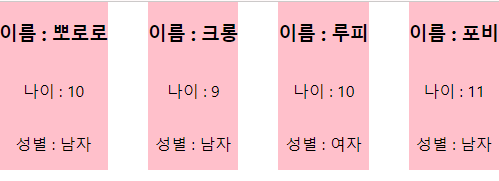
        <Ex02MemberBox name="뽀로로" age="10" gender="남자"/>
        <Ex02MemberBox name="크롱" age="9" gender="남자"/>
        <Ex02MemberBox name="루피" age="10" gender="여자"/>
        <Ex02MemberBox name="포비" age="11" gender="남자"/>
    </div>
  )
}

export default Ex02
import React from 'react'
function Ex02MemberBox({name, age, gender}) {
return (
<div style={{
backgroundColor : 'pink',
display : 'flex',
flexDirection : 'column',
marginBottom : '50px',
alignItems : 'center'
}}>
<h3>이름 : {name}</h3>
<p>나이 : {age}</p>
<p>성별 : {gender}</p>
</div>
)
}
export default Ex02MemberBox
노는게 제일 좋아~!