
📌 intro
< 객체 선언시 사용 방법 >
1. object 생성해 객체 생성
2. class를 인스턴화해서 생성
3. function 사용해 객체 생성
🧷 object 생성해 객체 생성
const yujin = {
    name: '안유진',
    year: 2003,
};
console.log(yujin);

// result > { name: '안유진', year: 2003 }
🧷 class를 인스턴화해서 생성
class Idole {
    name;
    year;

    constructor(name, year) {
        this.name = name;
        this.year = year;
    }
};
const yujin2 = new Idole('안유진', 2003);
console.log(yujin2);

// result > Idole { name: '안유진', year: 2003 }
🧷 function 사용해 객체 생성
function IdoleFunction(name, year) {
    this.name = name;
    this.year = year;
}
const liz = new IdoleFunction('리즈', 2004);
console.log(liz);

// result > IdoleFunction { name: '리즈', year: 2004 }
📌 Property Attribute
const yujin = {
    name: '안유진',
    year: 2003,
};

// 생성자 함수 혹은 클래스에 바로 .이 붙으면 static
console.log(Object.getOwnPropertyDescriptor(yujin, 'name'));
console.log(Object.getOwnPropertyDescriptor(yujin, 'year'));

// 모든 프로퍼티의 값 보여줌
console.log(Object.getOwnPropertyDescriptors(yujin));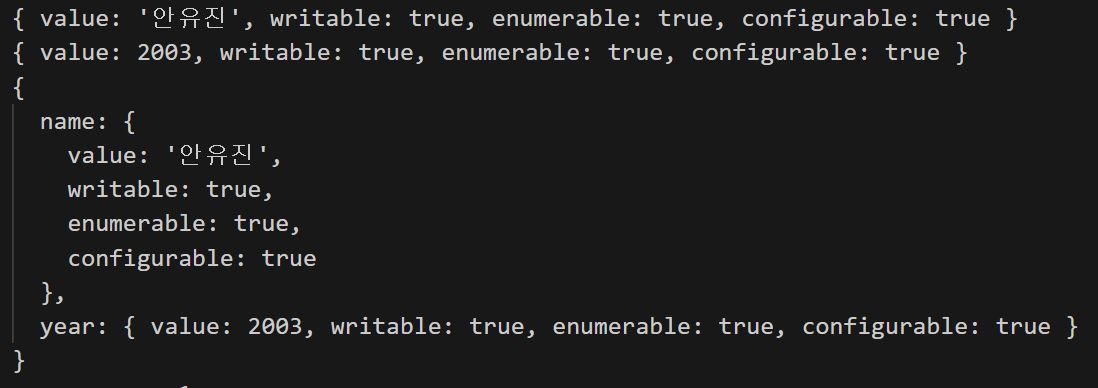
🧷 데이터 프로퍼티
키와 값으로 형성된 실질적 값을 갖고 있는 프로퍼티
- 다음 값을 따로 설정하지 않으면, 기본값은 false
- value - 실제 프로퍼티의 값
- writeable - 값 수정 여부. false이면 프로퍼티 값 수정 불가
- enmerable - 열거 가능 여부. for ... in 등 사용가능시 true
- configurable - 프로퍼티 어트리뷰트 재정의 가능 여부 판단
- false 일 경우 프로퍼티 삭제 혹은 어트리뷰트 변경 금지
- writeable 이 true 인 경우 값 변경 및 writzble 변경 가능
const yujin2 = {
    name: '안유진',
    year: 2003,

    get age() {
        return new Date().getFullYear() - this.year
    },

    set age(age) {
        this.year = new Date().getFullYear() - age;
    }
};console.log(yujin2);
console.log(yujin2.age);
yujin2.age = 32;
console.log(yujin2.age);
console.log(yujin2.year);
console.log(Object.getOwnPropertyDescriptor(yujin2, 'age'))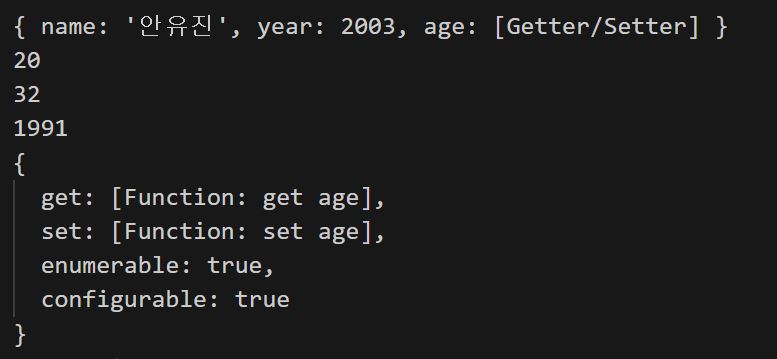
🔎 writable
- 값 수정 여부
false이면 프로퍼티 값 수정 불가
Object.defineProperty(yujin2, 'height', {
    value: 172,
    // 아래 모두 설정 하지 않으면, 기본값은 false
    writable: true,
    enumerable: true,
    configurable: true,
});console.log(yujin2);
console.log(Object.getOwnPropertyDescriptor(yujin2, 'height'));
yujin2.height = 168;
console.log(yujin2);
Object.defineProperty(yujin2, 'height', {
    value: 172,
    writable: false,
});
console.log(Object.getOwnPropertyDescriptor(yujin2, 'height'));
yujin2.height = 180;
console.log(yujin2);        // 오류는 나지 않지만 값 변경X
🔎 enumerable
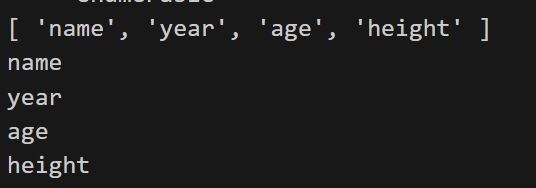
- 열거 가능 여부
for ... in등 사용 가능시true
console.log(Object.keys(yujin2));
for (let key in yujin2) {
    console.log(key);
}
name 프로퍼티 enumerable : false
=> 해당 프로퍼티 열거 되지 않음
Object.defineProperty(yujin2, 'name', {
    enumerable: false,
});

console.log(Object.getOwnPropertyDescriptor(yujin2, 'name'));
console.log(Object.keys(yujin2));
for (let key in yujin2) {
    console.log(key);
};
console.log(yujin2);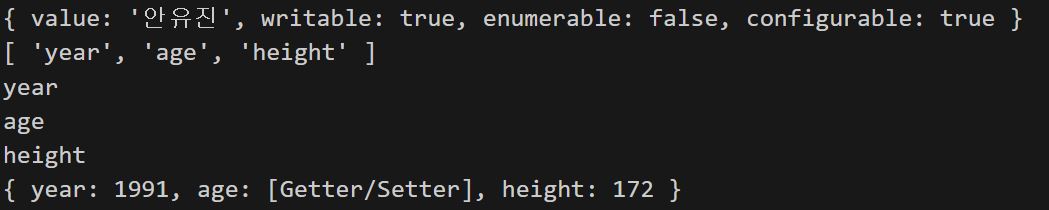
- 해당 프로퍼티가 사라진 것은 아님
=> 열거하지 못할 뿐,,,
console.log(yujin2.name);
🔎 configurable
- property attribute 재정의 가능 여부 판단
false=> 프로퍼티 삭제 및 어트리뷰트 변경 금지writable : true=> 값 변경 및writable변경 가능
Object.defineProperty(yujin2, 'height', {
    writable: true,
    configurable: false,
});
console.log(Object.getOwnPropertyDescriptor(yujin2, 'height'));
writable: true=>configurable : false여도 값 변경 가능
Object.defineProperty(yujin2, 'height', {
    value: 168,
})
console.log(Object.getOwnPropertyDescriptor(yujin2, 'height'));
writable: false변경
Object.defineProperty(yujin2, 'height', {
    writable: false
})
console.log(Object.getOwnPropertyDescriptor(yujin2, 'height'));
writable: false->writable: true변경 => Error 발생
Object.defineProperty(yujin2, 'height', {
    writable: true,
})
console.log(Object.getOwnPropertyDescriptor(yujin2, 'height'));
🧷 엑세서 프로퍼티
자체적으로 값을 갖고 있지 않지만 다른 값을 가져오거나 설정할 때 호출되는 함수로 구성된 프로퍼티
(ex. getter/setter)
📌 Immutable Objects
- Extensible : 확장 가능 여부 설정
- Seal
- Freezed : 동결 => 읽기 외 모든 기능 불가능하게 만듦
const yujin = {
    name: '안유진',
    year: 2003,

    get age() {
        return new Date().getFullYear - this.year;
    },

    set age(age) {
        this.age = new Date().getFullYear - age;
    }
};
console.log(yujin);
🔎 Extensible
- 확장 가능 여부 설정
extensible확인
console.log(Object.isExtensible(yujin));
yujin['position'] = 'vocal';
console.log(yujin);
extensible : false변경
Object.preventExtensions(yujin);
console.log(Object.isExtensible(yujin));
extensible : false=> 에러창NO, 값 추가X
yujin['group'] = '아이브';
console.log(yujin);
- 삭제 가능
delete yujin['position'];
console.log(yujin);
🔎 Seal
const yujin2 = {
    name: '안유진',
    year: 2003,

    get age() {
        return new Date().getFullYear - this.year;
    },

    set age(age) {
        this.age = new Date().getFullYear - age;
    }
};
console.log(yujin2);
seal확인
console.log(Object.isSealed(yujin2));
Seal : true변경
Object.seal(yujin2);
console.log(Object.isSealed(yujin2));
Seal : true=> 값 추가X
yujin2['group'] = '아이브';
console.log(yujin2);
Seal : true=> 값 삭제X
delete yujin2['name'];
console.log(yujin2)
- seal 을 하는 작업 =
configurable : false작업
Object.defineProperty(yujin2, 'name', {
    value: '가나다',
    writable: false
})
console.log(Object.getOwnPropertyDescriptor(yujin2, 'name'));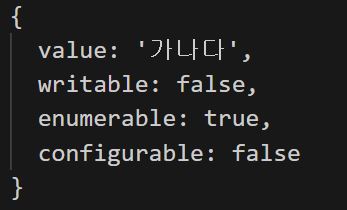
🔎 Freezed
- 읽기 외 모든 기능 불가능하게 만듦
const yujin3 = {
    name: '안유진',
    year: 2003,

    get age() {
        return new Date().getFullYear - this.year;
    },

    set age(age) {
        this.age = new Date().getFullYear - age;
    }
};
console.log(yujin3);
- Freezed 확인
console.log(Object.isFrozen(yujin3));
- Freezed 기능 수행
Object.freeze(yujin3);
console.log(Object.isFrozen(yujin3));
- 값 추가 및 삭제 불가
yujin3['group'] = '아이브';
console.log(yujin3);

delete yujin3['name'];
console.log(yujin3);
- 값 변경 불가 => 에러 발생
Object.defineProperties(yujin3, 'name', {
    CSSMathValue : '가나다'
})
- 하위 오브젝트의 freezed
- 상위 오브젝트를 freezed 해도 하위 오브젝트까지 freezed 되는 건 아님
=> 하위 오브젝트까지 freezed 하기 위해서는 재귀함수 등의 방법을 이용해 변경
const yujin4 = {
    name: '안유진',
    year: 2003,
    liz: {
        name: '리즈',
        year: 2004
    }
};
Object.freeze(yujin4);
console.log(Object.isFrozen(yujin4));
console.log(Object.isFrozen(yujin4['liz']));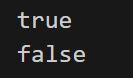
📌 Constructor Function
function Idol(name, year) {

  	this.name = name;
    this.year = year;

    this.dace = function () {
        return `${this.name}이 춤을 춘다.`
    }
}
const yujin = new Idol('안유진', 2003);
console.log(yujin);
console.log(yujin.dace());
new키워드 없이 함수형 실행시
=> 함수 반환이 없기 때문에undefined
const yujin2 = Idol('안유진', 2003);
console.log(yujin2);
💡 함수를 다음과 같이 바꾸면
=> if 문에서 undefined 인 경우,new키워드를 이용해 강제로 Idol 함수를 생성자 함수로 실행
function Idol(name, year) {

    //new 키워드 여부 없이 아래 객체 생성가능
    if (!new.target) {
        return new Idol(name, year)
    }

    this.name = name;
    this.year = year;

    this.dace = function () {
        return `${this.name}이 춤을 춘다.`
    }
}
🔎 global
- 해당파일이 실행될 떄 자동으로 생성되는 객체
new키워드 사용 없이 사용자 함수 실행시
=>this키워드가global에 붙어
=>global의 값을 설정하게 됨
※ 되도록 사용 X
console.log(global.name);
🔎 Arrow Function
const IdolArrow = (name, year) => {
    this.name = name;
    this.year = year;
};new키워드는 일반 함수에서만 사용 가능Arrow 함수사용 불가
const yujin3 = new IdolArrow('안유진', 2003);
📌 Prototype
__proto__
: 모든 객체에 존재하는 프로퍼티
: 상속에서 부모 클래스에 해당되는 값
: 유전자라고 생각하면 쉬움ㅎ
const testObj = {};
console.log(testObj.__proto__);
function Idol(name, year) {
    this.name = name;
    this.year = year;
}

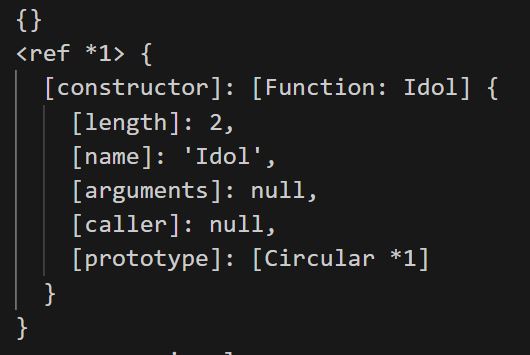
console.log(Idol.prototype);
console.dir(Idol.prototype, {
    showHidden: true,
});
🔎 Circular reference
console.log(Idol.prototype.constructor === Idol);
console.log(Idol.prototype.constructor.prototype === Idol.prototype);
const yujin = new Idol('안유진', 2003);
console.log(yujin.__proto__);
console.log(yujin.__proto__ === Idol.prototype);
console.log(testObj.__proto__ === Object.prototype);
console.log(Idol.__proto__ === Function.prototype);
console.log(Function.prototype.__proto__ === Object.prototype);
console.log(Idol.prototype.__proto__ === Object.prototype);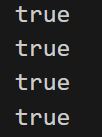
console.log(yujin.toString());
console.log(Object.prototype.toString());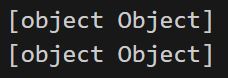
💡 어떤 부분이 유용?
function Idol2(name, year) {
    this.name = name;
    this.year = year;

    this.sayHi = function () {
        return `${this.name}이 인사를 합니다.`
    }
}

const liz = new Idol2('리즈', 2004);
const ray = new Idol2('레이', 2004);

console.log(liz.sayHi());
console.log(ray.sayHi());
- 왜 결과값이
false?
=> 같은 골격의 sayHi 함수이지만,
각 사람마다 고유의 함수라고 생각하기 때문
console.log(liz.sayHi === ray.sayHi);- 고유 프로퍼티인지 여부 확인
console.log(liz.hasOwnProperty('sayHi'));

// > result > true
function Idol3(name, year) {
this.name = name;
this.year = year;
};
Idol3.prototype.sayHello = function () {
return `${this.name} 이(가) 인사를 합니다.`
}
const liz2 = new Idol3('리즈', 2004);
const ray2 = new Idol3('레이', 2004);
console.log(liz2.sayHello());
console.log(ray2.sayHello());
- 왜 결과값이
true?
=> 한 공간에만 해당 함수 저장 => 효율적
console.log(liz2.sayHello === ray2.sayHello);false=> 상속받은 프로퍼티
console.log(liz2.hasOwnProperty('sayHello'));🔎 Static
Idol3.sayStaticHello = function () {
    return 'Hi! I am static method'
};
console.log(Idol3.sayStaticHello());
🔎 Override
function Idol4(name, year) {
    this.name = name;
    this.year = year;

    // 오버라이딩
    this.sayHello = function () {
        return 'Hi! instnace method'
    }
};

Idol4.prototype.sayHello = function () {
    return `Hi! prototype method!`
}

const liz3 = new Idol4('리즈', 2004);
console.log(liz3.sayHello());

🔎 get prototype of
function IdolModel(name, year) {
    this.name = name;
    this.year = year;
}

IdolModel.prototype.sayHello = function () {
    return `${this.name} Hello!`
}

function FemaleIdol(name, year) {
    this.name = name;
    this.year = year;

    this.dance = function () {
        return `${this.name} is dancing!`
    }
}

const gaEil = new IdolModel('가을', 2002);
const WY = new FemaleIdol('장원영', 2004);console.log(gaEil.__proto__);
console.log(gaEil.__proto__ === IdolModel.prototype);
console.log(Object.getPrototypeOf(gaEil) === IdolModel.prototype);
console.log(gaEil.sayHello());
console.log(WY.dance());
- WY는
FemaleIdol의 객체로IdolModel의 프로토인sayHello함수 사용 불가
console.log(WY.sayHello());
💡 프로토 변경
: 기존 프로토와 연결 끊김
=> 기존 프로토가 변경할 프로토와 연결되는 것은 아님
Object.setPrototypeOf(WY, IdolModel.prototype);console.log(WY.sayHello());
console.log(WY.constructor);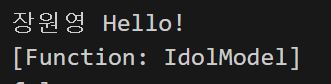
console.log(WY.constructor === FemaleIdol);
console.log(WY.constructor === IdolModel);
🔎 함수 prototype 직접 변경
FemaleIdol.prototype = IdolModel.prototype;const ive = new FemaleIdol('아이브', 2022);
console.log(Object.getPrototypeOf(ive) === FemaleIdol.prototype);
console.log(FemaleIdol.prototype === IdolModel.prototype);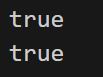

이렇게 유용한 정보를 공유해주셔서 감사합니다.