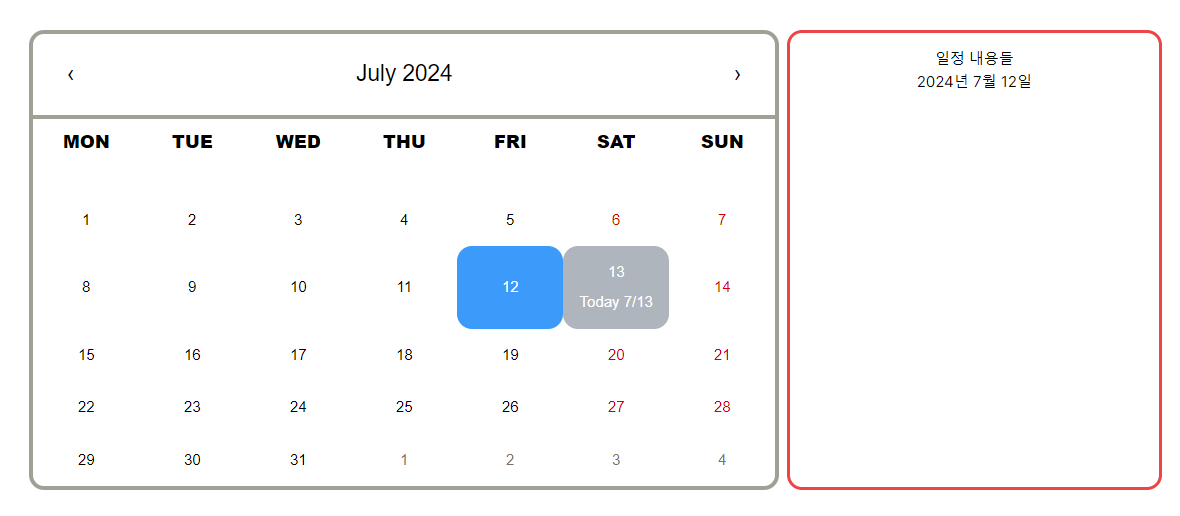
Notion의 캘린더처럼 달력에 일정을 간단하게 표시하고 싶어서 react-calendar 라이브러리를 사용하였다.
라이브러리에서 기본적으로 제공하는 css 파일을 수정해서 사용하기로 했다.
.react-calendar {
  width: 800px;
  max-width: 100%;
  background: white;
  border: 5px solid #a0a096;
  font-family: Arial, Helvetica, sans-serif;
  line-height: 2rem;
  border-radius: 1rem;
}

.react-calendar__navigation {
  display: flex;
  height: 90px;
  margin: 0;
  padding: 0;
  font-size: 1.5rem;
  border-bottom: 5px solid #a0a096;
}

.react-calendar__navigation__arrow {
  width: 80px;
}

.react-calendar__navigation button {
  background: none;
}

.react-calendar__navigation button:enabled:hover,
.react-calendar__navigation button:enabled:focus {
  background-color: #222222;
  color: white;
}

.react-calendar__month-view__weekdays {
  height: 70px;
  text-align: center;
  text-transform: uppercase;
  font: inherit;
  abbr {
    line-height: 50px;
    text-decoration: none;
    font-size: 1.2rem;
    font-weight: 900;
  }
}

.react-calendar__month-view__weekdays__weekday {
  text-align: center;
  padding: 0.5em;
}

.react-calendar__month-view__weekNumbers .react-calendar__tile {
  display: flex;
  align-items: center;
  justify-content: center;
  font: inherit;
  font-size: 0.75em;
  font-weight: bold;
}

.react-calendar__tile {
  max-width: 100%;
  height: 90px;
  padding: 12px 6px;
  background: none;
  text-align: center;
  line-height: 16px;
  font: inherit;
}

.react-calendar__tile:enabled:hover,
.react-calendar__tile:enabled:focus {
  background-color: #3c9bfa;
  border-radius: 16px;
  color: white;
}

.react-calendar__tile--now {
  background: #aeb5bd;
  color: white;
  border-radius: 16px;
}

.react-calendar__tile--now:enabled:hover,
.react-calendar__tile--now:enabled:focus {
  background: #007dfa;
  border-radius: 16px;
}

.react-calendar__tile--active {
  background: #3c9bfa;
  border-radius: 16px;
  color: white;
}
이후 Calender를 컴포넌트에서 사용했다.
"use client";

import { useState } from "react";
import Calendar from "react-calendar";
import "react-calendar/dist/Calendar.css";
import "../../assets/custom-calendar.css";

type ValuePiece = Date | null;
type Value = ValuePiece | [ValuePiece, ValuePiece];

export default function CalendarPage() {
  const today = new Date();
  const [date, setDate] = useState<Value>(today);

  const dateChangeHandler = (newDate: Value) => {
    setDate(newDate);
  };

  const isSameDay = (d1: Date, d2: Date) => {
    return (
      d1.getFullYear() === d2.getFullYear() &&
      d1.getMonth() === d2.getMonth() &&
      d1.getDate() === d2.getDate()
    );
  };

  const addContent = ({ date }: { date: Date }) => {
    if (isSameDay(date, today)) {
      return (
        <p>
          Today {date.getMonth() + 1}/{date.getDate()}
        </p>
      );
    }
    return null;
  };

  return (
    <main>
      <div className="flex justify-center gap-2">
        <Calendar
          value={date}
          onChange={dateChangeHandler}
          locale="en"
          prev2Label={null}
          next2Label={null}
          tileContent={addContent}
        />
        <div className="w-[400px] p-4 border-red-500 border-4 rounded-2xl">
          일정 내용들
          <br />
          <p>
            {date?.toLocaleString("ko-KR", {
              year: "numeric",
              month: "long",
              day: "2-digit",
            })}
          </p>
        </div>
      </div>
    </main>
  );
}
간단하게 react-calendar 사용법을 알아봤고, 이후에는 각 요일마다 일정들을 불러오고 추가하는 기능을 추가해야 한다.
참고 자료

뭐라도 해보자