
💻 HTML 기본 뼈대 공부하기
✍️ 표 생성 태그
<table> 표 전체의 윤곽
<tr> 행 생성
<td> 행에 셀 생성
<th> 표에 제목 셀 생성
<colspan> 열 합치기
<rowsapn> 행 합치기
<td colspan="합칠 열 개수"> 내용 </td>
<td rowspan="합칠 행 개수"> 내용 </td>
<caption> 표에 제목 붙이기, 테이블 태그 다음에 사용
<figcaption> 태그 대상을 <figure> 태그로 감싼 후, 태그를 사용해 제목, 설명 글 입력
🏁 <aria-describedby> 표에 대한 설명 제공하기
✍️ 표 구조 정의 태그
<thead>제목<tbody>본문<tfoot>요약
col 한 열에 있는 모든 셀에 같은 스타일 적용. 닫는 태그 없음
colgroup 여러 열을 묶어 스타일 적용, 묶는 열의 개수 만큼 col 사용
📑 (실습) 표 만들어보기
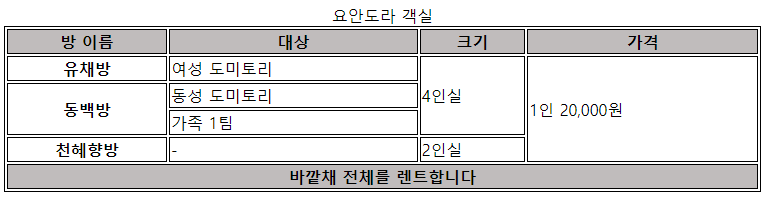
<!DOCTYPE html>
<html lang="ko">
<head>
    <meta charset="UTF-8">
    <title>Document</title>
    <style>
        table{
            width: 50%;
            border:1px solid black;
        }
        tr,th, td{
            border:1px solid black;
        }
    </style>
</head>
<body>
    <table>
        <caption>요안도라 객실</caption>
        <thead style="background-color: rgb(192, 188, 188);">
            <tr>
                <th>방 이름</th>
                <th>대상</th>
                <th>크기</th>
                <th>가격</th>
            </tr>
        </thead>

        <tbody>
            <tr>
                <th>유채방</th>
                <td>여성 도미토리</td>
                <td rowspan="3">4인실</td>
                <td rowspan="4">1인 20,000원</td>
            </tr>
            <tr>
                <th rowspan="2">동백방</th>
                <td>동성 도미토리</td>
            </tr>
            <tr>
                <td>가족 1팀</td>
            </tr>
            <tr>
                <th>천혜향방</th>
                <td>-</td>
                <td>2인실</td>
            </tr>
        </tbody>
        <tfoot style="background-color: rgb(192, 188, 188);">
            <tr>
                <th colspan="4">바깥채 전체를 렌트합니다</th>
            </tr>
        </tfoot>
    </table>
</body>
</html>
화이트해커 엘입니다😉