현재 오즈코딩스쿨 강의를 통해 프론트엔드를 학습하고 있습니다.
본 포스트는 해당 강의에 대한 내용 정리를 목적으로 합니다.
동기 vs 비동기
1. 동기(Synchronous)
-
코드가 순차적으로 실행됨.
-
이전 작업이 끝나야 다음 작업 실행.
-
실행 시간이 긴 경우, 다음 코드가 대기해야 함(블로킹).
console.log("첫 번째 작업 시작");
for (let i = 0; i < 1e9; i++) {} // 오래 걸리는 작업
console.log("두 번째 작업 실행");
✅ 첫 번째 작업이 끝날 때까지 두 번째 작업이 대기.
2. 비동기(Asynchronous) ✍️
-
코드 실행이 즉시 멈추지 않고 다음 코드로 진행됨.
-
시간이 걸리는 작업(네트워크 요청, 파일 읽기 등)은 백그라운드에서 처리.
-
완료 후 결과를 콜백,
Promise,async/await로 처리.
console.log("첫 번째 작업 시작");

setTimeout(() => {
    console.log("비동기 작업 실행");
}, 2000); // 2초 후 실행

console.log("두 번째 작업 실행");
✅ "비동기 작업 실행"은 2초 후 실행되지만, "두 번째 작업 실행"이 먼저 출력됨.
3. 비동기 처리 방법 ✍️
1) 콜백 함수(Callback)
- 함수의 인자로 다른 함수를 전달하여, 비동기 작업이 끝난 후 실행.
- 단점: 콜백이 중첩될수록 코드가 복잡해지는 "콜백 지옥" 발생
function fetchData(callback) {
    setTimeout(() => {
        callback("데이터 로드 완료");
    }, 2000);
}

fetchData((result) => {
    console.log(result); // "데이터 로드 완료" (2초 후 출력)
});
2) 프로미스 (Promise)
- 비동기 작업의 성공(
resolve()) 또는 실패(reject())를 처리하는 객체. - 장점:
.then()체이닝 가능, 콜백 지옥 해결.
const fetchData = new Promise((resolve, reject) => {
    setTimeout(() => {
        resolve("데이터 로드 완료");
    }, 2000);
});

fetchData.then((result) => {
    console.log(result); // "데이터 로드 완료" (2초 후 출력)
}).catch((error) => {
    console.error(error);
});
✅ then() → 성공 시 실행
✅ catch() → 실패 시 실행
3) async/await (ES8)
async함수 내에서await을 사용하여 비동기 코드도 동기처럼 작성 가능.- 장점: 가독성이 좋아짐, 에러 처리는
try-catch로 간단하게 가능.
✅ 발생시킬때 -> 던진다고한다. (throw)
✅ 명시적으로 인지할때 -> 잡는다고 한다. (catch)
async function fetchData() {
    return new Promise((resolve) => {
        setTimeout(() => resolve("데이터 로드 완료"), 2000);
    });
}

async function getData() {
    const result = await fetchData();
    console.log(result); // "데이터 로드 완료" (2초 후 출력)
}

getData();
✅ await을 만나면 해당 작업이 끝날 때까지 기다린 후 다음 코드 실행.
✅ 에러 처리 (try-catch)
async function getData() {
    try {
        const result = await fetchData();
        console.log(result);
    } catch (error) {
        console.error("에러 발생:", error);
    }
}

getData();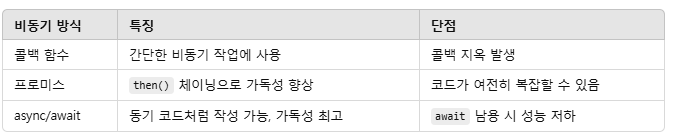
실습_TO DO List
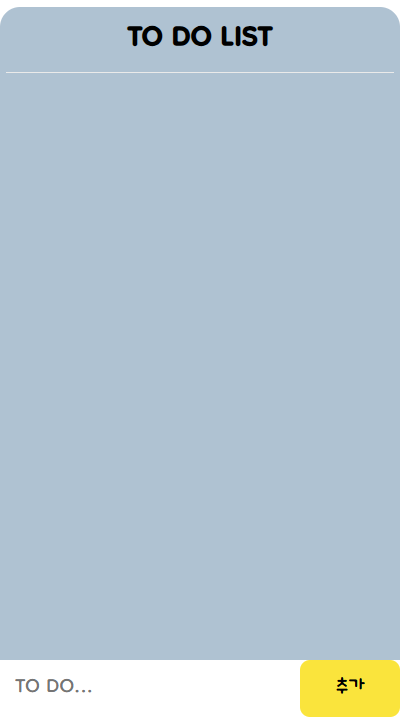
html
<!DOCTYPE html>
<html lang="ko">
    <head>
    <meta charset="UTF-8">
    <meta http-equiv="X-UA-Compatible" content="IE=edge">
    <meta name="viewport" content="width=device-width, initial-scale=1.0">
    <title>할일 목록</title>
    <link rel="stylesheet" href="todo.css">
    </head>
    <body>
        <div id="container">
            <div class="app">
                <h1>TO DO LIST</h1>
                <ul id="todo-list"></ul>
                <form id="todo-form">
                    <input name="todo" placeholder="TO DO..." autocomplete="off">
                    <input type="submit" value="추가">
                </form>
            </div>
        </div>
        <script src="todo.js"></script>
    </body>
</html>
css
@font-face {
  font-family: 'Dongle-Regular';
  src: url('https://cdn.jsdelivr.net/gh/projectnoonnu/noonfonts_2108_2@1.0/Dongle-Regular.woff') format('woff');
  font-weight: normal;
  font-style: normal;
}

*{
    font-family: 'Dongle-Regular';
    box-sizing: border-box;
}

html{
  font-size: 18px;
}

body{
  margin: 0;
}

.container{
  display: flex;
  justify-content: center;
  align-items: center;
  height: 100vh;
}

.app{
  position: relative;
  width: 320px;
  height: 568px;
  border-radius: 16px;
  background-color: rgb(171, 193, 209);
}

.app  > h1{
  font-size: 2em;
  text-align: center;
  margin: 10px 5px;
  border-bottom: 0.5px solid rgb(234, 234, 234);
}

ul{
  max-height: 420px;
  overflow: auto;
}

ul > li{
  cursor: pointer;
  position: relative;
  /* left: 60px; */
  list-style-type: none;
  width: 200px;
  height: 40px;
  margin-bottom: 10px;
  padding: 6px;
  background-color: rgb(254, 229, 77);
  border-radius: 8px;
}

ul > li::after{
  content: "";
  position: absolute;
  top: 10px;
  left: -10px;
  width: 0;
  height: 0;
  border-bottom: 16px solid transparent;
  border-left: 16px solid rgb(254, 229, 77);
}

ul > li > span{
  display: flex;
  justify-content: center;
  align-items: center;
  width: 16px;
  height: 16px;
  border-radius: 8px;
  background-color: rgb(234, 234, 234);
  position: absolute;
  /* left: -20px; */
  bottom: 2px;
}

form{ /* 내가 수정한 부분 */
background-color: rgb(255, 255, 255);
position: absolute;
bottom: 0;
left: 0;
width: 100%;
display: flex;
justify-content: space-between;
align-items: center;
padding-left: 10px;
box-sizing: border-box;
}

input{
  font-size: 1.4em;
  margin: 0;
  border: none;
  height: 45px;
}
input[type="text"]{
  width: 200px;
  padding-left: 10px;
}
input[type="text"]:focus{
  outline: none;
}
input[type="submit"]{
  cursor: pointer;
  width: 80px;
  border-radius: 8px;
  background-color: rgb(254, 229, 77);
}

.done{
  color: rgb(93, 93, 93);
  background-color: rgb(234, 234, 234);
}

.done::after{
  border-left: 16px solid rgb(234, 234, 234);
}
javascript
// 요소 선택 및 배열 선언
const todoList = document.getElementById("todo-list");
const todoForm = document.getElementById("todo-form");
let todoArr = [];

// 로컬 저장소에 저장하기
function saveTodos(){
    const todoString = JSON.stringify(todoArr)
    localStorage.setItem("myTodos", todoString)
}

// 로컬 저장소에서 불러오기
function loadTodos(){
    const myTodos= localStorage.getItem("myTodos")
    if(myTodos !== null){
        todoArr = JSON.parse(myTodos)
    }
    JSON.parse(myTodos)
}
loadTodos()

// 할일 삭제하기
function handleTodoDelBtnClick(clickedId){
    todoArr = todoArr.filter(function(aTodo){
        return aTodo.todoId !== clickedId
    })
    displayTodos()
    saveTodos()
}


// 할일 수정하기
function handleTodoItemClick(clickedId){
    todoArr = todoArr.map(function(aTodo){
        if(aTodo.todoId === clickedId){
            return {
                ...aTodo, todoDone: !aTodo.todoDone
            }
        } else{
            return aTodo
        }
    })
    displayTodos()
    saveTodos()
}


// 할일 보여주기
function displayTodos(){
    todoList.innerHTML = ""
    todoArr.forEach(function(aTodo){
        const todoItem = document.createElement('li')
        const todoDelBtn = document.createElement('span')
        todoDelBtn.textContent = 'x'
        todoItem.textContent = aTodo.todoText
        todoItem.title = "클릭하면 완료됨"
        if(aTodo.todoDone){
            todoItem.classList.add("done")
        } else{
            todoItem.classList.add("yet")
        }
        todoDelBtn.title = "클릭하면 삭제됨"

        todoItem.addEventListener("click", function(){
            handleTodoItemClick(aTodo.todoId)
        })

        todoDelBtn.addEventListener("click", function(){
            handleTodoDelBtnClick(aTodo.todoId)
        })

        todoItem.appendChild(todoDelBtn)
        todoList.appendChild(todoItem)
    })
}


// 할일 추가하기
todoForm.addEventListener("submit", function(e){
    e.preventDefault()
    const toBeAdded = {
        todoText: todoForm.todo.value,
        todoId: new Date().getTime(),
        todoDone: false
    }
    todoForm.todo.value = "";
    todoArr.push(toBeAdded)
    displayTodos()
    saveTodos()
});
끝맺음.
👉 비동기 처리는 async/await이 가장 가독성이 좋음!
실력이..늘고 있는 걸까?
UI/UX디자이너의 코딩 공부