NOTE
# Flask
: Micro-framework that allows us to make a website with Python. It has a basic to make a website.
https://flask.palletsprojects.com/en/1.1.x/
# Flask를 이용해 web-scraper를 웹사이트에 런칭하기
1) repl에서 flask 패키지를 다운로드 해준다.
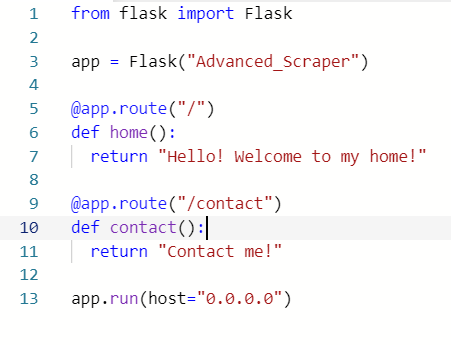
2) Flask를 import 해주고 아래와 같은 코드를 작성해준다. @는 decorator로 데코레이터는 바로 아래 있는 함수를 찾아 그 함수를 꾸며주는 역할을 한다. So as soon as Python sees a code like below, python knows that if somebody goes to "/contact", we want to execute the function under that decorator. Because decorators look for functions, if it's not a function under a decorator, I will get an error.
-
마지막줄의 host="0.0.0.0"은 repl에서 작업하기 때문에 넣어둔 것. As we include this, repl knows that we want to expose this as a website.
-
아래의 코드로 쉽게 두 개의 페이지를 만들어준 것.
# Dynamic URLs
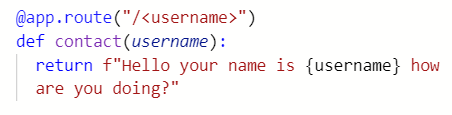
- 링크에 /simon와 같은 username을 입력하면 그 username이 contact 함수의 인자가 되어 Hello your name is simon how are you doing? 이 출력되는 것.
# Write HTML - make Templates
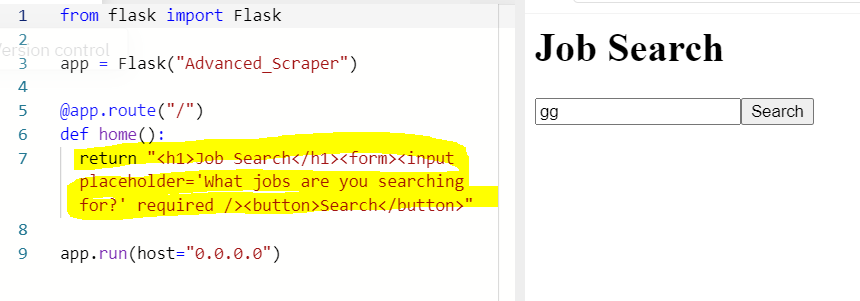
: What we want to do is making a form for users to write a job they are looking for, and to click with a button.
- 아래와 같이 html을 작성해도 되지만 it's a terrible way to write HTML. So we are creating a templates folder and create a html file there.
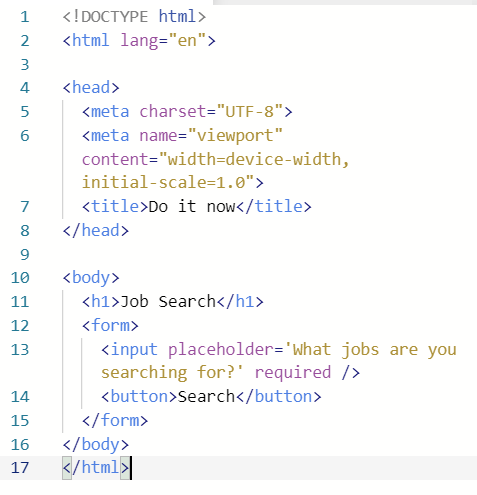
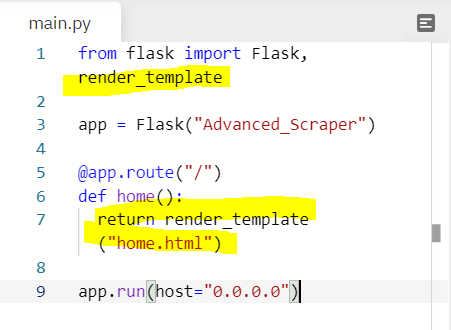
- Now what I have to do is to send this file to main.py. 아래와 같이 하면 flask가 templates folder 안에 있는 home.html 파일을 인식해서 출력해준다.
# Query parameters

-
우리가 원하는 화면은 보여지게 됐으나 검색어를 입력하고 search 버튼을 눌러도 아무 일도 일어나지 않는다. 무엇을 해야하나?
1) Action : The URL that processes the form submission.
2) Method : The HTTP method to submit the form with. Possible (case insensitive) values
get : The GET method; form data appended to the action URL with a ? separator. Use this method when the form has no side-effects.
3) name : The name of the form. The value must not be the empty string, and must be unique among the form elements in the forms collection that it is in, if any.
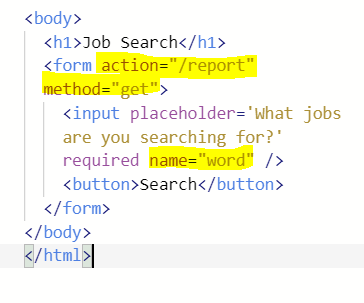
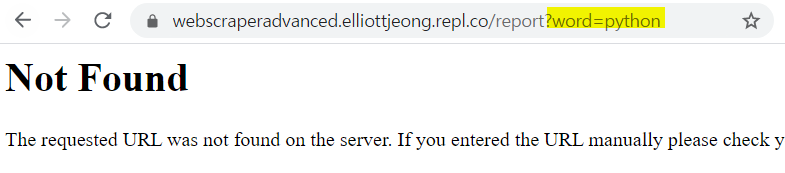
- 위와 같이 하고 다시 run을 해 검색어를 입력하고 search 버튼을 눌러보면 아래와 같이 새 페이지로 이동하고, "?word=검색어"가 url에 추가된다. 이를 Query parameters라고 한다.
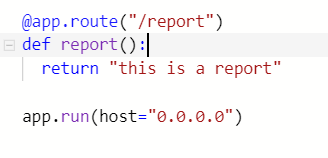
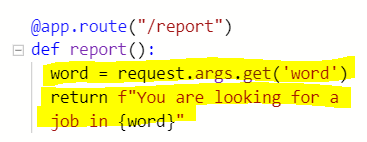
- 아래처럼 main.py에서 /report 페이지를 만들어 주면 검색어를 무엇을 입력하든, 뒤에 어떤 query parameters가 따라오든 결과는 같다. But what I want to do is getting the information about jobs that users are looking for. 즉 우리는 request를 해주어야 한다. Every time I go to the website, send some data to a website, that's a request. So we need to get all the requests.
- request를 통해 검색어로 수집된 데이터 딕셔너리를 불러오고 .get("key")를 통해 딕셔너리의 value를 호출시켜 word라는 변수에 저장한 것. Now, if I change query parameters of the link, for example, as ?word=Germany, it will return the text with "in Germany"
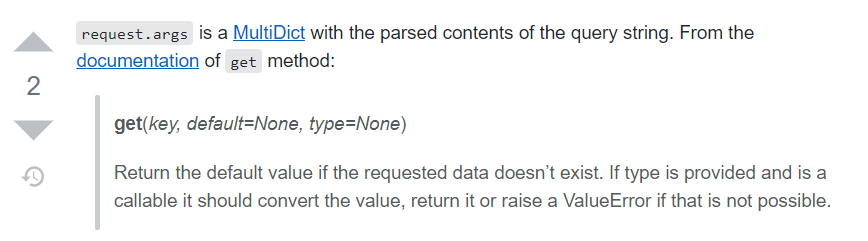
get https://werkzeug.palletsprojects.com/en/0.14.x/datastructures/#werkzeug.datastructures.MultiDict.get
MultiDict
https://werkzeug.palletsprojects.com/en/0.14.x/datastructures/#werkzeug.datastructures.MultiDict
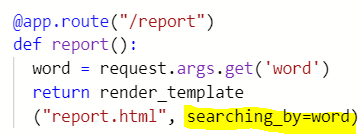
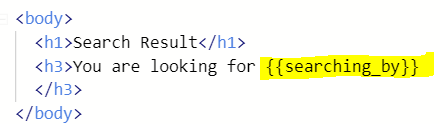
- report.html을 templates 폴더에 만들어 준다. 그곳에 html을 작성하고 main.py의 /report의 return은 다시 render_template("report.html")로 설정해준다. 그러고나면 이 안에 저장된 word를 report.html로 전송해줘야 하는데 how to?
: 아래와 같이 html에 입력해줄 키워드=word라고 해주면 {{}}에 갇혀 있는 키워드가 word에 저장된 데이터로 출력된다.
# Scraper Integration
: Connect the scraper I built with this website.
* Redirect
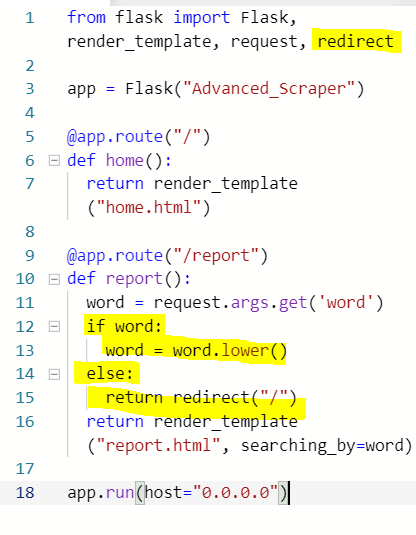
만약 링크에 ?word=keyword가 존재하지 않는 "https://webscraperadvanced.elliottjeong.repl.co/report" 이런 상태라면 위와 같은 코드로는 "You are looking for"만 출력되게 된다. However, what we want is to redirect users to the home page when nothing is searched.
- if word가 exist하면, word를 lowercase로 재저장하고, if word가 None이면, redirect("/"), 즉 home.html으로 redirect 하라는 말
* Bring my scrapers!
python뿐만 아니라 다른 직업들에 대해서도 검색을 할 수 있도록 scraper 코드를 수정해줘야 한다.
- scraper 파일을 웹페이지 만드는 flask 프로젝트로 옮겨올시 bs4, requests 패키지들 다시 install 해주어야 한다.
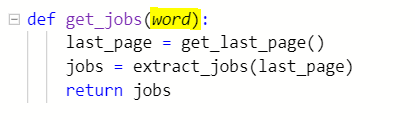
1) scraper.py 파일에서 job을 추출하는 최초함수의 변수에 입력된 키워드, 즉 검색어가 될 word를 입력해주고
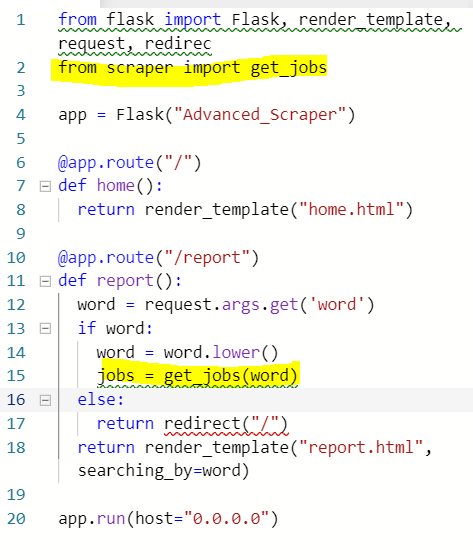
2) from scraper에서 imprt get_jobs 함수를 불러와 주고, if word가 존재할시, jobs라는 변수에 get_jobs(word)가 저장되도록 한다.
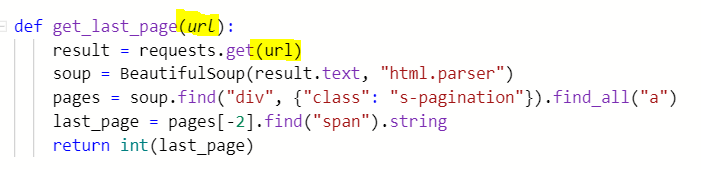
3) get_jobs(word)이 부른 get_last_page(word)가 다음과 같이 url에 정보를 request할 것이므로, URL은 맨 상단이 아닌 get_jobs(word) 안으로 옮겨와 키워드가 들어갈 란을 {word}로 바꿔줘야 한다.
-> 최초함수 get_jobs가 검색어인 word를 받아와 url을 생성하고 그 url이 get_last_page에 인자로 들어가 result에 해당 url에 대한 정보를 저장.
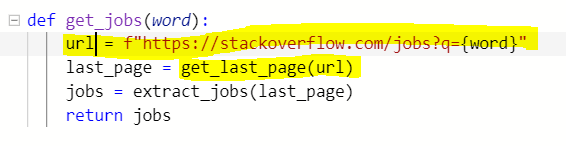
4) last_page 값을 get한 후, extract_jobs 함수가 실행되는데, 이 역시 url을 요구하므로 수정을 해줘야 한다. extract_jobs란 함수가 두 개의 인자를 가질 수 있도록.

# Make a faster scraper!
- 지금 이 상태로는 scraping 속도가 너무 느리다. Make a fake database.
- Database should be outside of route. Otherwise every time when we are searching something, the database would be emptied.
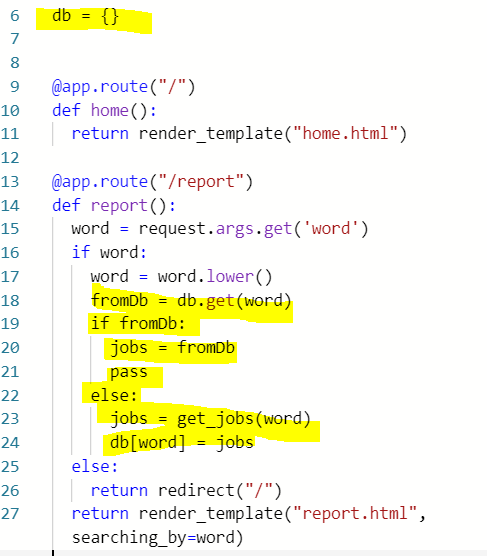
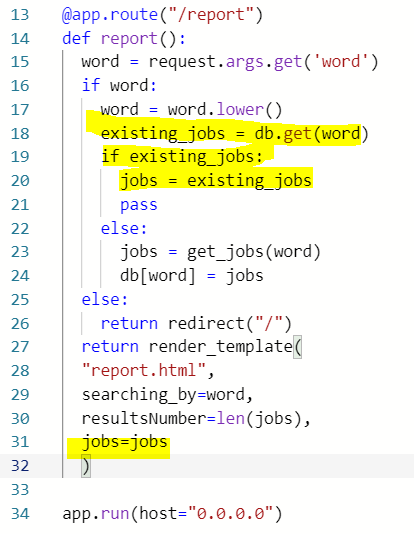
6: fake 데이터베이스를 만들어 준 것(dictionary type)
18: fromDb라는 변수는 6의 딕셔너리 db에서 word라는 키에 해당하는 value이다.
19: 만약 그렇게 입력된 키워드에 대한 value가 frmoDb에 존재한다면, 즉 already 저장된 값이라면 jobs= fromDB를 하고 pass
22: 존재하지 않는다면, 즉 새로 입력된 값이라면 jobs = get_jobs(word) function 실행한 후
24: db에 저장. 키는 word, value는 jobs.즉 만약 react 잡을 검색했다면, 키는 react 그리고 value는 추출된 react 잡들이 되는 것.
# Show the result to users!


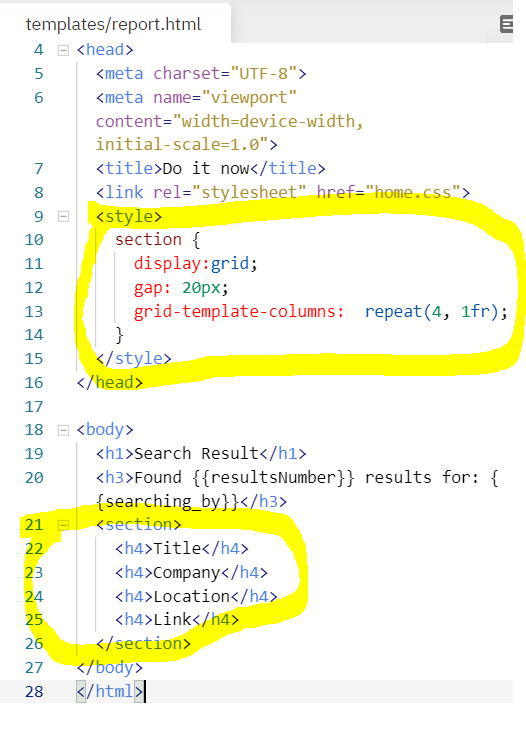
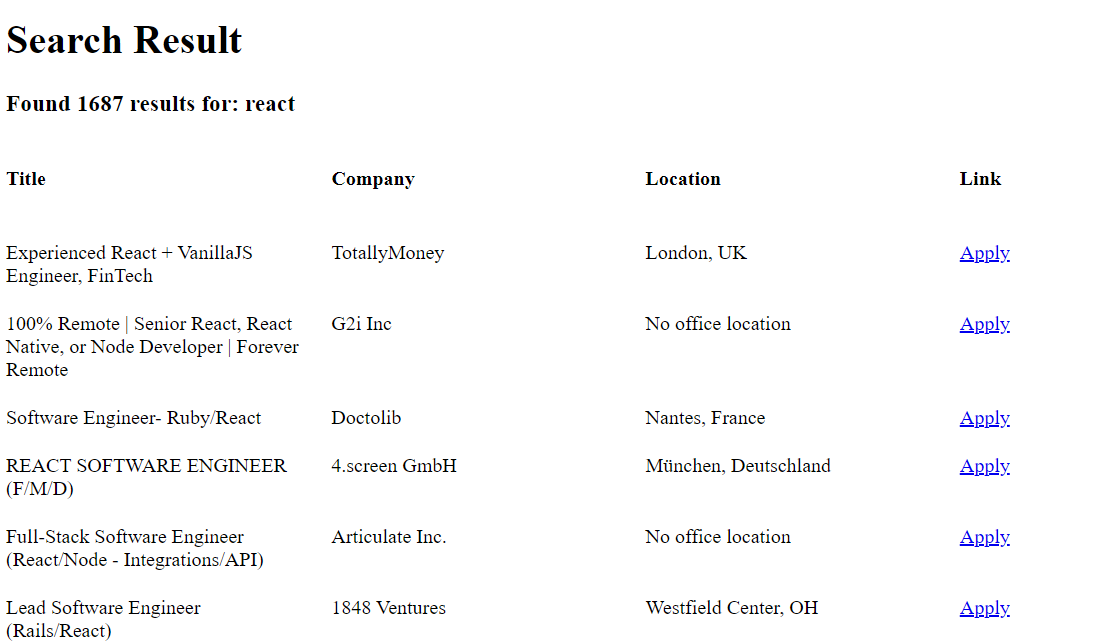
1) 표를 만들어서 결과를 보여주고 싶다면? 아래와 같이 html에 섹션을 만들어주고, css로 grid를 먼저 만든다.
Output :
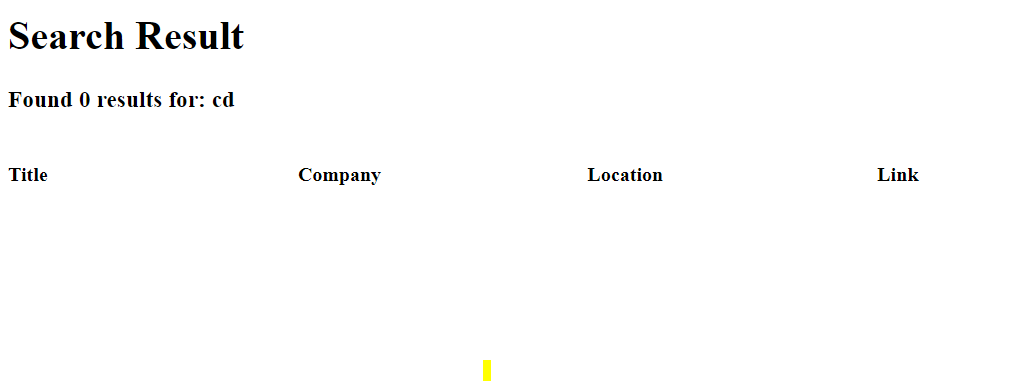
2) scraping한 잡들을 해당 grid에 넣어 보여주고 싶다면? 31번째 줄과 같이 추출된 jobs들을 html에 보내줄 수 있도록 render_template에 jobs=jobs를 해준다.
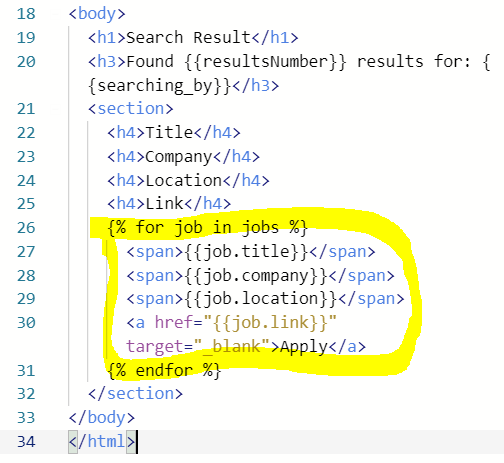
3) Flask는 html 안에서도 파이썬 코드를 입력할 수 있게 해준다. When you type python code on html for Flask, we need to write it in {% code here %}
- {{}} is to show variables
- {% %} is to execute codes inside
Output :
# 결과를 CSV로 다운받을 수 있게!
1) 결과를 받을 수 있는 페이지 만들어 주기
Try and Except
- try에 있는 것들을 시도해보고, 만약 그것들에 에러가 나면 except를 실행하는 것.
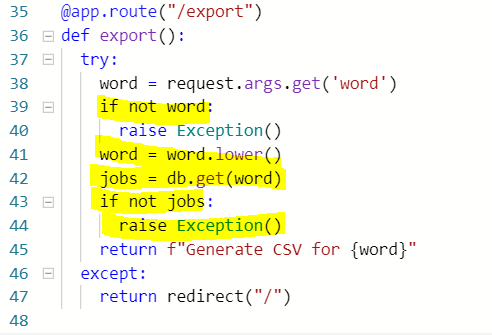
ㅡ> 아래 코드에서, 키워드가 만약 doesn't exist하면, raise Exception(), 즉 에러가 났으므로 그 consequences인 except를 실행: redirect to home.html
ㅡ> Exception is a word for Error
ㅡ> 여기서 이 코드를 삽입해주는 이유는, if somebody goes to /export without any ?word=검색어, 이 역시 홈으로 redirect를 해줘야 하기 때문. Therefore, this is a different way of redirecting from the first one for the "/report" page.
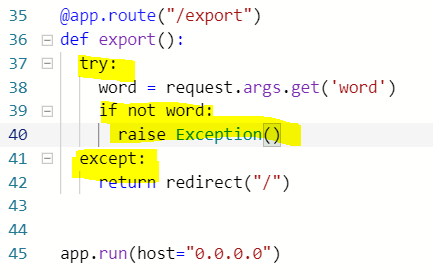
- 38 : variables인 word는 검색어로 저장된 키인 'word'의 value.
39 : 만약 word doesn't exist, 즉 키워드가 존재하지 않으면
40 : raise Exception() 에러! except block으로.
41 : 입력된 word, lowercase 처리 해주고
42 : jobs는 데이터베이스에 검색어 아래 저장된 잡리스팅
43 : 만약 데이터베이스에 그 키워드에 대한 잡리스팅이 없다면
44 : raise Exception() dpfj! except block으로.
45 : 에러가 발생하지 않았다면, return Generate CSV for 키워드
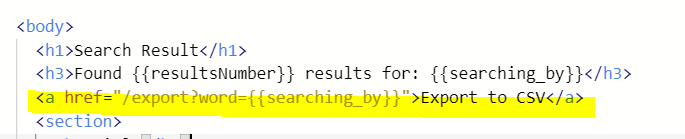
2) html로 연결해주기
Output :
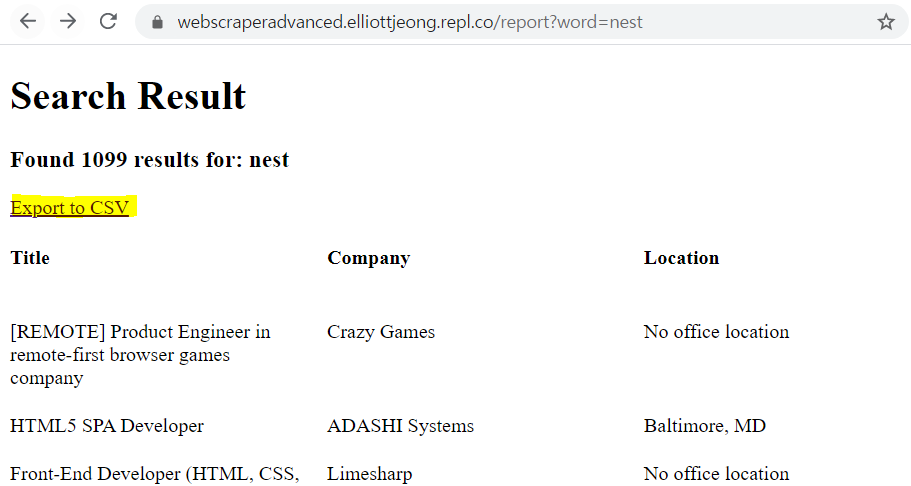
한번의 추출의 결과로 fake DB에 해당 내용이 저장되어 있으므로 export?word=nest 링크가 Exception block으로 가지 않고 제대로 작동

3) Export to CSV 링크를 눌렀을 때 CSV 파일이 생성되게 해주기
- 첫 csv용 scraper 만든 것을 웹용 새 프로젝트에 exporter.py 만들어서 복붙
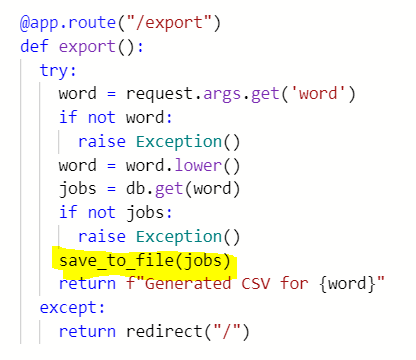
ㅡ> save_to_file(jobs)는 실행되면 jobs.csv라는 파일을 열거나 파일이 없다면 생성해서 인자에 저장된 정보들을 엑셀 형식으로 저장해주는 함수

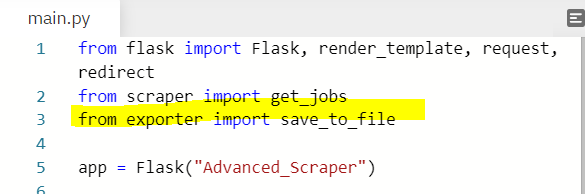
- main.py에서 save_to_file 함수를 import 해주고, export 함수가 실행되고 에러가 나지 않으면 실행될 것으로 save_to_file(jobs)를 작성해준다. 키워드에 대한 정보가 jobs에 저장돼 있으면 save_to_file은 실행되어 jobs.csv 파일이 생성될 것
4) send the csv files so that you can download!
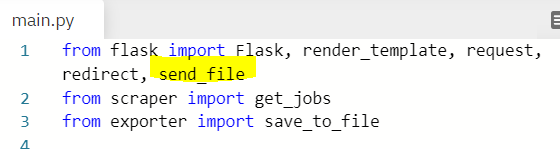
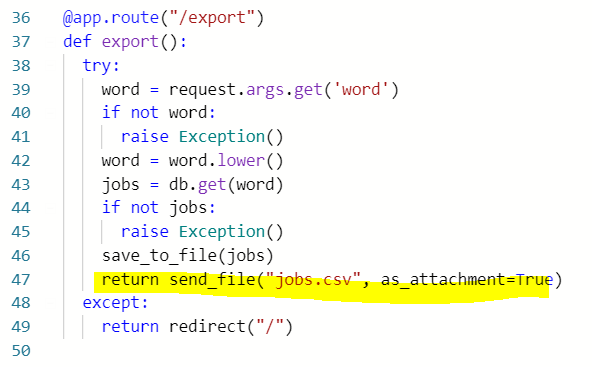
: flask에서 send_file function을 다운 받아준 후, export function의 return으로 send_file 해주면, 원하는 내용이 담긴 "jobs.csv" 파일이 다운로드된다.
# Conclusion
: If I want to build a website with DB, it would be better to keepy studying Django because doing it in Flask incldues more manual works than in Django.