문제상황
- 앞서 Secret에 대해 다룬 글은 ESO(External Secret Operator)를 직접 설치하거나, 설치된 환경을 전제로 하고 있음
- 동아리의 EKS 클러스터에 서버를 배포하는 상황에서는 ESO를 따로 설치 불가능
1. ESO가 설치되어 있다면
아래 작성된 내용은 모두 예시로, 실제 리소스가 아님
- IRSA가 적용된
ServiceAccount리소스 추가
apiVersion: v1
kind: ServiceAccount
metadata:
  name: server-sa       # ServiceAccount 이름
  namespace: dev
  annotations:          # IRSA 방식
eks.amazonaws.com/role-arn: arn:aws:iam::405906814034:role/server-sa- AWS IAM에서 IRSA Role에 Secret Manager 접근 권한 추가
{
    "Version": "2012-10-17",
    "Statement": [
        {
            "Effect": "Allow",
            "Action": [
                "secretsmanager:GetSecretValue",
                "secretsmanager:DescribeSecret"
            ],
            "Resource": [
                "arn:aws:secretsmanager:ap-northeast-2:123456789012:secret:my-app/db-credentials"
            ]
        }
    ]
}SecretStore생성 - ESO가 어떻게 AWS Secrets Manager에 연결할지 정의
# secret-store.yaml
apiVersion: external-secrets.io/v1beta1
kind: SecretStore
metadata:
  name: aws-secret-store
  namespace: dev
spec:
  provider:
    aws:
      service: SecretsManager
      region: ap-northeast-2
      auth:
        # IRSA를 사용하기 위한 설정
        jwt:
          serviceAccountRef:
name: server-sa # 앱이 사용하는 ServiceAccount 이름ExternalSecret생성 - 어떤 외부 Secret으로 k8s Secret 리소스를 만들지 정의
# external-secret.yaml
apiVersion: external-secrets.io/v1beta1
kind: ExternalSecret
metadata:
  name: db-credentials
  namespace: dev
spec:
  secretStoreRef:
    name: aws-secret-store  # 앞서 만든 SecretStore를 참조
    kind: SecretStore

  # 생성될 쿠버네티스 Secret의 이름
  target:
    name: db-secret
    # deletionPolicy: Delete # ExternalSecret이 삭제될 때 K8s Secret도 함께 삭제

  # 가져올 외부 Secret 정보
  dataFrom:
  - extract:
      # AWS Secrets Manager의 Secret 이름
key: my-app/db-credentialsDeployment에 적용 - 생성된 secret을 환경변수로 주입
apiVersion: apps/v1
kind: Deployment
metadata:
  name: server
  namespace: dev
spec:
  # ...
  template:
    metadata:
      # ...
    spec:
      serviceAccountName: server-sa # ServiceAccount 지정(필수는 아님)
      containers:
        - name: server
          image: ...
          # ...
          envFrom:
          - secretRef:
              name: db-secret       # ESO로 생성된 secret
2. Entrypoint 스크립트 by Gemini
핵심 아이디어
DockerfileENTRYPOINT: 컨테이너가 시작될 때 반드시 실행되는 고정적인 실행 파일을 지정CMD:ENTRYPOINT에 전달되는 기본 인자
# Entrypoint 지정
ENTRYPOINT ["/app/entrypoint.sh"]
# ENTRYPOINT ["java", "-jar", "app.jar"]  # 기존 Spring

# 기본 실행 명령어 지정 (Entrypoint 스크립트 마지막의 "$@"로 전달되어 Spring 앱을 실행)
CMD ["java", "-jar", "/app/app.jar"]
1. IRSA 설정: k8s ServiceAccount에 특정 AWS IAM Role을 연결
2. Pod에 ServiceAccount 지정: 해당 ServiceAccount를 사용하는 Pod는 AWS API를 호출할 수 있는 임시 자격증명을 자동으로 획득
3. Entrypoint 스크립트 실행: 컨테이너가 시작될 때, Spring 애플리케이션을 직접 실행하는 대신 셸 스크립트(entrypoint.sh)를 먼저 실행
4. 시크릿 조회 및 환경변수 설정: 스크립트는 내장된 AWS CLI를 사용해 AWS Secrets Manager에서 시크릿을 조회, 그 결과를 파싱하여 환경변수로 export
5. Spring 애플리케이션 실행: 스크립트의 마지막 단계에서 exec 명령으로 원래 실행하려 했던 Spring 애플리케이션(java -jar ...)을 실행
3. spring-boot-starter-waffle-secret-manage 의존성 사용
- 레포 링크: spring-boot-starter-waffle-secret-manager
- 동아리의 능력자님이 만들어주신 Spring Boot 의존성
→ 적용이 간단하여 실제로 채택하여 사용하였음
적용 - README.md
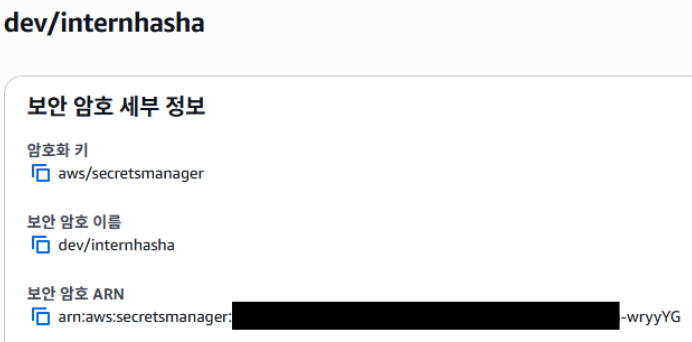
1. AWS Secret Manager에 Secret 생성
- 적절한 AWS 권한을 받아 Secret을 생성
- spring environment 설정처럼 key value 형태로 secret 생성
ex) key:spring.datasource.url/ value:jdbc:postgresql://localhost:5432/test
2. Spring 연동
2-1. spring 프로퍼티 생성
secret-names: {aws-secret-manager-name}
- 실제
application.yml에 적용
# ...
---
secret-names: dev/internhasha     # 가져올 AWS SecretManager의 Secret

spring:
    config:
        activate:
            on-profile: dev
    datasource:
        url:                      # spring.datasource.url이 secret에서 설정됨
        username:
        password:                 # 미리 정의된 프로퍼티는 변경하지 않음
# ...
2-2. CodeArtifact 등록 & 의존성 추가
- 해당 README.md를 참고하여 CodeArtifact 등록
build.gradle.kts에 의존성 추가
dependencies {
  //...
  implementation("com.wafflestudio.spring:spring-boot-starter-waffle-secret-manager:1.0.4")
}
CodeArtifact를 사용하는 이유 by Gemini
CodeArtifact: AWS의 비공개 저장소 ↔ 공개 저장소Maven Central- AWS 보안자격 증명을 통해 Auth Token을 받아
CodeArtifact에서 해당 의존성이 담긴 Jar 실행 파일을 가져와 적용- 소스코드는 공개되어 있어 이론상 코드를 그대로 가져와 사용 가능(빌드 필요)
CodeArtifact를 이용하면 수동 작업 대신 공식적으로 미리 빌드, 테스트된 실행 파일을 가져와 사용 가능
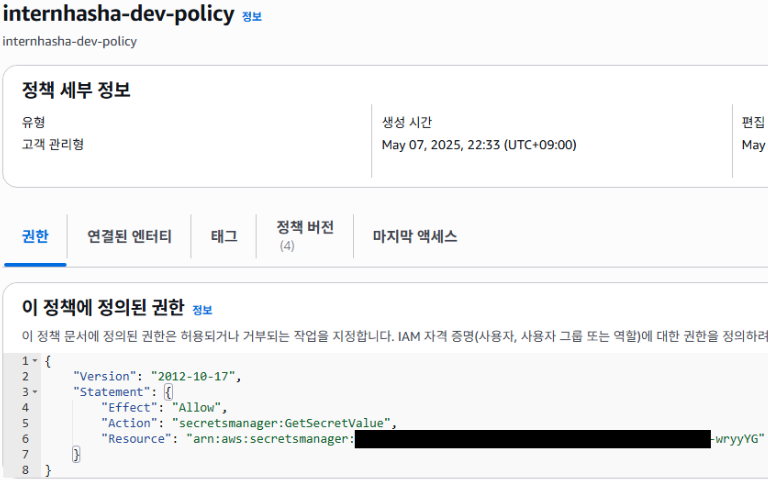
2. IRSA를 위한 IAM Role 생성 & 정책 설정
- 해당 secret에 접근할 수 있는 정책을 생성하고, role에 연결

3. Manifest 파일에 IRSA 적용
- 앞서 생성한 IAM Role의 ARN을 적용한
ServiceAccount리소스를 정의 Deployment에 해당ServiceAccount를 적용
apiVersion: apps/v1
kind: Deployment
# ...
spec:
  # ...
  template:
    metadata:
      labels:
        app: internhasha-server
    spec:
      serviceAccountName: internhasha
# ...
---
apiVersion: v1
kind: ServiceAccount
metadata:
  name: internhasha
  namespace: internhasha-dev
  annotations:
    eks.amazonaws.com/role-arn: arn:aws:iam::405906814034:role/internhasha-dev-role
---
# ...
4. Secret이 적용됨
- prod와 dev 각각 AWS SecretManager 보안암호, Role, Policy, ServiceAccount를 생성해서 적용하였음
원리
build.gradle.kts
spring-boot외에 사용하는 의존성- AWS Secrets Manager용 SDK: AWS Secrets Manager에 API 요청을 보내 Secret 값을 가져오는 역할
- AWS Security Token Service용 SDK: AWS SDK의 IRSA 인증용
group = "com.wafflestudio.spring"
dependencies {
    implementation("org.springframework.boot:spring-boot")

    implementation("software.amazon.awssdk:secretsmanager:2.25.15")
    implementation("software.amazon.awssdk:sts:2.25.15")

    testImplementation(kotlin("test"))
}
SecretsManagerEnvironmentPostProcessor.kt
- Spring Boot의
EnvironmentPostProcessor인터페이스를 활용 EnvironmentPostProcessor: Spring Boot 앱 시작 시 Environment 설정을 프로그래밍 방식으로 조작할 수 있게 해주는 인터페이스
→ Spring이application.yaml같은 설정 파일들을 읽어서 Environment를 구성했지만 아직 Bean 생성, 앱 시작을 하지 않은 시점에postProcessEnvironment메서드를 실행postProcessEnvironment메서드application.yaml에secret-names라는 속성을 찾아 가져올 Secret 목록을 생성getSecretString을 호출- AWS Secrets Manager 클라이언트 생성, Secret을 JSON 문자열로 가져옴
(IRSA 환경에서 실행될 때, AWS SDK가 자동으로 IRSA가 제공하는 자격 증명을 감지하여 사용) - Secret 문자열을
jacksonObjectMapper을 이용해 Map으로 변환(이미 있는 환경변수는 필터링) environment.propertySources.addFirst(...)을 이용해 가장 높은 우선순위의 Property Source로 추가(만약 필터링이 없으면application.yaml의 속성값도 덮어쓰기 가능)
= Spring Boot의 초기화 생명주기에 끼어들어, 앱이 완전히 시작하기 전에 IRSA 권한을 이용해 AWS Secrets Manager에서 보안암호를 조회, 이를 최고 우선순위를 가진 환경변수처럼 Spring 환경에 동적으로 주입
package com.wafflestudio.spring.secretsmanager.config

import com.fasterxml.jackson.module.kotlin.jacksonObjectMapper
import com.fasterxml.jackson.module.kotlin.readValue
import org.springframework.boot.SpringApplication
import org.springframework.boot.env.EnvironmentPostProcessor
import org.springframework.core.env.ConfigurableEnvironment
import org.springframework.core.env.MapPropertySource
import software.amazon.awssdk.regions.Region
import software.amazon.awssdk.services.secretsmanager.SecretsManagerClient
import software.amazon.awssdk.services.secretsmanager.model.GetSecretValueRequest

class SecretsManagerEnvironmentPostProcessor : EnvironmentPostProcessor {
    private val objectMapper = jacksonObjectMapper()
    private val region = Region.AP_NORTHEAST_2

    // Environment 구성 직후 호출됨
    override fun postProcessEnvironment(
        environment: ConfigurableEnvironment,
        application: SpringApplication,
    ) {
        // secret-names 키로 설정된 속성을 가져와 SecretManager의 보안암호 이름을 파싱
        val secretNamesProperty = environment.getProperty("secret-names") ?: return
        val secretNames = secretNamesProperty.split(",")
        val secrets = mutableMapOf<String, Any>()

        // 각 보안암호 이름별로 SecretManager로부터 값을 가져와 변환, 이미 존재하는 환경변수는 필터링
        secretNames.forEach { secretName ->
            val secretString = getSecretString(secretName)
            val parsedSecrets = objectMapper.readValue<Map<String, Any>>(secretString)
            secrets.putAll(
                parsedSecrets.filterKeys {
                    environment.getProperty(it).isNullOrEmpty()
                },
            )
        }

        // 가장 우선순위로 환경변수 추가
        // Add directly to environment
        if (secrets.isNotEmpty()) {
            environment.propertySources.addFirst(
                MapPropertySource("aws-secrets", secrets),
            )
        }
    }

    // 보안암호 이름을 받아, IRSA가 적용된 AWS SDK를 이용해 SecretManager로부터 값을 가져옴
    private fun getSecretString(secretName: String): String {
        val client = SecretsManagerClient.builder().region(region).build()
        val request = GetSecretValueRequest.builder().secretId(secretName).build()
        return client.getSecretValue(request).secretString()
    }
}
spring.factories
SecretsManagerEnvironmentPostProcessor를EnvironmentPostProcessor로 등록하여 Environment 구성 직후 실행될 수 있도록 설정
org.springframework.boot.env.EnvironmentPostProcessor=com.wafflestudio.spring.secretsmanager.config.SecretsManagerEnvironmentPostProcessorcf. 그냥 위 파일을
@Bean으로 등록할 수는 없을까? by GeminiSpring Boot가 시작되는 과정
1단계: 환경(Environment) 준비 단계
- Spring Boot가 시작
application.yaml등 설정 파일을 읽어 기본적인 Environment 객체를 생성spring.factories를 스캔하여EnvironmentPostProcessor로 등록된 클래스들을 찾아 실행- 모든 설정값이 포함된 최종 Environment가 완성
2단계: 애플리케이션 컨텍스트(Bean) 생성 단계
- 1단계에서 완성된 최종 Environment를 바탕으로, Spring Application Context 생성
@Component,@Configuration,@Service등을 스캔, Bean 생성@Configuration파일에서 DataSource Bean을 생성한다면, 이 Bean은 이미 1단계에서 완성된 Environment로부터spring.datasource.url같은 값들을 읽어서 생성을 시도⇒
SecretsManagerEnvironmentPostProcessor를@Bean으로 등록되는 시점은 이미 DataSource 같은 다른 Bean들이 설정값을 필요로 하는 시점이라 늦음⇒ 미리 CodeArtifact로 받은 의존성 JAR 파일을 이용해 1단계에서 환경변수 설정이 이루어져야 함