- 공식문서 참고 - User Notification 프레임워크
푸시 알림이 필요한 이유
- 앱이 inactive한 상태면 알람을 어떻게 재생할까?
- notification을 통해 알람 표시 / 소리 재생이 가능하다.
노티피케이션에 관한 간단한 사실들
- 앱에서 로컬하게, 또는 서버에서 원격으로 알림 생성 가능
- 로컬 알림을 위해서 앱은 노티피케이션 content를 생성하고 조건을 설정하고 노티피케이션 전달을 트리거한다.
- content, condition, trigger
- 원격 알림을 위해서 서버에서 푸시 알림을 생성하고, Apple Push Notification Service(APNs)가 그러한 알림을 유저 디바이스로 전달하는 과정을 처리한다.
- User Notification 프레임워크를 사용해서 할 수 있는 일들:
- 앱이 지원하는 알림 유형 정의하기
- 알림 타입과 연관된 커스텀 액션들 정의하기
- 로컬 알림 스케줄링하기
- 이미 전달된 알림 처리하기
- 유저 선택 액션에 대응하기
- 시스템은 로컬 및 원격 알림을 적시에 전달하기 위해 최선을 다하지만, 항상 전달이 보장되지는 않는다.
- PushKit 프레임워크는 VoIP 및 watchOS 컴플리케이션에서 사용하는 특정 유형의 알림에 대해 더 신속한 전달 메커니즘을 제공한다.
content 설정하기
- UMMutableNotificationContent 객체 프로퍼티 채우기
- 여기에 작성하는 필드들이 시스템이 알림을 전달하는 방법을 정의한다.
- 예를 들어 소리를 재생하려면 notification의 sound 프로퍼티에 값을 할당하면 된다.
- content에는 interruption level을 설정할 수 있다.
- .critical로 설정하면 시스템의 mute 설정을 무시하고 알림 푸시 가능하다.
- 다만 critical은 Apple의 허가를 통해 얻은 특별한 entitlement가 필요함
- 허가 링크/ 참고 스택오버플로우
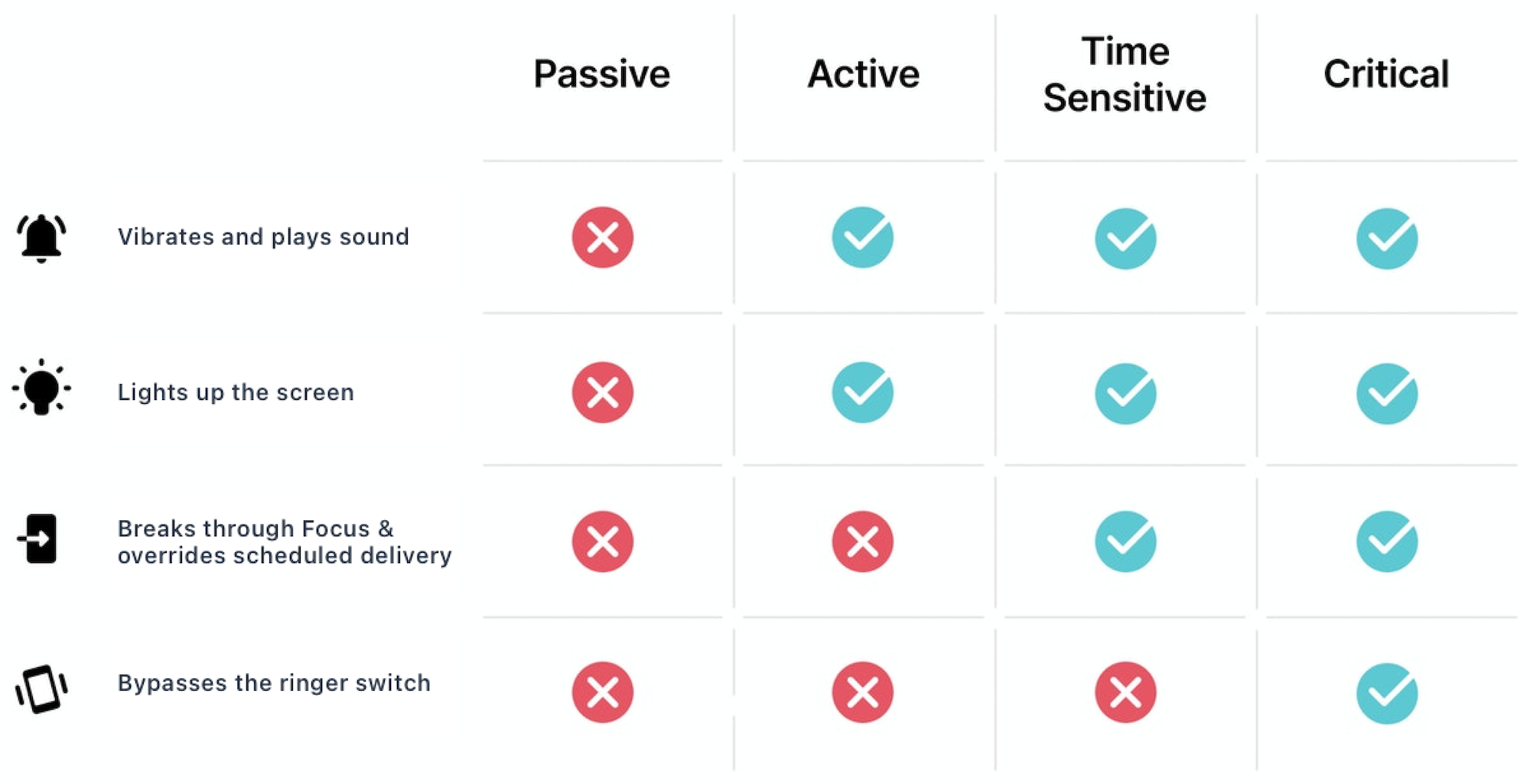
- 알람 앱 특성상 .critical 레벨을 설정하면 좋겠지만 허가가 필요하기 때문에 일단 신청해놓고 지금은 timeSensitive로 작업하기로 결정
condition 설정하기
- UNCalendarNotificationTrigger, UNTimeIntervalNotificationTrigger, UNLocationNotificationTrigger 활용해 노티피케이션 전달 조건 지정
- UNLocationNotificationTrigger
- 유저 디바이스가 특정한 지역에 진입할 때 알림 전달
- UNTimeIntervalNotificationTrigger
- 지정한 시간이 지나면 알림 전달
- UNCalendarNotificationTrigger
- 지정한 날짜와 시간에 알림 전달
- 1분만 앱에서는 지정한 날짜 및 시간마다 알림을 전달하는 기능, 타이머가 종료되면 알림을 전달하는 기능이 필요하다.
- UICalendarNotificationTrigger 사용하기로 결정
trigger 설정하기
        let trigger = UNCalendarNotificationTrigger(
            dateMatching: dateComponent.dateComponents(), repeats: repeats)

        // FIXME: uuidString으로 알림 생성하기 때문에 같은 시각에 대한 알림이 여러 개 생성될 수 있음.
        let uuidString = UUID().uuidString
        let request = UNNotificationRequest(identifier: uuidString, content: content, trigger: trigger)
return request- 트리거는 UNCalendarNotificationTrigger로 작성
- identifier, content, trigger 사용해 request 생성
알림 요청 추가하기
        // 시스템에 알림 추가
        let notificationCenter = UNUserNotificationCenter.current()
        Task {
            do {
                try await notificationCenter.add(request)
            } catch {
                AppLogger.error("NotificationManager: \(error.localizedDescription)")
            }
}- current 알림센터 가져와서 add
- 요청 삭제도 필요함
알림 요청 삭제하기
- 추가한 노티피케이션에 대한 삭제 기능도 필요함.
- 무엇을 identifier로 해야 하는지?
- 사용하는 쪽에서 입력받아 구현.
- removePending -> 아직 전달하지 않은 알림 삭제
- removeDelivered -> 이미 전달된 알림(화면에 이미 노출된) 삭제
 	   /// 대기 중인 알림 삭제
    /// - Parameter identifier: 알림 식별자
    func removePendingNotification(by identifier: String) {
        center.removePendingNotificationRequests(withIdentifiers: [identifier])
        AppLogger.info("AlarmNotification with identifier \(identifier) removed")
} 
ios 개발자에용