이미 있겠지만..
백준 문제를 풀다가 일일이 자꾸 문제의 티어를 검색해야 하는게 너무 불편해서
문제 번호 옆에 자동으로 티어를 띄워주는 확장프로그램을 찾아보고 있었다.
꽤 많이 나왔는데, 내가 원하는 종류는 안 보였고, 어떻게 잘 찾아서 실행해보니까
내가 원하는 기능만 지원 중단 되었다.
직접 만들자.
어차피 전에 크롬 확장 프로그램을 만들었던 경험도 있기도 하고, 그냥 후딱 만들고 배포해야겠다는 생각에 solved ac에서 api를 긁어왔다.
https://solved.ac/api/v3/search/problem?query={문제번호}
이 곳에 GET 리퀘를 날리면 JSON을 파싱해서 레벨 값을 추출할 수 있다.
열심히 content.js를 짜고 있었는데 문제가 생겼다.
CORS
거의 백엔드 들어있는 프로젝트 할 때마다 만나는 에러인 것 같다.
문제는 내가 만든 api 서버가 아니라서 content.js에서 fetch를 날릴 수 없다는 것이었다.
AWS Lambda
이참에 AWS Lambda를 활용해서 프록시 API를 만들기로 결정했다.
마침내 본론이다. AWS Lambda 사용기.
함수 생성

스크린샷과 같이 함수 이름과 사용할 언어, 그리고 아키텍쳐를 선택해줄 수 있다.
대충 이름 짓고 넘겼다.
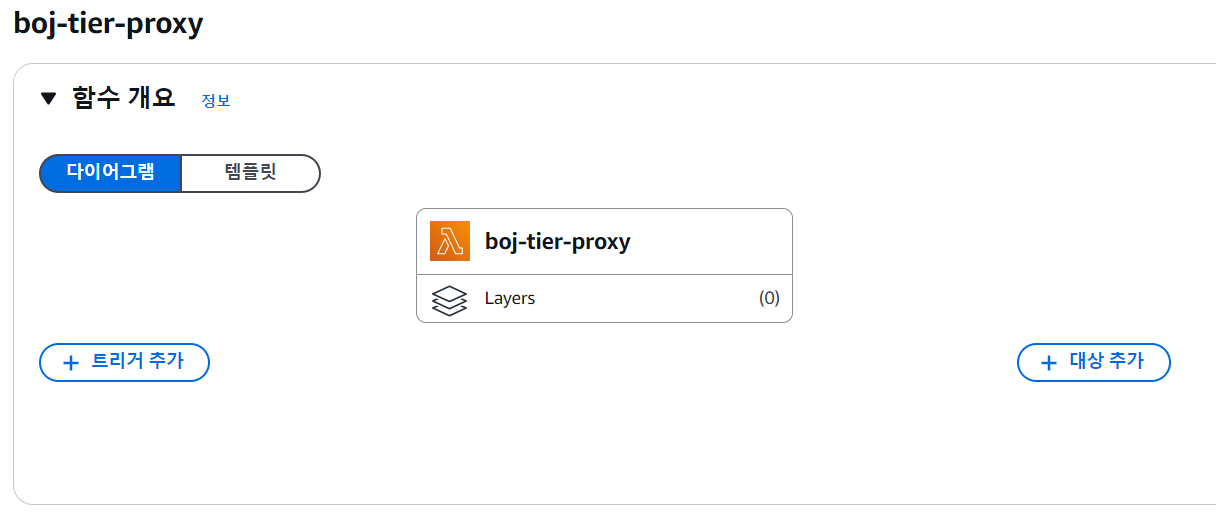
함수 편집
이렇게 창이 넘어가면서 코드 편집기가 나온다
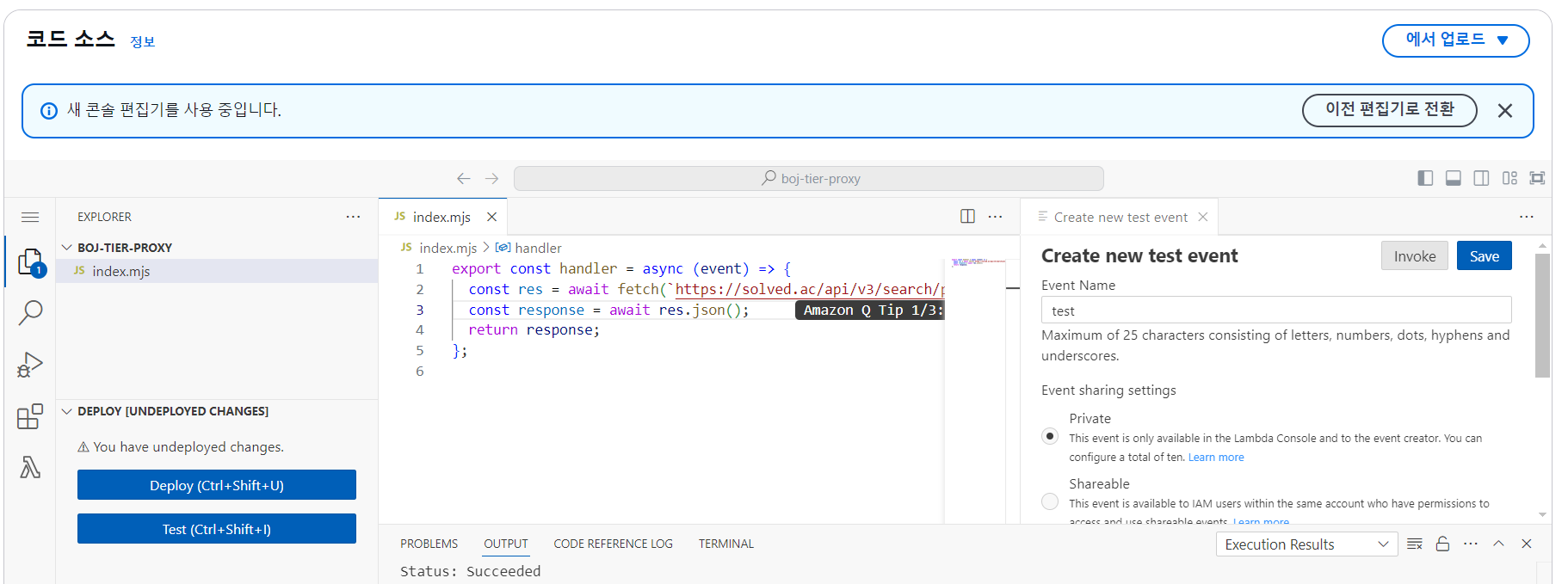
여기에서 함수 테스트와 수정을 하는데, 나는 코드가 상당히 간결하기 때문에 대충 써봤다.
export const handler = async (event) => {
  const problem = event.queryStringParameters?.problem;
  const res = await fetch(`https://solved.ac/api/v3/search/problem?query=${problem}`);
  const data = await res.json();
  const level = data["items"][0]["level"];
  return level;
};
이렇게 작성하면 레벨을 리턴하는 API가 완성이다.
굉장히 간단하다.
엔드포인트 설정
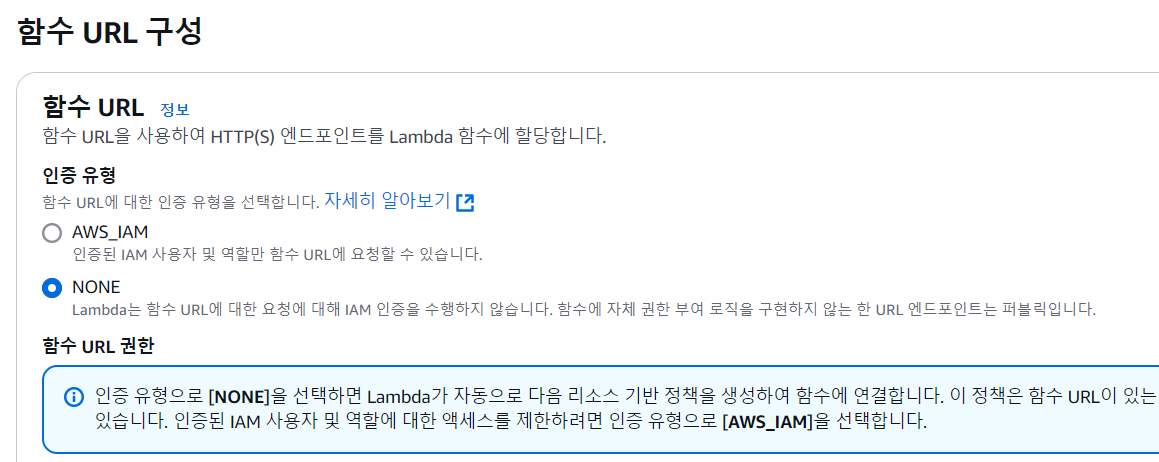
이제 함수 URL을 구성해줘야 하는데, 이렇게까지 온 이유가 CORS 문제 해결이었기 때문에, 오리진을 백준 사이트에 허용해준다.

이렇게 하면 된다.
HTTP 메서드는 어차피 GET 만 사용하니까
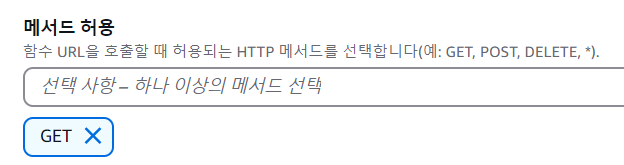
이렇게 메서드도 하나만 할 수 있도록 설정한다.
비상!!!!
생각해보니까 이렇게 하면 비용 폭탄을 맞을 가능성이 농후하다는 사실을 깨달았다.
문제 하나당 요청을 하나씩 날리는데, 한 페이지에 문제 100개가 있다고 하면, 10번만 사용해도 10000번 요청이 날아가고, 월별 100만 개의 무료 요청 횟수를 아득히 초과할 수 있었다.
export const handler = async (event) => {
    const problems = event.queryStringParameters?.problems.replaceAll("'","").split(",");
    const levels = [];
    for (let problem of problems) {
      problem = Number.parseInt(problem);
      const res = await fetch(`https://solved.ac/api/v3/search/problem?query=${problem}&page=1`);
      const data = await res.json();
      const level = data["items"][0]["level"];
      levels.push(level);
    }
    return levels;
  };
그래서 이렇게 코드를 수정했다. 이렇게 하면, 페이지 하나당 문제를 다 모아서 한번만 요청을 보내기 때문에 더 비용면에서 효율적이다.
사실 생각해보면 한번만 전체 문제들 싹 크롤링해서 JSON 같은걸로 저장해놓고 꺼내 쓰는게 훨씬 이득이긴 할텐데, lambda를 사용해보는 것에 의미를 두는 것으로 한다.
content.js
window.onload = async () => {
  const table = document.querySelector(".table").childNodes;
  const header = table[0].childNodes[0];
  header.childNodes[0].style = "width: 6%";
  header.childNodes[2].style = "width: 45%";
  header.childNodes[4].style = "width: 11%";
  const body = table[1].childNodes;
  const problems = [];

  for (let tr of body) {
    const pID = tr.querySelector(".list_problem_id").innerText;
    problems.push(pID);
  }

  const res = await fetch(
    `https://k6loix5qrsfdjr7lo3jmq6v5vm0ralrw.lambda-url.us-east-2.on.aws/?problems=${problems.toString()}`
  );
  const tier = document.createElement("th");
  tier.innerText = "티어";
  tier.style = "width: 5%";
  header.insertBefore(tier, header.childNodes[0]);
  const levels = await res.json();
  for (let i = 0; i < levels.length; i++) {
    const tr = body[i];
    const level = levels[i];
    const tierBody = document.createElement("td");
    tierBody.innerHTML = `<img src="https://static.solved.ac/tier_small/${level}.svg" alt="${level}-level" />`;
    tr.insertBefore(tierBody, tr.childNodes[0]);
  }
};
content.js는 이렇게 작성했다.
단점이라면, 서버리스 함수 특성상 느린 응답 속도 + 프록시 API 특성상 느린 응답 속도 + 많은 문제 한번에 처리 삼위 일체로 실행속도를 느리게 만들어서 거의 30초 이상이 걸린다는 것?
어쨋든 원하는 프로그램을 완성하였다.
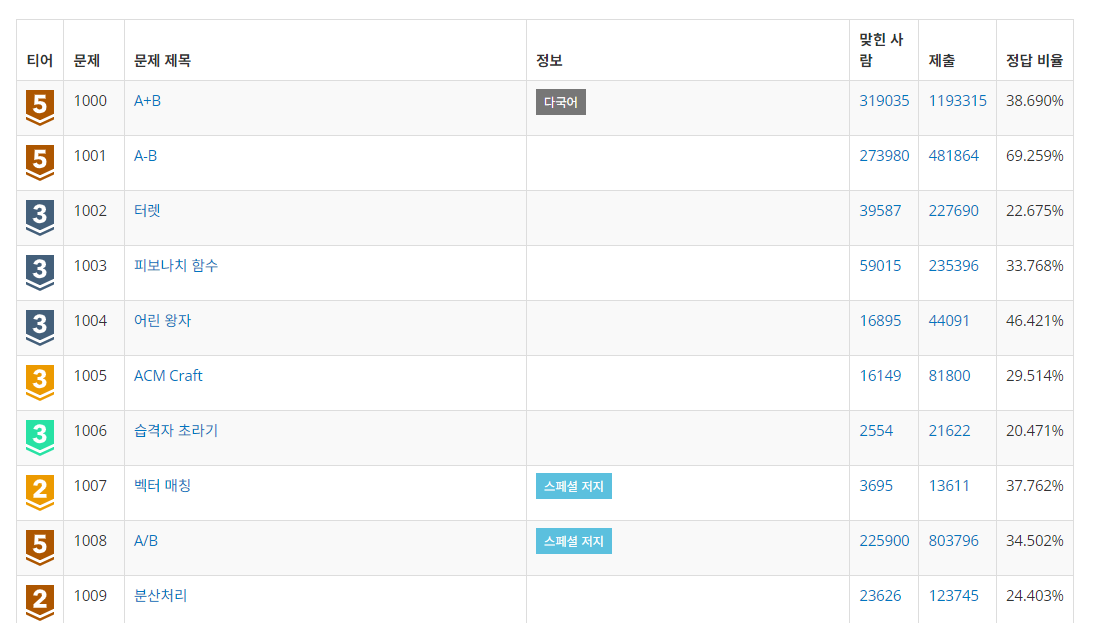
근데 문제가, 요청 응답이 진짜 너무 심하게 오래걸린다는 것이었다. 거의 무슨 체감상 1분 기다린 것 같다 ㅋㅋㅋㅋ
그래서 아까 생각했던 방법대로 API 요청을 날리지 않고, 저장되어있는 JSON 파일에서 불러오는 방식으로 변경하려한다.
너어어어어무 느림
간단하게 파이썬으로 모든 문제를 끌어와서 API 요청을 날리고 JSON 파일을 저장하는 코드를 작성했다.
import time
from selenium import webdriver
from selenium.webdriver.common.by import By
from selenium.webdriver.edge.options import Options
import requests
import json

options = Options()
driver = webdriver.Edge(options=options)

result = {}
for i in range(83, 320):
    print("page " + str(i))
    driver.get(f'https://www.acmicpc.net/problemset/{i}')
    problems = driver.find_elements(By.CLASS_NAME, "list_problem_id")
    problems = [int(problem.get_attribute("innerText"))
                for problem in problems]
    for j in range(len(problems)):
        try:
            res = requests.get(
            	f'https://solved.ac/api/v3/search/problem?query={problems[j]}&page=1')
            res = res.json()
        except:
            print("ERROR OCCURRED: Cooldown started...")
            j -= 1
            time.sleep(600)
            continue
        result[f"{problems[j]}"] = res["items"][0]["level"]
    with open("problem_tiers.json", "w") as outfile:
        json.dump(result, outfile)
이걸로 JSON 파일을 만들고 (무려 완성하면 대략 32000개의 문제), JSON 파일에서 바로 정보를 뽑아올 수 있게 수정하면 된다.
API 없앤 확장프로그램 코드
window.onload = async () => {
  console.log("BOJ-EXTENSION CALLED");
  const table = document.querySelector(".table").childNodes;
  const header = table[0].childNodes[0];
  header.childNodes[0].style = "width: 7%";
  header.childNodes[1].style = "width: 48%";
  header.childNodes[3].style = "width: 7%";
  const body = table[1].childNodes;
  const problems = [];

  if (window.location.pathname.includes("/problem/")) {
    const url = window.location.pathname.split("/");
    problems.push(url[url.length - 1]);
    console.log(problems);
  } else {
    for (let tr of body) {
      const pID = tr.childNodes[0].innerText;
      problems.push(pID);
    }
  }

  const res = await fetch(chrome.runtime.getURL("problems.json"));
  const tier = document.createElement("th");
  tier.innerText = "티어";
  tier.style = "width: 5%";
  header.insertBefore(tier, header.childNodes[0]);
  const levels = await res.json();
  for (let i = 0; i < problems.length; i++) {
    const tr = body[i];
    const level = levels[problems[i]];
    const tierBody = document.createElement("td");
    tierBody.innerHTML = `<img style="width: 50%" src="https://static.solved.ac/tier_small/${level}.svg" alt="${level}-level" />`;
    tr.insertBefore(tierBody, tr.childNodes[0]);
  }
};
이렇게 테이블에 표시되는 것 뿐만 아니라, 문제 페이지에 와서도 티어가 표시되도록 수정했다.
manifest.json에도
"web_accessible_resources": [
    {
      "resources": ["problems.json"],
      "matches": ["https://www.acmicpc.net/*"]
    }
  ]
이렇게 web accessible resource를 추가하였다.
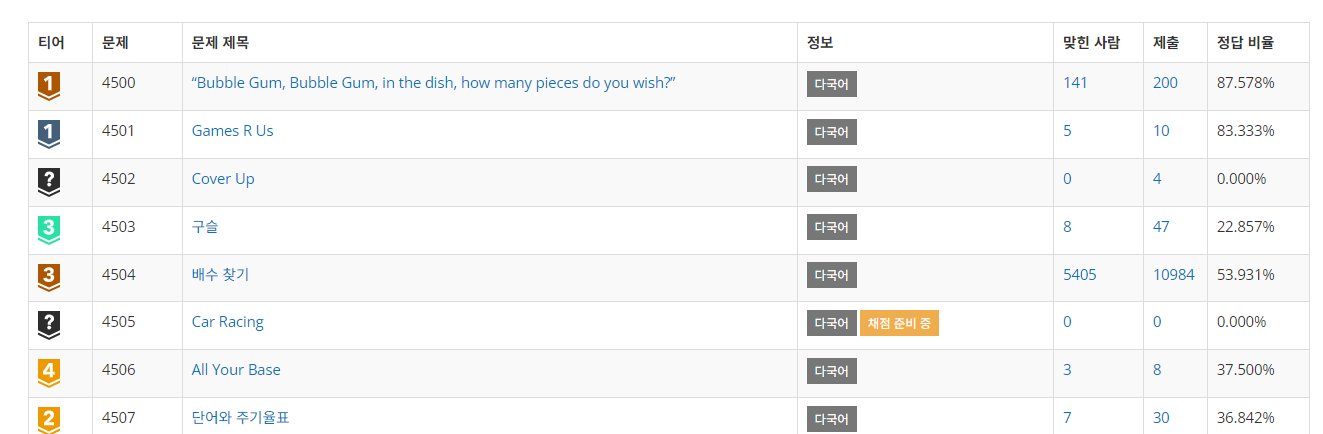
확장 프로그램으로 티어가 표시되는 백준 문제 테이블
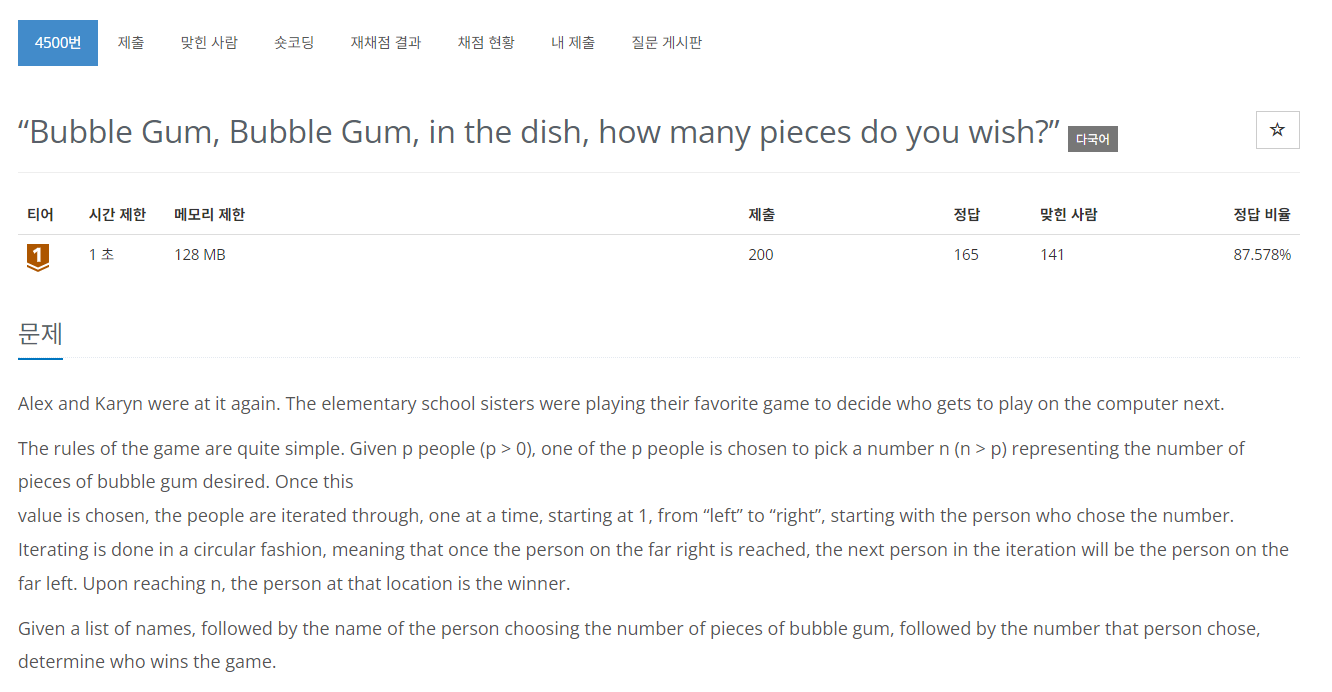
문제 페이지에도 정상적으로 티어가 표시된다.