[TIL] Recycler View Layout 바꾸기
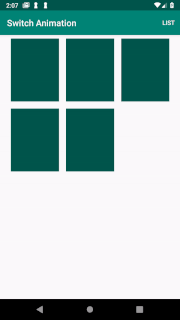
Recycler View Layout
리사이클러 뷰의 레이아웃을 관리해주는 Layout Manager는 크게 3가지가 있다.
LinearLayoutManager: 수평, 수직으로 뷰홀더들을 보여준다.GridLayoutManager: 격자 형식으로 뷰홀더들을 보여준다.StaggeredGridLayoutManager: 높이가 불규칙한 격자형식.
(반응형 매니저인 FlexBoxLayoutManager이 있지만 위의 세개가 많이 쓰인다)
Layout 변경하기
팀프로젝트를 진행하며 선택과제로 앱구동중 원하는 경우 레이아웃을 변경하는 과제를 구현해보았다.
특정 버튼을 클릭하면 레이아웃이 격자형과 리스트형으로 변경되도록 만들었다.

출처 - [Android] RecyclerView animated transition between Grid and List layouts.
- LayoutManager 등록
리사이클러 뷰를 생성한 뒤 레이아웃 매니저를 등록한다. 출처페이지의 경우 GridLayout Manager를 사용 spanCount를 이용해 레이아웃의 변경을 구현했기에 GridLayoutManager를 사용해 구현해보았다.
layoutManager = GridLayoutManager(context, 1)

with(binding.recyclerViewContact) {
	itemAnimator = null
    layoutManager = layoutManager
    adapter = listAdapter
}GridLayoutManager에 span count를 1로 지정하면 한라인에 생성되는 아이템이 1개뿐이기때문에 LinearLayoutManager를 사용한 것과 같이 구현이 가능하다.
초기에는 리스트 형태로 리사이클러 뷰를 생성해주고 버튼이 눌릴때 span count를 변경해 레이아웃을 변경하고, 어댑터를 다시 연결해준다.
with(layoutManager) {
	if (spanCount == 1) {
    	spanCount = 3
	} else {
    	spanCount = 1
	}
}
binding.recyclerViewContact.layoutManager = layoutManager
- 어댑터 뷰타입 설정하기
레이아웃을 변경할 준비가 끝나면 이제 레이아웃별로 다른 아이템이 출력되어야 하기 때문에 Adapter에서 뷰홀더를 생성하고 span count에 따라 다른 뷰홀더를 출력할 수 있도록 코드를 바꿔준다.
// 레이아웃 매니저를 생성자로 받아야 span conunt를 체크할 수 있다.
class ContactListAdapter(private val layoutManager: GridLayoutManager) :
    ListAdapter<ContactItems, RecyclerView.ViewHolder>(diffUtil) {

// 2가지 타입의 뷰홀더 준비 (리니어, 그리드)
    class ContentGridItemViewHolder(binding: ItemContactRecyclerViewGridBinding) :
    RecyclerView.ViewHolder(binding.root) { ... }

    class ContentsViewHolder(binding: ItemContactRecyclerViewBinding) :
    RecyclerView.ViewHolder(binding.root), ContactItemViewHolder { ... }

	.
    .
    .

// 뷰타입 생성시  span count에 따라 다른 뷰타입 생성
    override fun getItemViewType(position: Int): Int {
        val item = getItem(position)
        val span = layoutManager.spanCount

        if (item is ContactItems.Contents && span == 1) {
            return TYPE_CONTENT_LIST
        }

        if (item is ContactItems.Contents && span > 1) {
            return TYPE_CONTENT_GRID
        }
        throw IllegalArgumentException("Invaild span count")
    }

    // 뷰타입에 따라 리스트와 그리드 각각 뷰홀더를 생성한다.
	override fun onCreateViewHolder(
        parent: ViewGroup,
        viewType: Int
	): RecyclerView.ViewHolder {
        val inflater = LayoutInflater.from(parent.context)

        if (viewType == TYPE_CONTENT_LIST) {
            return ContentsViewHolder(ItemContactRecyclerViewBinding.inflate(inflater, parent,false))
        }

        if (viewType == TYPE_CONTENT_GRID) {
            return ContentGridItemViewHolder(ItemContactRecyclerViewGridBinding.inflate(inflater, parent, false))
        }
        throw IllegalArgumentException("Invalid view type")
    }

    //  뷰홀더에 내용을 구현 (인터페이스를 사용해 두 타입 모두 동시에 구현되도록 했다)
	override fun onBindViewHolder(holder: RecyclerView.ViewHolder, position: Int) {
	val item = getItem(position)

	if (item is ContactItems.Contents) { ... }
}
오늘은 어땟나요?

왜 자꾸 늦게자는거지...?
자야하는데....
못자겠어... 너무재미있다..

개발 첫걸음! 가보자구!