1️⃣ 의문점
1️⃣-1️⃣ 수정 전
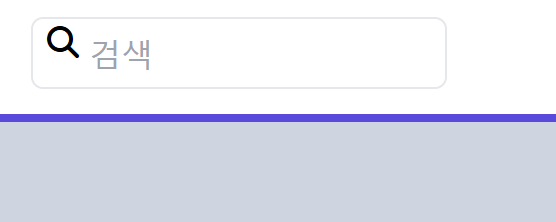
   <div class="relative">
        <span class="absolute inset-y-0 pl-2"> <i class="fa-solid fa-magnifying-glass mr-2"></i></span>
        <input class="pl-7 border focus:outline-none focus:border-indigo-600 rounded-md h-9 " type="text"
          placeholder="검색" />
      </div>
1️⃣-2️⃣ 수정 후
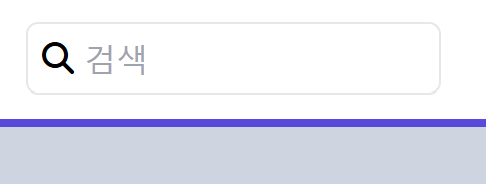
 <div class="relative">
          <span class="absolute flex items-center inset-y-0 pl-2"> <i
              class="fa-solid fa-magnifying-glass mr-2"></i></span>
          <input class="pl-7 border focus:outline-none focus:border-indigo-600 rounded-md h-9 " type="text"
            placeholder="검색" />
        </div>
1️⃣-3️⃣
인풋 창 안으로 돋보기 아이콘을 상하 가운데 정렬로 위치하게 하던 중 inset-y-0만으로 정렬이 되지 않아 items-center를 추가해주었다. 그러던 중 inset-y-0은 상하 여백을 0으로 만들어 가운데 정렬을 해주는 것으로 알고 있는데, 그렇다면 자연스럽게 아이템이 가운데 정렬이 되어야하지 않나라는 의문점이 생겼다.
2️⃣각 속성 정리
2️⃣-1️⃣ items-center
- Flexbox에서 사용되어 자식 요소들을 수직 방향(center)으로 정렬.
- items-center는 align-items: center; 역할
- 수직 축(Y축) 가운데 정렬
2️⃣-2️⃣ inset-y-0
- 절대 위치(absolute) 요소에서 상하 여백을 0으로 만드는 것.
- 부모는 relative여야 위치 기준이 된다.
- inset-y-0은 top: 0; bottom: 0;과 같다.
- 요소가 부모의 위쪽과 아래쪽에 딱 붙음.
- 요소의 높이를 자동으로 확장해서 부모 높이만큼 차지하게 됨.
3️⃣ 결론
inset-y-0은 top: 0, bottom: 0과 같다.
이건 부모 요소의 위와 아래에 아이콘 요소를 "늘려 붙인다"는 의미이다.
즉, 아이콘 요소의 높이가 부모 요소의 전체 높이와 같아진다는 것이지 가운데로 위치하게 하는 속성이 아니다.
결과:
→ 아이콘이 들어있는 span은 input과 똑같은 높이가 되지만,
→ 그 안에 있는 실제 아이콘는 여전히 위쪽에 붙어 있음
→ 왜? span 안의 정렬은 별도로 정의하지 않았기 때문
☑️
아이콘을 span 안에서 수직 가운데로 정렬하려면, 부모과 높이가 같아진 span을 flex items-center로 만들고, 그 안의 i를 수직 중앙 정렬해야 한다.

배우는 과정에 즐거움을 느끼고 있습니다.