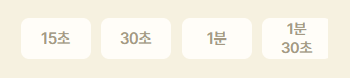
🚨 버튼을 가로로 두었을때, 화면의 가로 폭에 따라서 마지막 버튼의 텍스트가 두줄로 변경되서 나오는 문제(=버튼의 가로폭 줄어듬)
1️⃣ 문제
2️⃣ 시도
2️⃣-1️⃣ 가로 슬라이드바
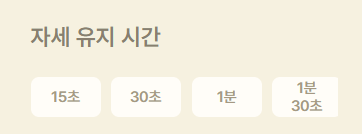
화면의 가로 폭이 줄어들었을때, 버튼의 크기가 줄어들지 않도록 가로 슬라이드 추가.
       import style from "./TimeMusicSelector.module.scss";
       import ShortButton from "../../buttons/shortbutton/ShortButton";

        <div className={style.time_container}>
          <h2>자세 유지 시간</h2>
          <div className={style.timebutton_container}>
            <ShortButton time="15초" />
            <ShortButton time="30초" />
            <ShortButton time="1분" />
            <ShortButton time="1분 30초" />
          </div>
        </div>
// ./TimeMusicSelector.module.scss
.timebutton_container {
padding: 20px 0px;
gap: 10px;
display: flex;
flex-direction: row;
overflow-x: auto;
scroll-snap-type: x mandatory;
}import style from './ShortButton.module.scss';
interface ShortButtonProps{
time : string;
}
function ShortButton({time}:ShortButtonProps) {
return (
<div className={style.shortbutton_container}>
<button className={style.shorthbutton}>
{time}
</button>
</div>
)
}
export default ShortButton
// ./ShortButton.module.scss
.shortbutton_container{

    .shorthbutton{
        height: 40px;
        flex-shrink: 0;
        min-width: 70px;
        padding: 0px 17px;

        @include background-color($color-1);

        border-radius: 8px;
        border: none;

        display: flex;
        align-items: center;
        justify-content: center;

        @include text-color($color-5);
        font-size: 15px;
        font-weight: 500;
    }
}
🔴 가로 슬라이드는 생겼으나 여전히 마지막 버튼의 텍스트가 두 줄로 나옴. 버튼에 flex-shrink: 0; 속성을 주었는데, 왜 줄어드는 건지 확인이 필요하다.
2️⃣-2️⃣ flex-shrink는 display:flex에서 가능하다.
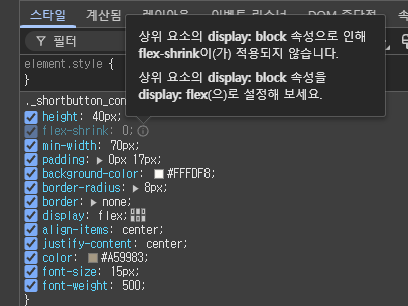
🟢flex-shrink: 0;는 flexbox의 특성으로, 자식 요소가 부모 컨테이너의 크기보다 커지지 않도록, 또는 줄어들지 않도록 설정하는 것으로 flex 레이아웃 내에서 사용이 가능하다.즉, shortbutton_container 가 display:flex 여야 자식인 shorthbutton에 flex-shrink 설정이 유효하다.
3️⃣ 최종
다른 코드들을 동일, 아래 코드만 수정하였다.
.shortbutton_container{
    display: flex;
    .shorthbutton{
        height: 40px;
        flex-shrink: 0;
        min-width: 70px;
        padding: 0px 17px;

        @include background-color($color-1);

        border-radius: 8px;
        border: none;

        display: flex;
        align-items: center;
        justify-content: center;

        @include text-color($color-5);
        font-size: 15px;
        font-weight: 500;
    }
}
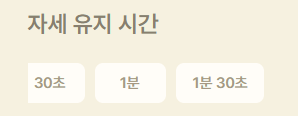
☑️결과
모든 버튼이 가로 폭이 줄어들어도 가로 길이를 일정하게 유지하는 것을 확인할 수 있다.

배우는 과정에 즐거움을 느끼고 있습니다.