day03
📌 session
- 하나의 웹 브라우저의 정보를 유지하기 위한
세션 정보를 저장
(브라우저 종료 시 종료, 클라이언트 로그인 정보)- 내장객체로서 브라우저마다 한 개씩 존재하고,
고유한 sessionID 생성 후 정보를 추출한다.
📢 장점
서버에서 접근할 수 있기 때문에
보안성이 좋고, 저장 용량의 한계
거의 없다.
📢 단점
서버에 부하가 걸릴수있다.
📢 session 사용하기
- 세션값 설정
session.setAttribute("설정이름",값);
- 세션 유지시간 설정하기(초 단위)
// 60분동안 저장
session.setMaxInactiveInterval(60*60);
// 무한대로 설정
session.setMaxInactiveInterval(-1);
- 세션에 저장된 값 가져오기
session.getAttribute("설정이름");
- 세션삭제
session.removeAttribute("설정이름")
// 세션 전체 제거
session.invalidate();
📢 session 예시
MyServlet.java
package com.codingbox.servlet;

import java.io.IOException;
import java.io.PrintWriter;

import javax.servlet.ServletContext;
import javax.servlet.ServletException;
import javax.servlet.annotation.WebServlet;
import javax.servlet.http.HttpServlet;
import javax.servlet.http.HttpServletRequest;
import javax.servlet.http.HttpServletResponse;
import javax.servlet.http.HttpSession;

@WebServlet("/calc")
public class MyServlet extends HttpServlet{
	@Override
	protected void service(HttpServletRequest arg0,
			HttpServletResponse arg1) throws ServletException, IOException {

		// session
		HttpSession session = arg0.getSession();

		// application 저장소 선언
//		ServletContext application
//					= arg0.getServletContext();

		String value_ = arg0.getParameter("value");
		String op = arg0.getParameter("operator");

		PrintWriter out = arg1.getWriter();
		int value = 0;

		if(!value_.equals("")) {
			value = Integer.parseInt(value_);
				}

				if( op.equals("=") ) {
					// 계산
					//int x = (Integer)application.getAttribute("value");
					int x = (Integer)session.getAttribute("value");
					int y = value;
					//String operator = (String)application.getAttribute("op");
					String operator = (String)session.getAttribute("op");

					int result = 0;

					if(operator.equals("+")) {
						result = x + y;
					} else {
						result = x - y;
					}

					out.printf("결과값 : %d", result);
				} else {
					// application 값 저장
//					application.setAttribute("value", value);
//					application.setAttribute("op", op);

					session.setAttribute("value", value);
					session.setAttribute("op", op);
				}
	}

}
calc.html
<!DOCTYPE html>
<html>
<head>
<meta charset="UTF-8">
<title>Insert title here</title>
</head>
<body>
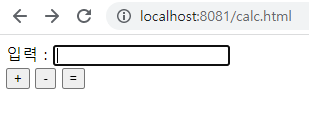
	<form action="calc" method="post">
		<div>
			<label>입력 : </label>
			<input type="text" name="value">
		</div>
		<div>
			<input type="submit" name="operator" value="+">
			<input type="submit" name="operator" value="-">
			<input type="submit" name="operator" value="=">
		</div>
	</form>
</body>
</html>
결과값
📌 쿠키(cookie)
- 웹 브라우저가 보관하고 있는 데이터로, 웹 서버에
요청을 보낼 때 쿠키를 헤더에 담아서 전송한다.
📢 장점
- 클라이언트의 일정 폴더에 정보를 저장하기 떄문에
서버의 부하를 줄일 수 있다.
📢 단점
- 정보가 사용자 컴퓨터에 저장되기 때문에
보안에 위협을 받을 수 있다.- 데이터 저장 용량에 제한이 있다.
- 과자 브스러기처럼 작은 값을 저장할 수 있다.
- 일반 사용자가 브라우저 내의 기능인 "쿠키차단"
을 사용하면 무용지물
MyServlet2.java
package com.codingbox.servlet;

import java.io.IOException;
import java.io.PrintWriter;

import javax.servlet.ServletContext;
import javax.servlet.ServletException;
import javax.servlet.annotation.WebServlet;
import javax.servlet.http.Cookie;
import javax.servlet.http.HttpServlet;
import javax.servlet.http.HttpServletRequest;
import javax.servlet.http.HttpServletResponse;
import javax.servlet.http.HttpSession;

@WebServlet("/calc2")
public class MyServlet2 extends HttpServlet {

	@Override
	protected void service(HttpServletRequest arg0, HttpServletResponse arg1) throws ServletException, IOException {

		//session


		// cookie
		Cookie[] cookies = arg0.getCookies();

		String value_ = arg0.getParameter("value");
		String op = arg0.getParameter("operator");

		PrintWriter out = arg1.getWriter();
		int value = 0;

		if(!value_.equals("")) {
			 value = Integer.parseInt(value_);
		}

		if( op.equals("=") ) {
			//int x = (Integer)application.getAttribute("value");
			//int x = (Integer)session.getAttribute("value");

			int x = 0;
//			Cookie c = cookies[0];
//			if (c.getName().equals("value")) {
//				x = Integer.parseInt(c.getValue());
//			}

			for ( Cookie c : cookies) {
				if(c.getName().equals("value")) {
					x = Integer.parseInt(c.getValue());
					break;
				}
			}

			int y = value;

			//String operator = (String)application.getAttribute("op");
			//String operator = (String)session.getAttribute("op");

			String operator = "";
			for( Cookie c : cookies) {
				if(c.getName().equals("op")) {
					operator = c.getValue();
					break;
				}
			}

			int result = 0;

			if(operator.equals("+")) {
				result = x + y;
			} else {
				result = x - y;
			}

			out.printf("결과값 : %d", result);
		} else {
			// application 값 저장
//			application.setAttribute("value", value);
//			application.setAttribute("op", op);

//			session.setAttribute("value", value);
//			session.setAttribute("op", op);

			// cookie로 저장, 저장시 문자열 형태만 사용
			Cookie valueCookie = new Cookie("value", String.valueOf(value));
			Cookie opCookie = new Cookie("op", op);
			// 사용자에게 cookie 전달
			arg1.addCookie(valueCookie);
			arg1.addCookie(opCookie);
		}

	}
}
calc2.html
<!DOCTYPE html>
<html>
<head>
<meta charset="UTF-8">
<title>Insert title here</title>
</head>
<body>
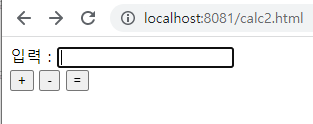
	<form action="calc2" method="post">
		<div>
			<label>입력 : </label>
			<input type="text" name="value">
		</div>
		<div>
			<input type="submit" name="operator" value="+">
			<input type="submit" name="operator" value="-">
			<input type="submit" name="operator" value="=">
		</div>
	</form>
</body>
</html>
결과값
📌 쿠키 vs 세션
- 쿠키
-> 클라이언트(=접속자 PC)에 저장
-> 저장형식 : text
-> 만료시점 : 쿠키 저장시 설정
-> 사용자원 : 클라이언트 리소스
-> 용량제한 : 총 300개
-> 속도 : 세션보다는 빠름
-> 보안 : 세션보다는 안좋음
- 세션
-> 웹 서버에 저장
-> 저장형식 : Object
-> 만료시점 : 브라우저 종료시 삭제
-> 사용자원 : 웹 서버 리소스
-> 용량제한 : 서버가 허용하는 용량제한
-> 속도 : 쿠키보다는 느림
-> 보안 : 쿠키보다 좋음
📌 계산기
package com.codingbox.servlet;

import java.io.IOException;
import java.io.PrintWriter;

import javax.servlet.ServletException;
import javax.servlet.annotation.WebServlet;
import javax.servlet.http.HttpServlet;
import javax.servlet.http.HttpServletRequest;
import javax.servlet.http.HttpServletResponse;

@WebServlet("/calc3")
public class MyServlet3 extends HttpServlet {

	@Override
	protected void service(HttpServletRequest arg0,
			HttpServletResponse arg1) throws ServletException, IOException {

		PrintWriter out = arg1.getWriter();

		out.write("<!DOCTYPE html>");
		out.write("<html>");
		out.write("<head>");
		out.write("<meta charset=\"UTF-8\">");
		out.write("<title>Insert title here</title>");
		out.write("<style>");
		out.write("input {");
		out.write("width: 50px;");
		out.write("height: 50px;");
		out.write("}");
		out.write(".output{ ");
		out.write("height: 50px;");
		out.write("background: #e9e9e9;");
		out.write("font-size: 24px;");
		out.write("font-weight: bold;");
		out.write("text-align: right;");
		out.write("padding: 0px 5px;");
		out.write("}");
		out.write("</style>");
		out.write("</head>");
		out.write("<body>");
		out.write("	<form action=\"calcPage\" method=\"post\">");
		out.write("		<table>");
		out.write("			<tr>");
//		out.write("				<td class=\"output\" colspan=\"4\">0</td>");
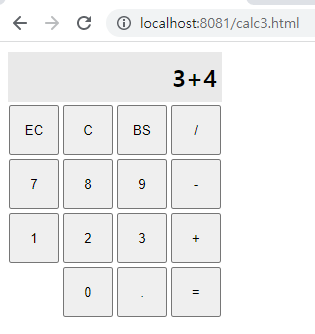
		out.printf("				<td class=\"output\" colspan=\"4\">%s</td>",3+4);
		out.write("			</tr>");
		out.write("			<tr>");
		out.write("				<td><input type=\"submit\" name=\"operator\" value=\"CE\"></td>");
		out.write("				<td><input type=\"submit\" name=\"operator\" value=\"C\"></td>");
		out.write("				<td><input type=\"submit\" name=\"operator\" value=\"BS\"></td>");
		out.write("				<td><input type=\"submit\" name=\"operator\" value=\"/\"></td>");
		out.write("			</tr>");
		out.write("			<tr>");
		out.write("				<td><input type=\"submit\" name=\"value\" value=\"7\"></td>");
		out.write("				<td><input type=\"submit\" name=\"value\" value=\"8\"></td>");
		out.write("				<td><input type=\"submit\" name=\"value\" value=\"9\"></td>");
		out.write("				<td><input type=\"submit\" name=\"operator\" value=\"-\"></td>");
		out.write("			</tr>");
		out.write("			<tr>");
		out.write("				<td><input type=\"submit\" name=\"value\" value=\"4\"></td>");
		out.write("				<td><input type=\"submit\" name=\"value\" value=\"5\"></td>");
		out.write("				<td><input type=\"submit\" name=\"value\" value=\"6\"></td>");
		out.write("				<td><input type=\"submit\" name=\"operator\" value=\"*\"></td>");
		out.write("			</tr>");
		out.write("			<tr>");
		out.write("				<td><input type=\"submit\" name=\"value\" value=\"1\"></td>");
		out.write("				<td><input type=\"submit\" name=\"value\" value=\"2\"></td>");
		out.write("				<td><input type=\"submit\" name=\"value\" value=\"3\"></td>");
		out.write("				<td><input type=\"submit\" name=\"operator\" value=\"+\"></td>");
		out.write("			</tr>");
		out.write("			<tr>");
		out.write("				<td></td>");
		out.write("				<td><input type=\"submit\" name=\"value\" value=\"0\"></td>");
		out.write("				<td><input type=\"submit\" name=\"dot\" value=\".\"></td>");
		out.write("				<td><input type=\"submit\" name=\"operator\" value=\"=\"></td>");
		out.write("			</tr>");
		out.write("		</table>");
		out.write("	</form>");
		out.write("</body>");
		out.write("</html>");


	}
}
calc.html
<!DOCTYPE html>
<html>
<head>
<meta charset="UTF-8">
<title>Insert title here</title>
<style>
	input {
		width: 50px;
		height: 50px;
	}
	.output{
		height: 50px;
		background: #e9e9e9;
		font-size: 24px;
		font-weight: bold;
		text-align: right;
		padding: 0px 5px;
	}

</style>
</head>
<body>
	<form action="calc3" method="post">
		<table>
			<tr>
				<td class="output"colspan="4">3+4</td>
			</tr>
			<tr>
				<td><input type="submit" name="operator" value="EC" /> </td>
				<td><input type="submit" name="operator" value="C" /> </td>
				<td><input type="submit" name="operator" value="BS" /> </td>
				<td><input type="submit" name="operator" value="/" /> </td>
			</tr>
			<tr>
				<td><input type="submit" name="value" value="7" /> </td>
				<td><input type="submit" name="value" value="8" /> </td>
				<td><input type="submit" name="value" value="9" /> </td>
				<td><input type="submit" name="operator" value="-" /> </td>
			</tr>
			<tr>
				<td><input type="submit" name="value" value="1" /> </td>
				<td><input type="submit" name="value" value="2" /> </td>
				<td><input type="submit" name="value" value="3" /> </td>
				<td><input type="submit" name="operator" value="+" /> </td>
			</tr>
			<tr>
				<td></td>
				<td><input type="submit" name="value" value="0" /> </td>
				<td><input type="submit" name="dot" value="." /> </td>
				<td><input type="submit" name="operator" value="=" /> </td>
			</tr>
		</table>
	</form>

</body>
</html>
결과값
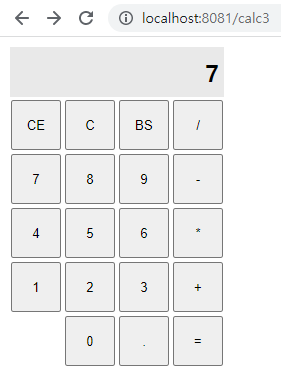
기본출력
= q버튼 클릭시

⭐️내가만든쿠키⭐️