🍧코드 구성
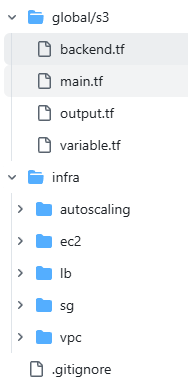
🍧버킷 만들고 백앤드 지정
global/s3/backend.tf
- AWS 프로바이더를 쓰고, Terraform 상태파일(.tfstate)을 S3에 보관하면서 DynamoDB로 락을 거는 설정
- 해당 S3 버킷/ DynamoDB 테이블이 실제로 존재해야 함
terraform {
  required_providers {
    aws = {
      source = "hashicorp/aws"
    }
  }
  ## 백앤드 지정 - tfstate를 저장하는 원격 저장소
  backend "s3" {
    bucket         = "user00-terraform-state"
    key            = "global/s3/terraform.tfstate"
    region         = "ap-northeast-2"
    dynamodb_table = "user00-terraform-locks"
    encrypt        = true
  }
}
1. 백엔드 지정하는 백엔드 블록 주석 하고 init, apply 해서 버킷 만들기
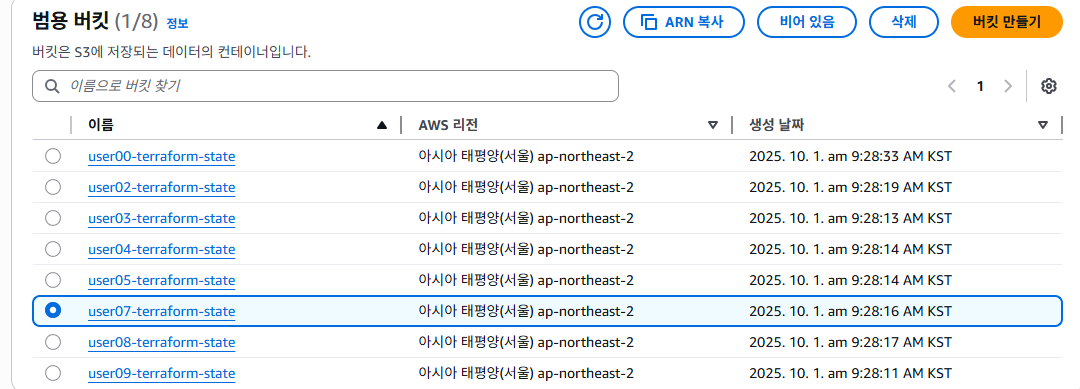
2. 주석 해제하고 init, apply
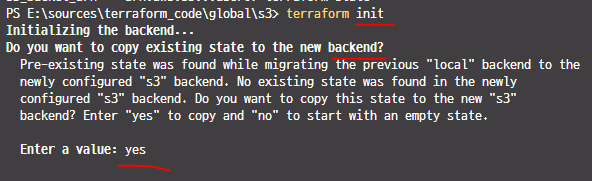
- init 할 때 백엔드를 사용할껀지 물어본다.
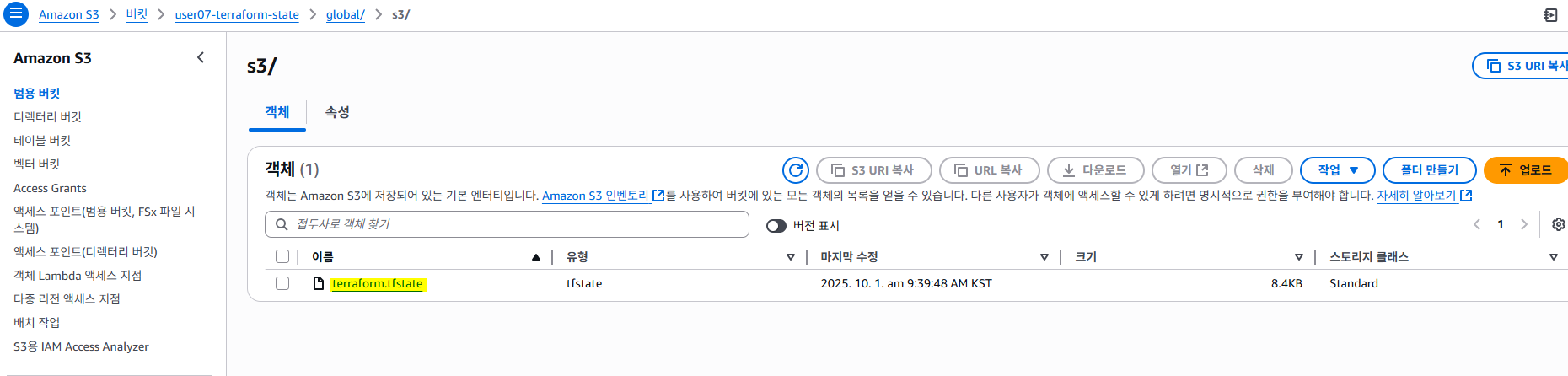
- 버킷 들어와서 새로고침하고 확인
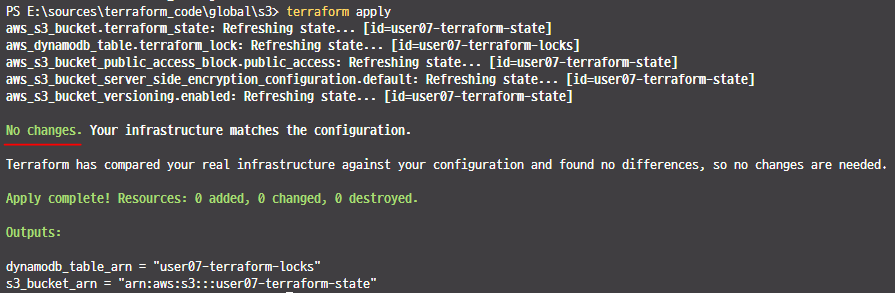
- apply 하면 No changes
- tfstate를 저장하는 토대를 만든것
global/s3/main.tf
- S3 버킷: .tfstate 보관 + 버전관리 + 서버측 암호화 + 퍼블릭 접근 차단
- DynamoDB 테이블: 상태 락(동시 실행 방지) 용
provider "aws" {
  region = var.region # AWS 작업 리전을 변수로 받음
}

## 버킷 생성
resource "aws_s3_bucket" "terraform_state" {
  bucket        = "${var.prefix}-terraform-state" # S3 버킷 이름이 전 세계에서 유일
  force_destroy = true # 버킷 안에 객체가 남아 있어도 파괴 시 강제 삭제, 편리하지만 실수로 destroy 하면 상태 히스토리가 통째로 지워짐
}

## 상태 파일의 전체 리비전 기록을 볼 수 있도록 버전 지정
resource "aws_s3_bucket_versioning" "enabled" {
  bucket = aws_s3_bucket.terraform_state.id
  versioning_configuration {
    status = "Enabled"
  }
}

## 기본적으로 서버측 암호화 활성화
## 민감값이 state에 들어갈 수 있으므로 필수
resource "aws_s3_bucket_server_side_encryption_configuration" "default" {
  bucket = aws_s3_bucket.terraform_state.id
  rule {
    apply_server_side_encryption_by_default {
      sse_algorithm = "AES256"
    }
  }
}

## S3 버킷에 대한 공용 액세스 차단
## 퍼블릭 정책/ACL을 전부 차단해서 실수 노출 방지
resource "aws_s3_bucket_public_access_block" "public_access" {
  bucket                  = aws_s3_bucket.terraform_state.id
  block_public_acls       = true
  block_public_policy     = true
  ignore_public_acls      = true
  restrict_public_buckets = true
}

## DynamoDB 테이블 생성
## Terraform이 상태를 쓸 때 동시에 두 번 apply 되는 것을 방지하는 락 레코드를 저장
resource "aws_dynamodb_table" "terraform_locks" {
  name         = "${var.prefix}-terraform-locks"
  billing_mode = "PAY_PER_REQUEST"
  hash_key     = "LockID"
  attribute {
    name = "LockID"
    type = "S"
  }
}
global/s3/output.tf
output은 다른 스택에서 terraform_remote_state로 가져다 쓴다.
## S3 버킷의 ARN(예: arn:aws:s3:::user00-terraform-state)을 출력
output "s3_bucket_arn" {
  value       = aws_s3_bucket.terraform_state.arn
  description = "The ARN of the S3 bucket"
}

## DynamoDB 락 테이블의 이름(예: user00-terraform-locks)을 출력
output "dynamodb_table_name" {
  value       = aws_dynamodb_table.terraform_locks.name
  description = "The name of the DynamoDB table"
}
global/s3/variable.tf
variable "region" {
  description = "The AWS region to create resources in"
  type        = string
  default     = "ap-northeast-2"
}
variable "prefix" {
  description = "The name of the prefix for resources"
  type        = string
  default     = "user00"
}
## 이미 리소스에서 테이블 이름을 ${var.prefix}-terraform-locks처럼 prefix로부터 일관되게 생성하고 있어서 주석처리 한듯
## table_name 변수를 별도로 두면 둘 중 하나만 바뀌는 불일치(예: prefix는 user00인데 table_name은 다른 값)
# variable "table_name" {
#   description = "The name of the DynamoDB table"
#   type        = string
#   default = "user00-terraform-locks"
# }
🍧VPC 만들기
backend.tf
terraform {
  required_providers {
    aws = {
      source = "hashicorp/aws"
    }
  }
  backend "s3" {
    bucket         = "user00-terraform-state"
    key            = "infra/vpc/terraform.tfstate" # 키값(위치) 확인
    region         = "ap-northeast-2"
    dynamodb_table = "user00-terraform-locks"
    encrypt        = true
  }
}
backend에서는 변수 사용 못함
main.tf
2개 AZ에 퍼블릭/프라이빗 서브넷을 가진 VPC를 만들고, IGW + NAT 게이트웨이로 인터넷 라우팅을 구성하는 내용
- VPC 1개
- 퍼블릭 서브넷 2개(각 AZ 1개씩) → IGW로 인터넷 나감
- 프라이빗 서브넷 2개(각 AZ 1개씩) → NAT GW 통해 아웃바운드만 인터넷 나감
- 라우트 테이블 2개: 퍼블릭용(IGW), 프라이빗용(NAT GW)
- 퍼블릭: 서브넷 → 퍼블릭 RT → IGW → 인터넷(양방향)
- 프라이빗: 서브넷 → 프라이빗 RT → NAT GW → 인터넷(아웃바운드만)
// VPC 생성
// var.cidr_block 대역(예: 10.0.0.0/16)으로 VPC 하나 생성
resource "aws_vpc" "vpc" {
  cidr_block = var.cidr_block

  tags = {
    Name = "${var.prefix}-vpc"
  }
}

// subnet 생성
// 각 AZ에 퍼블릭 1개, 프라이빗 1개씩 총 4개
// 퍼블릭/프라이빗을 이름과 라우팅으로 구분(아래 라우트 테이블에서 결정)
resource "aws_subnet" "public01" {
  vpc_id            = aws_vpc.vpc.id
  cidr_block        = var.public_subnet_cidr[0]
  availability_zone = var.azs[0]

  tags = {
    Name = "${var.prefix}-public01"
  }
}
resource "aws_subnet" "public02" {
  vpc_id            = aws_vpc.vpc.id
  cidr_block        = var.public_subnet_cidr[1]
  availability_zone = var.azs[1]

  tags = {
    Name = "${var.prefix}-public02"
  }
}
resource "aws_subnet" "private01" {
  vpc_id            = aws_vpc.vpc.id
  cidr_block        = var.private_subnet_cidr[0]
  availability_zone = var.azs[0]

  tags = {
    Name = "${var.prefix}-private01"
  }
}
resource "aws_subnet" "private02" {
  vpc_id            = aws_vpc.vpc.id
  cidr_block        = var.private_subnet_cidr[1]
  availability_zone = var.azs[1]

  tags = {
    Name = "${var.prefix}-private02"
  }
}

// Internet Gateway 생성
// 퍼블릭 서브넷이 인터넷으로 나가는 관문
resource "aws_internet_gateway" "igw" {
  vpc_id = aws_vpc.vpc.id

  tags = {
    Name = "${var.prefix}-igw"
  }
}

// EIP 생성
// NAT 게이트웨이는 퍼블릭 서브넷에 배치하고 EIP를 붙임
resource "aws_eip" "eip" {
  domain = "vpc"
  #depends_on = [ "aws_internet_gateway.user00-igw" ]
  lifecycle {
    create_before_destroy = true
  }
  tags = {
    Name = "${var.prefix}-eip"
  }
}
// NAT Gateway 생성
resource "aws_nat_gateway" "nat-gw" {
  allocation_id = aws_eip.eip.id
  subnet_id     = aws_subnet.public01.id     // NAT는 "퍼블릭" 서브넷에 둔다
  depends_on    = ["aws_internet_gateway.igw"]
  tags = {
    Name = "${var.prefix}-nat-gw"
  }
}

// Public Route Table 생성
// VPC가 자동으로 만든 기본 RT를 가져와 IGW로 기본 경로(0.0.0.0/0) 추가 → 퍼블릭용으로 사용
resource "aws_default_route_table" "public-rt" {
  default_route_table_id = aws_vpc.vpc.default_route_table_id

  route {
    cidr_block = "0.0.0.0/0"
    gateway_id = aws_internet_gateway.igw.id
  }
  tags = {
    Name = "${var.prefix}-public-rt"
  }
}

// Public Subnet 과 Route Table 연결
// 퍼블릭 서브넷 2개를 이 RT에 연결(association)
resource "aws_route_table_association" "public01-rt-assoc" {
  subnet_id      = aws_subnet.public01.id
  route_table_id = aws_default_route_table.public-rt.id
}
resource "aws_route_table_association" "public02-rt-assoc" {
  subnet_id      = aws_subnet.public02.id
  route_table_id = aws_default_route_table.public-rt.id
}

// Private Route Table 생성
// 프라이빗용 RT를 새로 만들고, 기본 경로를 NAT GW로 설정
resource "aws_route_table" "private-rt" {
  vpc_id = aws_vpc.vpc.id

  route {
    cidr_block     = "0.0.0.0/0"
    nat_gateway_id = aws_nat_gateway.nat-gw.id
  }
  tags = {
    Name = "${var.prefix}-private-rt"
  }
}

// Private subnet 과 Private Route Table 연결
// 프라이빗 서브넷 2개를 이 RT에 연결
resource "aws_route_table_association" "private01-rt-assoc" {
  subnet_id      = aws_subnet.private01.id
  route_table_id = aws_route_table.private-rt.id
}
resource "aws_route_table_association" "private02-rt-assoc" {
  subnet_id      = aws_subnet.private02.id
  route_table_id = aws_route_table.private-rt.id
}
output.tf
output "vpc_id" {
  value = aws_vpc.vpc.id
}
output "public01_id" {
  value = aws_subnet.public01.id
}
output "public02_id" {
  value = aws_subnet.public02.id
}
output "private01_id" {
  value = aws_subnet.private01.id
}
output "private02_id" {
  value = aws_subnet.private02.id
}
다른데서 가져다 쓸 리소스들을 output.tf에 설정해줘야한다.
ex.) vpc id, subnet id 등
provider.tf
provider "aws" {
  region = var.region
}
vars.tf
variable "region" {
  type    = string
  default = "ap-northeast-2"
}

variable "cidr_block" {
  type    = string
  default = "10.0.0.0/16"
}

variable "public_subnet_cidr" {
  type    = list(any)
  default = ["10.0.0.0/20", "10.0.16.0/20"]
}
variable "private_subnet_cidr" {
  type    = list(any)
  default = ["10.0.64.0/20", "10.0.80.0/20"]
}

variable "azs" {
  type    = list(any)
  default = ["ap-northeast-2a", "ap-northeast-2c"]
}

variable "prefix" {
  type    = string
  default = "user00"
}- init 후 apply
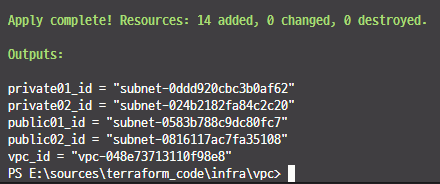
- vpc, subnet, 탄력적 IP주소, NAT 게이트웨이 등 만들어진것 확인
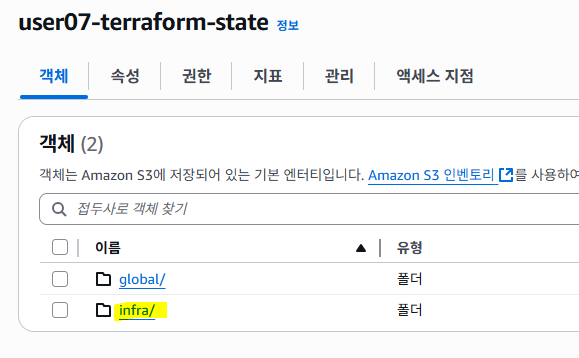
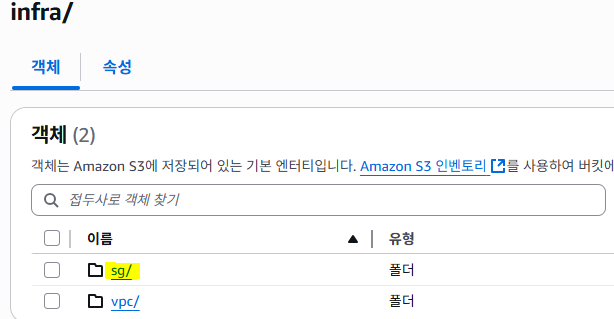
- 버킷에 infra 생긴것 확인
🍧보안그룹(sg) 만들기
ssh-accept를 vpc에 지정 ==> vpc id 필요, vpc id를 sg로 가져와야함
backend.tf
terraform {
  required_providers {
    aws = {
      source = "hashicorp/aws"
    }
  }
  backend "s3" {
    bucket         = "user00-terraform-state"
    key            = "infra/sg/terraform.tfstate"
    region         = "ap-northeast-2"
    dynamodb_table = "user00-terraform-locks"
    encrypt        = true
  }
}
main.tf
- VPC 안에서 3개의 보안그룹(SG) 을 만들고 각각 SSH(22), HTTP(80), HTTPS(443) 인바운드를 열어주는 선언
- 모든 SG는 같은 VPC(원격 스테이트 data.terraform_remote_state.vpc.outputs.vpc_id)에 설치
- 각각 인바운드:
- ssh-accept: 22/tcp 를 0.0.0.0/0(전세계)에서 허용
- http-accept: 80/tcp 를 전세계에서 허용
- https-accept: 443/tcp 를 전세계에서 허용
- 아웃바운드(egress)는 세 개 모두 모든 트래픽 허용(일반적인 기본값)
- 태그 Name 붙여서 콘솔에서 구분 쉽게
// SSH 보안그룹
resource "aws_security_group" "ssh-accept" {
  name        = "${var.prefix}-ssh-accept"
  description = "Security group to allow SSH access"
  vpc_id      = data.terraform_remote_state.vpc.outputs.vpc_id

  ingress {
    description = "SSH from anywhere"
    from_port   = 22
    to_port     = 22
    protocol    = "tcp"
    cidr_blocks = ["0.0.0.0/0"] // 실습이 아니면 반드시 고정 IP(집/회사 CIDR)로 제한하거나, 배스천/SSM 사용을 권장
  }
  egress {
    description = "Allow all outbound traffic"
    from_port   = 0
    to_port     = 0
    protocol    = "-1"
    cidr_blocks = ["0.0.0.0/0"]
  }
  tags = {
    Name = "${var.prefix}-ssh-accept"
  }
}

// HTTP 보안그룹
resource "aws_security_group" "http-accept" {
  name        = "${var.prefix}-http-accept"
  description = "Security group to allow HTTP access"
  vpc_id      = data.terraform_remote_state.vpc.outputs.vpc_id

  ingress {
    description = "HTTP from anywhere"
    from_port   = 80
    to_port     = 80
    protocol    = "tcp"
    cidr_blocks = ["0.0.0.0/0"]
  }
  egress {
    description = "Allow all outbound traffic"
    from_port   = 0
    to_port     = 0
    protocol    = "-1"
    cidr_blocks = ["0.0.0.0/0"]
  }
  tags = {
    Name = "${var.prefix}-http-accept"
  }
}

// HTTPS 보안그룹
resource "aws_security_group" "https-accept" {
  name        = "${var.prefix}-https-accept"
  description = "Security group to allow HTTPS access"
  vpc_id      = data.terraform_remote_state.vpc.outputs.vpc_id

  ingress {
    description = "HTTPS from anywhere"
    from_port   = 443
    to_port     = 443
    protocol    = "tcp"
    cidr_blocks = ["0.0.0.0/0"]
  }
  egress {
    description = "Allow all outbound traffic"
    from_port   = 0
    to_port     = 0
    protocol    = "-1"
    cidr_blocks = ["0.0.0.0/0"]
  }
  tags = {
    Name = "${var.prefix}-https-accept"
  }
}
output.tf
output "ssh_sg_id" {
  value = aws_security_group.ssh-accept.id
}
output "http_sg_id" {
  value = aws_security_group.http-accept.id
}
output "https_sg_id" {
  value = aws_security_group.https-accept.id
}
provider.tf
provider "aws" {
  region = var.region
}
remote.tf
- 다른 스택에서 만든 VPC의 상태(출력값)를 가져오는 연결선
- 목적: SG 스택에서 VPC 스택의 출력값(예: vpc_id, 서브넷 ID)을 읽어와 재사용하려고 쓰는 데이터 소스
data "terraform_remote_state" "vpc" {
  backend = "s3"
  config = {
    bucket = "${var.prefix}-terraform-state" # 원격 상태가 저장된 S3 버킷
    key    = "infra/vpc/terraform.tfstate"   # 그 버킷 안의 경로/파일명
    region = "ap-northeast-2"      # 버킷 리전
  }
}
terraform_remote_state는 원격지(여기서는 vpc)의 state를 쓰겠다고 지정
vars.tf
variable "region" {
  type    = string
  default = "ap-northeast-2"
}
variable "prefix" {
  type    = string
  default = "user00"
}- init 후 apply
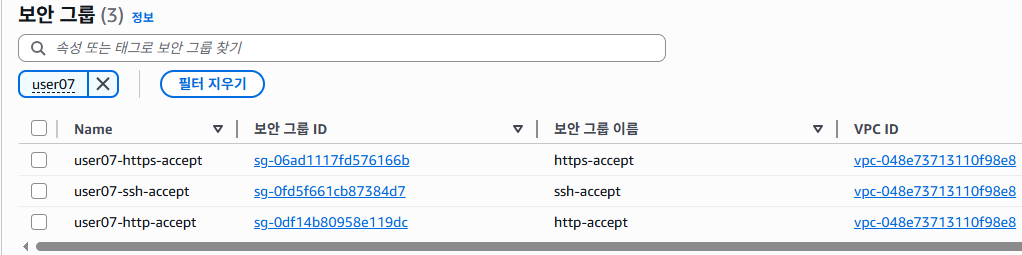
🍧bastion 만들기
infra/ec2/bastion/backend.tf
terraform {
  required_providers {
    aws = {
      source = "hashicorp/aws"
    }
  }
  backend "s3" {
    bucket         = "user00-terraform-state"
    key            = "infra/ec2/bastion/terraform.tfstate"
    region         = "ap-northeast-2"
    dynamodb_table = "user00-terraform-locks"
    encrypt        = true
  }
}
infra/ec2/bastion/data.tf
// Ubuntu 22.04 AMI
data "aws_ami" "ubuntu" {
  most_recent = true
  owners      = ["099720109477"] // Canonical

  filter {
    name   = "name"
    values = ["ubuntu/images/hvm-ssd/ubuntu-jammy-22.04-amd64-server-*"]
  }

  filter {
    name   = "virtualization-type"
    values = ["hvm"]
  }
}| 구분 | var | data |
|---|---|---|
| 값 출처 | 사용자/환경 | 클라우드/API/다른 스택 |
| 성격 | 입력 파라미터 | 읽기 전용 조회 결과 |
| 시점 | plan 전에 이미 앎 | plan 때 API로 가져옴 |
| 예 | var.region, var.prefix | data.aws_ami.ubuntu.id,data.terraform_remote_state.vpc.outputs.vpc_id |
var = 내가 넣는 값, data = 밖에서 가져오는 값
infra/ec2/bastion/main.tf
// Basten Server 구축
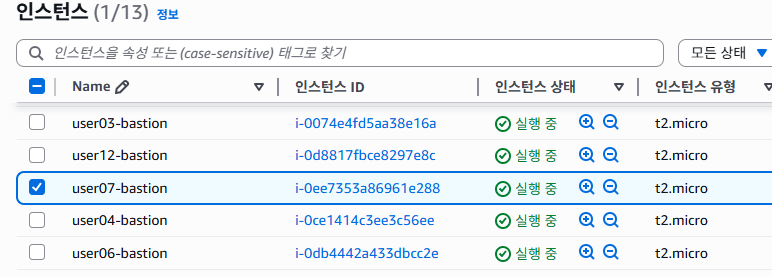
resource "aws_instance" "bastion" {
  ami                         = data.aws_ami.ubuntu.id
  instance_type               = var.instance_type
  subnet_id                   = data.terraform_remote_state.vpc.outputs.public02_id
  vpc_security_group_ids      = [data.terraform_remote_state.sg.outputs.ssh_sg_id]
  key_name                    = var.key_name
  associate_public_ip_address = true
  tags = {
    Name = "${var.prefix}-bastion"
  }
}
infra/ec2/bastion
/output.tf
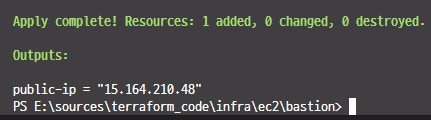
output "public-ip" {
  value = aws_instance.bastion.public_ip
}
infra/ec2/bastion/provider.tf
provider "aws" {
  region = var.region
}
infra/ec2/bastion/remote.tf
data "terraform_remote_state" "vpc" {
  backend = "s3"
  config = {
    bucket = "${var.prefix}-terraform-state"
    key    = "infra/vpc/terraform.tfstate"
    region = "ap-northeast-2"
  }
}
data "terraform_remote_state" "sg" {
  backend = "s3"
  config = {
    bucket = "${var.prefix}-terraform-state"
    key    = "infra/sg/terraform.tfstate"
    region = "ap-northeast-2"
  }
}
infra/ec2/bastion/vars.tf
variable "region" {
  type    = string
  default = "ap-northeast-2"
}
variable "instance_type" {
  type    = string
  default = "t2.micro"
}
variable "key_name" {
  type    = string
  default = "user00-key"
}
variable "prefix" {
  type    = string
  default = "user00"
}
🍧시작 템플릿, 오토스케일링 그룹 만들기
- 시작 템플릿은 이미지 필요
- https://registry.terraform.io/providers/hashicorp/aws/latest/docs/resources/launch_template 참고
infra/autoscaling/backend.tf
terraform {
  required_providers {
    aws = {
      source = "hashicorp/aws"
    }
  }
  backend "s3" {
    bucket         = "user00-terraform-state"
    key            = "infra/autoscaling/terraform.tfstate"
    region         = "ap-northeast-2"
    dynamodb_table = "user00-terraform-locks"
    encrypt        = true
  }
}
infra/autoscaling/main.tf
// 시작 템플릿
resource "aws_launch_template" "launch_template" {
  name          = "${var.prefix}-launch-template"
  image_id      = var.ami_id
  instance_type = var.instance_type
  key_name      = var.key_name
  vpc_security_group_ids = [data.terraform_remote_state.sg.outputs.ssh_sg_id,
                            data.terraform_remote_state.sg.outputs.http_sg_id,
                            data.terraform_remote_state.sg.outputs.https_sg_id]

  lifecycle {
    create_before_destroy = true
  }

  tag_specifications {
    resource_type = "instance"

    tags = {
      Name = "${var.prefix}-launch-template"
    }
  }
}

// 오토스케일링 그룹 생성
resource "aws_autoscaling_group" "asg" {
  name = "${var.prefix}-autoscaling-group"
  desired_capacity = 1
  max_size         = 2
  min_size         = 1
  vpc_zone_identifier = [data.terraform_remote_state.vpc.outputs.private01_id,
                         data.terraform_remote_state.vpc.outputs.private02_id]
  launch_template {
    id      = aws_launch_template.launch_template.id
    version = "$Latest"
  }

  target_group_arns = [ data.terraform_remote_state.lb.outputs.target_group_arn]

  tag {
    key                 = "Name"
    value               = "${var.prefix}-autoscaling-group"
    propagate_at_launch = true
  }
  lifecycle {
    create_before_destroy = true
  }
  health_check_type         = "ELB"
  health_check_grace_period = 300
  force_delete              = true
}
infra/autoscaling/provider.tf
provider "aws" {
  region = var.region
}
infra/autoscaling/remote.tf
data "terraform_remote_state" "vpc" {
  backend = "s3"
  config = {
    bucket = "${var.prefix}-terraform-state"
    key    = "infra/vpc/terraform.tfstate"
    region = var.region
  }
}
data "terraform_remote_state" "sg" {
  backend = "s3"
  config = {
    bucket = "${var.prefix}-terraform-state"
    key    = "infra/sg/terraform.tfstate"
    region = var.region
  }
}
data "terraform_remote_state" "lb" {
  backend = "s3"
  config = {
    bucket = "${var.prefix}-terraform-state"
    key    = "infra/lb/terraform.tfstate"
    region = var.region
  }
}
infra/autoscaling/var.tf
variable "region" {
  description = "The AWS region to deploy resources in."
  type        = string
  default     = "ap-northeast-2"
}
variable "prefix" {
  description = "Prefix for resource names."
  type        = string
  default     = "user00"
}
variable "ami_id" {
  description = "The AMI ID for the EC2 instances."
  type        = string
  default     = "ami-0845ee48fd22cc61a"
}
variable "instance_type" {
  description = "The instance type for the EC2 instances."
  type        = string
  default     = "t2.micro"
}
variable "key_name" {
  description = "The name of the key pair to use for the instances."
  type        = string
  default     = "user00-key"
}
🍧로드밸런서 만들기
infra/lb/backend.tf
terraform {
  required_providers {
    aws = {
      source = "hashicorp/aws"
    }
  }
  backend "s3" {
    bucket         = "user00-terraform-state"
    key            = "infra/lb/terraform.tfstate"
    region         = "ap-northeast-2"
    dynamodb_table = "user00-terraform-locks"
    encrypt        = true
  }
}
infra/lb/main.tf
ALB(인터넷 공개) 를 퍼블릭 서브넷 2개에 배치하고,
HTTP 80 리스너에서 들어온 트래픽을
타깃 그룹(app_tg) 으로 포워딩하게 만든다.
타깃 그룹은 VPC 내부(HTTP:80) 인스턴스들의 헬스체크(/) 로 상태를 판단.
// Application Load Balancer
// aws_lb.alb (로드 밸런서 본체)
resource "aws_lb" "alb" {
  name               = "${var.prefix}-alb"
  internal           = false     # 인터넷-페이싱 ALB (공개)
  load_balancer_type = "application"   # L7(HTTP/HTTPS) 로드밸런서
  // ALB 보안그룹: 80/443을 외부에 개방
  security_groups = [data.terraform_remote_state.sg.outputs.http_sg_id,
  data.terraform_remote_state.sg.outputs.https_sg_id]

  // 퍼블릭 서브넷 2개(AZ 분산)
  subnets = [data.terraform_remote_state.vpc.outputs.public01_id,
  data.terraform_remote_state.vpc.outputs.public02_id]
  enable_deletion_protection = false # 실수 삭제 보호 꺼짐(운영에선 켜는 걸 고려)

  tags = {
    Name = "${var.prefix}-alb"
  }
}
// 리스너 규칙
// aws_lb_listener.http (리스너)
resource "aws_lb_listener" "http" {
  // port = 80, protocol = HTTP → HTTP 요청 수신
  load_balancer_arn = aws_lb.alb.arn
  port              = "80"
  protocol          = "HTTP"

  // 들어온 요청을 app_tg(타깃 그룹)으로 그대로 전달
  default_action {
    type             = "forward"
    target_group_arn = aws_lb_target_group.app_tg.arn
  }
}

// 대상 그룹
// aws_lb_target_group.app_tg (타깃 그룹)
resource "aws_lb_target_group" "app_tg" {
  // 백엔드 인스턴스/AutoScaling가 HTTP:80으로 서비스할 것을 가정
  name     = "${var.prefix}-app-tg"
  port     = 80
  protocol = "HTTP"
  vpc_id   = data.terraform_remote_state.vpc.outputs.vpc_id

  // "/" 경로로 헬스체크, 200이면 정상. 간격 30초, 타임아웃 5초
  health_check {
    path                = "/"
    protocol            = "HTTP"
    matcher             = "200"
    interval            = 30
    timeout             = 5
    healthy_threshold   = 5
    unhealthy_threshold = 2
  }

  tags = {
    Name = "${var.prefix}-app-tg"
  }
}
- HTTPS 권장:
운영에선 443 리스너 + ACM 인증서를 쓰고, 80 → 443 리다이렉트 권장.- 보안그룹 모범사례:
ALB SG는 80/443을 전 세계 허용 가능하지만, 백엔드 SG는 ALB SG만 소스로 허용(CIDR 0.0.0.0/0 금지)
백엔드 인스턴스 연결 : ASG에 타깃 그룹을 붙여야 트래픽이 감
ASG에서 직접 지정하는 방법
resource "aws_autoscaling_group" "asg" {
...
target_group_arns = [aws_lb_target_group.app_tg.arn]
}
infra/lb/output.tf
output "alp_dns_name" {
  description = "The DNS name of the Application Load Balancer"
  value       = aws_lb.alb.dns_name
}
output "target_group_arn" {
  description = "The ARN of the target group"
  value       = aws_lb_target_group.app_tg.arn
}
infra/lb/provider.tf
provider "aws" {
  region = var.region
}
infra/lb/remote.tf
data "terraform_remote_state" "vpc" {
  backend = "s3"
  config = {
    bucket = "${var.prefix}-terraform-state"
    key    = "infra/vpc/terraform.tfstate"
    region = var.region
  }
}
data "terraform_remote_state" "sg" {
  backend = "s3"
  config = {
    bucket = "${var.prefix}-terraform-state"
    key    = "infra/sg/terraform.tfstate"
    region = var.region
  }
}
data "terraform_remote_state" "asg" {
  backend = "s3"
  config = {
    bucket = "${var.prefix}-terraform-state"
    key    = "infra/autoscaling/terraform.tfstate"
    region = var.region
  }
}
infra/lb/var.tf
variable "region" {
  description = "The AWS region to deploy resources in."
  type        = string
  default     = "ap-northeast-2"
}
variable "prefix" {
  description = "Prefix for resource names."
  type        = string
  default     = "user00"
}
variable "key_name" {
  description = "The name of the key pair to use for the instances."
  type        = string
  default     = "user00-key"
}

🍧오토스케일링에 대상그룹 추가
➡️ 이미 위에 소스에는 추가되어있다.
infra/autoscaling/main.tf에 대상그룹 추가
...
target_group_arns = [ data.terraform_remote_state.lb.outputs.target_group_arn]
...
infra/autoscaling/remote.tf에 내용 추가
상대방(lb)의 백앤드를 내 remote에
...
data "terraform_remote_state" "lb" {
  backend = "s3"
  config = {
    bucket = "${var.prefix}-terraform-state"
    key    = "infra/lb/terraform.tfstate"
    region = var.region
  }
infra/lb/output.tf에 내용 추가
...
output "target_group_arn" {
  description = "The ARN of the target group"
  value       = aws_lb_target_group.app_tg.arn
}-
lb에서 apply

-
autoscaling 에서 init하고 apply
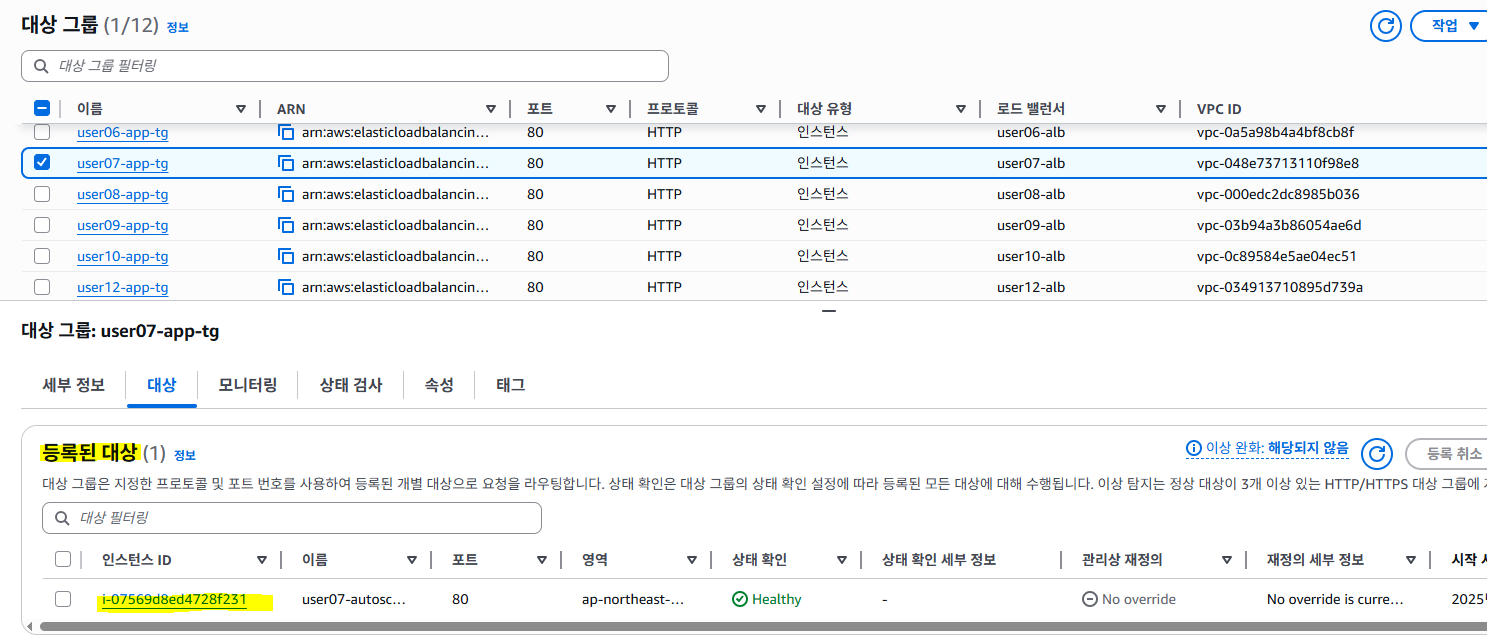 ↑ 대상그룹에 등록된 대상 추가된거 확인
 -
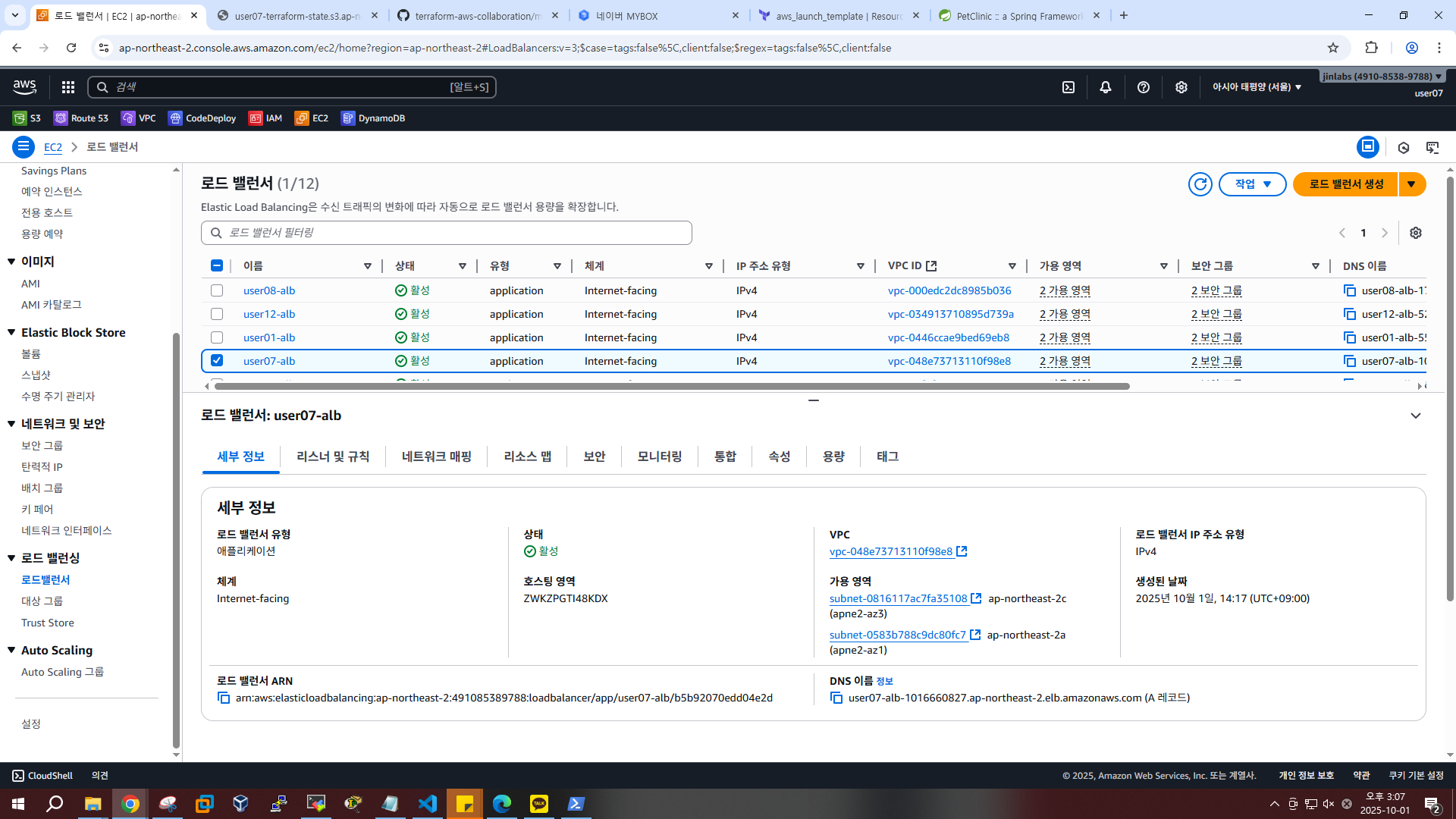
로드 밸런서에서 DNS 이름 복사(우측 하단)
-
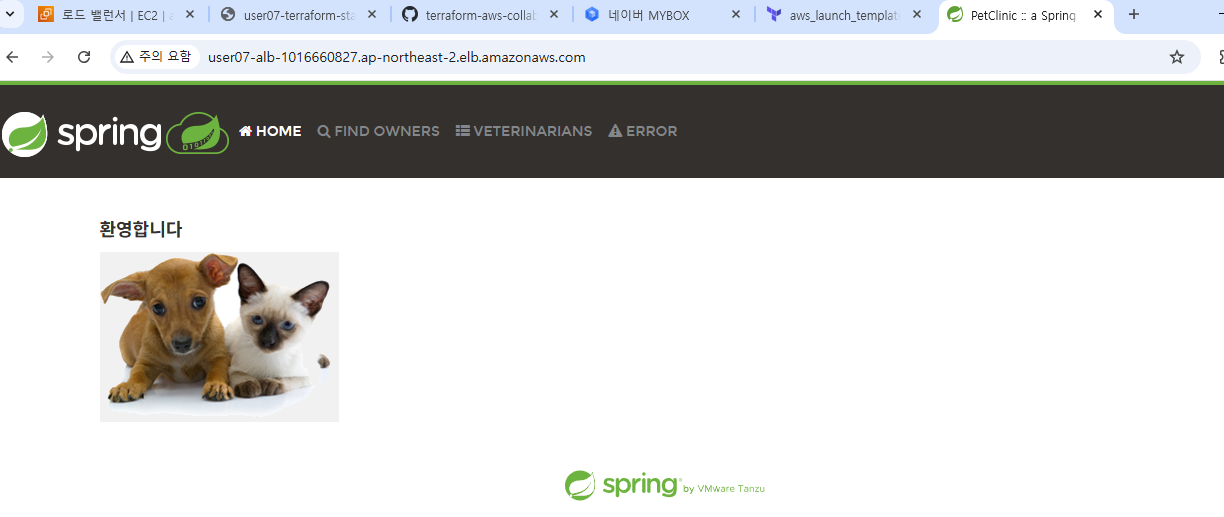
웹브라우저에서 접속 확인
🍧destroy 하기
destroy 순서 중요
autoscaling destroy
lb destroy
bastion destroy
sg destroy
vpc destroy
s3 destroy