1) Variables
-
역할: 환경별(개발/운영) 차이, 민감정보, 자주 바뀌는 값을 코드 밖으로 빼서 재사용·표준화.
-
보관 위치(권장 구조)
variables.tf: 변수 선언terraform.tfvars또는*.auto.tfvars: 기본값(개발용 등)env/dev.tfvars,env/prod.tfvars: 환경별 값- CI/서버에선 **환경변수
TF_VAR_...**나 비밀관리(Secrets) 권장
기본 문법
# variables.tf
variable "instance_type" {
  type        = string
  description = "EC2 type for web servers"
  default     = "t3.micro"   # 없으면 plan/apply 때 입력 프롬프트
  sensitive   = false        # true면 출력/로그에 감춤
  nullable    = false        # null 금지(명시적 입력 요구)
}
타입 옵션(강타입 권장)
- 원시:
string,number,bool - 컬렉션:
list(string),set(number),map(string) - 구조:
object({ name=string, port=number }),tuple([string, number]) - 팁: 타입을 지정하면 오타/형 변환을 초기 단계에서 잡을 수 있어 안정적.
값 주입(우선순위)
- CLI:
-var 'k=v',-var-file=env/dev.tfvars(가장 강함) - 환경변수:
TF_VAR_instance_type=t3.small - 자동 로드:
terraform.tfvars,*.auto.tfvars - variable.default (마지막)
팀 운영에선
-var-file=env/<stage>.tfvars패턴이 가장 예측 가능.
2) Validation: 안전한 입력만 통과시키기
variable 블록 안에 **validation { condition ...; error_message ... }**를 넣어 값 검사.
기본 예시(열거형 제한)
variable "instance_type" {
  type = string
  validation {
    condition     = contains(["t3.micro","t3.small","t3.medium"], var.instance_type)
    error_message = "instance_type must be one of: t3.micro, t3.small, t3.medium."
  }
}
숫자 범위(포트 범위)
variable "port" {
  type = number
  validation {
    condition     = var.port >= 1 && var.port <= 65535
    error_message = "port must be 1..65535."
  }
}
CIDR 형식 검사(정규식 말고 함수로!)
variable "vpc_cidr" {
  type = string
  validation {
    # cidrnetmask()가 에러 없이 동작하면 합법 CIDR
    condition     = can(cidrnetmask(var.vpc_cidr))
    error_message = "vpc_cidr must be a valid IPv4 CIDR, e.g., 10.0.0.0/16."
  }
}
리스트/맵의 모든 원소 검사(길이·문자셋 등)
variable "tags" {
  type        = map(string)
  default     = {}
  description = "Global tags"
  validation {
    condition = alltrue([
      for k, v in var.tags :
      length(k) > 0 && length(k) <= 64 &&
      length(v) > 0 && length(v) <= 256 &&
      can(regex("^[A-Za-z0-9._:/=+@-]*$", k)) &&
      can(regex("^[A-Za-z0-9._:/=+@ -]*$", v))
    ])
    error_message = "tags must follow AWS tag key/value rules."
  }
}
복합 타입(object) + 교차검증(의미 제약)
variable "listener" {
  type = object({
    protocol = string
    port     = number
  })
  validation {
    condition = (
      (lower(var.listener.protocol) == "http"  && var.listener.port == 80 ) ||
      (lower(var.listener.protocol) == "https" && var.listener.port == 443)
    )
    error_message = "protocol/port must be http:80 or https:443."
  }
}
파일에서 구조 읽어 검증
# env/dev.json 예) {"azs":["ap-northeast-2a","ap-northeast-2c"]}
variable "settings" {
  type = object({ azs = list(string) })
  default = jsondecode(file("${path.root}/env/dev.json"))
  validation {
    condition     = length(var.settings.azs) >= 2
    error_message = "At least 2 AZs are required."
  }
}
유용 함수:
can(),try(),regex()/regexall(),length(),contains(),alltrue()/anytrue()등.
3) 실전 템플릿
# variables.tf
variable "region" {
  type        = string
  default     = "ap-northeast-2"
  description = "AWS region"
}

variable "instance_type" {
  type        = string
  default     = "t3.micro"
  validation {
    condition     = contains(["t3.micro","t3.small","t3.medium"], var.instance_type)
    error_message = "Allowed: t3.micro|t3.small|t3.medium"
  }
}

variable "vpc_cidr" {
  type        = string
  default     = "10.0.0.0/16"
  validation {
    condition     = can(cidrnetmask(var.vpc_cidr))
    error_message = "Provide a valid IPv4 CIDR like 10.0.0.0/16"
  }
}

variable "allowed_ips" {
  type    = list(string)
  default = ["0.0.0.0/0"]
  validation {
    condition     = alltrue([for c in var.allowed_ips : can(cidrnetmask(c))])
    error_message = "allowed_ips must be a list of valid CIDRs."
  }
}

variable "db_password" {
  type        = string
  sensitive   = true
  nullable    = false
  description = "DB password (set via TF_VAR_db_password or var-file)"
  validation {
    condition     = length(var.db_password) >= 12
    error_message = "db_password must be at least 12 chars."
  }
}
# providers.tf
provider "aws" {
region = var.region
}# terraform.tfvars.example (Git에 커밋, 실제 비밀은 제외)
region = "ap-northeast-2"
instance_type= "t3.small"
vpc_cidr = "10.1.0.0/16"
allowed_ips = ["203.0.113.10/32", "198.51.100.0/24"]
# db_password = "set-me-via-env-or-secret-store"적용 흐름:
terraform init
terraform validate
terraform plan -var-file=env/dev.tfvars -out=plan.bin
terraform apply plan.bin
4) 요약
- 강타입 + validation으로 “쓰레기 입력” 차단
- 환경별 var-file(
env/dev.tfvars,env/prod.tfvars)로 재현성 유지 - 민감정보는 tfvars에 넣지 말고
TF_VAR_...+ 비밀저장소(Secrets) 사용 - nullable=false로 반드시 필요한 값은 강제 입력
- 검증은 함수 우선: CIDR 등은
can(cidrnetmask())같은 도메인 함수 활용 - CI 파이프라인:
fmt→validate→plan -out→PR 리뷰→apply plan.bin
5) 실습
resource "local_file" "maybe" {
  count    = var.file_create ? 1 : 0
  content  = var.content
  filename = "maybe.txt"
}

variable "file_create" {
  type    = bool
  default = true
}

variable "content" {
  type        = string
  description = "파일이 생성되는 경우에 내용이 비어있는지 확인합니다."
  validation {
    condition     = var.file_create == true ? length(var.content) > 0 : true
    error_message = "파일 내용이 비어있을 수 없습니다."
  }
}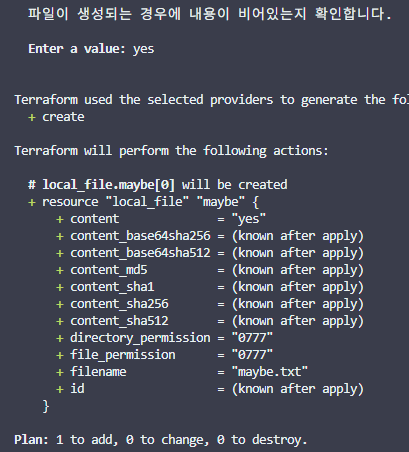
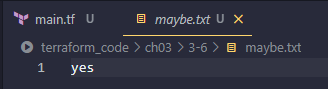
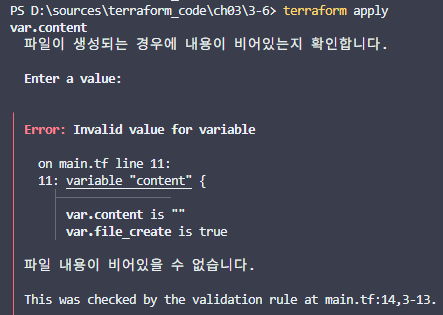
yes 입력 안하고 그냥 엔터치면 에러

`•.¸¸.•´´¯`••._.• 🎀 𝒸𝓇𝒶𝓏𝓎 𝓅𝓈𝓎𝒸𝒽💞𝓅𝒶𝓉𝒽 🎀 •._.••`¯´´•.¸¸.•`