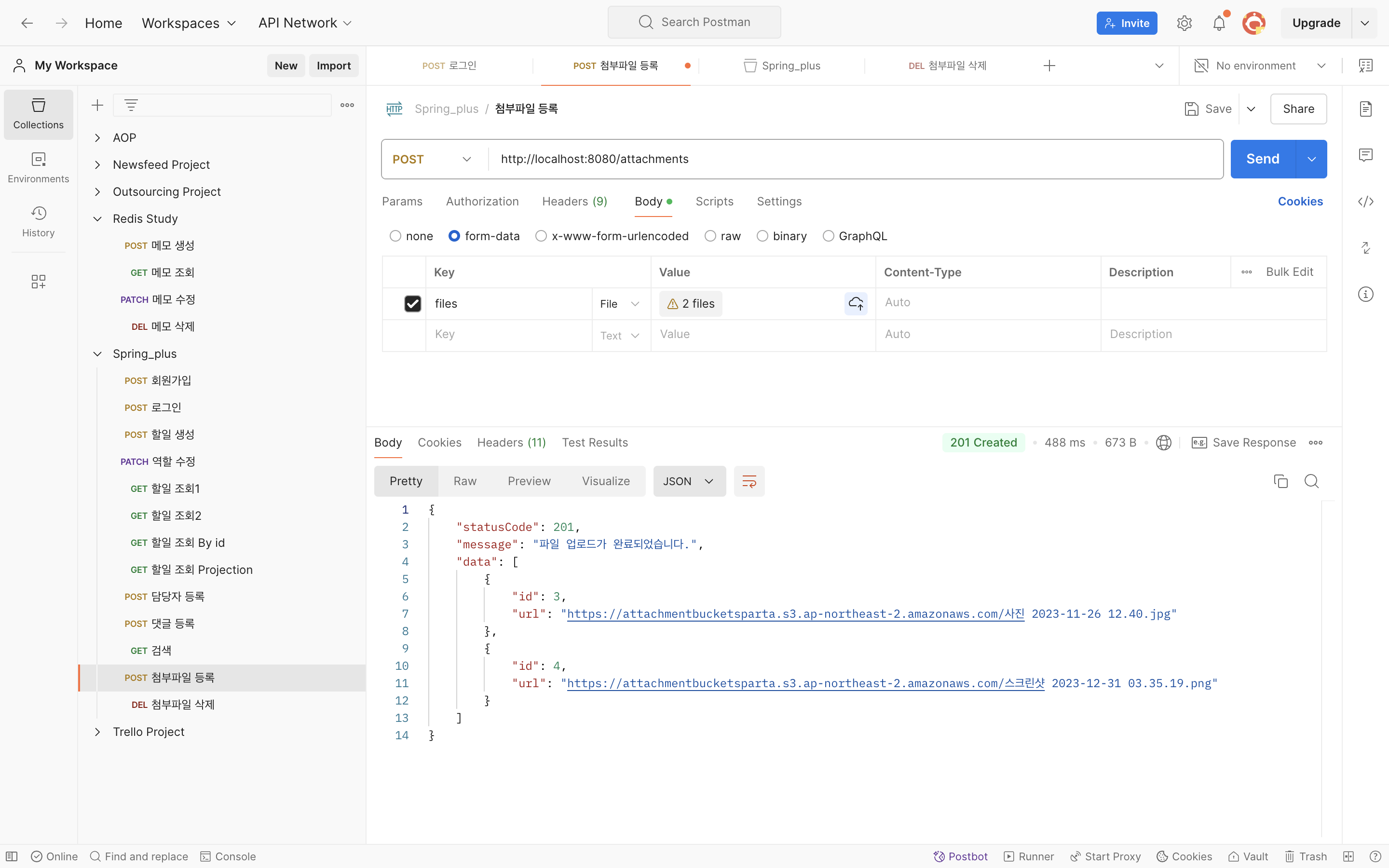
위의 글을 참고하여 AWS S3를 연결했다.
application.properties
cloud.aws.region.static=ap-northeast-2
cloud.aws.stack.auto=false
cloud.aws.s3.bucket=${S3_NAME}
cloud.aws.credentials.access-key=${S3_ACCESS}
cloud.aws.credentials.secret-key=${S3_SECRET}
build.gradle
// AWS S3
implementation 'org.springframework.cloud:spring-cloud-starter-aws:2.2.6.RELEASE'
S3Config.java
@Configuration
public class S3Config {
    @Value("${S3_ACCESS}")
    private String accessKey;
    @Value("${S3_SECRET}")
    private String secretKey;
    @Value("${cloud.aws.region.static}")
    private String region;
    @Bean
    public AmazonS3Client amazonS3Client() {
        BasicAWSCredentials awsCredentials= new BasicAWSCredentials(accessKey, secretKey);
        return (AmazonS3Client) AmazonS3ClientBuilder.standard()
                .withRegion(region)
                .withCredentials(new AWSStaticCredentialsProvider(awsCredentials))
                .build();
    }
}
AttachmentController.java
@RestController
@RequestMapping("/attachments")
@RequiredArgsConstructor
public class AttachmentController {
    private final AttachmentService attachmentService;
    @PostMapping
    public ResponseEntity<ResponseDto<List<AttachmentResponseDto>>> uploadAttachments(
            @AuthenticationPrincipal AuthUser authUser,
            @RequestPart List<MultipartFile> files
    ) throws IOException {
        List<AttachmentResponseDto> responseDto = attachmentService.uploadAttachments(authUser, files);
        return ResponseEntity.status(HttpStatus.CREATED)
                .body(ResponseDto.of(HttpStatus.CREATED, "파일 업로드가 완료되었습니다.", responseDto));
    }

    @DeleteMapping("/{attachment_id}")
    public ResponseEntity<ResponseDto<String>> deleteAttachment(
            @AuthenticationPrincipal AuthUser authUser,
            @PathVariable("attachment_id") Long attachmentId
    ) {
        attachmentService.deleteAttachment(authUser, attachmentId);
        return ResponseEntity.status(HttpStatus.OK)
                .body(ResponseDto.of(200, "성공적으로 삭제되었습니다."));
    }
}
AttachmentService.java
@Service
@RequiredArgsConstructor
@Transactional(readOnly = true)
public class AttachmentService {
    private final AmazonS3Client amazonS3Client;
    private final AttachmentRepository attachmentRepository;

    @Value("${cloud.aws.s3.bucket}")
    private String bucket;


    @Transactional
    public List<AttachmentResponseDto> uploadAttachments(AuthUser authUser, List<MultipartFile> files) throws IOException {

        List<AttachmentResponseDto> responseDtos = new ArrayList<>();

        List<String> supportedFileTypes = List.of("image/jpeg", "image/png", "application/pdf", "test/csv");


        for(MultipartFile file : files) {

            // 파일 형식 검사
            if(!supportedFileTypes.contains(file.getContentType())) {
                throw new InvalidRequestException("지원되지 않는 파일 형식입니다: " + file.getContentType());
            }

            // 업로드된 파일의 원래 이름 가져옴, 이 이름은 S3 버킷에 저장될 파일 이름으로 사용됨.
            String fileName = file.getOriginalFilename();

            // 파일이 S3애 업로드된 후 접근할 수 있는 URL 생성, S3 버킷에서 파일에 접근할 수 있는 경로.
            String fileUrl = "https://" + bucket + ".s3.ap-northeast-2.amazonaws.com/" + fileName;

            // 파일에 대한 메타데이터를 담을 ObjectMetadata 객체 생성, S3에 파일을 업로드할 때 메타데이터를 함께 전달해야함.
            ObjectMetadata metadata = new ObjectMetadata();

            /*
                Meta data란?
                - 데이터에 관한 데이터
                - 파일 이름, 파일 크기(5MB), 파일 형식(MIME 타입), 생성 날짜, 마지막 수정 날짜, 저작자 등

             */

            // 파일의 MIME 타입(image/jpeg, application/pdf)을 메타데이터에 설정, S3에 올바른 파일 형식이 저장됨.
            metadata.setContentType(file.getContentType());

            // metadata에 파일 크기 설정, S3에서 파일의 크기를 추적하는 데 사용.
            metadata.setContentLength(file.getSize());

            // amazonS3Client를 사용해서 파일을 S3 버킷에 업로드. 버킷 이름, 파일 이름, 파일의 입력스트림(파일 내용), metadata
            amazonS3Client.putObject(bucket, fileName, file.getInputStream(), metadata);

            Attachment attachment = new Attachment(fileUrl);
            Attachment savedAttachment = attachmentRepository.save(attachment);
            responseDtos.add(new AttachmentResponseDto(savedAttachment));
        }

        return responseDtos;

    }


    @Transactional
    public void deleteAttachment(AuthUser authUser, Long attachmentId) {
        Attachment attachment = attachmentRepository.findById(attachmentId)
                .orElseThrow(() -> new InvalidRequestException("해당 첨부파일을 찾을 수 없습니다."));


        // 첨부파일의 URL에서 실제 파일 이름을 추출한다.
        // attachment.getUrl() : 첨부파일이 저장된 S3의 URL 반환.
        // substring(attachment.getUrl().lastIndexOf("/") + 1) : URL의 마지막 슬래시 뒤에 오는 파일 이름 부분을 잘라냄.
        String fileName = attachment.getUrl().substring(attachment.getUrl().lastIndexOf("/") + 1);

        // AWS S3 버킷에서 해당 파일을 삭제, S3 클라이언트를 통해 지정된 bucket에서 추출한 fileName에 해당하는 파일을 제거.
        amazonS3Client.deleteObject(bucket, fileName);

        attachmentRepository.delete(attachment);
    }
}
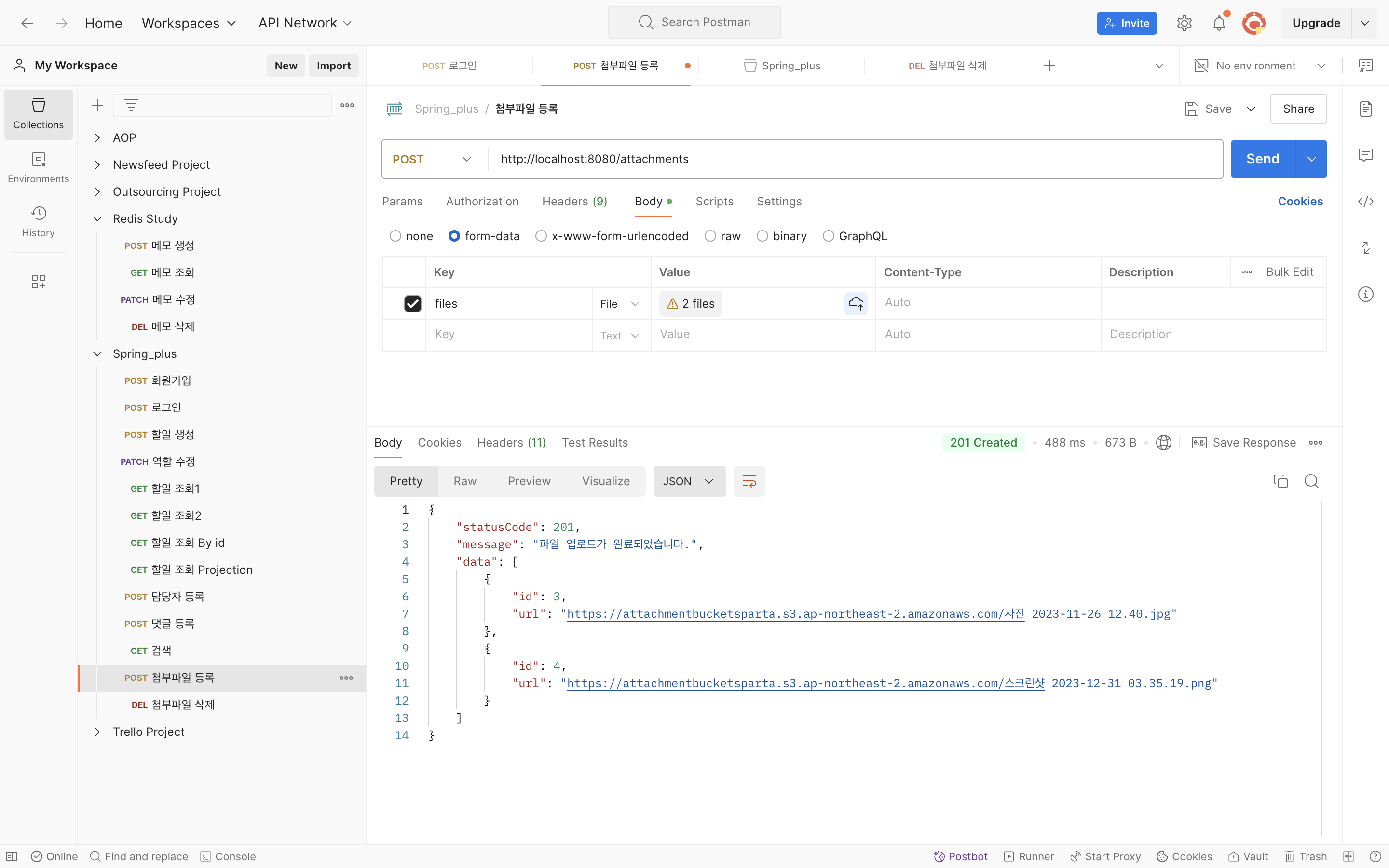
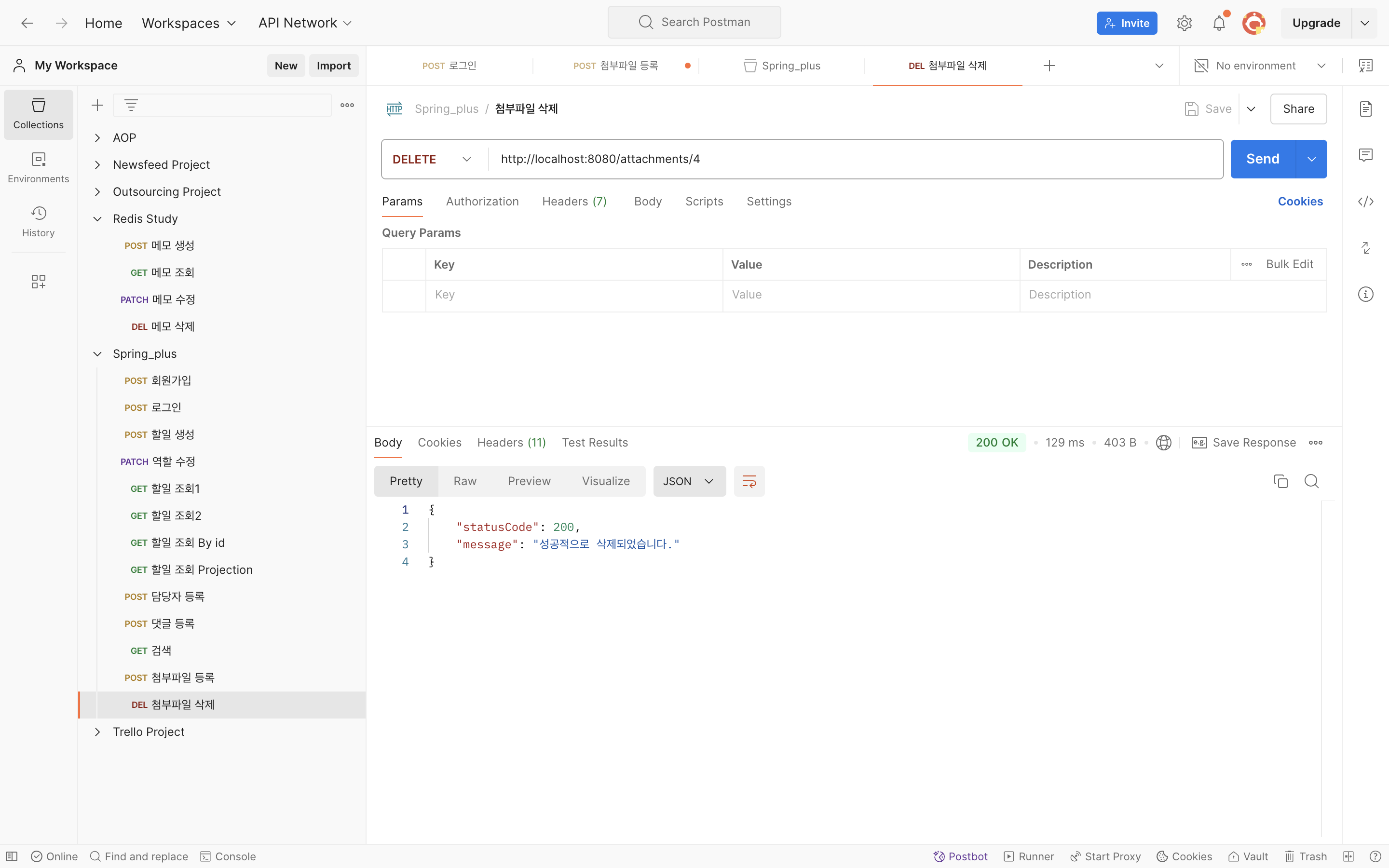
Postman 화면
-
첨부파일 등록 요청
-
첨부파일 삭제 요청

게으르지만 성실히 공부하기^_^