코드카타
10. Controller 이해하기
package com.sparta.springmvc.controller;

import org.springframework.stereotype.Controller;
import org.springframework.web.bind.annotation.*;

@Controller
@RequestMapping("/api") // 중복 경로 처리
public class HelloController {
    @GetMapping("/hello")
    @ResponseBody
    public String hello() {
        return "Hello World";
    }

    @PutMapping("/hello") // api 경로는 같을 수 있으나 메서드는 같을 수 없다.
    @ResponseBody
    public String putHello() {
        return "Put Method 요청";
    }


    @GetMapping("/get")
    @ResponseBody
    public String get() {
        return "GET Method 요청";
    }

    @PostMapping("/post")
    @ResponseBody
    public String post() {
        return "POST Method 요청";
    }

    @PutMapping("/put")
    @ResponseBody
    public String put() {
        return "PUT Method 요청";
    }

    @DeleteMapping("/delete")
    @ResponseBody
    public String delete() {
        return "Delete Method 요청";
    }

}
@Controller
: Controller 만들기
@RequestMapping("/api")
: 공통적으로 있는 api 경로
@ResponseBody
: ResponseBody가 없으면 templates 파일에서 html 코드를 찾아 반환하는 것인데
우리는 그냥 데이터를 반환하고 싶은 것이므로 ResponseBody를 붙여줘야한다.
📌 @GetMapping("/get")
: GET Method Controller, 서버로부터 데이터 얻기
📌 @PostMapping("/post")
: POST Method Controller, 서버에 데이터 추가, 작성
📌 @PutMapping("/put")
: PUT Method Controller, 서버의 데이터를 갱신, 작성
📌 @DeleteMapping("/delete")
: DELETE Method Controller, 서버의 데이터를 삭제
    @GetMapping("/hello")
    @ResponseBody
    public String hello() {
        return "Hello World";
    }

    @PutMapping("/hello") // api 경로는 같을 수 있으나 메서드는 같을 수 없다.
    @ResponseBody
    public String putHello() {
        return "Put Method 요청";
    }
Get, Put method인데 "/hello"로 api 경로가 같다. => 가능
11. 정적 페이지와 동적 페이지
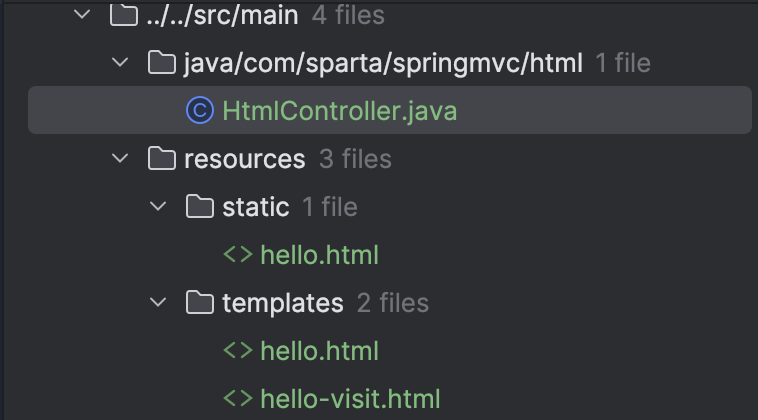
package com.sparta.springmvc.html;

import org.springframework.stereotype.Controller;
import org.springframework.ui.Model;
import org.springframework.web.bind.annotation.GetMapping;
import org.springframework.web.bind.annotation.RequestMapping;

@Controller
//@RequestMapping
public class HtmlController {


    // static 폴더에서 정적 html 불러오기
    @GetMapping("/static-hello")
    public String hello() {
        return "hello.html";
    } // localhost:8080/static-hello 로 인터넷에 검색하면 오류가 발생한다.
    // 그 이유는 hello.html은 정적 페이지이기 때문인데
    // localhost:8080/hello.html로 검색하면 나온다.
    // 그러면 controller로 hello.html 파일을 열수 없는가? 그건 아니다

    @GetMapping("/html/redirect") // status code : 302
    public String htmlStatic() {
        return "redirect:/hello.html";
    }
    // templates 폴더에서 정적 html 불러오기
    @GetMapping("/html/templates")
    public String htmlTemplates() {
        return "hello";
    }
    // templates에서 html 파일을 불러오고 싶을 때는
    // html 파일 이름(hello.html에서 hello)만 return

    private static long visitCount = 0;
    @GetMapping("/html/dynamic")
    public String htmlDynamic(Model model) {
        visitCount++;
        model.addAttribute("visits", visitCount);
        return "hello-visit";
    }

}
@GetMapping("/static-hello")
public String hello() {
return "hello.html";
}static 폴더에서 정적 html 불러오기
- localhost:8080/static-hello 로 인터넷에 검색하면 오류가 발생한다.
- 그 이유는 hello.html은 정적 페이지이기 때문인데
- localhost:8080/hello.html로 검색하면 나온다.
- 그러면 controller로 hello.html 파일을 열수 없는가? 그건 아니다
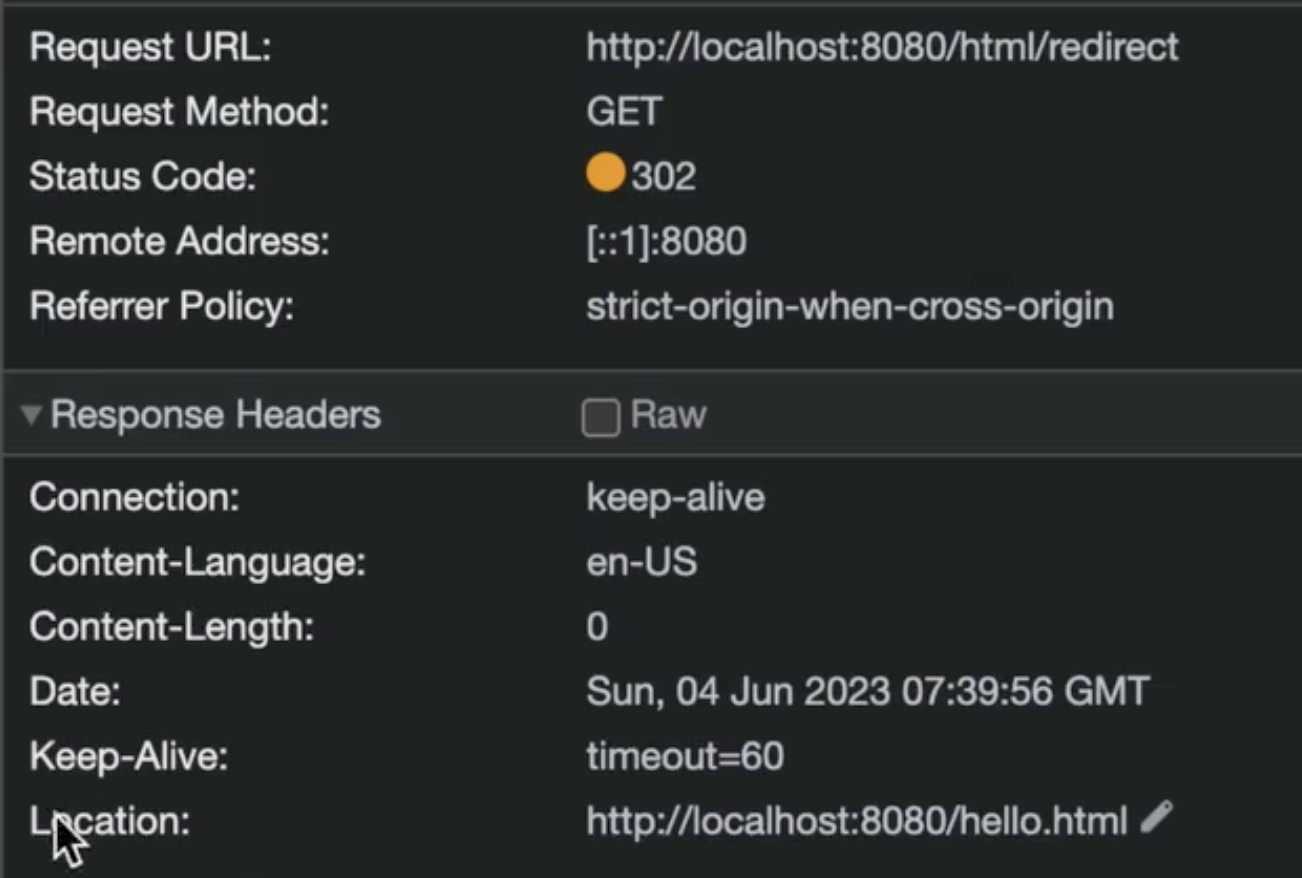
    @GetMapping("/html/redirect")
    public String htmlStatic() {
        return "redirect:/hello.html";
    }
status code : 302 => Redirection이다.
    @GetMapping("/html/templates")
    public String htmlTemplates() {
        return "hello";
    }
templates 폴더에서 정적 html 불러오기
- templates에서 html 파일을 불러오고 싶을 때는
- html 파일 이름(hello.html에서 hello)만 return
- static 폴더에서 불러올 때는 hello.html을 return 해야한다.
    private static long visitCount = 0;
    @GetMapping("/html/dynamic")
    public String htmlDynamic(Model model) {
        visitCount++;
        model.addAttribute("visits", visitCount);
        return "hello-visit";
    }
Model 객체는 Controller에서 View로 데이터를 전달할 때 사용된다.
Controller Method에서 Model 객체에 데이터를 추가하면, 해당 데이터는 View에서 접근할 수 있게 된다.
model.addAttribute("visits", visitCount);${visits}에 "visits"에 visitCount를 저장
<!DOCTYPE html>
<html>
<head><meta charset="UTF-8"><title>Hello Spring</title></head>
<body>
<div>
  Hello, Spring 동적 웹 페이지!!
</div>
<div>
  (방문자 수: <span th:text="${visits}"></span>)
</div>
</body>
</html>
12. 데이터를 Client에 반환하는 방법
Star.java
package com.sparta.springmvc.response;

import lombok.Getter;

@Getter
public class Star {
    // json의 key
    String name;
    int age;

    public Star(String name, int age) {
        // json의 value
        this.name = name;
        this.age = age;
    }

    public Star() {}
}
ResponseController.java
package com.sparta.springmvc.response;

import org.springframework.stereotype.Controller;
import org.springframework.web.bind.annotation.GetMapping;
import org.springframework.web.bind.annotation.GetMapping;
import org.springframework.web.bind.annotation.RequestMapping;
import org.springframework.web.bind.annotation.ResponseBody;

@Controller
@RequestMapping("/response")
public class ResponseController {
    // Content-Type: text/html
    // Response Body
    // {"name":"Robbie", "age":95}
    @GetMapping("/json/string")
    @ResponseBody
    public String helloStringJson() {
        return "{\"name\":\"Robbie\",\"age\":95}";
        // java에서는 JSON을 반환하지 않으므로 JSON 형식을 모방한 String을 반환
    }

    // Content-Type: application/json
    // Response Body
    // {"name":"Robbie", "age":95}
    // 자바 객체를 넘기려먼 javascript에서는 이를 이해할 수 없어서
    // java에서 자동으로 자바 객체를 json 형태로 변환해준다.
    @GetMapping("/json/class")
    @ResponseBody
    // ResponseBody가 없으면 templates 파일에서 html 코드를 찾아 반환하는 것인데
    // 우리는 그냥 데이터를 반환하고 싶은 것이므로 ResponseBody를 붙여줘야한다.
    public Star helloClassJson() {
        return new Star("Robbie", 95);
    }

    // 위 둘의 차이는 첫번재는 text 형식으로 날아가고 두번재는 json 형식으로 날아간다.
}
@GetMapping("/json/string")
@ResponseBody
public String helloStringJson() {
return "{\"name\":\"Robbie\",\"age\":95}";
}Content-Type: text/html
Response Body
{"name":"Robbie", "age":95}
java에서는 JSON을 반환하지 않으므로 JSON 형식을 모방한 String을 반환
    @GetMapping("/json/class")
    @ResponseBody
    public Star helloClassJson() {
        return new Star("Robbie", 95);
    }
Content-Type: application/json
Response Body
{"name":"Robbie", "age":95}
자바 객체를 넘기려먼 javascript에서는 이를 이해할 수 없어서, java에서 자동으로 자바 객체를 json 형태로 변환해준다.
위 둘의 차이는 첫번재는 text 형식으로 날아가고 두번재는 json 형식으로 날아간다.
ResponseRestController.java
package com.sparta.springmvc.response;

import org.springframework.web.bind.annotation.GetMapping;
import org.springframework.web.bind.annotation.RequestMapping;
import org.springframework.web.bind.annotation.RestController;

@RestController
// view(html)을 반환하는 것이 아니라 데이터(json)을 반환하고 싶은 경우
// @ResponseBody를 계속 붙이지 않아도 데이터를 반환할 수 있다.
@RequestMapping("/response/rest")
public class ResponseRestController {
    // [Response header]
    //   Content-Type: text/html
    // [Response body ]
    //   {"name":"Robbie","age":95}
    @GetMapping("/json/string")
    public String helloStringJson() {
        return "{\"name\":\"Robbie\",\"age\":95}";
    }

    // [Response header]
    //   Content-Type: application/json
    // [Response body]
    //   {"name":"Robbie","age":95}
    @GetMapping("/json/class")
    public Star helloClassJson() {
        return new Star("Robbie", 95);
    }
}
@RestController는 모든 Controller 메서드가 @ResponseBody를 포함하도록 한 것.
13. Jackson이란 무엇인가?
Star.java
package com.sparta.springmvc.response;

import lombok.Getter;

@Getter
public class Star {
    // json의 key
    String name;
    int age;

    public Star(String name, int age) {
        // json의 value
        this.name = name;
        this.age = age;
    }

    public Star() {}
}
package com.sparta.springmvc;
import com.fasterxml.jackson.core.JsonProcessingException;
import com.fasterxml.jackson.databind.ObjectMapper;
import com.sparta.springmvc.response.Star;
import org.junit.jupiter.api.DisplayName;
import org.junit.jupiter.api.Test;
public class JacksonTest {
@Test
@DisplayName("Object To JSON : get Method 필요") // Star class에서는 Get 함수가 필요하다.
void test1() throws JsonProcessingException {
Star star = new Star("Robbie", 95);
ObjectMapper objectMapper = new ObjectMapper(); // Jackson 라이브러리의 ObjectMapper
String json = objectMapper.writeValueAsString(star);
System.out.println("json = " + json);
}
@Test
@DisplayName("JSON To Object : 기본 생성자 & (get OR set) Method 필요") // 증요
void test2() throws JsonProcessingException {
String json = "{\"name\":\"Robbie\",\"age\":95}"; // JSON 타입의 String
// name을 nam이라고 치면 해당 field를 찾을 수 없다는 오류가 발생한다.
ObjectMapper objectMapper = new ObjectMapper(); // Jackson 라이브러리의 ObjectMapper
Star star = objectMapper.readValue(json, Star.class); // Star.class: 스타 객체의 타입
System.out.println("star.getName() = " + star.getName());
System.out.println("star.getAge() = " + star.getAge()); // soutv
}
}
Object to JSON
void test1() throws JsonProcessingException {
        Star star = new Star("Robbie", 95);

        ObjectMapper objectMapper = new ObjectMapper();
        String json = objectMapper.writeValueAsString(star);

        System.out.println("json = " + json);
    }
📌 ObjectMapper
: Jackson 라이브러리의 ObjectMapper
📌 objectMapper.writeValueAsString(star)
: star 객체를 String으로 변환해주는 메서드
JSON to Object
void test2() throws JsonProcessingException {
        String json = "{\"name\":\"Robbie\",\"age\":95}";
        // JSON 타입의 String
        // name을 nam이라고 치면 해당 field를 찾을 수 없다는 오류가 발생한다.

        ObjectMapper objectMapper = new ObjectMapper(); // Jackson 라이브러리의 ObjectMapper

        Star star = objectMapper.readValue(json, Star.class); // Star.class: 스타 객체의 타입
        System.out.println("star.getName() = " + star.getName());
        System.out.println("star.getAge() = " + star.getAge()); // soutv
    }
String json = "{\"name\":\"Robbie\",\"age\":95}";Json 타입의 String
name을 nam이라고 치면 해당 field를 찾을 수 없다는 오류가 발생한다.
Star star = objectMapper.readValue(json, Star.class);json이라는 Json 형식의 String을 Star.class 객체 타입으로 변환하여 star 객체에 저장
14. Path Variable과 Request Param
package com.sparta.springmvc.request;

import org.springframework.stereotype.Controller;
import org.springframework.web.bind.annotation.*;

@Controller
@RequestMapping("/hello/request")
public class RequestController {
    @GetMapping("/form/html")
    public String helloForm() {
        return "hello-request-form";
    }

    // [Request sample]
    // GET http://localhost:8080/hello/request/star/Robbie/age/95
    @GetMapping("/star/{name}/age/{age}") // 받을 데이터는 {변수명}
    @ResponseBody
    public String helloRequestPath(@PathVariable String name, @PathVariable int age)
    {
        return String.format("Hello, @PathVariable.<br> name = %s, age = %d", name, age);
    }

    // [Request sample] Request Param, Query String 방식
    // GET http://localhost:8080/hello/request/form/param?name=Robbie&age=95 // 데이터의 구분 &으로
    @GetMapping("/form/param")
    @ResponseBody
    public String helloGetRequestParam(@RequestParam(required=false) String name, @RequestParam int age) { // @RequestParam 지워도 int age만으로 실행 가능하다.
        // name을 넣지 않은 경우
        // 에러 발생
        // 2024-08-12T12:05:56.468+09:00  WARN 67275 --- [spring-mvc] [nio-8080-exec-1] .w.s.m.s.DefaultHandlerExceptionResolver : Resolved [org.springframework.web.bind.MissingServletRequestParameterException: Required request parameter 'name' for method parameter type String is not present]
        // name 없어도 실행가능하게 할 수 있는 방법 required=false
        // null 값이 대신 들어감
        return String.format("Hello, @RequestParam.<br> name = %s, age = %d", name, age);
    }

    // [Request sample]
    // POST http://localhost:8080/hello/request/form/param
    // Header
    //  Content type: application/x-www-form-urlencoded
    // Body
    //  name=Robbie&age=95
    @PostMapping("/form/param") // html은 form 태그를 활용하면 <form method="POST" action="/hello/request/form/param">
    @ResponseBody
    public String helloPostRequestParam(@RequestParam String name, @RequestParam int age) {
        return String.format("Hello, @RequestParam.<br> name = %s, age = %d", name, age);
    }

}
15. HTTP 데이터를 객체로 처리하는 방법
 	// [Request sample]
    // POST http://localhost:8080/hello/request/form/model
    // Header
    //  Content type: application/x-www-form-urlencoded
    // Body
    //  name=Robbie&age=95
    @PostMapping("/form/model")
    @ResponseBody
    public String helloRequestBodyForm(@ModelAttribute Star star) { // body에 들어있는 데어터 정보를 Star 객체에 담아올 수 있다.
        return String.format("Hello, @ModelAttribute.<br> (name = %s, age = %d) ", star.name, star.age);
    }


    // [Request sample]
     // GET http://localhost:8080/hello/request/form/param/model?name=Robbie&age=95
    @GetMapping("/form/param/model")
    @ResponseBody
    public String helloRequestParam(@ModelAttribute Star star) { // @ModelAttribute 생략가능
        return String.format("Hello, @ModelAttribute.<br> (name = %s, age = %d) ", star.name, star.age);
    }

    // [Request sample]
    // POST http://localhost:8080/hello/request/form/json
    // Header
    //  Content type: application/json
    // Body
    //  {"name":"Robbie","age":"95"}
    // Json 형식의 데이터가 넘어왔을 때 처리하는 방식
    // @RequestBody를 사용
    @PostMapping("/form/json")
    @ResponseBody
    public String helloPostRequestJson(@RequestBody Star star) {
        return String.format("Hello, @RequestBody.<br> (name = %s, age = %d) ", star.name, star.age);
    }