4. 이벤트
- jQuery의 이벤트에는 기존 자바스크립트의 이벤트가 모두 존재
- 기존 자바스크립트의 이벤트를 연결할 때보다 훨씬 간편하게 이벤트 연결 가능
4.1 이벤트 연결 기본 : on()
<head>
    <style>
        .reverse {
            background: black;
            color: white;
        }
    </style>
    <script src="http://code.jquery.com/jquery-3.1.1.js"></script>
    <script>
        $(document).ready(function () {
            // h1 태그에 click 이벤트를 연결
            // click 이벤트 발생시, 이벤트 발생 객체에 '+' 추가
            $('h1').on('click', function () {
                $(this).html(function (index, html) {
                    return html + '+';
                });
            });

            // h1 태그에 mouseenter, mouseleave 이벤트를 연결
            $('h1').on({
                mouseenter: function () { $(this).addClass('reverse'); },
                mouseleave: function () { $(this).removeClass('reverse'); }
            });
        });
    </script>
</head>
4.2 간단한 이벤트 연결
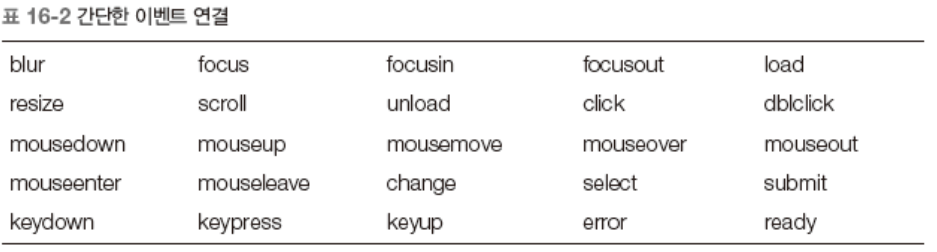
	$(selector).focus(function(event) {});
    $(selector).click(function(event) {});
    <script>
        $(document).ready(function () {
            // 이벤트를 연결

            // $('h1') => 3개의 h1 객체를 return
            // hover(fun1(), func2())
            // => func1()은 mouseenter event가 발생할 때 실행
            // => func2()은 mouseleave event가 발생할 때 실행
            $('h1').hover(function () {
                // $(this) => clik event가 발생한 h1 객체
                $(this).addClass('reverse');
            }, function () {
                $(this).removeClass('reverse');
            });
        });
    </script>
4.3 이벤트 연결 제거 : off()
<script>
        $(document).ready(function () {
            // 이벤트를 연결합니다.
            $('h1').click(function () {
                // 출력합니다.
                $(this).html('CLICK');
                alert('이벤트가 발생했습니다.');

                // 이벤트가 발생된 객체에 등록된 event를 제거합니다.
                $(this).off();
            });
        });
</script>

4.4 매개변수 context
- this 를 의미한다고 생각
- selector가 적용하는 범위를 한정함
<script>
        $(document).ready(function () {
            // 이벤트를 연결합니다.
            // $('div') => div 객체 3개 가져옴.
            $('div').click(function () {
                // 변수를 선언합니다.
                // $(this) => 선택된 div를 의미
                // find('h1') => 선택된 div안에 있는 h1객체를 가져옴
                var header = $(this).find('h1').text();
                var paragraph = $(this).find('p').text();

                // 출력합니다.
                alert(header + '\n' + paragraph);
            });
        });
    </script>
4.5 이벤트 객체
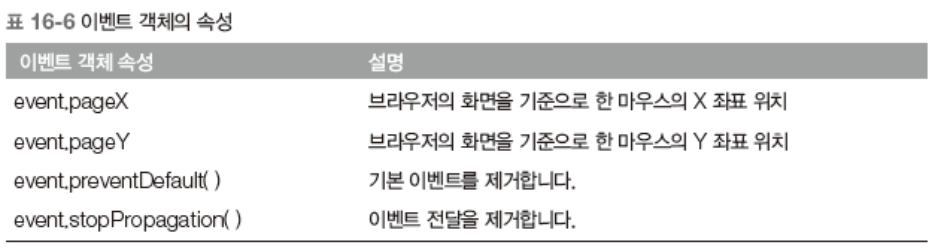
<script>
        $(document).ready(function () {
            // 변수를 선언합니다.
            var canvas = document.getElementById('canvas');
            var context = canvas.getContext('2d');

            // 이벤트를 연결합니다.
            $(canvas).on({
                mousedown: function (event) {
                    // 위치를 얻어냅니다.
                    var position = $(this).offset();
                    var x = event.pageX - position.left;
                    var y = event.pageY - position.top;

                    // 선을 그립니다.
                    context.beginPath();
                    context.moveTo(x, y);
                },
                mouseup: function (event) {
                    // 위치를 얻어냅니다.
                    var position = $(this).offset();
                    var x = event.pageX - position.left;
                    var y = event.pageY - position.top;

                    // 선을 그립니다.
                    context.lineTo(x, y);
                    context.stroke();
                }
            });
        });
    </script>
4.6 이벤트 강제 발생 : trigger()
<script>
        $(document).ready(function () {
            // 이벤트를 연결합니다.
            $('h1').click(function () {
                $(this).html(function (index, html) {
                    return html + '★';
                });
            });

            // 1초마다 함수를 실행합니다.
            setInterval(function () {
                // $('h1') => h1객체 2개 return
                // last() => h1객체 2개 중에 마지막 h1객체 return
                // trigger : event를 program에서 강제 발생시킴
                $('h1').last().trigger('click');
            }, 1000);

            // setInterval(function () {
            //     $('h1').last().click();
            // }, 1000);
        });
    </script>
4.7 기본 이벤트와 이벤트 전달
- 기본 이벤트를 제거하고, 이벤트 전달을 막을 때

<script>
        $(document).ready(function () {
            $('a').click(function (event) {
                $(this).css('background-color', 'blue');
                // stopPropagation : event 전달하는 것을 stop
                // =>  <a> tag에 click등 발생된 event를 다른 객체에 전달하는 것을
                //    stop하겠다는 의미 (bubbling등 기준에 의해서 부모 tag에
                //    event가 발생하는 것을 stop)
                event.stopPropagation();
                // preventDefault : Default 처리 기준을 prevent(막는 것)
                event.preventDefault();

                // false를 return하면 stopPropagation과 preventDefault 메소드를
                // 동시에 실행하는 효과를 가짐
                // return false;
            });

            $('h1').click(function () {
                $(this).css('background-color', 'red');
            });
        });
</script>
4.8 이벤트 연결 범위 한정
4.9 마우스 이벤트
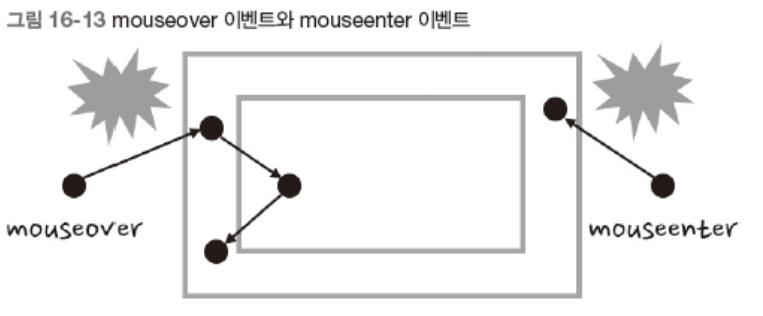
- mouseover : 자식 객체에도 적용
- mouseenter : 내/외부 판단 (자식에 적용X)
<script>
        $(document).ready(function () {
            // outer div객체에 mouseover event와 mouseenter event가 등록
            // inner div객체에는 event가 등록되어 있지 않은 것임

            // javascript에서 mouseenter event의 특징 : 한 번 발생이 되면 중복 발생이 되지 않음
            // mousemove event의 특징 : outer div객체의 자식인 inner div에서 발생된
            //                          mouse over event가 bubbling 방식에 의해
            //                           부모인 outer div객체에 전달이 됨
            $('.outer').mouseover(function () {
                $('body').append('<h1>MOUSEOVER</h1>');
            }).mouseenter(function () {
                $('body').append('<h1>MOUSENTER</h1>');
            });
        });
    </script>
4.10 키보드 이벤트
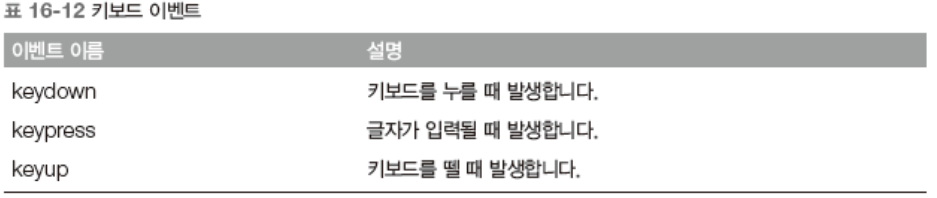
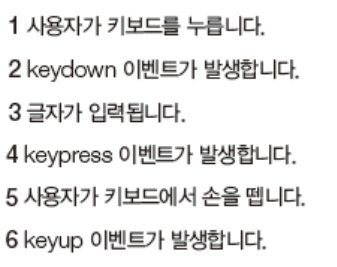
<script>
        $(document).ready(function (event) {
            // keyup event : 키보드에서 글자를 누른후 키보드를 띄면 발생하는 event
            $('textarea').keyup(function () {
                // 남은 글자 수를 구합니다.
                // 현재 textarea에 입력된 글자 전체를 가져옴 <= $(this).val()
                var inputLength = $(this).val().length;
                var remain = 150 - inputLength;

                // 문서 객체에 입력합니다.
                $('h1').html(remain);

                // 문서 객체의 색상을 변경합니다.
                if (remain >= 0) {
                    $('h1').css('color', 'black');
                } else {
                    $('h1').css('color', 'red');
                }
            });
        });
    </script>
4.11 윈도 이벤트
- scroll() : 무한 스크롤
4.12 입력 양식 이벤트
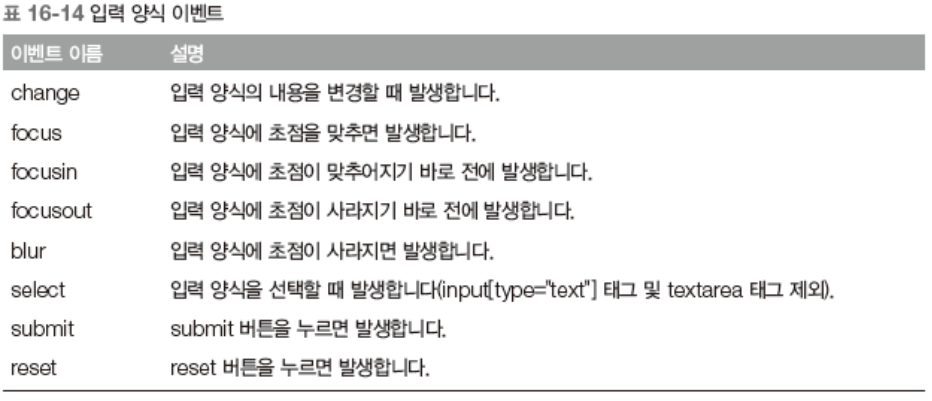
    <script>
        $(document).ready(function () {
            // submit event 발생 시점 : submit button을 click하면 발생
            $('#my-form').submit(function (event) {
                // 입력 양식의 value를 가져옵니다.
                var name = $('#name').val();
                var password = $('#password').val();

                // 출력합니다.
                alert(name + ' : ' + password);

                // 기본 이벤트를 제거합니다.
                // submit 버튼 click시 web server로 데이터 전송하는 기본 명령어를
                // 막는다 <= preventDefault
                event.preventDefault();
            });
        });
</script><script>
$(document).ready(function () {
// change event 발생시점 : checkbox인 경우 unchecked된 상태애소
// checked 된 상태로 변환되거나, checked => unchecked로 상태 변경
$('#all-check').change(function () {
// this : id가 all-check인 객체
if (this.checked) {
// children() => div객체의 자식들을 다 가져옴
// prop method : 객체의 property(속성)값을 변경할 때 사용
// checked : checkbox의 속성 이름
$('#check-item').children().prop('checked', true);
} else {
$('#check-item').children().prop('checked', false);
}
});
});
</script>
그래도 해야지 어떡해