PWA 설치 유도 팝업 설정 방법 정리
최근 웹사이트를 PWA(Progressive Web App) 로 구현하는 사례가 늘어나고 있음.
PWA는 앱처럼 설치가 가능하고 오프라인에서도 동작할 수 있어 사용자 경험 개선에 큰 도움이 됨.
그중 중요한 포인트는 사용자가 자연스럽게 앱을 설치하도록 설치 유도 팝업을 제공하는 것임.
1. 주요 기능 개요
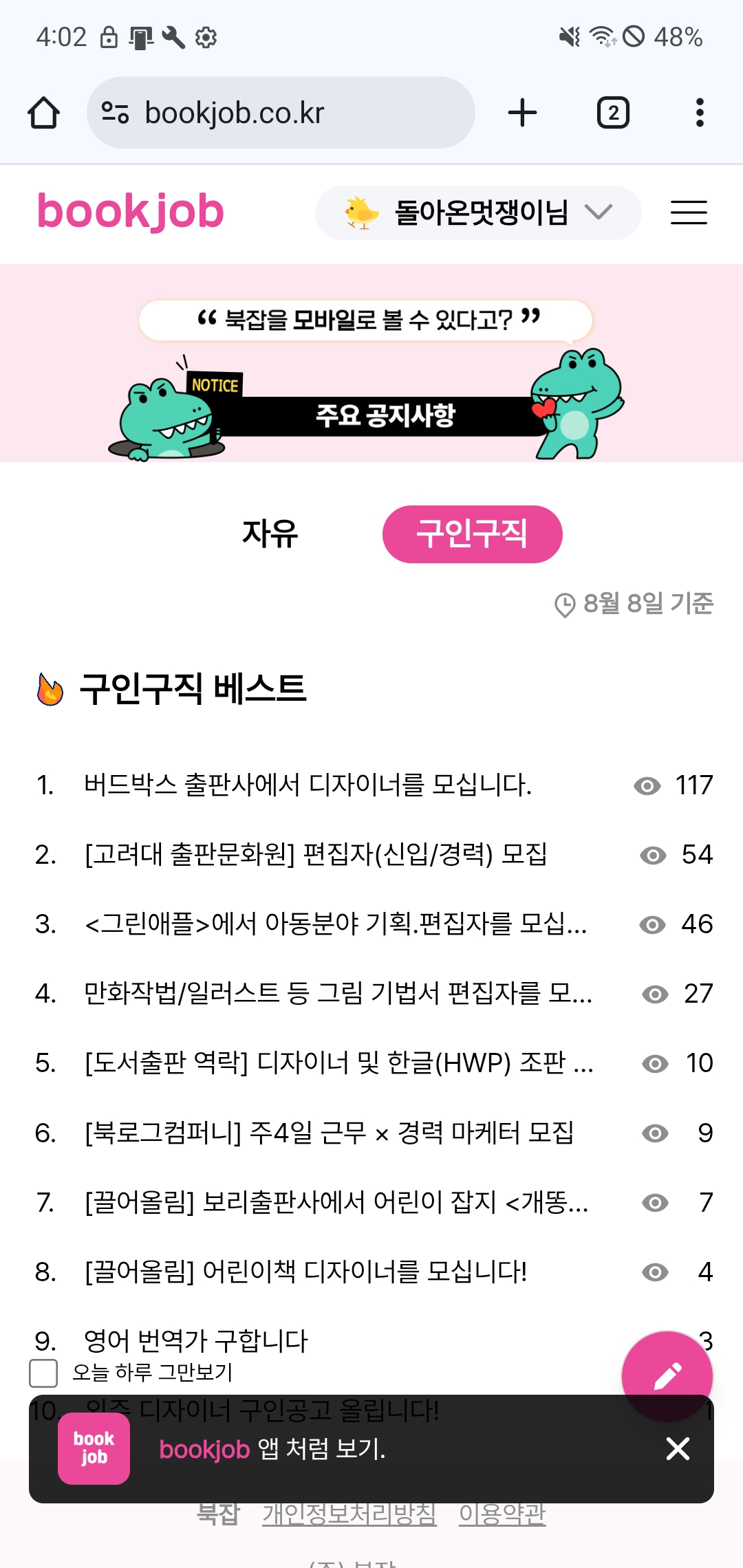
- 이 PwaPopUp 컴포넌트는 다음과 같은 기능을 제공했음.
- beforeinstallprompt 이벤트를 감지해 설치 유도 준비를 했음
- 모바일과 데스크톱 환경에 따라 다른 UI를 작성
- "오늘 하루 그만보기" 옵션을 통해 LocalStorage를 활용해 팝업 노출을 제어했음
- 사용자가 설치를 거부하면 일정 시간 뒤 다시 팝업을 노출하도록 설정했음
2. 핵심 상수
const HIDE_ANIMATION_DURATION = 1000
const SNOOZE_DURATION = 1000 * 60 * 30
const LOCAL_STORAGE_KEY = 'pwaPopupHiddenDate'
- HIDE_ANIMATION_DURATION: 팝업 숨김 애니메이션 시간(1초)
- SNOOZE_DURATION: 팝업 다시 보여줄 때까지의 대기 시간(30분)
- LOCAL_STORAGE_KEY: 오늘 하루 보지 않기 설정을 저장할 key 값
팝업 동작 주기를 관리하는 핵심 값들을 상수로 작성했음.
3. beforeinstallprompt 이벤트 처리
useEffect(() => {
  const hiddenDate = localStorage.getItem(LOCAL_STORAGE_KEY)
  const today = new Date().toDateString()
  if (hiddenDate !== today) {
    setIsDisplayAllowed(true)
  }

  const handleBeforeInstallPrompt = (e) => {
    e.preventDefault()
    setDeferredPrompt(e)
  }

  window.addEventListener('beforeinstallprompt', handleBeforeInstallPrompt)

  return () => {
    window.removeEventListener('beforeinstallprompt', handleBeforeInstallPrompt)
    clearTimeout(timerRef.current)
  }
}, [])- 오늘 날짜와 LocalStorage에 저장된 값을 비교해 팝업 표시 여부를 결정했음
- beforeinstallprompt 이벤트를 가로채어, 브라우저 기본 동작을 막고 직접 컨트롤 가능하게 했음
4. 팝업 숨김 및 재노출 로직
const scheduleNextAppearance = () => {
  setIsDisplayAllowed(false)

  if (dontShowToday) {
    localStorage.setItem(LOCAL_STORAGE_KEY, new Date().toDateString())
  } else {
    timerRef.current = setTimeout(() => {
      setIsDisplayAllowed(true)
    }, SNOOZE_DURATION)
  }
}- 닫기 버튼을 누른 경우 팝업이 사라지고, "오늘 하루 그만보기" 체크 여부에 따라 동작을 달리했음
- 체크한 경우 → LocalStorage에 오늘 날짜 저장
- 체크하지 않은 경우 → 30분 후 다시 노출되도록 타이머 설정
5. 설치 버튼 동작
const handleInstallClick = async () => {
  if (!deferredPrompt) return
  await deferredPrompt.prompt()

  const outcome = await deferredPrompt.userChoice
  if (outcome === 'accepted') {
    setIsDisplayAllowed(false)
    timerRef.current = setTimeout(() => {
      setDeferredPrompt(null)
    }, HIDE_ANIMATION_DURATION)
  } else {
    scheduleNextAppearance()
  }
}
- 사용자가 설치를 수락하면 팝업을 닫고 더 이상 표시하지 않도록 했음
- 거절하면 일정 시간이 지난 뒤 다시 팝업을 보여주도록 했음
import { useEffect, useRef, useState } from 'react'
import useIsMobile from '../../hooks/header/useIsMobile'
import favicon from '../../../public/favicon-144x144.png'
import { IoClose } from 'react-icons/io5'

const HIDE_ANIMATION_DURATION = 1000
const SNOOZE_DURATION = 1000 * 60 * 30
const LOCAL_STORAGE_KEY = 'pwaPopupHiddenDate'

const PwaPopUp = () => {
  const [deferredPrompt, setDeferredPrompt] = useState(null)
  const [isDisplayAllowed, setIsDisplayAllowed] = useState(false)
  const [dontShowToday, setDontShowToday] = useState(false)
  const timerRef = useRef(null)
  const isMobile = useIsMobile()

  const isVisible = isDisplayAllowed && deferredPrompt

  useEffect(() => {
    const hiddenDate = localStorage.getItem(LOCAL_STORAGE_KEY)
    const today = new Date().toDateString()
    if (hiddenDate !== today) {
      setIsDisplayAllowed(true)
    }

    const handleBeforeInstallPrompt = (e) => {
      e.preventDefault()
      setDeferredPrompt(e)
    }

    window.addEventListener('beforeinstallprompt', handleBeforeInstallPrompt)

    return () => {
      window.removeEventListener('beforeinstallprompt', handleBeforeInstallPrompt)
      clearTimeout(timerRef.current)
    }
  }, [])

  const scheduleNextAppearance = () => {
    setIsDisplayAllowed(false)

    if (dontShowToday) {
      localStorage.setItem(LOCAL_STORAGE_KEY, new Date().toDateString())
    } else {
      timerRef.current = setTimeout(() => {
        setIsDisplayAllowed(true)
      }, SNOOZE_DURATION)
    }
  }

  const handleClose = () => {
    scheduleNextAppearance()
  }

  const handleInstallClick = async () => {
    if (!deferredPrompt) return
    await deferredPrompt.prompt()

    const outcome = await deferredPrompt.userChoice
    if (outcome === 'accepted') {
      setIsDisplayAllowed(false)
      timerRef.current = setTimeout(() => {
        setDeferredPrompt(null)
      }, HIDE_ANIMATION_DURATION)
    } else {
      scheduleNextAppearance()
    }
  }

  const MobilePopup = (
    <div className='fixed z-50 w-full h-auto bottom-9'>
      <div className='flex items-center mx-4 mb-1'>
        <label className='flex space-x-2 bg-white'>
          <input
            type='checkbox'
            checked={dontShowToday}
            onChange={(e) => setDontShowToday(e.target.checked)}
            className='form-checkbox'
          />
          <span className='text-xs'>오늘 하루 그만보기</span>
        </label>
      </div>
      <div className='flex w-auto h-[60px] px-2 mx-4 rounded-lg bg-black/85 '>
        <div onClick={handleInstallClick} className='flex items-center w-full h-[60px]'>
          <img src={favicon} alt='favicon' className='w-10 mx-2 rounded-lg' />
          <p className='flex items-center w-full ml-2 text-sm'>
            <span className='font-bold text-main-pink'>bookjob</span>
            <span className='ml-1 text-white'>앱 처럼 보기.</span>
          </p>
        </div>
        <button onClick={handleClose} className='flex items-center h-full text-2xl text-white'>
          <IoClose />
        </button>
      </div>
    </div>
  )
  const DesktopPopup = (
    <div className='fixed z-50 flex flex-col items-start h-auto p-1 w-96 bottom-5 left-4'>
      <div className='flex flex-col items-center w-full h-[100px] p-1 rounded-lg bg-black/85'>
        <button onClick={handleClose} className='flex justify-end w-full text-white'>
          <IoClose />
        </button>
        <div className='flex flex-row items-center justify-between w-full px-2 pb-1'>
          <p className='flex gap-4 text-start'>
            <img src={favicon} alt='favicon' className='w-14 h-14 ' />
            <span className='flex items-center text-white'>
              홈 화면에 추가하고
              <br />더 빠르게 이용하세요
            </span>
          </p>
          <button
            onClick={handleInstallClick}
            className='px-5 py-2 transition-all rounded-full text-zinc-800 bg-[#FDF8FA] shadow-l hover:bg-main-pink hover:scale-105 hover:text-[#FDF8FA]'
          >
            <span>Install</span>
          </button>
        </div>
      </div>
      <label className='flex gap-2 px-2'>
        <input
          type='checkbox'
          checked={dontShowToday}
          onChange={(e) => setDontShowToday(e.target.checked)}
          className='form-checkbox'
        />
        <span className='text-sm'>오늘 하루 그만보기</span>
      </label>
    </div>
  )

  return (
    <div
      className={`fixed z-50 bottom-0 transition-all duration-1000 ease-in-out w-full ${
        isVisible ? 'opacity-100 translate-y-0' : 'opacity-0 translate-y-5 pointer-events-none '
      }`}
    >
      {deferredPrompt && (isMobile ? MobilePopup : null)}
    </div>
  )
}

export default PwaPopUp
방구석 개발자