Next.js에서 페이지 이탈을 막고 싶었다
✅ 들어가며
프로젝트를 진행하다 보면, 사용자가 입력 중이던 내용을 실수로 날리는 상황을 방지하고 싶을 때가 있습니다.
이번 포스트에서는 Next.js Page Router 환경에서 페이지 이탈 방지 기능을 구현하고,
기본 confirm 창 대신 디자인된 커스텀 팝업 UI를 적용한 경험을 공유하려고 합니다.
이전에 App Router 기반으로 작성한 글이 궁금하다면?
👉 App Router에서 페이지 이탈 막기 + 커스텀 팝업 구현 방법
🧩 배경
최근 진행한 프로젝트에서 더 완성도 있는 사용자 경험을 제공하고자
- 페이지 이탈 방지 기능을 추가하게 되었고
- 디자인된 팝업 UI가 준비되어 있었기 때문에,
- 기본 브라우저 confirm 창 대신 Promise 기반의 커스텀 팝업 컴포넌트를 활용하기로 결정했습니다.
App Router 기반에서는 해당 기능을 구현해본 적이 있었지만,
Page Router에서는 뒤로 가기의 구현 방식이 달라서 새롭게 정리해볼 필요가 있었습니다.
📌 구현 방향
- 페이지 이탈 시 사용자에게 확인 팝업 띄우기
- 기본 confirm 창이 아닌 커스텀 UI 사용
- 뒤로 가기, 내부 이동, 외부 이동 각각에 대한 처리
- 코드 구조를 커스텀 Hook 기반으로 분리해서 재사용성 향상
어떻게 구현했을까?
🔧 커스텀 팝업 Promise 적용
커스텀 팝업의 사용자 입력을 처리하기 위해 resolve함수를 받을 수 있도록 상태를 정의합니다.
  const [moveResolveFn, setMoveResolveFn] = useState<
    ((choice: boolean) => void) | null
  >(null);

  const openModalAndWaitForChoice = () => {
    return new Promise<boolean>((resolve) => {
      showPopup();                       // 모달 열기
      setMoveResolveFn(() => resolve);   // 사용자의 응답을 나중에 resolve하기 위해 저장
  	});
  };
이후, 커스텀 팝업 내부의 버튼과 연결되는 함수는 다음과 같이 작성합니다.
openModalAndWaitForChoice()의 Promise를 resolve하는 핵심 함수이며,
팝업의 버튼과 연결되어 실제 사용자 응답을 로직에 전달하게 됩니다.
  const handleConfirmPopup = () => {
    if (moveResolveFn) {
      hidePopup();                       // 모달 닫기
      moveResolveFn(true);               // 확인 응답
    }
  };

  const handleCancelPopup = () => {
    if (moveResolveFn) {
      hidePopup();
      moveResolveFn(false);               // 취소 응답
    }
  };
이 함수들은 이후 커스텀 팝업 컴포넌트에서 확인 / 취소 버튼의 onClick 이벤트에 연결됩니다.
  <Popup
    onClose={handleCancelPopup}
    onConfirm={handleConfirmPopup}
  >
  	...
  </Popup>
🔒 페이지 이탈 방지 처리
이탈 방지 기능을 구현할 때, 고려해야하는 상황은 다음과 같습니다.
- 뒤로 가기 (popstate)
- 내부 링크 이동 (router.push)
- 외부 링크 혹은 새로고침 (window.beforeunload)
내부 링크 이동 제어
Next.js에서는 router.push를 통해 내부 페이지로 이동합니다.
이 메서드를 커스텀하여 이동 전에 confirm 로직이 실행되도록 했습니다.
useEffect(() => {
  const originalPush = router.push;

  const newPush: NextRouter['push'] = async (url, as, options) => {
    // 페이지 이탈 X: 페이지 이탈 방지 조건 만족 + 커스텀 팝업 취소 버튼 클릭
    if (isPageMoveRestricted && !(await openModalAndWaitForChoice())) {
      return false;
    }

    // 페이지 이탈 O: 기존 router.push() 메서드 실행
    await originalPush(url, as, options);
    return true;
  };

  router.push = newPush;

  return () => {
    router.push = originalPush;
  };
}, [router, isPageMoveRestricted]);
외부 링크 & 새로고침 차단
외부 링크 클릭, 브라우저 새로고침, 탭 닫기 등을 처리하기 위해 beforeunload 이벤트를 활용했습니다.
  const handleBeforeUnload = useCallback(
    (e: BeforeUnloadEvent) => {
      // 페이지를 벗어나지 않아야 하는 경우
      if (isPageMoveRestricted) {
        e.preventDefault();
        e.returnValue = true; // legacy 브라우저를 위해 추가
      }
    },
    [isPageMoveRestricted],
  );

  useEffect(() => {
    window.addEventListener("beforeunload", handleBeforeUnload);

    return () => {
      window.removeEventListener("beforeunload", handleBeforeUnload);
    };
  }, [handleBeforeUnload]);
🔎 주의할 점
- 이 방식은 브라우저의 기본 confirm 창만 사용할 수 있으며, 커스텀 UI를 적용할 수 없습니다.
- 이는 보안상의 이유로 브라우저가 사용자 경험을 통일시키기 위해 제한하고 있는 부분입니다.
- 따라서 외부 링크나 새로고침 시에는 디자인된 팝업 대신 브라우저가 제공하는 기본 확인창이 뜨는 것이 정상 동작입니다.
뒤로 가기 이동 제어
기존에 App Router에서는 window의 popstate 이벤트 핸들러를 통해 뒤로 가기 동작을 제어했지만, Page Router에서는 동일한 방식으로 구현했을 때 제대로 동작하지 않았습니다.
Next.js의 공식문서를 통해서, useRouter의 뒤로가기 이벤트를 제어하는 방법을 확인할 수 있었습니다.
  const originalPush = router.push;

  const handleBeforePopState = ({ as }: { as: string }) => {
    if (as === router.asPath) {
      return true;
    }
    if (isPageMoveRestricted) {
      openModalAndWaitForChoice().then((result) => {
        if (!result) {
          history.pushState(null, "", router.asPath);
        } else {
          originalPush(as);
        }
      });
      return false; // 이동 차단
    }
    return true; // 이동 허용
  };

  useEffect(() => {
    router.beforePopState(handleBeforePopState);

    return () => {
      router.beforePopState(() => true);
    };
  }, [router, isPageMoveRestricted]);
💡 왜 originalPush를 외부에 선언했을까?
'내부 링크 이동 제어'의 코드에서 router.push가 커스텀 push로 바뀌게 되는데, 뒤로 가기(popstate) 핸들링에서는 원래의 push 동작이 필요합니다.
⚙️ 페이지 이탈 조건 적용
해당 프로젝트에서는 페이지 상태(작성 / 수정 / 보기)를 query parameter로 구분하고 있었기 때문에, 작성 중이거나 수정 중일 때만 이탈 방지 모달이 보이도록 조건을 걸어야 했습니다.
이를 위해 useBlockNavigation 훅에 isPageMoveRestricted 값을 전달해 조건적으로 동작하도록 구현했습니다.
// NoteForm.tsx
const {
  formState: { isValid, isSubmitSuccessful, isDirty },
} = methods;

const { isPopupOpen, handleCancelPopup, handleConfirmPopup } =
  useBlockNavigation({
    isPageMoveRestricted:
      // (1. 제출되지 않음 상태) + [(2. 수정 모드) or (3. 글 작성 시도한 경우)]
      !isSubmitSuccessful && (editMode || isDirty),
  });
react-hook-form 라이브러리를 사용하고 있었기 때문에, 아래와 같이 원하는 조건을 간단하게 적용할 수 있었습니다.
- 폼이 아직 제출되지 않았고,
- 새 노트 작성 중이며 글 입력이 있었거나,
- 노트 수정 중일 때
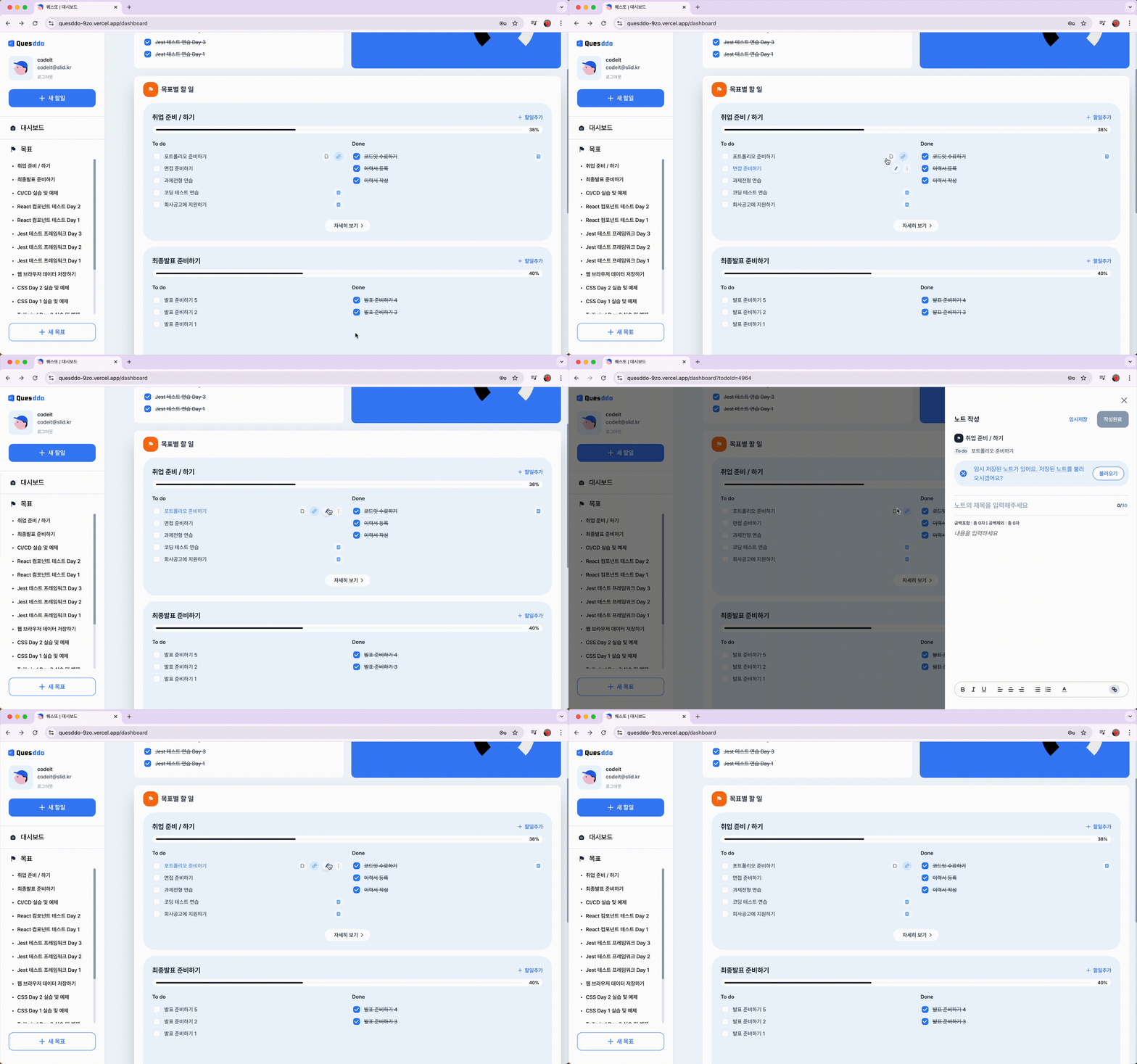
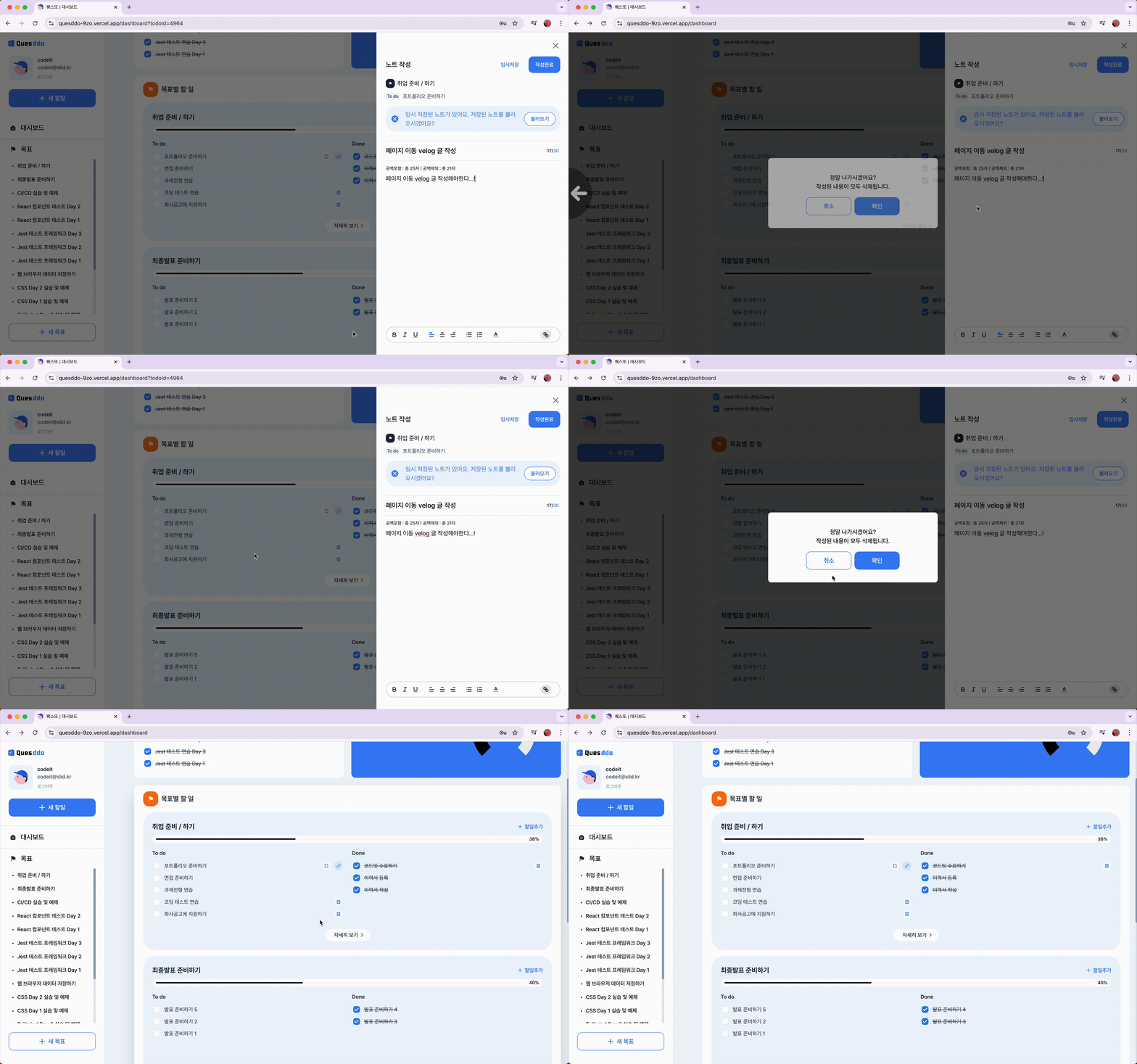
🎞️ 구현 영상
-
폼 제출X + 글 입력 히스토리X
-
폼 제출X + 글 입력 히스토리O
마무리
🔄 설계 회고: Hook vs 컴포넌트 방식
이번에는 이탈 방지 로직을 커스텀 Hook(useBlockNavigation)으로 분리하고, 팝업 UI는 별도의 컴포넌트로 독립시켜서 구현했습니다.
이 방식의 장점은:
- 로직과 UI가 깔끔하게 분리되고
- Hook을 통해 다양한 화면에서 재사용 가능하다는 점입니다.
하지만 구현을 끝낸 뒤 생각해보니, App Router에서 사용했던 구조처럼 전체를 하나의 컴포넌트로 묶고, 팝업 내용을 children으로 받는 방식도 꽤 괜찮았겠다는 생각이 들었습니다.
<LeavePagePopUp>
  ...팝업 내용...
</LeavePagePopUp>
이렇게 하면 사용자는 LeavePagePopUp 컴포넌트 내부에서 필요한 UI만 넘겨주면 되기 때문에 조금 더 직관적인 구조가 될 수도 있었을 것 같습니다.
결국에는 "어떤 로직을 공통화할지", "UI와 제어를 어디서 끊을지"에 대한 선택의 문제였고, 프로젝트의 규모나 복잡도에 따라 다른 방식이 더 적합할 수도 있겠다는 생각을 하게 되었습니다.
📝 이번 구현을 돌아보며
이번 작업을 통해 Page Router 환경에서도 구조화된 방식으로 이탈 방지를 구현할 수 있었고, 디자인된 팝업을 통해 사용자 경험을 높일 수 있는 방법도 알게 되었습니다.
App Router와 Page Router의 페이지 이동 방지 처리의 차이점에 대해 헷갈렸던 부분도 정리되었고, 훅과 컴포넌트 분리로 재사용성과 유지보수성도 높아졌다고 생각합니다.
혹시 더 나은 방식이나 개선점이 있다면 댓글로 알려주세요! 🙌
💻 전체 코드 보기
// hooks/useBlockNavigation.tsx
import { NextRouter, useRouter } from "next/router";
import { useCallback, useEffect, useState } from "react";

import { useModalContext } from "@/contexts/InputModalContext";

type StopMovePageProps = {
  isPageMoveRestricted: boolean;
};

export const useBlockNavigation = ({
  isPageMoveRestricted,
}: StopMovePageProps) => {
  const router = useRouter();
  const { isPopupOpen, showPopup, hidePopup } = useModalContext();
  const [moveResolveFn, setMoveResolveFn] = useState<
    ((choice: boolean) => void) | null
  >(null);

  const originalPush = router.push;

  const handleConfirmPopup = () => {
    if (moveResolveFn) {
      hidePopup();
      moveResolveFn(true);
    }
  };

  const handleCancelPopup = () => {
    if (moveResolveFn) {
      hidePopup();
      moveResolveFn(false);
    }
  };

  const openModalAndWaitForChoice = () => {
    return new Promise<boolean>((resolve) => {
      showPopup();
      setMoveResolveFn(() => resolve);
    });
  };

  // 뒤로 가기
  const handleBeforePopState = ({ as }: { as: string }) => {
    if (as === router.asPath) {
      return true;
    }
    if (isPageMoveRestricted) {
      openModalAndWaitForChoice().then((result) => {
        if (!result) {
          history.pushState(null, "", router.asPath);
        } else {
          originalPush(as);
        }
      });
      return false; // 이동 차단
    }
    return true; // 이동 허용
  };

  useEffect(() => {
    router.beforePopState(handleBeforePopState);

    return () => {
      router.beforePopState(() => true);
    };
  }, [router, isPageMoveRestricted]);

  // 외부 링크 이동
  const handleBeforeUnload = useCallback(
    (e: BeforeUnloadEvent) => {
      // 페이지를 벗어나지 않아야 하는 경우
      if (isPageMoveRestricted) {
        e.preventDefault();
        e.returnValue = true; // legacy 브라우저를 위해 추가
      }
    },
    [isPageMoveRestricted],
  );

  useEffect(() => {
    window.addEventListener("beforeunload", handleBeforeUnload);

    return () => {
      window.removeEventListener("beforeunload", handleBeforeUnload);
    };
  }, [handleBeforeUnload]);

  // 내부 링크 이동
  useEffect(() => {
    const originalPush = router.push;

    const newPush: NextRouter["push"] = async (url, as, options) => {
      // 페이지를 벗어나지 않아야 하는 경우
      if (isPageMoveRestricted && !(await openModalAndWaitForChoice())) {
        return false;
      }

      await originalPush(url, as, options);
      return true;
    };
    router.push = newPush;

    return () => {
      router.push = originalPush;
    };
  }, [router, isPageMoveRestricted]);

  return {
    isPopupOpen,
    handleCancelPopup,
    handleConfirmPopup,
  };
};