
모닝스터디
Freezed 사용법
- 패키지 추가
flutter pub add \
  dev:build_runner \
  freezed_annotation \
  dev:freezed
# if using freezed to generate fromJson/toJson, also add:
flutter pub add json_annotation dev:json_serializable-
클래스 작성 (freezed 문법대로)
-
코드생성
dart run build_runner watch -d.gitignore에 생성된 파일 안올라가게 추가
.gitignore 파일에 추가
* > 앞에 파일명 상관 없이 . 뒤에 내용이 똑같으면 올리지 않는다
*.freezed.dart
*.g.dart
Firebase
Firebase 셋팅
fierbase 로그인 되어있는지 확인하기
- fierbase login
flutterfire cli 패키지 설치
- dart pub global activate flutterfire_cli
프로젝트 가져오는 명령어
- flutterfire configure
core 추가해야 에러 사라짐
- flutter pub add firebase_core
firebase 에서 fierstore 사용 할 수 있게 패키지 추가해줘야함
- flutter pub add cloud_firestore
시뮬레이터 실행
(오류 날 경우 버전 확인 해보기)
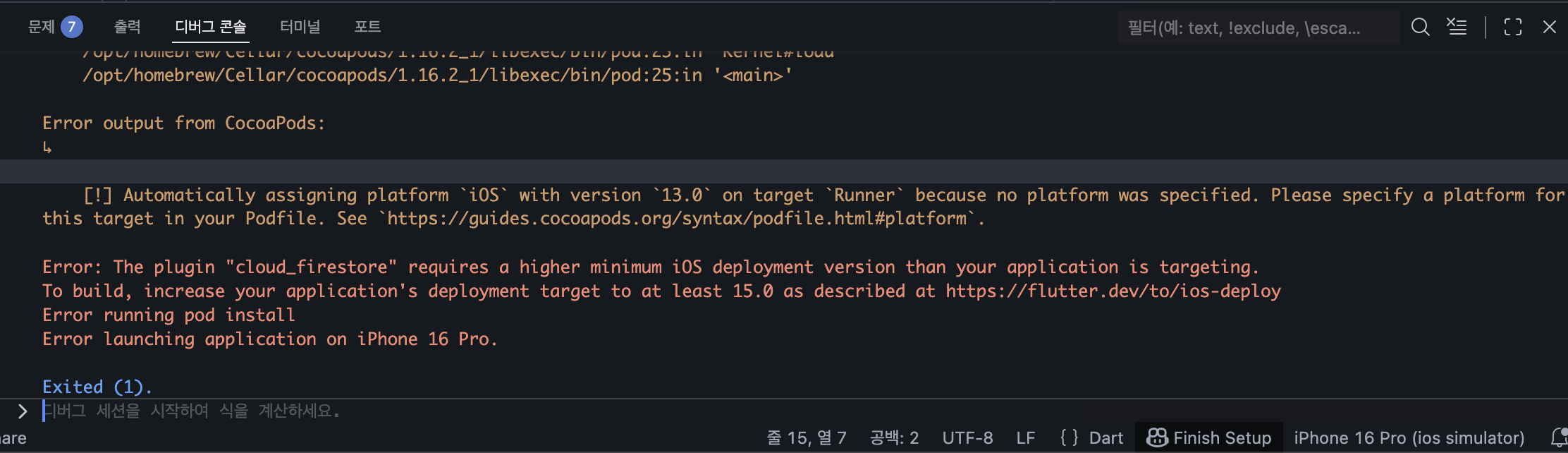
- 노란 부분에 적힌 버전과 하단 버전이 다를경우
- ios > PodFile > 2번째 줄에 있는 "# platform :ios, '13.0'" 주석 해제 후 빨간색에 적힌 버전으로 수정 후 시뮬레이션 실행 (위 사진에서는 15.0)
void main() async {
  WidgetsFlutterBinding.ensureInitialized();
  // 런앱이 실행되기전 비동기 함수 사용해서 데이터 초기화 할 때 꼭 넣어줘야함
  await Firebase.initializeApp // initializeApp = 비동기이기에 awit 써줘야함
(options: DefaultFirebaseOptions.currentPlatform); //currentPlatform = 만들어진 firebase option 파일 , 각 플랫폼에 맡게 자동으로 옵션을 구현해줌
  runApp(ProviderScope(child: MyApp()));
}
riverPod
riverPod 셋팅
riverPod 패키지 추가
-
flutter pub add flutter_riverpod
-
ProviderScope(child : MyApp())< ProviderScope로 묶어줘야함
void main() async {
  WidgetsFlutterBinding.ensureInitialized();
  await Firebase.initializeApp(options: DefaultFirebaseOptions.currentPlatform);
  runApp(ProviderScope(child: MyApp()));
}
파이어 베이스에서 문서를 가져오고 저장하는 부분
import 'package:cloud_firestore/cloud_firestore.dart';
import 'package:tasks/to_do/to_do_entity.dart';

class ToDoRepository {
  //
  Future<void> addTodo(ToDoEntity toDo) async {
    //
  }
  Future<void> updataTodo(ToDoEntity toDo) async {
    //
  }
  Future<void> deleteTodo(String id) async {
    //
  }
  Future<List<ToDoEntity>?> getTodos() async {
    FirebaseFirestore firestore = FirebaseFirestore.instance;
    // 파이어 베이스 가져올거임
    final collectionRef = firestore.collection('todos');
    // 파이어베이스에서 todos 를 참조할거야
    final result = await collectionRef.get(); // collectionRef 가져올거야 = todos
    final docs = result.docs; // 파이어베이스 todos 안에 있는 문서 다 가져올 거야
    docs.map((todo) {
      // 문서를 fromJson 사용해서 문서랑 id 를 합칠거야
      final map = {'id': todo.id, ...todo.data()};
      return ToDoEntity.fromJson(map);
    }).toList();
  }
}

//id,title,description,isFavorite,isDone => firebase 저장해줘
Future<void> insert({required ToDoEntity todo}) async {
  // firestor instance 만들기
  FirebaseFirestore firestore = FirebaseFirestore.instance;
  // 컬렉션에 참조 할 수 있는 컬렉션 참조 만들어야함
  final collectionRef = firestore.collection('todos');
  // todos 컬렉션에 저장할 수 있는 무언가를 만들어줘야함
  final docRef = collectionRef.doc();
  // 넣을 데이터인 map 만들기
  final data = todo.toJson();
  // map 저장
  await docRef.set(data);
}

``