
웹 게임을 만들며 배우는 React - 인프런
hooks TIP
- hooks는 순서가 중요함
- hooks 선언을 조건문, 반복문 안에 넣으면 안됨
useEffect안에도useState선언 하지 말것
useEffect는 두번째 인자를 다르게 하고싶으면 여러번 써도 됨componentDidUpdate에서 조건문으로 나눈것을useEffect에서는 두번째 인자에 하나씩 넣어서 여러번 씀
componentDidMount만 하고 싶을 때
useEffect(()=>{
	//ajax
},{});
componentDidUpdate에서만 실행되고 componentDidMount에서는 실행 안하고 싶을 때
const mounted = useRef(false);
useEffect(()=>{
	if(!mounted.current){
    	mounted.current=true;
    }else{
      //ajax 호출
    }
}.[바뀌는 값]);
틱택토
- 소규모 앱에서는
useReducer와contextAPI로 가능- 비동기 불편함, 큰 앱에서는
redux사용함
- 비동기 불편함, 큰 앱에서는
useReducer
//reducer의 초기값
const initialState = {
 	winner:'',
  	turn:'o',
  	tableData:[['','',''],['','',''],['','','']],
}
//변수로 빼놓은 action type -> dispatch의 type에 오타있을시 오류 발생용
const SET_WINNER = 'SET_WINNER';
//reducer
//dispatch된 action에 따라 return 실행
const reducer = (state,action) =>{
	switch(action.type){
		case 'SET_WINNER':
			//state.winner = action.winner; 이렇게 하면 안됨
			return{
				...state,
				winner: action.winner,
			}
		...기타 reducer...
	}
}
const TicTacToe = () => {
  //상단의 reducer와 initialState를 사용하여 useReducer
  const [state,dispatch] = useReducer(reducer,initialState);
  const {tableData, turn, winner} = state; //위 state 구조분해할당
  const onClickTable = useCallback(()=>{ //props로 내리므로 useCallback
  	dispatch({type: SET_WINNER, winner:turn});
    //table클릭시 dispatch 실행 -> useReducer(reducer,...)의 reducer로 action 전달
  },[]);
  //승자 판정하는 코드, useReducer가 비동기로 실행되기 때문에 useEffect로 recentCellr감지하여 승자 판정
  //전체 다 검사하지 않고, 가로줄, 세로줄만 검사함
  useEffect(()=>{
	conet [row, cell] = recentCell;
	if(row < 0){ //최근 셀 초기값 [-1,-1], componentDidMount시에는 return
		return;
	}
	let win = false;
 	//누른 셀의 가로줄 판정
	if(tableData[row][0] === turn && tableData[row][1] === turn && tableData[row][2] === turn){
			win = true;
	}
 	//누른 셀의 세로줄 판정
	if(tableData[0][cell] === turn && tableData[1][cell] === turn && tableData[2][cell] === turn){
		win = true;
	}
 	//대각선 2개 판정
	if(tableData[0][0] === turn && tableData[1][1] === turn && tableData[2][2] === turn){
 		win = true;
	}
	if(tableData[0][2] === turn && tableData[1][1] === turn && tableData[2][0] === turn){
		win = true;
	}
 	if(win){//승리시
 		dispatch({type: SET_WINNER, winner: turn})
 		dispatch({type:RESET_GAME})
 	}else{
 		//무승부검사
 		let all = true; //all이 true면 무승부라는 뜻
 		tableData.forEach((row)=>{
 			row.forEach((cell)=>{
 				if(!cell){ //셀이 중간에 하나라도 비면
 					all = false;
 				}
 			});
 		});
 		if(all){
 			//무승부
 			dispatch({type:RESET_GAME})

 		} else {
 			//턴 넘기기
 			dispatch({type:CHANGE_TURN})
 		}

 	}
  },[recentCell]);
  return (
	<>
		<Table onClick={onClickTable}/>
		{winner && <div> {winner}님의 승리</div>}
	</>
  );
}contextAPI사용 안하면 table에서 선언한dispatch를 td에서 사용하려면 table > tr > td 까지 props로 내려줘야함useReducer의dispath에서 데이터 바꾸는게 비동기임,redux는 동기- 비동기 state에 따라서 무언가를 처리할 떄는
useEffect를 사용한다 useState를 많이 쓰지 않고useReducer를 사용해서 여러개 state를 한번에 관리 가능useState가 너무 많아질때는useRedcer를 고려해 보자
무엇 때문에 리렌더링 되는지 체크해보기
props 체크
- 틱택토를 만들었는데 클릭한 칸이 아닌 9개 모든칸이 렌더됨
<td/>컴포넌트에서 체크
const ref = useRef([]);
useEffect(()=>{
	console.log(rowIndex === ref.current[0], cellIndex === ref.current[1], dispatch === ref.current[2], cellData === ref.current[3]);
  ref.current = [rowIndex,cellIndex,dispatch, cellData]
},[rowIndex,cellIndex,dispatch, cellData]);- 위 처럼
useEffect,useRef설정을 하고td를 눌러본다. - true, true, true, false 가 나옴 -> cellData가 바뀜
- 이런식으로 찾는데 td, tr다 별문제 없음
memo로 감싸기
memo로 컴포넌트를 감쌈React.memo<- 자세히 다시 찾아보기
- 최후의 수단으로
useMemo사용 가능하다고 함 <- 자세히 다시 찾아보기
지뢰찾기
context API
createContext
- createContext 선언 후 컴포넌트를 Provider로 감싸며 데이터를보내면 하위 컴포넌트에서 해당 데이터를 접근 가능
  export const TableContext = createContext({
 	//별 의미없는 초기값, 모양만 맞춰줌
 	tableData: [],
 	dispatch: () => {},
  });
  const MineSearch = () => {
  	const [state, dispatch] = useReducer(reducer, initialState);
 			//useMemo로 provider로 보내는 값을 캐싱
 			//dispatch는 변하지 않는 값이므로 바뀌는 목록에 넣지 않아도 됨
  	const value = useMemo(()=>({ tableData: state.tableData, dispatch }),[state.tableData])
  	return (
  		<TableContext.Provider value={value}>
 		//provider에 dispatch를 넣음 -> 어디서나 dispatch 접근 가능
 			<Form/>
 			<div>
 			...
 		 </TableContext.Provider>
  	)
}- contextAPI는 최적화가 힘들다
- provider로 보내는 값들이 리렌더되면 바뀌어서 자식 컴포넌츠들도 리렌더되기 때문
- 그래서 useMemo로 캐싱을 함
useContext
- useContext로 가져다가 씀
import {TableContext} from './MineSearch';
const From = () => {
 	const {dispatch} = useContext(TableContext);

}
React Router
npm i react-router react-router-dom
- 웹이여여서 react-router-dom설치
- react-router를 의존
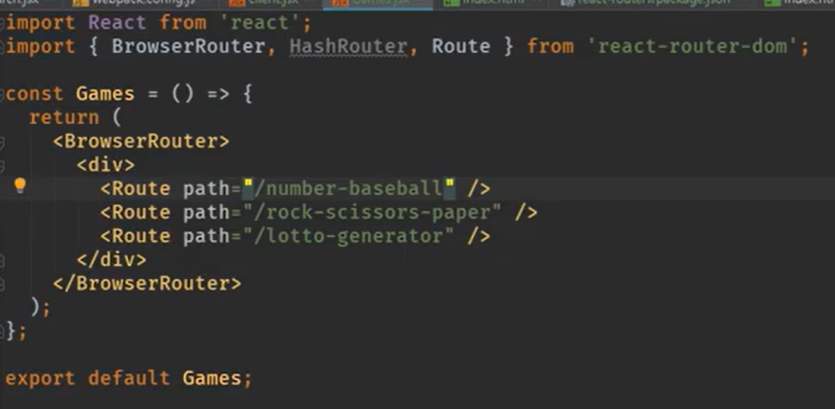
BrowserRouter
- 라우터의 최 상단을 감싸준다

2022 목표 - 리액트 잘하기