Phong Lighting Model and Directional Light
Phong Lighting Model
Lighting : 빛과 물체간의 상호작용을 계산하는 기술
Phong model : 4가지 terms을 이용해 계산
- diffuse / specular / ambient / emissive
Light Source
광원(Light Source) : 종류별 계산 방식에 차이 존재
- Directional Light : 물체의 위치에 무관하게 항상 같은 방향에서 들어오는 빛 (ex: 태양)
- Point Light (전구)
- Spot Light (손전등)
- Area Light
Diffuse Term
Lambertain surfaces : 빛이 들어오면 모든 방향으로 거의 비슷한 양을 반사시키는 표면
- 해당 물체를 어떤 위치에서 봐도 같은 색으로 판단
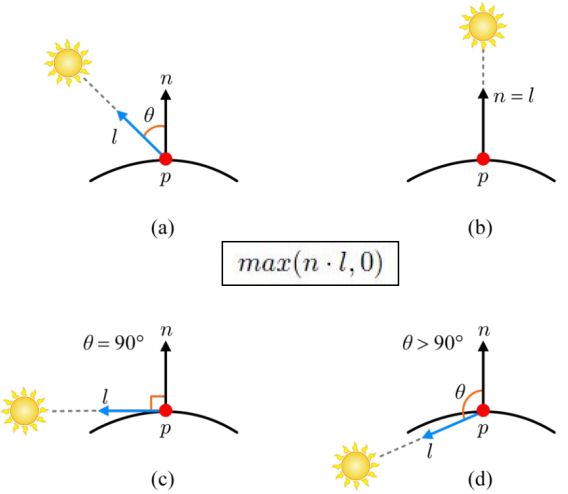
light vector : 물체의 한 점 에서 태양 빛이 비추는 방향으로 가는 벡터
normal vector : 표면의 법선 벡터
: 과 사이의 각도
빛의 위치별 가 받는 양 :
- 가 커질수록 받는 빛의 양이 줄어들다가 최종적으로 0이 됨
The diffuse term :
- 빛의 색상()에 물체가 반사하는 파장()을 element-wise multiplication 하여 계산함.
- : light source의 diffuse
- : material의 diffuse
Specular Term
바라보는 방향에 따라 계산 결과가 달라짐
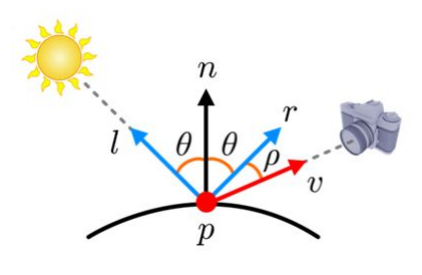
reflection vector : 빛이 들어와서 반사되는 방향의 벡터
view vector : 표면에서 카메라(눈)를 향하는 벡터
: 와 사이의 각도
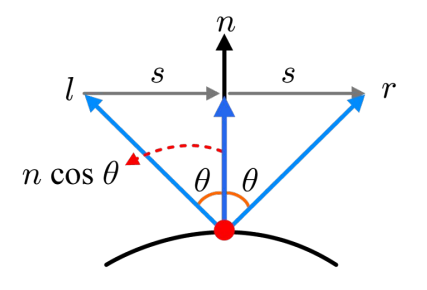
computing the reflection vector
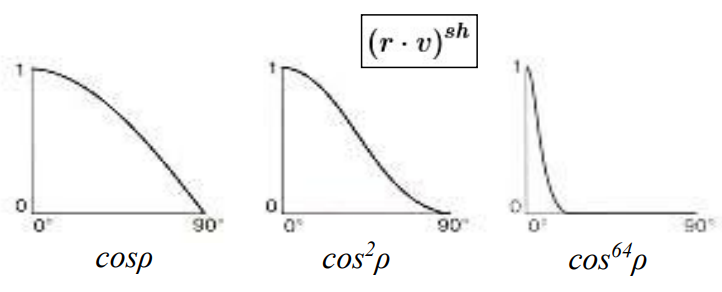
fall off 가 클수록 카메라가 벡터에 조금만 멀어져도 하이라이트를 줄이겠다는것을 의미함
- 가 높을수록 하지 않다는 것을 의미함
The specular term :
는 와 달리 hightlight 계산 시 빛의 색 유지를 위해 gray-scale 값을 갖게 됨
Ambient and Emissive Terms
Ambient Light : 물체를 비추는 직접적인 조명 없이 태양빛이 산란되어 보이게 되는 빛
- 어디인지는 모르나 어디선가 들어오는 빛이 있을것이라 생각
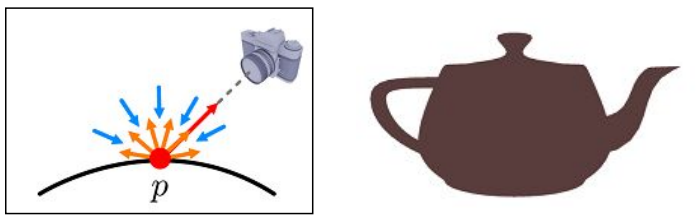
The ambient term :
빛이 어느 각도에서 오는지 모르기에 별도의 파라미터가 존재하지 않음
Emissive Light : 물체의 표면자체가 빛을 발산하는 경우 (ex: 네온사인)
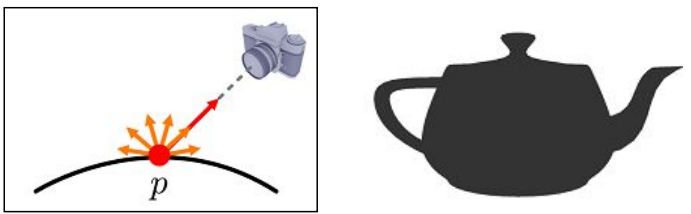
The emissive term :
Phong Lighting Model
Per-fragment Lighting
fragement shader에서의 lighting 작업 방식
- 물체 표면의 두 점을 가정
- 표면 위 어디에서나 direction light 가 동일하기에 uniform 으로 전달
- 벡터는 물체의 표면에 따라 달라지기에 계산 필요
- 벡터가 world-space vector 이기에 같은 의미를 가지기 위해서는 벡터는 같은 좌표계 (world-space)에 존재해야함
- 모든 fragment의 normal vector는 rasterization 과정에서 interpolation되어 계산됨
- 을 통해 벡터 (world-space) 계산됨
- 벡터 또한 world-space view vector 이어야 함
- 각 vertex들은 world space에서의 좌표와 EYE(camera position) 의 좌표를 빼서 벡터 계산
- 다른 fragment들은 interpolation하여 계산됨
위 과정들을 통해 모든 fragment들은 자신의 값을 갖게 되어 각각의 Lighting 결과를 얻을 수 있음
Simple Example - Shader
Vertex Shader
#version 330

layout (location = 0) in vec3 pos;
layout (location = 1) in vec2 tex;
layout (location = 2) in vec3 norm;

out vec4 vCol;
out vec2 TexCoord;
out vec3 Normal;

uniform mat4 model;
uniform mat4 projection;
uniform mat4 view;

void main()
{
	gl_Position = projection * view * model * vec4(pos, 1.0f);
	vCol = vec4(clamp(pos, 0.0f, 1.0f), 1.0f);

	TexCoord = tex;

	Normal = mat3(transpose(inverse(model))) * norm;
}
모델에 불균일한 크기변환이 적용될 경우, 단순히 모델 행렬만 곱한다면 법선 벡터가 더 이상 표면에 수직이 아니게 되는 문제 발생
- mat3() : 모델의 이동(translation) 정보는 제거하고, 회전(rotation)과 크기 변환(scaling) 정보만 사용
- inverse() : 모델에 적용된 크기 변환의 영향을 제거하기 위해 사용
- transpose() : 모델에 적용된 회전 변환을 법선 벡터에 올바르게 적용하기 위해 사용
Fragement Shader
#version 330

in vec4 vCol;
in vec2 TexCoord;

out vec4 color;

struct DirectionalLight
{
	vec3 color;
	float ambientIntensity;
};

uniform sampler2D theTexture;
uniform DirectionalLight directionalLight;

void main()
{
	vec4 ambientColor = vec4(directionalLight.color, 1.0f) * directionalLight.ambientIntensity;

	color = texture(theTexture, TexCoord) * ambientColor;
}
참고 영상 : ComputerGraphics Lecture 9. Lighting - 김형기 교수님
참고 자료 : Introduction to Computer Graphics with OpenGL ES
