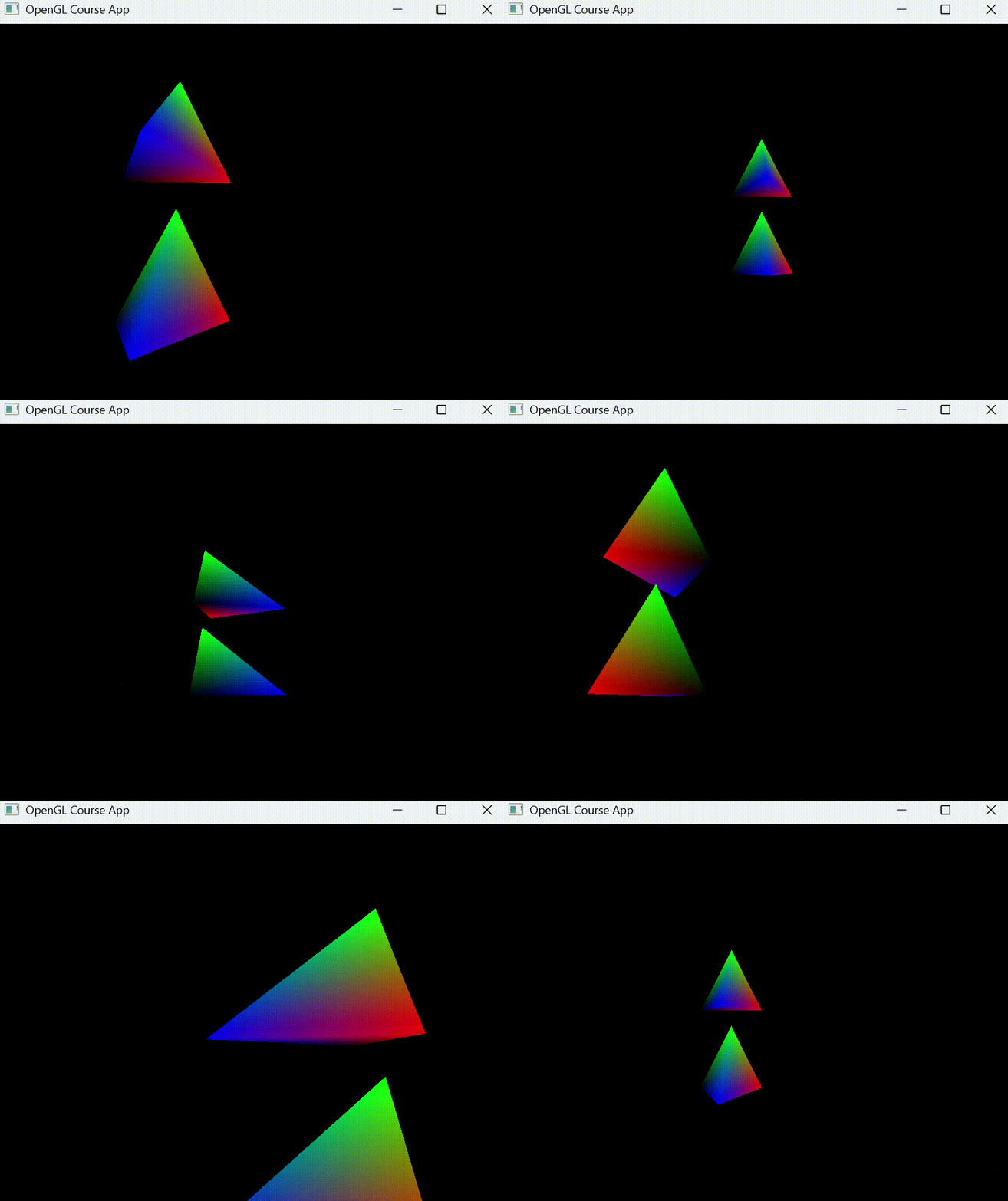
The Camera and User Input
Camera / View Space
View Space : 카메라의 시점에서 바라 본 좌표계
View Matrix : 월드 공간의 좌표를 뷰 공간의 좌표로 변환시켜주는 행렬
View Matrix
Camera Position : 월드 공간에서 카메라가 어디에 있는지 나타내는 벡터
Direction : 카메라가 바라보는 방향을 나타내는 벡터
- Direction은 보통 Target에서 Position을 빼서 구함
- Direction Vector : 카메라가 바라보는 방향과 반대인 벡터
Right : 카메라의 오른쪽 방향을 나타내는 벡터
- 월드의 'UP' 벡터와 카메라의 'Direction' 벡터를 외적하여 구할 수 있음.
Up : 카메라의 위쪽 방향을 나타내는 벡터
- 월드의 'Right' 벡터와 카메라의 'Direction' 벡터를 외적하여 구할 수 있음.
View Matrix 계산 과정
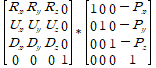
GLM lookAt
glm::mat4 viewMatrix = glm::lookAt(position, target, up);positon : 카메라의 위치 벡터
target : 카메라가 바라볼 지점의 위치 벡터
up : 월드 공간에서의 위쪽 방향을 나타내는 벡터
glm::vec3(0.0f, 1.0f, 0.0f) // up vector을 통해서 복잡한 계산 없이 뷰 행렬을 만들 수 있음.
Moving the Camera
키보드 입력 (W, A, S, D)을 받아 카메라의 position 벡터 값을 변경해주면 카메라가 이동하는 것 처럼 표현 됨.
Simple Example - Key Input
void Window::handleKeys(GLFWwindow* window, int key, int code, int action, int mode)
{
	Window* theWindow = static_cast<Window*>(glfwGetWindowUserPointer(window));

    if (key == GLFW_KEY_ESCAPSE && action == GLFW_PRESS)
    	glfwSetWindowShouldClose(window, GLFW_TRUE);

    if (key >= 0 && key < 1024)
    {
    	if (action == GLFW_PRESS)
        	theWindow->keys[key] = true;
        else if (action == GLFW_RELEASE)
        	theWindow->keys[key] = false;
    }
}
void Camera::keyControl(bool* keys, GLfloat deltaTime)
{
GLfloat velocity = moveSpeed * deltaTime;
if (keys[GLFW_KEY_W])
position += front * velocity;
if (keys[GLFW_KEY_S])
position -= front * velocity;
if (keys[GLFW_KEY_A])
position -= right * velocity;
if (keys[GLFW_KEY_D])
position += right * velocity;Delta Time
컴퓨터의 성능에 따라 게임 루프의 속도가 달라질 수 있는 문제 발생.
이전 프레임과 현재 프레임 사이의 시간 간격을 측정하여 이동 거리에 곱해주면, 컴퓨터 성능에 상관없이 일정한 속도로 카메라를 움직일 수 있음.
Delta Time을 통해 프레임 속도에 독립적인 움직임 구현 가능
Simple Example
GLfloat deltaTime, lastTime;

GLfloat now = glfwGetTime();
deltaTime = now - lastTime;
lastTime = now;
Turning
마우스의 움직임을 통해 카메라의 방향 즉, 카메라의 direction 벡터를 변경하는 것.
Simple Example - Mouse Input
void Window::handleMouse(GLFWwindow* window, double xPos, double yPos)
{
	Window* theWindow = static_cast<Window*>(glfwGetWindowUserPointer(window));

    if (theWindow->mouseFirstMoved)
    {
    	theWindow->lastX = xPos;
        theWindow->lastY = yPos;
        theWindow->mouseFirstMoved = false;
    }

    theWindow->xChange = xPos - theWindow->lastX;
    theWindow->yChange = theWindow->lastY - yPos;

    theWindow->lastX = xPos;
    theWindow->lastY = yPos;
}
void Camera::mouseControl(GLfloat xChange, GLfloat yChange)
{
xChange *= turnSpeed;
yChange *= turnSpeed;
yaw += xChange;
pitch += yChange;
if (pitch > 89.0f)
pitch = 89.0f;
if (pitch < -89.0f)
pitch = -89.0f;
update();
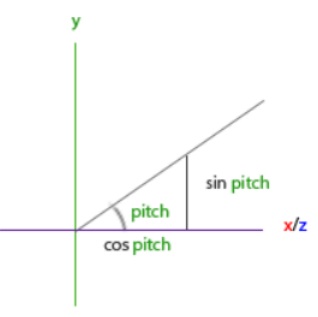
}Pitch : 카메라가 위아래로 고개를 까딱이는 움직임
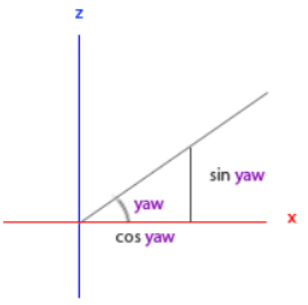
Yaw : 카메라가 좌우로 도리도리하는 움직임
Turning - Pitch
Turning - Yaw
Turning - Pitch and Yaw
Simple Example - Turning
void Camera::update()
{
	front.x = cos(glm::radians(yaw)) * cos(glm::radians(pitch));
    front.y = sin(glm::radians(pitch));
    front.z = sin(glm::radians(yaw)) * cos(glm::radians(pitch));
    front = glm::normalize(front);

    right = glm::normalize(glm::cross(front, worldUp));
    up = glm::normalize(glm::cross(right, front));
}
마우스의 x, y 움직임 변화량을 이용하여 Pitch와 Yaw 값을 계산하고, 삼각함수를 이용하여 새로운 direciton 벡터를 구할 수 있음.
새로운 direction 벡터를 lookAt 함수의 target 계산에 이용하면 카메라 회전이 구현 됨.