maven 개발
기본적으로 eclipse에 spring boot 환경 다운로드
application.yml
server:
  port: 8111

spring:
  datasource:
    url: jdbc:oracle://localhost:3306/xe
    username: SCOTT
    password: TIGER
    driver-class-name: oracle.jdbc.driver.OracleDriver

mybatis:
  configuration:
    multiple-result-sets-enabled: false
    map-underscore-to-camel-case: true
    call-setters-on-nulls: true
    jdbc-type-for-null: varchar
    default-fetch-size: 500
  mapper-locations:
  - classpath:mybatis/mapper/*.xml
pom.xml
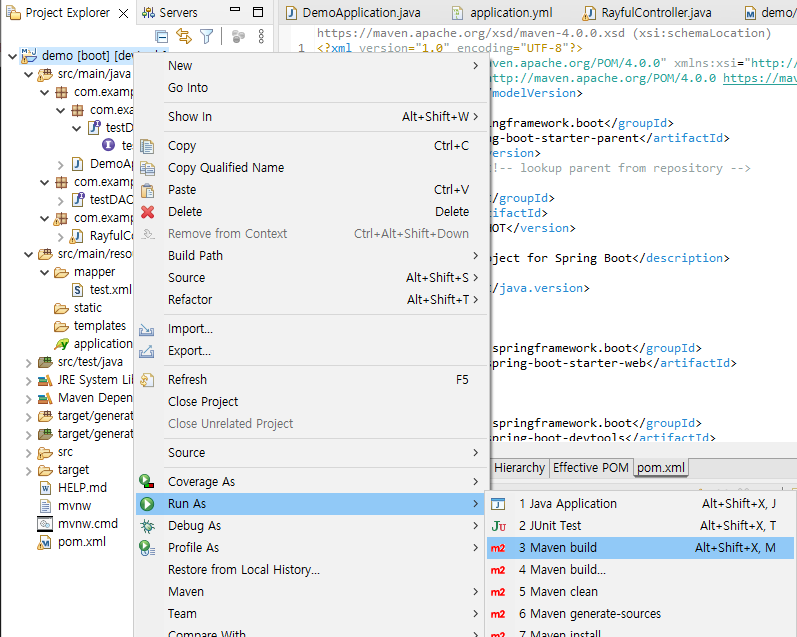
각 의존성을 부여하여 항상 새로 빌드한다.
Controller.java
application.yml에서 설정한 포트를 REST로 연결하여준다.
package com.example.demo.handler;
import org.springframework.web.bind.annotation.GetMapping;
import org.springframework.web.bind.annotation.RestController;
import lombok.extern.slf4j.Slf4j;

@RestController
@Slf4j
public class RayfulController {
	@GetMapping("/test")
	public int countEntity(){
		int number = 0;
		return number;
	}
}
DAO
repository를 정확하게 설정하여준다.
package com.example.demo.dao;

import org.springframework.stereotype.Repository;

@Repository("com.example.demo.dao.testDAO")
public interface testDAO {
}
Application.java
@componentScan을 이용하여 packages를 설정해준다.
package com.example.demo;


import org.springframework.boot.SpringApplication;
import org.springframework.boot.autoconfigure.SpringBootApplication;
import org.springframework.context.annotation.ComponentScan;

@SpringBootApplication
@ComponentScan(basePackages = {"com.example.demo.handler"})
public class DemoApplication {
	public static void main(String[] args) {
		SpringApplication.run(DemoApplication.class, args);
		System.out.println("mainApplication 실행");
	}
}

Be {Nice} Be {Kind}