수정사항
PlayerController에서 Grid를 public으로 둬서 유니티 에디터에서 직접 드래그 앤 드롭으로 그리드를 등록해주었었는데 MapManager라는 새로운 클래스를 만들고 그 안에서 Grid 컴포넌트를 생성하고 어디서든 필요한 곳에서 쓸 수 있도록 Managers 클래스에서 Contents region에서 등록을 해주었다.
Collision 영역 추출 좌표 영역 확대하기
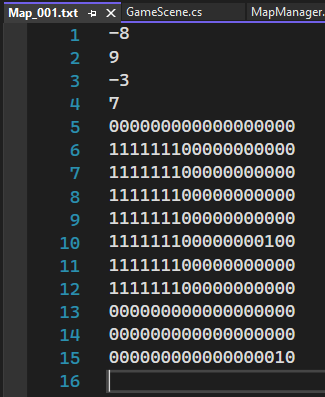
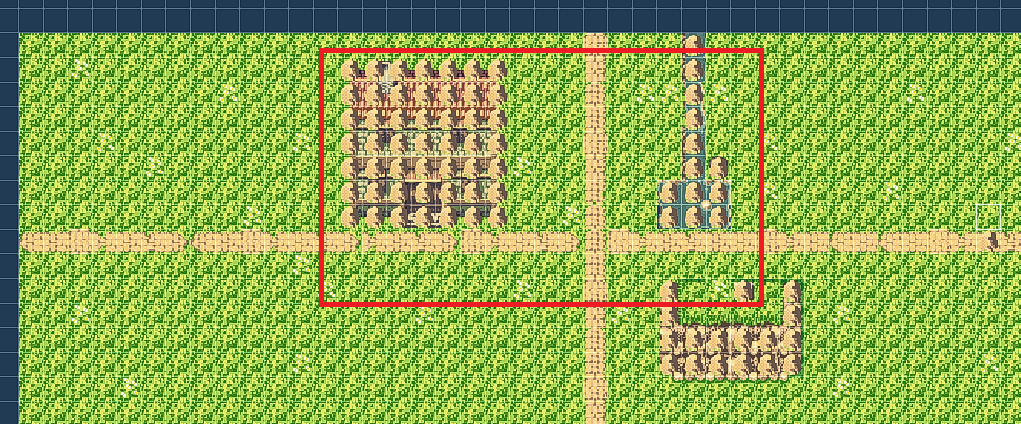
이전에는 위 사진과 같이 추출한 텍스트파일처럼 맵 전체 영역이 아닌 갈 수 없는 부분이 존재하는 영역 크기만큼만 추출한 것을 볼 수 있었다. (물길쪽 바위는 나중에 추가한 것임)
이번에는 맵 전체로 확대시켜보자
public class MapEditor
{
#if UNITY_EDITOR

    [MenuItem("Tools/GenerateMap")]
    private static void HelloWorld()
    {
        GameObject[] gameObjects = Resources.LoadAll<GameObject>("Prefabs/Map");

        foreach(GameObject go in gameObjects)
        {
            Tilemap tmBase = Util.FindChild<Tilemap>(go, "Tilemap_Base", true);
            Tilemap tm = Util.FindChild<Tilemap>(go, "Tilemap_Collision", true);

            using (var writer = File.CreateText($"Assets/Resources/Map/{go.name}.txt"))
            {
                writer.WriteLine(tmBase.cellBounds.xMin);
                writer.WriteLine(tmBase.cellBounds.xMax);
                writer.WriteLine(tmBase.cellBounds.yMin);
                writer.WriteLine(tmBase.cellBounds.yMax);

                for (int y = tmBase.cellBounds.yMax; y >= tmBase.cellBounds.yMin; y--) // 위에서부터 내려옴
                {
                    for (int x = tmBase.cellBounds.xMin; x <= tmBase.cellBounds.xMax; x++)
                    {
                        TileBase tile = tm.GetTile(new Vector3Int(x, y, 0));
                        if (tile != null)
                            writer.Write("1");
                        else
                            writer.Write("0");
                    } // 한줄 끝
                    writer.WriteLine();
                }
            }
        }
    }
#endif
}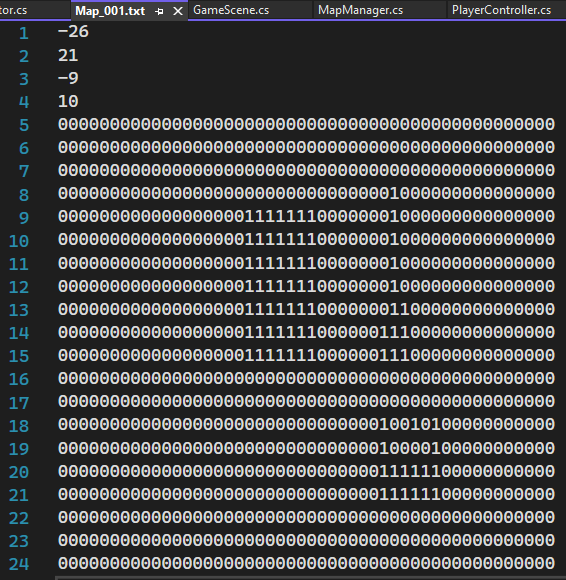
이중 for문의 범위를 tmBase로 확대시켰다.
만약 tm이 null이라면 프리팹에서 Tilemap_Collision이 비활성화 되어있는지 확인해보자!
txt로 추출한 collision 영역 플레이어 이동시 적용
public class MapManager
{
    public Grid CurrentGrid { get; private set; }

    public int MinX { get; set; }
    public int MaxX { get; set; }
    public int MinY { get; set; }
    public int MaxY { get; set; }

    bool[,] _collision;

    public bool CanGo(Vector3Int cellPos)
    {
        if (cellPos.x < MinX || cellPos.x > MaxX)
            return false;
        if (cellPos.y < MinY || cellPos.y > MaxY)
            return false;

        int x = cellPos.x - MinX;
        int y = MaxY - cellPos.y;
        return !_collision[y, x];
    }

    public void LoadMap(int mapid)
    {
        DestroyMap();

        string mapName = "Map_" + mapid.ToString("000"); // 000 포맷으로 변환하도록 함
        GameObject go = Managers.Resource.Instantiate($"Map/{mapName}");

        GameObject collision = Util.FindChild(go, "Tilemap_Collision", true);
        if (collision != null)
            collision.SetActive(false);

        CurrentGrid = go.GetComponent<Grid>();

        TextAsset txt = Managers.Resource.Load<TextAsset>($"Map/{mapName}"); // .txt는 추가하지 말것!
        StringReader reader = new StringReader(txt.text);

        MinX = int.Parse(reader.ReadLine());
        MaxX = int.Parse(reader.ReadLine());
        MinY = int.Parse(reader.ReadLine());
        MaxY = int.Parse(reader.ReadLine());

        int xCount = MaxX - MinX + 1; // 양쪽이 다 포함되니까 +1
        int yCount = MaxY - MinY + 1;
        _collision = new bool[yCount, xCount];

        for(int y=0; y<yCount; y++)
        {
            string line = reader.ReadLine();
            for(int x=0; x<xCount; x++)
            {
                _collision[y, x] = (line[x] == '1' ? true : false);
            }
        }
    }

    public void DestroyMap()
    {
        GameObject map = GameObject.Find("Map");
        if(map != null)
        {
            GameObject.Destroy(map);
            CurrentGrid = null;
        }
    }
}
MapManager에서는 CanGo(), LoadMap(), Destroy() 세 가지 함수를 만들었다.
LoadMap()에서는 GameScene.cs에서 mapid(ex. 12)를 전달하면 프리팹에서 생성해놓은 Map_012를 가져와서 Tilemap_Collision을 비활성화 시킨다음 Txt로 변환시킨 파일을 가져와서 한줄씩 뽑아온 다음 1이라면 _collision 2차원 배열에 true 0이라면 false를 저장시켜주도록 했다.
이렇게 2차원 배열을 만들어두고 PlayerController에서 CanGo() 함수를 호출시켜서 갈 수 있는지 여부에 따라 플레이어의 이동을 제한시키는데 PlayerController::UpdateMoving()을 다음과 같이 수정했다.
 void UpdateMoving()
    {
        if (_isMoving == false && _dir != MoveDir.None) // 유닛 한칸 이동 끝날때까지 입력 못받게
        {
            Vector3Int destPos = _cellPos;
            switch (Dir)
            {
                case MoveDir.Up:
                    destPos += Vector3Int.up;
                    break;
                case MoveDir.Down:
                    destPos += Vector3Int.down;
                    break;
                case MoveDir.Left:
                    destPos += Vector3Int.left;
                    break;
                case MoveDir.Right:
                    destPos += Vector3Int.right;
                    break;
            }

            if(Managers.Map.CanGo(destPos))
            {
                _cellPos = destPos;
                _isMoving = true;
            }
        }
    }
GetDirInput() 함수에서 아예 아무것도 입력하지 않았다는 _dir = MoveDir.None인 상태에서는 아예 건너뛰도록 하였다. (WASD중 하나를 맨 처음 눌렀을 때 플레이어가 목적지까지 이동하기 전까지 호출되는 수많은 UpdateMoving()함수의 내부 로직이 무시됨)
그리고 임시로 destPos 변수를 하나 만들고 현재 좌표 (_cellPos)를 저장해둔다.
그리고 방향에 따라 destPos의 좌표를 변경시키고 만약 CanGo(destPos)를 호출시켜서 destPos위치가 갈 수 있는지 체크를 한 다음 true를 반환한다면 _cellPos를 destPos로 변경시켜주는 로직으로 변경시켰다.
