
TailwindCSS는 HTML 내에서 class 내에 스타일을 적용시켜줄 수 있는 CSS 프레임워크다.
아래와 같은 장단점이 있다.
- 장점
- 코드 작성 시, class명을 작성할 필요가 없음.
- 별도의 css 파일을 생성할 필요가 없음.
- 협업할 때, 직관적인 코드로 의사소통이 가능.
- 단점
- css 내용을 html에 작성하기 때문에 코드가 지저분함.
- text-shadow나 animation-delay 등의 몇 가지 기능은 지원되지 않아 관련 라이브러리를 설치하거나 별도로 css 내에 추가해야 함
지표
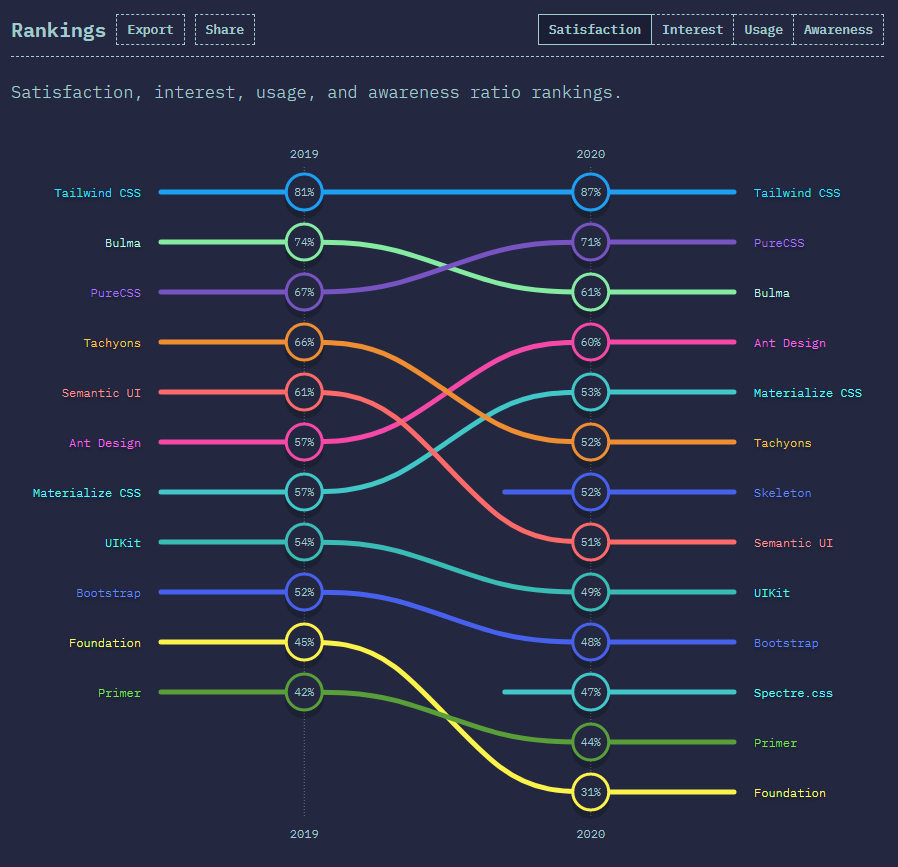
위의 표와 같이 가장 인기있으며 인지도는 꾸준히 상승하는 것을 확인할 수 있다.
실습
본 환경은 ReactJS 환경이다.- version
node v16.13.2- 라이브러리 설치
npm i tailwindcss postcss autoprefixer -D- 환경 설정 파일 생성
npx tailwindcss init
touch postcss.config.jstailwincss.config.js파일 설정
const { default: plugin } = require("tailwindcss/plugin");

module.exports = {
  content: [
    "./pages/**/*.{js,ts,jsx,tsx}",
    "./components/**/*.{js,ts,jsx,tsx}",
  ],
  theme: {
    extend: {
		}
  },
  plugins: [],
};

// tailwind.config.jspostcss.config.js파일 설정
const { join } = require("path");
module.exports = {
  plugins: {
    tailwindcss: {
      config: join(__dirname, "tailwind.config.js"),
    },
    autoprefixer: {},
  },
};

// postcss.config.jsstyle/globals.css파일에 추가
@tailwind base;
@tailwind components;
@tailwind utilities;

// globals.css
여기까지 하면 세팅은 끝났다.
예제를 통해 테스트 해보자.
예제
<div>태그로 박스를 3개 만들고 가로로 정렬하려고 한다.- 기존 방식
import React from "react";

import "./Box.css";

const Box = () => {
  return (
    <div>
      <div className="boxes">
        <div>Box1</div>
        <div>Box2</div>
        <div>Box3</div>
      </div>
    </div>
  );
};

export default Box;

// Box.js
.boxes {
display: flex;
width: 100%;
margin: auto;
}
// Box.css- Tailwind CSS 활용 방식
import React from "react";

const Box = () => {
  return (
    <div>
      <div className="flex w-full m-auto">
        <div>Box1</div>
        <div>Box2</div>
        <div>Box3</div>
      </div>
    </div>
  );
};

export default Box;

// Box.js
놀랍게도 위의 두 방식은 100% 같은 동작을 한다.
기존 방식에 비해 새로운 방식은 별도의 CSS 파일이 필요없음은 물론 boxes라는 클래스명도 선언할 필요가 없어졌다.
앞으로 진행하는 프로젝트는 모두 Tailwind CSS를 활용할 것 같다.

For me better than yesterday
글 잘보았습니다.!!
혹시 css프레임워크 랭킹지표는 어디에서 볼 수 있을까요?