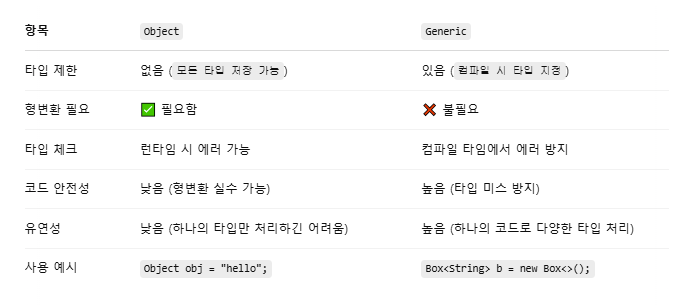
제네릭과 Object의 차이점
ArrayList도 제네릭 클래스
ArrayList<String> list = new ArrayList<>();
list.add("apple");
list.add("banana");
ArrayList <.E> 내부정의
public class ArrayList<E> extends AbstractList<E> implements List<E>, RandomAccess, Cloneable, Serializable {
HashMap도 제네릭 클래스
HashMap<String, Integer> map = new HashMap<>();
map.put("math", 95);
map.put("science", 88);
HashMap<K,V> 내부 정의
public class HashMap<K, V> extends AbstractMap<K, V> implements Map<K, V>, Cloneable, Serializable {
Key는 중복불가, Value는 중복가능
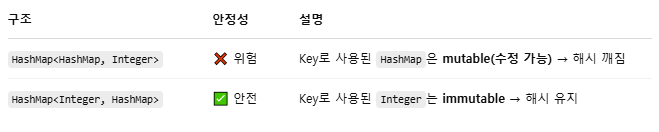
제네릭은 타입에 제한이 없기 때문에 HashMap<HashMap, Integer> 형태로도 선언이 가능하다.
import java.util.*;

public class Main {
    public static void main(String[] args) {
        HashMap<String, String> innerMap1 = new HashMap<>();
        innerMap1.put("name", "Alice");

        HashMap<String, String> innerMap2 = new HashMap<>();
        innerMap2.put("name", "Bob");

        HashMap<HashMap<String, String>, Integer> outerMap = new HashMap<>();

        outerMap.put(innerMap1, 100);
        outerMap.put(innerMap2, 200);

        for (HashMap<String, String> key : outerMap.keySet()) {
            System.out.println("Key: " + key + " | Value: " + outerMap.get(key));
        }
    }
}
하지만 HashMap은 mutable이기 때문에 key로 쓰면 위험하다. 수정이 불가능한 객체를 Key로 사용하는 것이 좋다.
제네릭이 없다면? Object로 하게 될 경우
ArrayList list = new ArrayList();  // 타입 명시 X → 모두 Object로 처리
list.add("apple");
list.add(123);  // 타입 혼합 가능

String str = (String) list.get(0);  // 형변환 필요
Integer n = (Integer) list.get(1);  // 잘못 캐스팅하면 런타임 에러 발생
Student 클래스를 만든다.
Student 배열을 만들어서 사용하는 방법
		Student s1 = new Student("James", 93);
		Student s2 = new Student("Ann", 95);
		Student s3 = new Student("May", 100);
		Student s4 = new Student("June", 64);
		Student s5 = new Student("Jane", 56);

		Student[] students = new Student[5];
		students[0]=s1;
		students[1]=s2;
		students[2]=s3;
		students[3]=s4;
		students[4]=s5;

		int cnt=0;
		for(int i=0; i<students.length; i++) {
			if(students[i].getScore()<60)
				cnt++;
			System.out.println(students[i]);
		}
		System.out.println("낙제생: "+cnt+"명");
ArrayList를 사용하는 방법
		Student s1 = new Student("James", 93);
		Student s2 = new Student("Ann", 95);
		Student s3 = new Student("May", 100);
		Student s4 = new Student("June", 64);
		Student s5 = new Student("Jane", 56);

		ArrayList<Student> sList = new ArrayList<>();
		sList.add(s1);
		sList.add(s2);
		sList.add(s3);
		sList.add(s4);
		sList.add(s5);

		int count=0;
		for(int i=0; i<sList.size(); i++) {
			if(sList.get(i).getScore()<60)
				count++;
			System.out.println(sList.get(i));
		}
		System.out.println("낙제생: "+cnt+"명");
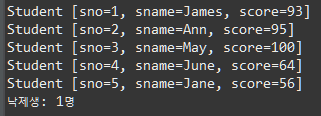
같은 결과값을 보여준다.
for문 사용
기본 for문: for(초기값; 범위; 반복){}
향상된 for문: for(배열의 요소 타입변수 선언: 배열){}
		int count=0;
		for(int i=0; i<sList.size(); i++) {
			if(sList.get(i).getScore()<60)
				count++;
			System.out.println(sList.get(i));
		}
		System.out.println("낙제생: "+cnt+"명");

		int count2=0;
		for(Student s: sList) {
			if(s.getScore()<60)
				count2++;
			System.out.println(s);
		}
예제
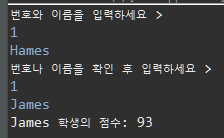
학생의 점수를 알려주는 프로그램
번호와 이름을 입력하세요.
해당되는 학생이 있으면 번호나 이름을 확인하세요.
해당되는 학생이 있으면 해당 학생에 대한 점수는 몇 점이에요.
package ex0408;

import java.util.ArrayList;
import java.util.Scanner;

public class Test {

	public static void main(String[] args) {

		Student s1 = new Student("James", 93);
		Student s2 = new Student("Ann", 95);
		Student s3 = new Student("May", 100);
		Student s4 = new Student("June", 64);
		Student s5 = new Student("Jane", 56);

		ArrayList<Student> sList = new ArrayList<>();
		sList.add(s1);
		sList.add(s2);
		sList.add(s3);
		sList.add(s4);
		sList.add(s5);

		checkScore(sList);

	}

	public static void checkScore(ArrayList<Student> sList) {
		Scanner sc = new Scanner(System.in);
		int idx = 999;
		int inputNum;
		String inputName;
		System.out.println("번호와 이름을 입력하세요 > ");
		while(true) {
			inputNum = sc.nextInt();
			inputName = sc.next();

			for(int i=0; i<sList.size(); i++) {
				if(sList.get(i).getSno()==inputNum && inputName.equals(sList.get(i).getSname())) {
					idx = i;
					break;
				}
			}

			if(idx!=999) {
				System.out.println(sList.get(idx).getSname()+" 학생의 점수: " +sList.get(idx).getScore());
				break;
			}
			else{
				System.out.println("번호나 이름을 확인 후 입력하세요 >");
			}
		}
	}
}
Student.java
package ex0408;

public class Student {
	private static int cnt;
	private int sno;
	private String sname;
	private int score;


	public Student(String sname, int score){
		sno = ++cnt;
		this.sname = sname;
		this.score = score;
	}
	public int getSno() {
		return sno;
	}
	public String getSname() {
		return sname;
	}
	public int getScore() {
		return score;
	}
	public void setSno(int sno) {
		this.sno = sno;
	}
	public void setSname(String sname) {
		this.sname = sname;
	}
	public void setScore(int score) {
		this.score = score;
	}
	@Override
	public String toString() {
		return "Student [sno=" + sno + ", sname=" + sname + ", score=" + score + "]";
	}

}
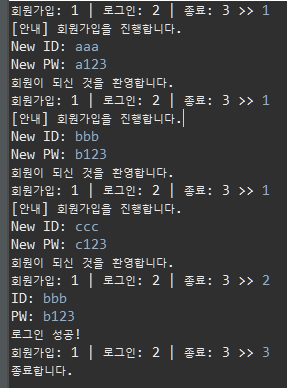
로그인 프로그램
회원가입, 로그인하는 프로그램
LoginTest.java
package ex0408;

import java.util.ArrayList;
import java.util.Scanner;

public class LoginTest {

	public static void main(String[] args) {

		ArrayList<Login> lList = new ArrayList<>();
		Scanner sc = new Scanner(System.in);

		System.out.print("회원가입: 1 | 로그인: 2 | 종료: 3 >> ");
		int choice = sc.nextInt();

		while(choice!=3) {

			if(choice==1) {
				join(lList);
			}
			else if(choice==2){
				login(lList);
			}
			System.out.print("회원가입: 1 | 로그인: 2 | 종료: 3 >> ");
			choice = sc.nextInt();
		}
		System.out.println("종료합니다.");
	}


	public static void join(ArrayList<Login> lList) {
		System.out.println("[안내] 회원가입을 진행합니다.");
		Join j = new Join();
		j.JoinProcess();
		lList.add(new Login(j.getId(),j.getPw()));
		System.out.println("회원이 되신 것을 환영합니다.");
	}

	public static void login(ArrayList<Login> lList) {
		Scanner sc = new Scanner(System.in);
		boolean flag = true;
		String id;
		String pw;
		while(flag) {
			System.out.print("ID: ");
			id=sc.next();
			System.out.print("PW: ");
			pw=sc.next();

			flag=LoginChecker.checkLoginInfo(lList, id, pw);

			if(flag) {
				System.out.println("ID와 PW를 확인하세요.");
			}else {
				System.out.println("로그인 성공!");
			}
		}
	}
}
Join.java
package ex0408;

import java.util.Scanner;

public class Join {
	String id;
	String pw;

	public String getId() {
		return id;
	}

	public String getPw() {
		return pw;
	}

	public void setId(String id) {
		this.id = id;
	}

	public void setPw(String pw) {
		this.pw = pw;
	}

	public void JoinProcess() {
		Scanner sc = new Scanner(System.in);
		System.out.print("New ID: ");
		id = sc.next();
		System.out.print("New PW: ");
		pw = sc.next();
	}
}
Login.java
package ex0408;

public class Login {

	private String id;
	private String pw;

	public Login(String id, String pw){
		this.id=id;
		this.pw=pw;
	}

	public String getId() {
		return id;
	}
	public String getPw() {
		return pw;
	}
	public void setId(String id) {
		this.id = id;
	}
	public void setPw(String pw) {
		this.pw = pw;
	}
	@Override
	public String toString() {
		return "Login [id=" + id + ", pw=" + pw + "]";
	}
}
LoginChecker.java
package ex0408;

import java.util.ArrayList;

public class LoginChecker {

	public static boolean checkLoginInfo(ArrayList<Login> lList, String id, String pw) {

		for(Login l : lList) {
			if(l.getId().equals(id) && l.getPw().equals(pw)) {
				return false;
			}
		}
		return true;
	}
}
결과