Resilience4j Circuit Breaker 적용하여 장애 대응하기 (+ Custom Predicate구현, 네이밍 규칙 변경)
Resilience4j 란?
함수형 프로그래밍으로 설계된 경량(lightweight) 장애 허용(fault tolerance) 라이브러리이며 기존 Netflix Hystrix를 대체하는 라이브러리입니다.
Circuit Breaker, Rate Limiter, Retry, Bulkhead 등의 방식을 사용하고
이 방식들을 데코레이터 패턴으로 사용할 수 있도록 제공하여 필요한 방식만 직접 선택하여 사용할 수 있습니다.
Resilience4j 핵심 모듈
1 Circuit Breaker
호출이 실패하거나 타임아웃 상황에 Circuit Breaker 를 열어서 차단하는 방식
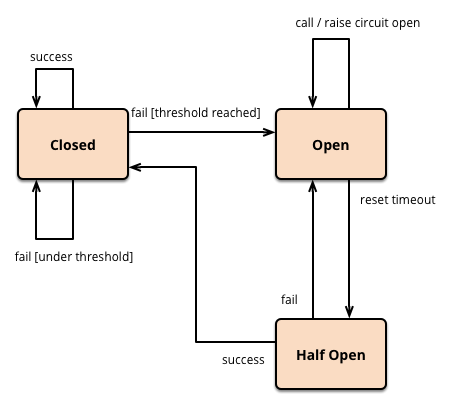
circuit breaker 상태
- CLOSED : 서킷브레이커가 닫혀 있는 상태로 서킷브레이커가 감싼 내부의 프로세스로 요청을 보내고 응답을 받을 수 있다.
- OPEN : 서킷브레이커가 열려 있는 상태로 서킷브레이커는 내부의 프로세스로 요청을 보내지 않는다.
- HALF_OPEN : 서킷브레이커가 열려 있는 상태지만 내부의 프로세스로 요청을 보내고 실패율을 측정해 상태를 CLOSED 혹은 OPEN 상태로 변경한다.
호출 결과를 저장하고 집계할 때 슬라이딩 윈도우 방식을 사용한다
- 개수 기반 슬라이딩 윈도우(count-based sliding window)
- 시간 기반 슬라이딩 윈도우(time-based sliding window)
동작 시나리오
-
실패 비율(failure rate) 또는 느린 호출(slow call) 이 설정한 임계치보다 크거나 같으면 CircuitBreaker의 상태는 Closed → Open 으로 변경된다
- 기본적으로 모든 예외를 실패로 간주하고 실패로 간주할 예외 리스트를 정의할 수도 있다
- 실패 비율/느린 호출 비율을 계산하기 위해 호출 결과를 최소치는 기록한 상태여야 한다.
- CircuitBreaker가 Open 상태이면 CallNotPermittedException 을 던져 호출을 반려한다.
-
대기 시간이 경과하고 나면 OPEN → HALF_OPEN 상태로 변경되며 설정한 횟수만큼 호출을 허용해 이 백엔드가 아직도 이용 불가능한지, 아니면 사용 가능한 상태로 돌아왔는지 확인한다.
- 허용한 호출을 모두 완료할때 까지는 그 이상의 호출은 CallNotPermittedException으로 거부된다.
-
실패 비율이나 느린호출 비율이 설정한 임계치보다 크거나 같으면 상태는 다시 OPEN으로 변경되고 둘 모두 임계치 미만이며 CLOSED 상태로 돌아간다.
2 Rate Limiter
제한치를 넘어간 것을 감지했을 때의 동작이나 제한할 요청 타입과 관련된 광범위한 옵션을 제공한다.
간단히 제한치를 넘어선 요청을 거부하거나 큐를 만들어서 나중에 실행할 수도 있고, 어떤 방식으로든 두 정책을 조합해도 된다.
3 Retry
실패한 실행을 짧은 지연을 가진 후 재시도하는 매커니즘이다
4 Bulkhead
동시 실행 횟수를 제한하는데 활용할 수 있는 패턴이다
- 세마 포어를 사용하는 SemaphoreBulkhead
- 동시 요청 수를 제한을 두고 요청 수에 도달한 이후 요청에 대해서 BulkheadFullException 발생
- 유한 큐와 고정 스레드 풀을 사용하는 FixedThreadPoolBulkhead
- 시스템 자원과 별도로 thread pool을 설정하고 설정된 thread pool은 서비스를 제공하기 위한 용도로만 사용
- thread pool과 별도로 waiting queue를 설정할 수 있다. 만약 thread pool과 waiting queue 가 full 인 경우 BulkheadFullException이 발생
Resilience4j 적용하기
~feign client에 circuit breaker 방식을 적용하였습니다~
📌 dependency추가 (pom.xml 사용 기준)
아래 spring-cloud-starter-circuitbreaker-resilience4j 를 pom.xml에 추가합니다
<dependency>
	<groupId>org.springframework.cloud</groupId>
	<artifactId>spring-cloud-starter-circuitbreaker-resilience4j</artifactId>
</dependency>
그 외에 기능을 사용하고 싶으면 아래 디펜던시를 선택해서 추가하면 됩니다
<dependency>
    <groupId>io.github.resilience4j</groupId>
    <artifactId>resilience4j-circuitbreaker</artifactId>
    <version>${resilience4jVersion}</version>
</dependency>
<dependency>
    <groupId>io.github.resilience4j</groupId>
    <artifactId>resilience4j-ratelimiter</artifactId>
    <version>${resilience4jVersion}</version>
</dependency>
<dependency>
    <groupId>io.github.resilience4j</groupId>
    <artifactId>resilience4j-retry</artifactId>
    <version>${resilience4jVersion}</version>
</dependency>
<dependency>
    <groupId>io.github.resilience4j</groupId>
    <artifactId>resilience4j-bulkhead</artifactId>
    <version>${resilience4jVersion}</version>
</dependency>
<dependency>
    <groupId>io.github.resilience4j</groupId>
    <artifactId>resilience4j-cache</artifactId>
    <version>${resilience4jVersion}</version>
</dependency>
<dependency>
    <groupId>io.github.resilience4j</groupId>
    <artifactId>resilience4j-timelimiter</artifactId>
    <version>${resilience4jVersion}</version>
</dependency>
📌 yml 파일 설정 추가
임의로 설정한 값들입니다.
resilience4j:
  circuitbreaker:
    configs:
      default:
        failureRateThreshold: 20 # 실패율 임계값 해당 값 이상이면 closed -> open으로 상태변경
        permittedNumberOfCallsInHalfOpenState: 10 # half_open 상태일 때 허용할 call 개수
        maxWaitDurationInHalfOpenState: 10000 # half_open 상태에서 open 상태로 변경되기 전 최대 유지시간 10초
        slidingWindowType: COUNT_BASED # 슬라이딩 윈도우 타입 (COUNT_BASED / TIME_BASED)
        slidingWindowSize: 50 # count_based - 개수 time_based - 초
        minimumNumberOfCalls: 10  # 최초 failureRate, slowCallRate를 계산하기 위한 최소 Call 개수
        waitDurationInOpenState: 60000 # open -> half open 상태로 변경 대기 시간
record-failure-predicate: com.test.config.resilience4j.TimeOutExceptionRecordFailurePredicate| property | default value | description |
|---|---|---|
| failureRateThreshold | 50 | 실패한 호출에 대한 임계값으로 이 값을 초과하면 서킷이 열린다. |
| slowCallDurationThreshold | 60000 [ms] | 호출 시간이 설정한 값보다 길면 slow call로 판단한다. |
| slowCallRateThreshold | 100 | slow call 비율이 설정한 값보다 크거나 같으면 OPEN 상태로 바뀌고 호출을 차단한다. |
| minimumNumberOfCalls | 100 | failure/slow rate을 계산하기 위한 최소 호출 수 |
| waitDurationInOpenState | 60000 [ms] | OPEN → HALF_OPEN 으로 변경 되기까지 대기 시간 |
| recordExceptions | empty | 서킷 작동에 영향을 주는 예외 리스트 |
| 리스트에 등록된 예외 중에서만 서킷 작동에 영향을 준다. | ||
| ignoreExceptions | empty | 서킷 작동에 영향을 주지 않는 예외 리스트 |
| slidingWindowType | COUNT_BASED | 서킷브레이커가 닫힐 때 호출 결과를 기록하는데 사용하는 슬라이딩 윈도우의 유형 |
maxWaitDurationInHalfOpenState 설정 주의 사항
waitDurationInOpenState, permittedNumberOfCallsInHalfOpenState 작동 방식
1. 요청 50개중에 20%이상 실패나면 써킷 작동(open)한다.
2. 써킷 작동되면 waitDurationInOpenState(1분, default) 소요되면 half open으로 상태 변경된다.
3. half open 상태에서 permittedNumberOfCallsInHalfOpenState(10)개 만큼 수행후 성공하면 써킷 미작동(close)한다.
4. Half open 상태에서 permittedNumberOfCallsInHalfOpenState(10)개 만큼 수행후 실패하면 써킷 작동(open)한다.
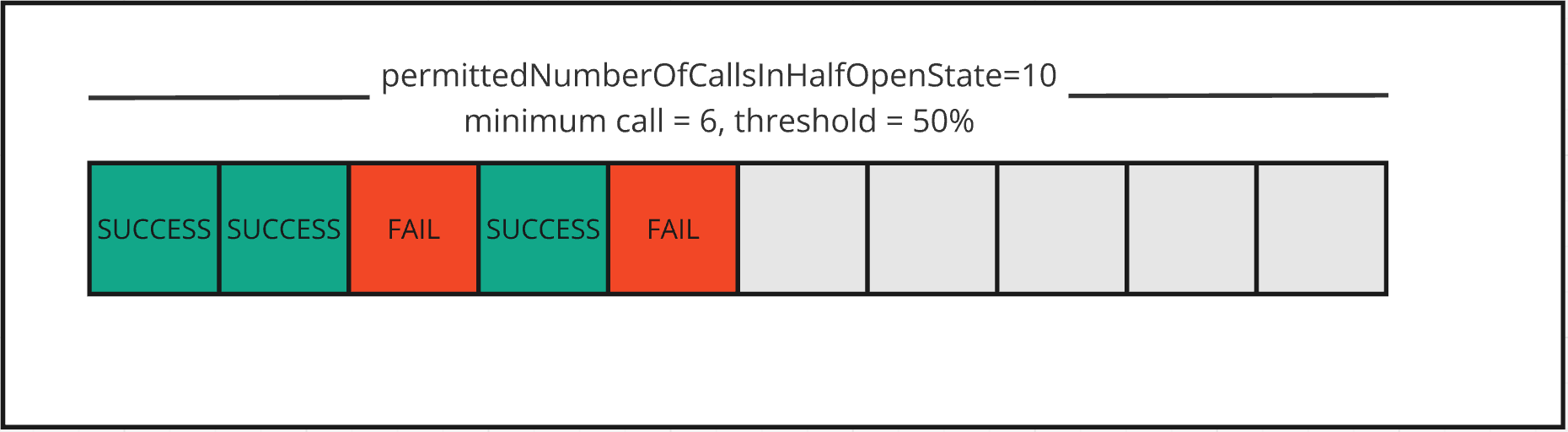
❗️❗️ 만약 Half open을 허용하는 최대 유지시간(maxWaitDurationInHalfOpenState)이 지나면 permittedNumberOfCallsInHalfOpenState(10개)를 수행하기 전에 open 상태로 변경됩니다.
최대 유지시간보다 API 응답 대기 시간이 길다면 circuit이 무한으로 open 상태를 유지하는 상황에 빠질 수 있으므로 참고하여 maxWaitDurationInHalfOpenState을 선정해야 합니다.
maxWaitDurationInHalfOpenState값을 0(default)으로 지정하면permittedNumberOfCallsInHalfOpenState 수만큼 api 호출하여 판단하므로 default값을 유지하도록 하였습니다.
maxWaitDurationInHalfOpenState 설정 값만큼 대기한 이후
최소 호출 수만큼 요청을 받기 전에 maxWaitDurationInHalfOpenState에 설정된 값만큼 시간이 지나면 Circuit Breaker는 OPEN 상태로 전환합니다.
해당 시간 동안 받은 응답의 결과와 상관없이 무조건 OPEN 상태로 전환합니다.
출처) https://meetup.nhncloud.com/posts/385
📌 Custom Predicate 설정
특정 exception이 실패로 측정되도록 하는 Custom Predicate를 설정할 수 있습니다.
Predicate은 실패로 측정되고자 하는 exception은 true로, 성공으로 측정되고자 하는 경우는 false를 리턴해야 한다.
기본값에서는 모든 exception이 실패로 기록되지만 현 프로젝트에선 time-out이 발생하는 케이스만 오류로 측정하도록 하는 요구가 있었습니다.
public class TimeOutExceptionRecordFailurePredicate implements Predicate<Throwable> {

    @Override
    public boolean test(Throwable t) {
        // RetryableException 예외이고, timed out 발생시에만 에러로 인식
        if (t instanceof RetryableException && t.getMessage().startsWith("Read timed out")) {
            return true;
        } else if (t instanceof FeignException.GatewayTimeout) {
            return true;
        }
        return false;
    }
}
이와 같은 Predicate<Throwable>을 구현한 클래스를 생성하고 원하는 특정 예외인 경우 true값을 반환하도록 test 메서드를 오버라이드 하면 됨!
record-failure-predicate: com.test.config.resilience4j.TimeOutExceptionRecordFailurePredicate위의 설정 yml에서 볼 수 있듯이 생성한 클래스를 record-failure-predicate 속성에 넣어주면 설정 완료 됩니다.
📌 feign client에 CircuitBreaker 어노테이션 추가
@FeignClient(name = "testClient", url = "tesetUrl")
public interface CommandClient {
    @CircuitBreaker(name = "CommandClient#saveItem")
    @PostMapping("/item")
    ApiResponseDto<List<ItemResDto>> saveItem(@RequestBody List<ItemReqDto> itemReqDtos) {
	...
}
@CircuitBreaker(name = "{circuitBreaker명}")
@CircuitBreaker(name = "{circuitBreaker명}", fallbackMethod = "{fallbackMethod 명}")fallback Method를 지정할수도 있고 생략할 수도 있습니다.
- fallback method를 사용하면 circuitBreaker가 OPEN 상태로 변경되어 CallNotPermittedException 발생시 fallback 함수가 호출됩니다.
- fallback method를 설정하지 않으면 CallNotPermittedException가 발생시 처리되는 로직이 없거나(단순 예외 발생)
- callNotPermittedException을 받는 ExceptionHandler가 있으면 여기서 에러를 캐치합니다.
fallback 구현 관련 참고 사항
- fallback 메서드는 어노테이션 적용 위치와 동일한 위치에 있어야 합니다.
- 그래서 feign client같은 interface에서는 default 메서드를 구현하거나
- interface를 감싸는 wrapper class를 만들어서 구현하는 방식이 있고 또는 fallback class를 구현해서 적용하는 방식도 있습니다.
circuitBreaker 이름 관련 참고 사항
circuitBreaker명은 클래스명#메서드명으로 설정했습니다.
원래 feign client에 circuitBreaker를 사용한다는 설정을 yml에 넣어두면 feign에서 자동으로 인식하여 메서드 별로 이름을 자동 매핑합니다. (DefaultCircuitBreakerNameResolver가 사용됨)
feign.client.circuitbreker.enabled = true 설정

Spring-Cloud-OpenFeign 4.0.0-SNAPSHOT 버전부터는
spring.cloud.openfeign.circuitbreaker.enabled
설정을 넣으면 @CircuitBreaker 어노테이션을 사용하지 않아도
feignClientClassName#calledMethod(parameterTypes) 패턴으로 자동 네임이 생성됩니다.
그러나.. 기존 Prometheus와 출동이 발생하였고 네이밍 규칙을 변경하기로 하였습니다.
java.lang.IllegalArgumentException: Prometheus requires that all meters with the same name have the same set of tag keys.

There is already an existing meter named 'resilience4j_circuitbreaker_state' containing tag keys [name, state]. The meter you are attempting to register has keys [group, name, state].
CircuitBreaker 네이밍 규칙을 변경하는 방법
CircuitBreakerNameResolver 인터페이스를 feign에서 가져와서 네이밍 규칙을 변경할 수 있습니다.
spring-docs 문서 참고하면 네이밍 규칙을 feignClientName_calledMethod의 형태로 다음과 같이 변경할 수 있습니다.
@Configuration
public class FooConfiguration {
    @Bean
    public CircuitBreakerNameResolver circuitBreakerNameResolver() {
        return (String feignClientName, Target<?> target, Method method) -> feignClientName + "_" + method.getName();
    }
}
📌 test용 controller 추가
CircuitBreakerRegistry는 설정값을 저장하는 인메모리 저장소라고 생각하면 됩니다
@RestController
@RequiredArgsConstructor
@Slf4j
public class CircuitBreakerTestController {
	private final MarketCollectCommandClient feign;
    private final CircuitBreakerRegistry circuitBreakerRegistry;

    @GetMapping("/circuit/call") // feign client 호출
    public ResponseEntity<List<ItemResDto>> call(@RequestBody List<ItemDto> itemDtos) {
        List<ItemResDto> response = feign.saveItem(itemDtos).getData();
        return ResponseEntity.ok(response);
    }

    @GetMapping("/circuit/close") // circuitBreaker close로 상태 변경
    public ResponseEntity<Void> close(@RequestParam String name) {
        circuitBreakerRegistry.circuitBreaker(name)
                .transitionToClosedState();
        return ResponseEntity.ok().build();
    }

    @GetMapping("/circuit/open") // circuitBreaker open으로 상태 변경
    public ResponseEntity<Void> open(@RequestParam String name) {
        circuitBreakerRegistry.circuitBreaker(name)
                .transitionToOpenState();
        return ResponseEntity.ok().build();
    }

    @GetMapping("/circuit/status") // circuitBreaker 상태 확인
    public ResponseEntity<CircuitBreaker.State> status(@RequestParam String name) {
        CircuitBreaker.State state = circuitBreakerRegistry.circuitBreaker(name)
                .getState();
        return ResponseEntity.ok(state);
    }

    @GetMapping("/circuit/all") // circuitBreaker 상태 확인
    public ResponseEntity<Void> all() {
        Seq<CircuitBreaker> circuitBreakers = circuitBreakerRegistry.getAllCircuitBreakers();
        for (CircuitBreaker circuitBreaker : circuitBreakers) {
            log.error("circuitName={}, state={}", circuitBreaker.getName(), circuitBreaker.getState());
        }
        return ResponseEntity.ok().build();
    }

    @ExceptionHandler(FeignException.class)
    public ResponseEntity<?> handleFeignException(FeignException e) {
        return ResponseEntity.badRequest()
                .body(Collections.singletonMap("code", "FeignException"));
    }

    @ExceptionHandler(NoFallbackAvailableException.class)
    public ResponseEntity<?> handleNoFallbackAvailableException(NoFallbackAvailableException e) {
        return ResponseEntity.badRequest()
                .body(Collections.singletonMap("code", "NoFallbackAvailableException"));
    }

    @ExceptionHandler(CallNotPermittedException.class)
    public ResponseEntity<?> handleCallNotPermittedException(CallNotPermittedException e) {
        return ResponseEntity.badRequest()
                .body(Collections.singletonMap("code", "CallNotPermittedException"));
    }

}
참고
https://resilience4j.readme.io/
https://godekdls.github.io/Resilience4j/contents/
https://spring.io/projects/spring-cloud-circuitbreaker
https://docs.spring.io/spring-cloud-circuitbreaker/docs/current/reference/html/
https://docs.spring.io/spring-cloud-openfeign/docs/current/reference/html/#spring-cloud-feign-circuitbreaker
https://arnoldgalovics.com/spring-cloud-feign-resilience4j-testing/
https://mangkyu.tistory.com/289
https://godekdls.github.io/Resilience4j/introduction/
https://meetup.nhncloud.com/posts/385