발단
user table에서 password를 수정하는 기능을 구현 후, 똑같은 방식으로 username, email을 수정하는 기능을 추가하려고 하였음.
전개
- UpdateUsernameRequestDto
@Getter
public class UpdateUsernameRequestDto {

    private final String verifyPassword;

    private final String newUsername;

    public UpdateUsernameRequestDto(String verifyPassword, String newUsername) {
        this.verifyPassword = verifyPassword;
        this.newUsername = newUsername;

    }
}- UserController
@PatchMapping("/users/username/{id}")
    public ResponseEntity<Void> updateUsername(
            @PathVariable Long id,
            @RequestBody UpdateUsernameRequestDto requestDto
    ) {
        userService.updateUsername(id, requestDto.getVerifyPassword(), requestDto.getNewUsername());

        return new ResponseEntity<>(HttpStatus.OK);
}- User Service
@Transactional
    public void updateUsername(Long id, String verifyPassword, String newUsername) {
        User findUser = userRepository.findByIdOrElseThrow(id);

        if(!findUser.getPassword().equals(verifyPassword)) {
            throw new ResponseStatusException(HttpStatus.UNAUTHORIZED, "비밀번호가 일치하지 않습니다.");
        }
        findUser.updateUsername(newUsername);
}- User
public void updateUsername(String username) {
        this.username = username;
}- UserRepository
public interface UserRepository extends JpaRepository<User, Long> {
    default User findByIdOrElseThrow(Long id) {
        return findById(id)
                .orElseThrow(() ->
                        new ResponseStatusException(
                                HttpStatus.NOT_FOUND,
                                "Does not exist id = " + id)
                );
    }
}
만들어 둔 것 그대로 활용
위기
그러나 출력이 되지 않음.
몇번이나 점검했으나 교안과 다르지 않음.
튜터님께 찾아감
- User
public void updateUsername(String username) {
        this.username = username;
    }
사실 이때 String 'U'sername 이라고 되어있었는데, 이거 먼저 지적받음. 동일하게 인식되도록 소문자로 바꿔줌
절정
원인 파악
오류 로그 :
org.springframework.beans.factory.BeanCreationException: Error creating bean with name 'requestMappingHandlerMapping' defined in class path resource [org/springframework/boot/autoconfigure/web/servlet/WebMvcAutoConfiguration$EnableWebMvcConfiguration.class]: Ambiguous mapping. Cannot map 'userController' method
com.example.schedule.controller.UserController#updateUsername(Long, UpdateUsernameRequestDto)
to {PATCH [/users/{id}]}: There is already 'userController' bean method
"There is already 'userController' bean method"
동일한 주소를 사용하는 것이 있는지 확인이 필요하다.
@PatchMapping("/{id}")
    public ResponseEntity<Void> updatePassword(
            @PathVariable Long id,
            @RequestBody UpdatePasswordRequestDto requestDto
            ) {
        userService.updatePassword(id, requestDto.getOldPassword(), requestDto.getNewPassword());

        return new ResponseEntity<>(HttpStatus.OK);
    }

    @PatchMapping("/{id}")
    public ResponseEntity<Void> updateUsername(
            @PathVariable Long id,
            @RequestBody UpdateUsernameRequestDto requestDto
    ) {
        userService.updateUsername(id, requestDto.getVerifyPassword(), requestDto.getNewUsername());

        return new ResponseEntity<>(HttpStatus.OK);
    }
그리고 실제로 패스워드 수정기능과 유저네임 수정 기능의 주소가 동일하다.
이렇게 될 경우 스프링이 비밀번호를 업데이트하고싶은건지, 이름을 업데이트하고싶은건지 알 수 없음
결말
해결방법
: 주소를 다르게 수정해줌
	@PatchMapping("/password/{id}")
    public ResponseEntity<Void> updatePassword(
            @PathVariable Long id,
            @RequestBody UpdatePasswordRequestDto requestDto
            ) {
        userService.updatePassword(id, requestDto.getOldPassword(), requestDto.getNewPassword());

        return new ResponseEntity<>(HttpStatus.OK);
    }

    @PatchMapping("/username/{id}")
    public ResponseEntity<Void> updateUsername(
            @PathVariable Long id,
            @RequestBody UpdateUsernameRequestDto requestDto
    ) {
        userService.updateUsername(id, requestDto.getVerifyPassword(), requestDto.getNewUsername());

        return new ResponseEntity<>(HttpStatus.OK);
    }
이제 정상적으로 구동이 된다.
배운 것: 오류 로그를 잘 보자.
+추가
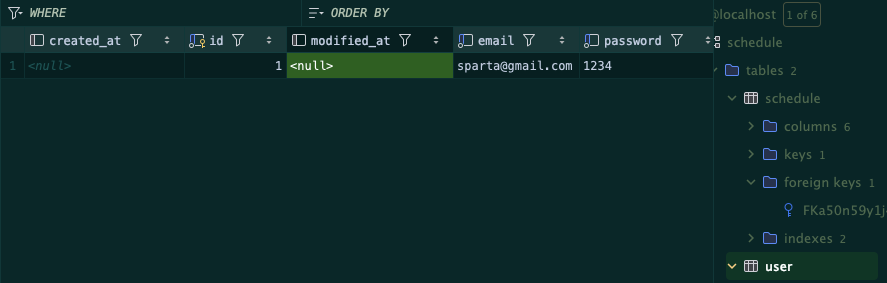
요렇게 타임스탬프가 찍히지 않는다거나 하면
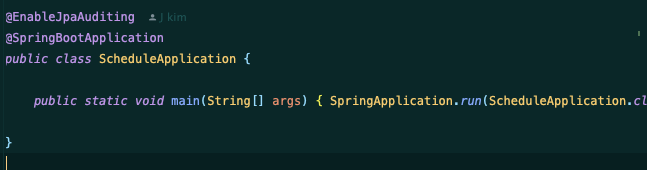
@EnableJpaAuditing을 빼먹지 않았는지 볼 필요가 있다